[Doc] Add Pulsar isolation #9692
Conversation


 Anonymitaet
requested review from
Huanli-Meng,
Jennifer88huang-zz and
codelipenghui
Anonymitaet
requested review from
Huanli-Meng,
Jennifer88huang-zz and
codelipenghui


 eolivelli
left a comment
eolivelli
left a comment
eolivelli
left a comment
There was a problem hiding this comment.
thank you very much for providing this useful information !
I really missed it when I started using this feature.
I left some feedback, please take a look @Anonymitaet
| pulsar-admin namespaces set-bookie-affinity-group options | ||
| ``` | ||
|
|
||
| For more information about the command and descriptions, see [here](http://pulsar.apache.org/tools/pulsar-admin/2.8.0-SNAPSHOT/#-em-set-bookie-affinity-group-em-). |
There was a problem hiding this comment.
we should not have a pointer to a specific version 2.8.0-SNAPSHOT, probably for links to the Pulsar website itself we can use simply reletive references
There was a problem hiding this comment.
@eolivelli thanks for your suggestion. While the Pulsar website itself (Pulsar Admin CLI doc) does not contain this command and the information on the "Pulsar Admin CLI" page is far behind from pulsar-admin where contains the latest information.
Seems that there was an issue (create automatic workflow) to sync contents from pulsar-admin to the Pulsar website, but no more updates for a long time. I think right now the best choice is to point users to get the latest information and we can update the link once we have a better option.
| **Example** | ||
|
|
||
| ```shell | ||
| bin/pulsar-admin bookies set-bookie-rack \ |
There was a problem hiding this comment.
we could cite this command
bin/pulsar-admin bookies list-bookies
that allows you to have the list of available bookies.
otherwise it is not clear to the user where to pick the bookie identifiers
this new command is available only from 2.8.0 anwards

There was a problem hiding this comment.
Let's decouple the documentation change into two different pull requests. The documentation here can simply be copied to other releases to improve the documentation there. bin/pulsar-admin bookies list-bookies is a separate command introduced in 2.8.0. Let's not couple them together.
When people try to set bookie track, people already know which bookie to set the track information. The bookie can be found in many different ways. I don't think we should add bookies list-bookies to confuse people.
One note that Yu can add is that the set-bookie-rack is to specify the track information for only one bookie. If people want to specify the track for all bookies, they have to run the command for individual bookie. But they can put a script when starting a bookie to set its rack.
There was a problem hiding this comment.
The bookie can be found in many different ways
the only alternative way I know is with bin/bookkeeper shell listbookies -a
As I know how BK works it is easy for me to find a way to get the list of bookies, but I am not sure that the regular user knows how the Bookie identifies itself.
I am saying this because I had to help users in the past to search for the actual bookie id in their cluster
btw I have no strong opinion on this, we cannot cite that command.
Anyone who is using pulsar-admin bookies will easily find the 'list-bookies' command
There was a problem hiding this comment.
@eolivelli - listbookies serves a different purpose for people to list the available bookies. People don't use listbookies to get the list of bookies and then use set-bookie-rack to set rack for individual bookie. People should have a startup script to call set-bookie-rack when a bookie is starting up. See my other comments with @Anonymitaet. Let's avoid giving misleading information on how people should use set-bookie-rack
There was a problem hiding this comment.
@sijie I am fine with not telling about this command here in this document
For your interest pulsar-admin bookies list_bookies and bookkeeper shell listbookies -a
reports all of the existent bookies, in spite of their state.
bookkeeper shell listbookies -rw reports only the available bookies
 sijie
added
the
doc
sijie
added
the
doc

| **Example** | ||
|
|
||
| ```shell | ||
| bin/pulsar-admin bookies set-bookie-rack \ |
There was a problem hiding this comment.
Let's decouple the documentation change into two different pull requests. The documentation here can simply be copied to other releases to improve the documentation there. bin/pulsar-admin bookies list-bookies is a separate command introduced in 2.8.0. Let's not couple them together.
When people try to set bookie track, people already know which bookie to set the track information. The bookie can be found in many different ways. I don't think we should add bookies list-bookies to confuse people.
One note that Yu can add is that the set-bookie-rack is to specify the track information for only one bookie. If people want to specify the track for all bookies, they have to run the command for individual bookie. But they can put a script when starting a bookie to set its rack.
|
|
||
| ```shell | ||
| bin/pulsar-admin bookies set-bookie-rack \ | ||
| --bookie 127.0.0.1:3181 \ |
There was a problem hiding this comment.
| --bookie 127.0.0.1:3181 \ | |
| --bookie 127.0.0.1:3181 \ |
127.0.0.1:3181 should be changed to bookie-id. The bookie id is in <hostname>:<port> format.
There was a problem hiding this comment.
@sijie thanks for your suggestions.
I think your note, --bookie bookie-id (the bookie id is in <hostname>:<port> format), and Explain what people should put in --primary. are "explanations" for the command pulsar-admin bookies set-bookie-rack, right?
Currently, both pulsar-admin bookies list-bookies and pulsar-admin bookies set-bookie-rack are not available on the pulsar-admin website, and it seems that we have the following bookie related commands but none of them are available on the pulsar-admin website.
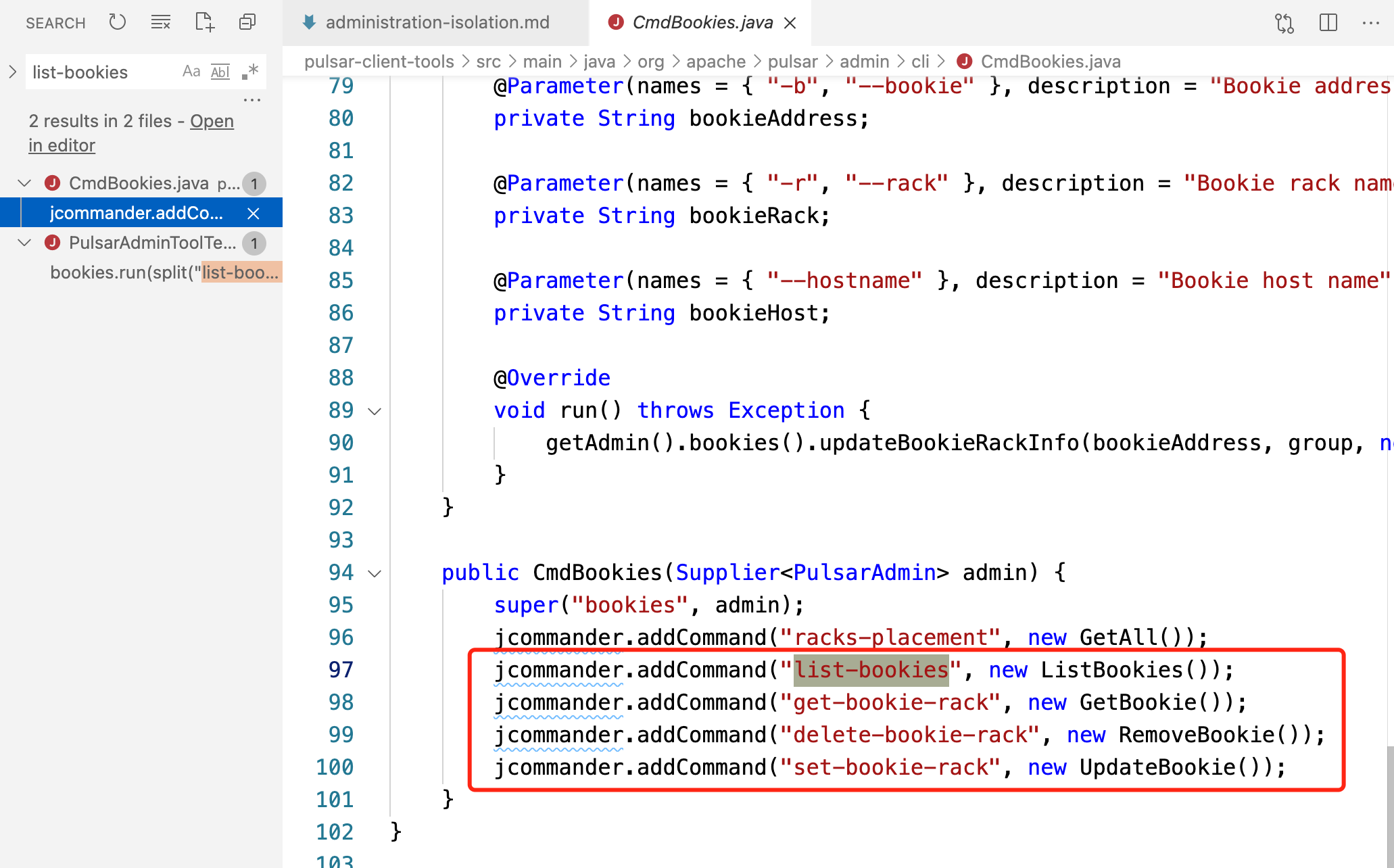
Will these commands be shown on the pulsar-admin website? If so, I think the explanations talked above should be added to the command pulsar-admin bookies set-bookie-rackon the pulsar-admin website rather than here because users who want to use pulsar-admin commands would navigate to the pulsar-admin website to see descriptions, notes, and flags. And here are just example values.
For example, I added the descriptions for --primary-group and --secondary-group on the pulsar-admin website rather than every occurrence they are shown on Pulsar website docs.
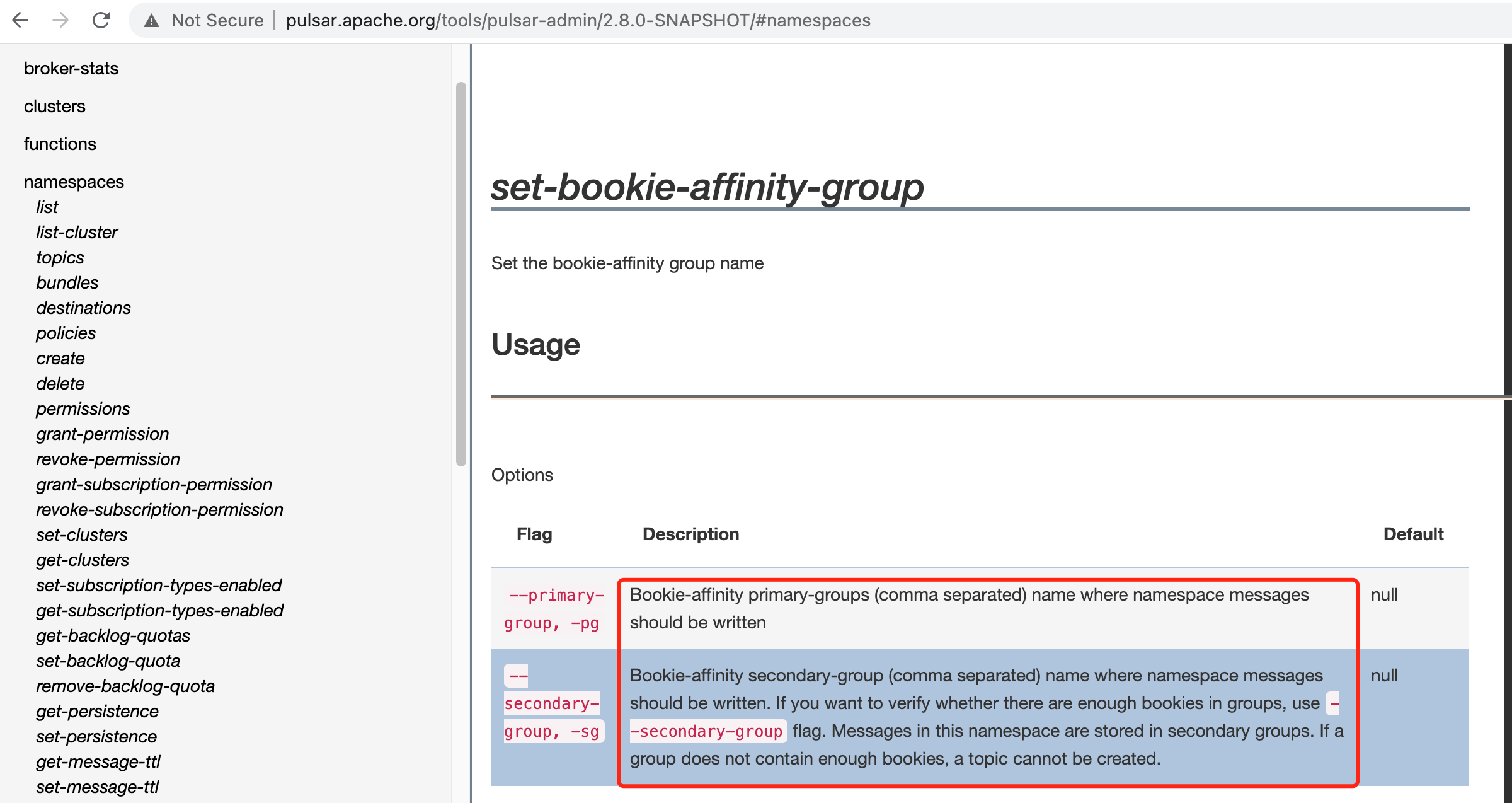
Thoughts?
There was a problem hiding this comment.
Those commands should show up. You might want to ping @tuteng to see why they don't show up.
There was a problem hiding this comment.
Sure, then I'll add explanations (note, --bookie bookie-id (the bookie id is in <hostname>:<port> format), and Explain what people should put in --primary.) on pulsar-admin website rather than here.
There was a problem hiding this comment.
Hi @tuteng, we have the following bookie related commands but none of them are shown on the pulsar-admin website, could you please take a look? thanks
| ```shell | ||
| bin/pulsar-admin bookies set-bookie-rack \ | ||
| --bookie 127.0.0.1:3181 \ | ||
| --hostname 127.0.0.1:3181 \ |
| --auto-failover-policy-type min_available \ | ||
| --auto-failover-policy-params min_limit=1,usage_threshold=80 \ | ||
| --namespaces my-tenant/my-namespace \ | ||
| --primary 10.193.216.* my-cluster policy-name |
There was a problem hiding this comment.
| --primary 10.193.216.* my-cluster policy-name | |
| --primary 10.193.216.* my-cluster policy-name |
Explain what people should put in --primary.

 Huanli-Meng
left a comment
Huanli-Meng
left a comment
Huanli-Meng
left a comment
There was a problem hiding this comment.
a minor comment. PTAL
| pulsar-admin ns-isolation-policy set options | ||
| ``` | ||
|
|
||
| For more information about the command and descriptions, see [here](http://pulsar.apache.org/tools/pulsar-admin/2.8.0-SNAPSHOT/#-em-set-em-). |
There was a problem hiding this comment.
I think it's better not to specify the specific version of pulsar-admin
There was a problem hiding this comment.
@Huanli-Meng thanks for your suggestion. While the Pulsar website itself (Pulsar Admin CLI doc) does not contain this command and the information on the "Pulsar Admin CLI" page is far behind from pulsar-admin where contains the latest information.
Seems that there was an issue (create automatic workflow) to sync contents from pulsar-admin to the Pulsar website, but no more updates for a long time. I think right now the best choice is to point users to get the latest information and we can update the link once we have a better option.

There was a problem hiding this comment.
@Anonymitaet I have the same concern here, it's better not to specify the version. You can use the general one http://pulsar.apache.org/tools/pulsar-admin/
or use variable for the version.
There was a problem hiding this comment.
OK, I've changed them to general links.
There was a problem hiding this comment.
then you can use variable, like this
http://pulsar.apache.org/tools/pulsar-admin/{{pulsar:version}}-SNAPSHOT/#-em-set-em-
There was a problem hiding this comment.
@jennifer88huang this variable does not work for all cases, since for minor releases, for example, 2.6.3, http://pulsar.apache.org/tools/pulsar-admin/ does not have 2.6.3-SNAPSHOT, so I change the specific link (http://pulsar.apache.org/tools/pulsar-admin/2.8.0-SNAPSHOT/#-em-set-em-) to a general link http://pulsar.apache.org/tools/pulsar-admin/. PTAL.


6 participants


Add docs to fix #3104, #8977, and #8976.