[Dashboard] Hide slice titles when they're empty#8018
Conversation


Codecov Report
@@           Coverage Diff           @@
##           master    #8018   +/-   ##
=======================================
  Coverage   65.58%   65.58%
=======================================
  Files         469      469
  Lines       22461    22461
  Branches     2438     2438
=======================================
  Hits        14730    14730
  Misses       7611     7611
  Partials      120      120
Continue to review full report at Codecov.
|

 etr2460
force-pushed
the
erik-ritter--fix-empty-slice-title
branch
from
etr2460
force-pushed
the
erik-ritter--fix-empty-slice-title
branch
from
05d97df to
e7ffb6c
Compare


|
Oh wait, we need to make sure there's an easy way to edit (currently you'd click on the |

| @@ -109,6 +109,7 @@ class SliceHeader extends React.PureComponent { | |||
| : '') | |||
There was a problem hiding this comment.
@mistercrunch the line above this allows you to click on the title to edit it from the dashboard ^^^

There was a problem hiding this comment.
oh nice! Never mind my comment then!


|
@etr2460 How to make slice title in dashboard is hidden but in chart list view it has the title? |
 mistercrunch
added
🏷️ bot
mistercrunch
added
🏷️ bot
5 participants


CATEGORY
Choose one
SUMMARY
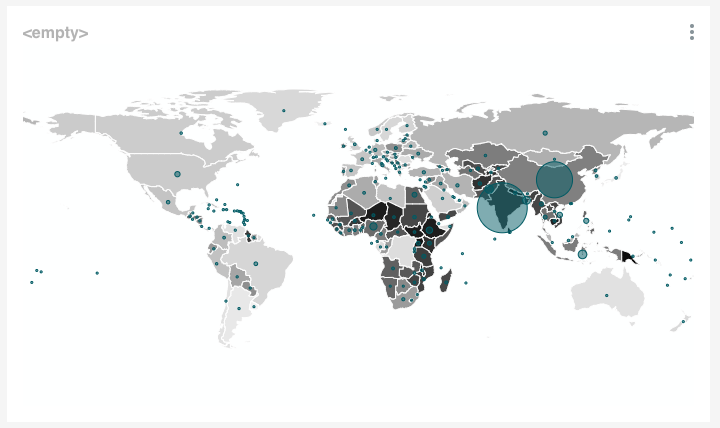
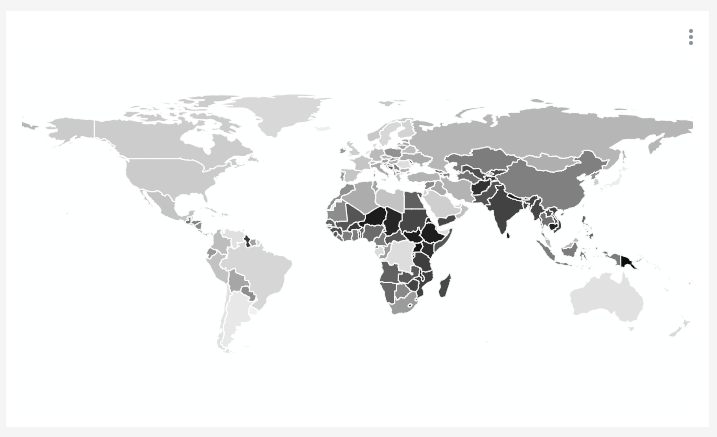
After #7084 slices can no longer have whitespace as a name. This means that there's no way to remove the title from a slice in a dashboard. This PR removes the
<empty>text from a slice when viewing it in a dashboard.This also prevents you from saving a slice with whitespace as a title.
BEFORE/AFTER SCREENSHOTS OR ANIMATED GIF
Before:
After:
TEST PLAN
View slices with and without titles in dashboards. See titles when not set to NULL, but see no titles when the slice doesn't have one
ADDITIONAL INFORMATION
REVIEWERS
@graceguo-supercat @john-bodley @kristw