Add autocomplete to filename in file scan operators #1688
Merged
Conversation
This file contains hidden or bidirectional Unicode text that may be interpreted or compiled differently than what appears below. To review, open the file in an editor that reveals hidden Unicode characters.
Learn more about bidirectional Unicode characters


# Conflicts:
#	core/amber/src/main/scala/edu/uci/ics/texera/web/resource/dashboard/file/UserFileResource.scala
#	core/new-gui/src/app/app.module.ts
#	core/new-gui/src/app/workspace/component/property-editor/operator-property-edit-frame/operator-property-edit-frame.component.ts
#	core/new-gui/yarn.lock
…exera/texera into yunyan-inputfield-autocomplete

 Yicong-Huang
changed the title
Yicong-Huang
changed the title

Yicong-Huang
requested changes
Oct 25, 2022

core/amber/src/main/scala/edu/uci/ics/texera/web/resource/dashboard/file/UserFileResource.scala
Outdated
Show resolved
Hide resolved
core/new-gui/src/app/workspace/component/input-autocomplete/input-autocomplete.component.ts
Outdated
Show resolved
Hide resolved
core/new-gui/src/app/workspace/component/input-autocomplete/input-autocomplete.component.ts
Outdated
Show resolved
Hide resolved
core/new-gui/src/app/workspace/component/input-autocomplete/input-autocomplete.component.ts
Outdated
Show resolved
Hide resolved
core/new-gui/src/app/workspace/component/input-autocomplete/input-autocomplete.component.ts
Outdated
Show resolved
Hide resolved
core/new-gui/src/app/workspace/component/input-autocomplete/input-autocomplete.component.ts
Outdated
Show resolved
Hide resolved
core/new-gui/src/app/workspace/component/input-autocomplete/input-autocomplete.component.ts
Outdated
Show resolved
Hide resolved


Contributor
|
Per our discussion, please remove |
Xiao-zhen-Liu
added a commit
that referenced
this pull request
Nov 10, 2022

## Content This PR adds real-time collaborative form editing to operator property editor. Only `string` type is affected, i.e., other field types like number or enum will remain the same. The result looks like the below demo: 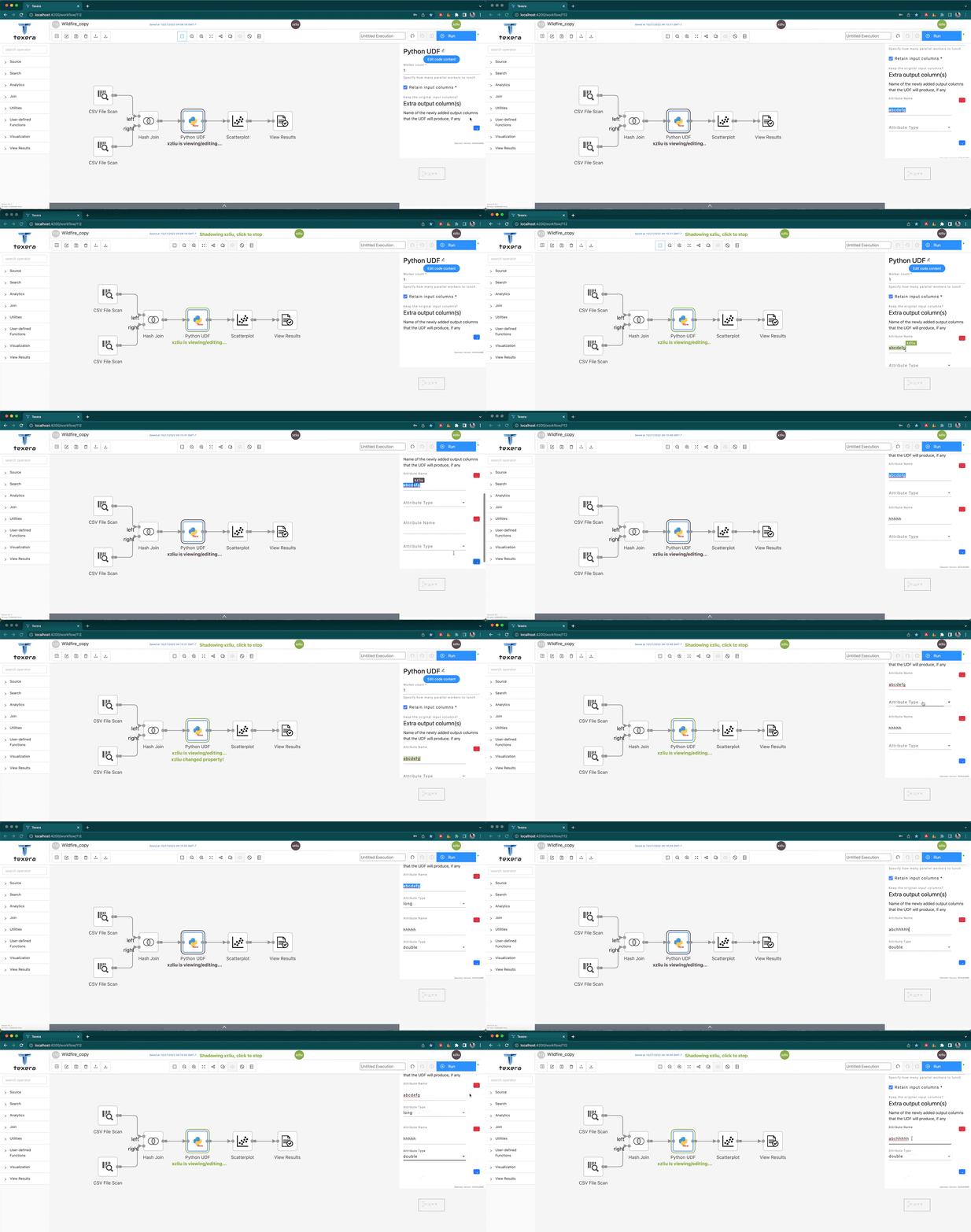 This also automatically solves the input flickering issue with previous text editors for property editor. ## Implementation - Implemented `updateYTypeFromObject` which updates a YType, in particular `OperatorPredicate.OperatorProperties`, which in `sharedModel` is `YType<Readonly<{ [key: string]: any }>>`. Previously in `updateOperatorProperty()`, we used `createYTypeFromObject` to create a new shared object based on the updated form data. That makes collaborative form editing impossible since the form fields will never be able to connect to the same shared object. `updateYTypeFromObject` recursively infers which shared fields need to be updated instead of replaced, in particular `Y.Text` and `Y.Array` and `Y.Map` types. - Since the shared field needs to be "already there", empty objects as form data is not acceptable. I modified formly config to make `string` type have default values (`""`). - Implemented a new [formly custom field wrapper](https://formly.dev/docs/guide/custom-formly-wrapper/), `CollabWrapperComponent`. Compatible with `PresetWrapperComponent` and will be applied to all `string` and `texearea` types. The new wrapper replaces the default input editor with [`quill` editor](https://quilljs.com), and infers the shared type that it needs to use based on its `operatorID`, `field`, and `parents`. Then it connects to shared text using [`y-quill`](https://github.com/yjs/y-quill). - Renamed `coeditor` in `UserState` type to `user`. This is because `y-quill` expects `user` type in its awareness states, to enable color for cursors. - Modified a few related test cases to accommodate this PR. ## Limitations - Does not work with number fields for two reasons: A. in `sharedModel` there is no shared type for `number` since it is considered a primitive type. To enable collaborative editing would require `Y.Text` type. B. Even if we convert the type on-the-fly, the conversion is not elegant and the new editor does not support the `increment` and `decrement` buttons we normally see for numerical form field editors. - Have not implemented on breakpoint editor yet. ## Compatibilities - Should work with #1688 since that PR uses custom field component which works on other field types, which does not conflict with form wrapper. - Works with `PresetWrapper`. BTW I also located the problems right now with preset wrapper, which is with `ajv` compiling (line 297 in `preset.service.ts`, `const fitsSchema = PresetService.ajv.compile(presetSchema)(preset);`) when validating the preset to apply. Co-authored-by: zuozhiw <zuozhiw@gmail.com>

Xiao-zhen-Liu
added a commit
that referenced
this pull request
Dec 13, 2022
This PR fixes a bug where the following functionalities are not disabled when `workflowModificatonEnabled` is `true`: - Disable operator - Cache operator - Auto Layout - Delete All - Import Workflow - Add Comment - Restore to a Version - Python UDF's Edit button - Python UDF code editor - Context Menu items These bugs are introduced by #1674's deletion of "lock" in previous shared editing implementation. For other components, I use `WorkflowActionService`'s flag. For Python UDF's readonly status I use formly's status, since we allow temporarily enabling modification of properties during execution. Added back the "readonly" button for UDF, and used a workaround similar to #1688 to fix the unit test. It would look like below: 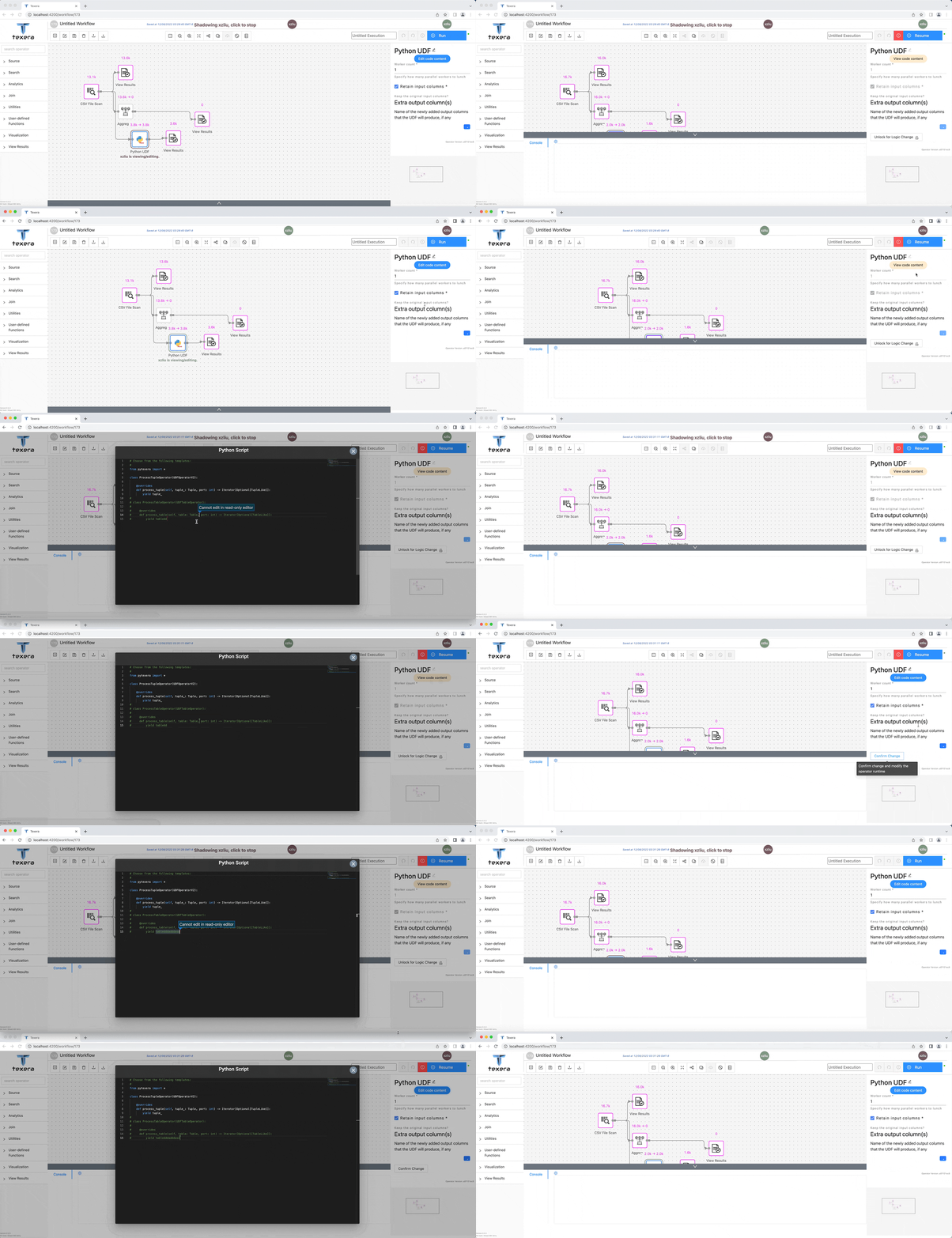 There is one more complexity for version display: since when displaying a version, workflow modification is always disabled, we cannot use this flag to determine whether restore version should be disabled. This has never been handled properly. For now I added a temporary flag to remember the workflow action disabled status before displaying a particular version.

Closed
Sign up for free
to join this conversation on GitHub.
Already have an account?
Sign in to comment
3 participants


Add this suggestion to a batch that can be applied as a single commit.
This suggestion is invalid because no changes were made to the code.
Suggestions cannot be applied while the pull request is closed.
Suggestions cannot be applied while viewing a subset of changes.
Only one suggestion per line can be applied in a batch.
Add this suggestion to a batch that can be applied as a single commit.
Applying suggestions on deleted lines is not supported.
You must change the existing code in this line in order to create a valid suggestion.
Outdated suggestions cannot be applied.
This suggestion has been applied or marked resolved.
Suggestions cannot be applied from pending reviews.
Suggestions cannot be applied on multi-line comments.
Suggestions cannot be applied while the pull request is queued to merge.
Suggestion cannot be applied right now. Please check back later.
This PR contains the function of autocomplete input box. which is mainly for file input. It's a custom Formly component that can also be implemented in other file input places. Users can type username, file name, or username plus filename. The filenames that contain the input content have the highest priority, followed by the username and username plus filename.
Currently, the file list is handled by the backend. The current usage is a keyword search. In order to process the file path symbol "/" and reserved symbols such as " ", the frontend will encode the input and backend will decode the input, which can process all kinds of input.