
Kddl is a Swiss army knife for database models. Define your schema once, generate everything else (documentation, SQL scripts, code).
Kddl can be used as a CLI tool, a library, a Gradle plugin, or a Maven plugin. It is multiplatform (jvm, js, linux, macos, windows).
                                    ┌─────────────┐
                                ┌──>│ PostgreSQL  │
                                │   └─────────────┘
                                │   ┌─────────────┐
 ┌─────────────┐                ├──>│  HyperSQL   │
 │  .kddl file │───┐            │   └─────────────┘
 └─────────────┘   │   ┌──────┐ │   ┌─────────────┐
                   ├──>│ kddl │─┼──>│  PlantUML   │
 ┌─────────────┐   │   └──────┘ │   └─────────────┘
 │ JDBC source │───┘            │   ┌─────────────┐
 └─────────────┘                ├──>│    KDDL     │
    (jvm only)                  │   └─────────────┘
                                │   ┌─────────────┐
                                └──>│   Kotlin    │ (with skorm plugin)
                                    └─────────────┘
This tool is fully functional but still maturing. If you try it, be sure to give some feedback!
kddl [OPTIONS] > [output_file]
Options:
  -i, --input     -> mandatory; input file or JDBC URL (with credentials)
  -f, --format    -> mandatory; output format (value should be one of [kddl, plantuml, postgresql])
  -d, --driver    -> jdbc driver, needed when input is a JDBC URL (classname, must be present in the classpath)
  -q, --quoted    -> quoted identifiers
  -u, --uppercase -> uppercase identifiers
  -h, --help      -> Usage info
Here's the example.kddl file, which should be enough to understand the syntax by example.
click to expand
// Definition for database geo// Supported data types: // boolean, integer, bigint, serial, long, float, double, numeric(n,p), money, // time, timetz, date, timestamp, timestamptz, interval, char, char(n), varchar(n), text, // enum( 'value1' [,] 'value2' ...), uuid, json, blob, clob, varbit
// a database contains options and schemas database geo {
// a schema contains tables and links schema infra {
// a table contains fields, either given a type or a destination table table zone { *code varchar(10) // '*' stands for 'part of pk', otherwise pk is generated as needed !name varchar(50) // '!' stands for unique description text? // '?' stands for nullable field active boolean = false // default value } table department : zone // inherit a table from another (for engines which support table inheritance like PostgresQL) table city : zone { hasTrain boolean? } // declarations can be inlined table link { distance integer src_id --> zone // mandatory foreign key field dst_id --> zone hub_id --> zone? (down) // nullable foreign key field } city *--> department (up) // plantuml arrow direction can be specified}
schema client {
table contact { // no primary key definition; see below // gender, lastname, firstname // field types are optional for plantuml (use a coma to disambiguate) gender char? // field types are mandatory for postgresql firstname varchar(200) +lastname varchar(200) // field is indexed } table location { name varchar(50) = 'untitled' // string literals use single quotes nature enum('depart', 'arrival') as LocationNature // enum with custom type name address text? } location *--> contact // will generate the implicit "contact_id serial" primary key in contact location *--> infra.zone // foreign key referencing a table in another schema}
}
To generate the plantuml graph definition script for this model, do:
kddl -i example.kddl -f plantuml > example.pu
plantuml -Tpng example.pu
And here's the result:
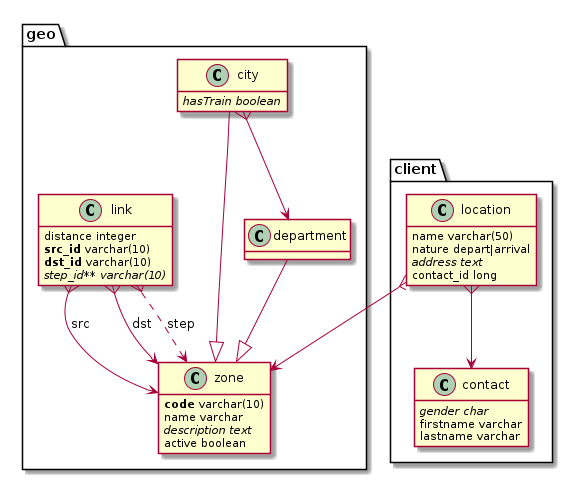
You may need to install plantuml, with something like sudo apt install plantuml on linux platforms.
To generate the PostgreSQL creation script for this model, do:
kddl -i example.kddl -f postgresql > example.sqlTo do the reverse, aka generate the kddl model file from a running JDBC database, you can do:
kddl -i jdbc://...<jdbc URL with credentials> -f kddl > output.kddl
plugins {
    id("com.republicate.kddl") version "0.16"
}

kddl {
    model.set(file("src/main/kddl/schema.kddl"))
    sql.set(file("$buildDir/generated-resources/main/init.sql"))
}
Then run:
./gradlew generateSQL<plugin>
<groupId>com.republicate.kddl</groupId>
<artifactId>kddl-maven-plugin</artifactId>
<version>0.16</version>
<executions>
<execution>
<goals>
<goal>generate-sql</goal>
</goals>
<configuration>
<model>${project.basedir}/src/main/kddl/schema.kddl</model>
<sql>${project.build.directory}/generated-resources/kddl/init.sql</sql>
<format>POSTGRESQL</format>
</configuration>
</execution>
</executions>
</plugin>Available formats: POSTGRESQL, HYPERSQL, PLANTUML, KDDL
Options:
model(required) — source .kddl filesql— output file (default:target/generated-resources/kddl/init.sql)format— output format (default:POSTGRESQL)quoted— use quoted identifiers (default:false)uppercase— use uppercase identifiers (default:false)
You'll need to have gradle installed.
Clone and build:
git clone https://github.com/arkanovicz/kddl.git
cd kddl
./install.sh
To install the kddl command everywhere, assuming that ~/bin is in your path:
ln -s ~/<path_to_kddl_repository>/kddl.sh ~/bin/kddlPlease adapt the installation and run scripts.
./gradlew build
- document library usage
- wire SQL→KDDL reverse engineering (Calcite parser available in JVM)
- db versioning handling (generation of update scripts from previous version, aka sql patches from two model versions)
- custom types
- more tests (for instance: inheritance from another schema's table)
- align fields (add a space if no field prefix)
- kddl files inclusions
- support enum(foo,bar) (without quotes) or just foo|bar
- support merging of relations like: Service -- Carrier --* User
- handle enum names collisions (=> error if values are not the same, factorized otherwise)
- option to reset target schema or not
- allow alternate prefix characters to be able to define several orthogonal keys
- backstitched identifiers support
- a field can be implied in one foreign key at most (but it may be a good practice...)
- multivalued foreign keys fields must be named after target primary key fields (quite the same...)
- enum fields of the same name share the same values (also a good practice!)