"Panes > Split Down" doesn't split tabs if they are single-click-opened (italic tab label) #16934

Description

Prerequisites
- Put an X between the brackets on this line if you have done all of the following:
- Reproduced the problem in Safe Mode: https://flight-manual.atom.io/hacking-atom/sections/debugging/#using-safe-mode
- Followed all applicable steps in the debugging guide: https://flight-manual.atom.io/hacking-atom/sections/debugging/
- Checked the FAQs on the message board for common solutions: https://discuss.atom.io/c/faq
- Checked that your issue isn't already filed: https://github.com/issues?utf8=✓&q=is%3Aissue+user%3Aatom
- Checked that there is not already an Atom package that provides the described functionality: https://atom.io/packages
Description
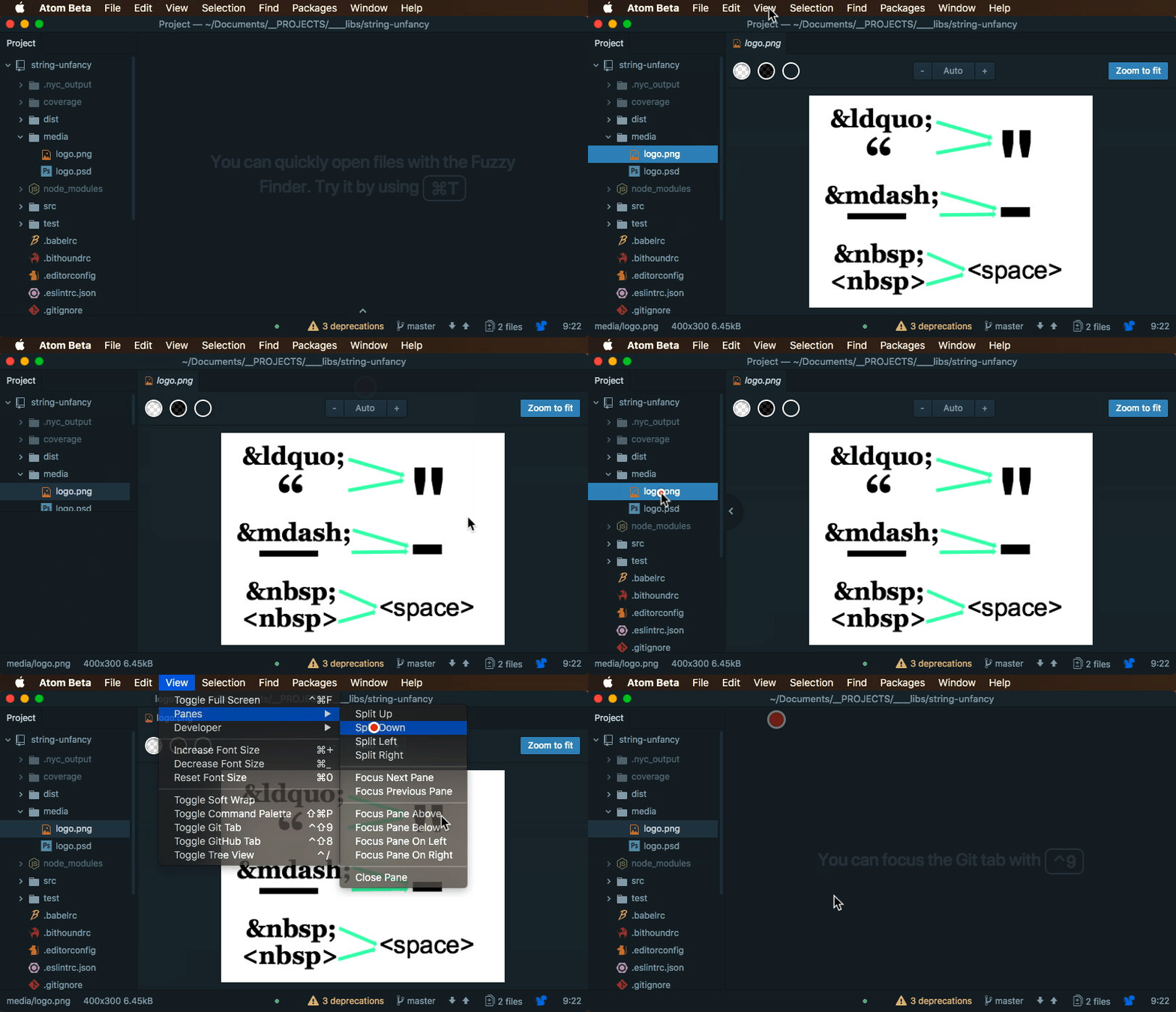
When you single click on file tree on left sidebar, that file tab's label is in italic and tab doesn't stay opened, but another single-clicked file replaces it. I'm talking about this mode in particular, as opposed to file being double-clicked, when tab's label is in normal font.
When single-clicked, it's not possible to split down the pane with a file open. If it was double-clicked, it works as intended. While example is shown with an image, any file will not pane-split if it was opened by single-clicking (its tab's label was in italic).
Steps to Reproduce
- Single-click on any file on the file Tree View panel. Make sure newly-created tab's label is in italic (you didn't double-click).
- Activate menu item: View > Panes > Split Down
Expected behavior: Window splitting accordingly and file being open.
Actual behavior: Tree View sidebar splits instead with no file opened in newly-created split.
Reproduces how often: 100%
Versions
Atom : 1.24.0
Electron: 1.6.16
Chrome : 56.0.2924.87
Node : 7.4.0
MacOS : 10.13.3