git commit's main title and the text comment of the commit are not readable with light UI and dark syntax combination #2251

Description

Prerequisites
- Put an X between the brackets on this line if you have done all of the following:
- Reproduced the problem in Safe Mode: https://flight-manual.atom.io/hacking-atom/sections/debugging/#using-safe-mode
- Followed all applicable steps in the debugging guide: https://flight-manual.atom.io/hacking-atom/sections/debugging/
- Checked the FAQs on the message board for common solutions: https://discuss.atom.io/c/faq
- Checked that your issue isn't already filed: https://github.com/issues?utf8=✓&q=is%3Aissue+user%3Aatom
- Checked that there is not already an Atom package that provides the described functionality: https://atom.io/packages
Description
With a certain theme setting, the git commit's main title and the text comment of the commit are not readable.
Steps to Reproduce
- Go to Settings - Themes and set:
- UI Theme: One Light
- Syntax Theme: One Dark
- Open a directory/file with a git repo.
- Open git (Ctrl+Shift+9). I assume that you are the list of commits will appear.
- Click on any commit. A commit window will appear.
Expected behavior:
I expect the text to be with good colors, good contrast and generally speaking readable.
Actual behavior:
Color of the text is bad:
- every change's title (
@@ -66, 7 +133,7 @@ class ComponentAdmin(VersionAdmin, admin.ModelAdmin):, my name,X committed 9 days ago, id of the commit (4a899d2) are too grey. - but most importantly, the main title and the text comment of the commit are not readable.
Show as is:
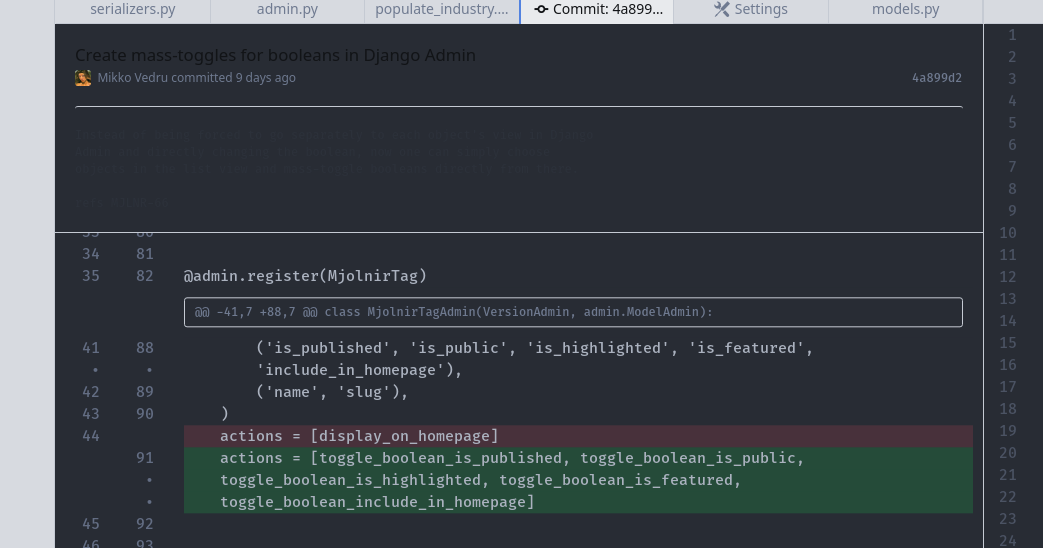
Ctrl+a, all the text selected so you could see what is missing:
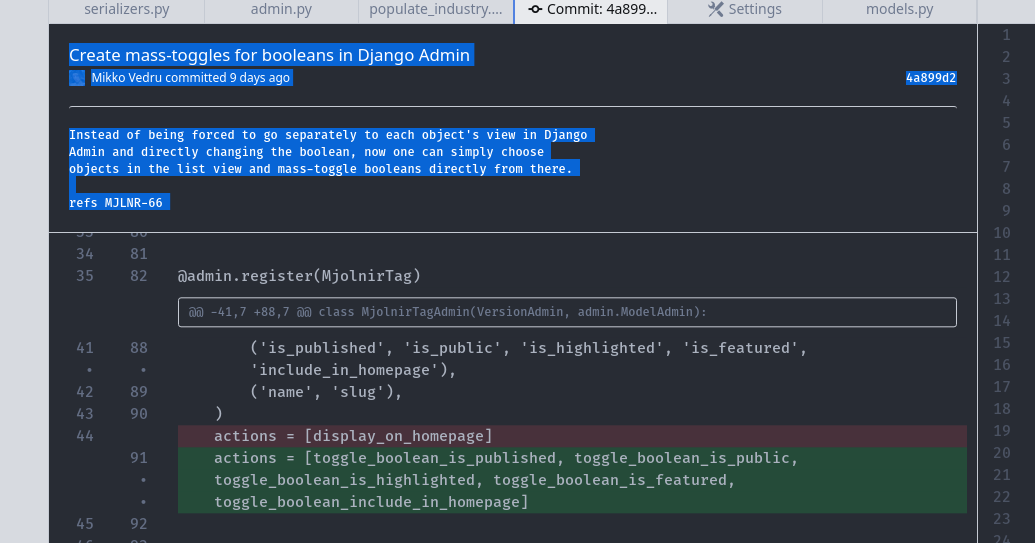
I checked all the other combinations and even though some (for example the reversed combination "UI Theme: One Dark; Syntax Theme: One Light") definitely require some work to improve contrast and readability, this is the only one that is properly bugged.
Reproduces how often:
100%
Versions
Atom : 1.39.1
Electron: 3.1.10
Chrome : 66.0.3359.181
Node : 10.2.0
apm 2.2.4
npm 6.2.0
node 8.9.3 x64
atom 1.39.1
python 2.7.15+
git 2.17.1
Linux Mint Cinnamon 19.2