Skip to content
This repository was archived by the owner on Dec 15, 2022. It is now read-only.

Conversation

@BinaryMuse
Copy link
Contributor

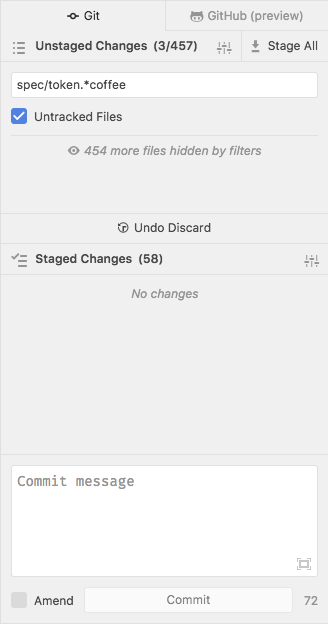
In some cases, the list of staged/unstaged/unmerged files can get to be pretty unmanageable. For these cases, it would be nice to have an easy mechanism for filtering the list down. I'm imagining a UI kinda like this:

cursor_and___atom_and_octicons

When the "settings" button to the right of the list header is clicked, a filter panel will drop down.

cursor_and___atom_and_staging-view_js_ ___github_github_and_octicons

Modifying the options updates the UI in real time; the list is filtered and an indication of how many files have been filtered out is shown. Additionally, at the bottom of the file list, a "fake" entry shows that some files aren't shown, and clicking this will ensure that the filter box is open.

cursor_and___atom

To note, these screenshots are just mocks. There's definitely some additional UX thinking that could be done here.

  • What types of things might we want to filter out (other than by path glob and tracked/untracked status)?
  • What's a good UI for providing an affordance for "clearing" the filters
  • Should the filters be allowed to be closed as long as they are active?
  • Is the filter button clear enough?
  • Where else can the UX be improved?

/cc @simurai in particular for 💭 s

Fixes #888

@simurai
Copy link
Contributor

simurai commented Aug 25, 2017

Pushed some changes where the file count is moved next to the title:

screen shot 2017-08-25 at 2 24 34 pm

  • Then you can see the count even when the filter is collapsed/hidden. Also good in case the list is long and the "more files hidden by filters" isn't visible.
  • Being next to the "Untracked Files" might look like the numbers refers to the tracked/untracked and not the filter as a whole.

Downside: It gets a bit crowded up there. 😆

  1. Remove the word "Changes" from the title?
  2. Remove the "Stage All" button? It's still available from the context menu.
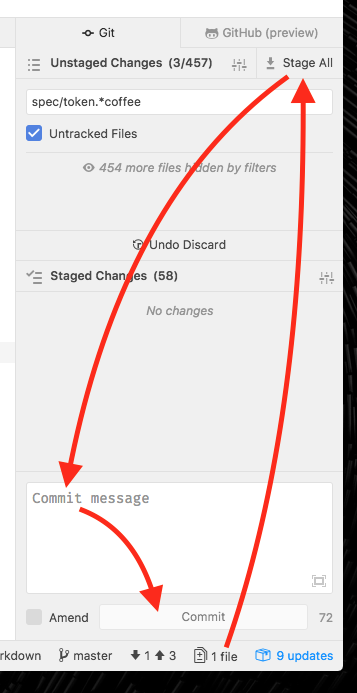
  3. Move the "Stage All" button down next to the commit button?

I wanted to propose #3 anyways, because currently when using the mouse, opening the panel, click on "Stage All", then move down again to the input always take so long:

screen shot 2017-08-25 at 2 42 40 pm

With this Option B prototype, you could stay in the bottom area and travel distance is minimal.

I can open a separate issue just for that, so this PR stays focused.

@simurai
Copy link
Contributor

simurai commented Aug 25, 2017

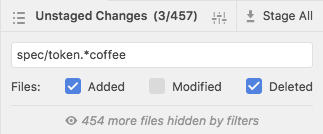
What types of things might we want to filter out (other than by path glob and tracked/untracked status)?

Also modified and deleted files?

image

What's a good UI for providing an affordance for "clearing" the filters

An X in the right corner? Like search inputs. You can also clear the filter with esc or when pressing a second time, the whole filter closes.

x

Should the filters be allowed to be closed as long as they are active?

Hmm.. good question. Maybe not? Or closing would clear the filter. Then there is less chance of "Damn, where are the changes I just made".

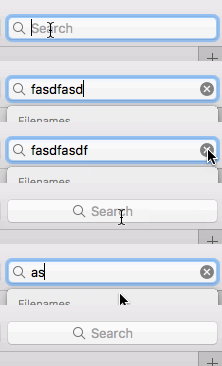
Is the filter button clear enough?

An alternative might be a magnifying glass? Although it's not really a "search".

screen shot 2017-08-25 at 3 43 08 pm

Sign up for free to subscribe to this conversation on GitHub. Already have an account? Sign in.

Labels

None yet

Projects

None yet

Development

Successfully merging this pull request may close these issues.

Filter changed file lists

3 participants