RFC for Interactive Log View #1419
There are no files selected for viewing
| Original file line number | Diff line number | Diff line change |
|---|---|---|
| @@ -0,0 +1,63 @@ | ||
| # Interactive Log View | ||
|
|
||
| ## Status | ||
|
|
||
| Proposed | ||
|
|
||
| ## Summary | ||
|
|
||
| Open a pane item displaying a navigable, live 3D model of your git commit graph. | ||
|
|
||
| ## Motivation | ||
|
|
||
| Visualizing the commit graph is an important tool for learning git. A live view of the commit graph can inobtrusively help git newcomers form the correct mental model for commit graph operations (branching, merging, rebasing). | ||
|
|
||
| We do not currently have a way to initiate merge, rebase, or cherry-pick operations from the editor. A log view would be the most logical place to do so, because it's where you have the most context about the existing relationship of the refs you'd like to merge or rebase. | ||
|
|
||
| A log view would grant us a way to answer the question of where you are relative to nearby refs and tags. | ||
|
|
||
| Why 3D? Flat visualizations of git history quickly fall victim to the "guitar hero problem": | ||
|
|
||
| [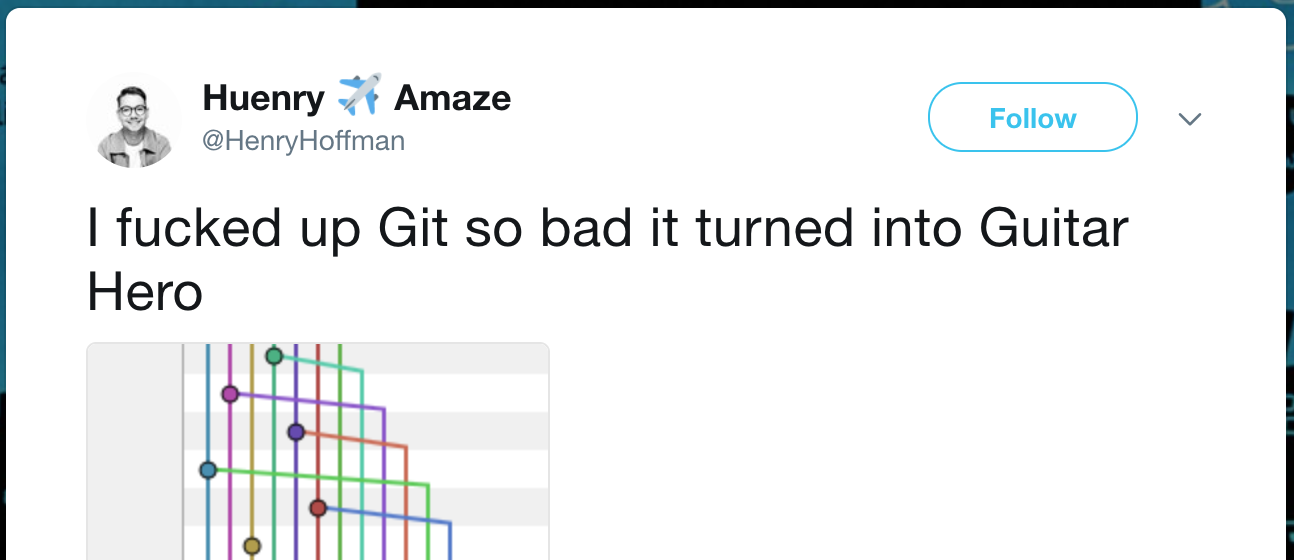](https://twitter.com/henryhoffman/status/694184106440200192) | ||
|
|
||
| I'm hopeful that the extra "space" afforded by rendering in WebGL and level-of-detail fading can give us a view that remains functional even in the face of dramatic tangles. | ||
|
|
||
| ## Explanation | ||
|
|
||
| The log view is a pane item launched by: | ||
|
|
||
| * The `github:log` command in the command palette. | ||
| * An "Open Log" menu item in the context menu on the recent commit history. | ||
|
|
||
| When launched, the log view pane uses WebGL to render a 3D model of your commit graph. | ||
|
Contributor
There was a problem hiding this comment. @smashwilson Do you have an example of a 3D log visualization or is it something that only exists in your imagination. 💭
Contributor
Author
There was a problem hiding this comment. Totally and completely in my head 😆 If I get a chance, I might start playing around with a prototype for this to see if it's viable. There was a problem hiding this comment. On a semi-related note, I met some guys who made a git branch viewer for the hololens (it would display the branch graph fixed in space). So I guess that's one realization of a 3D log visualisation |
||
|
|
||
| * Each commit is rendered as a sphere, possibly with adjacent text (see below). | ||
| * A line joins each commit to its parent. | ||
|
There was a problem hiding this comment. parent(s)* There was a problem hiding this comment. Merge commits actually have as many parents as needed. Two is just the most common. |
||
| * Refs are rendered as rectangular tags attached to the relevant commits. | ||
| * When a remote is present, commits that are not reachable from any remote ref are rendered _[TODO]_. Commits that have been fetched but are not reachable from any local ref are rendered _[TODO]_. | ||
|
There was a problem hiding this comment. There's basically 2 pieces of information you want to convey (preferably visually and at a glance) here:
My initial thought (assuming this view has a strong sense of up and down) is that local only commits are rendered as a pyramid (pointing up, which mildly indicates push). Remote only commits are rendered as an inverted pyramid (pointing down, which mildly indicates pull). Any commit that is both local and remote will be a sphere. My idea for indicating which remote/remotes a commit is part of is to render an icon within the pyramid/sphere for each remote a commit is part of. We could use a house icon for origin, and a wavy (diagonal upwards) icon for upstream. Maybe basic geometric shapes (square, circle, triangle, star) for any other remotes. Local in this case is signified by the absence of an icon, or possibly by a computer. If you give each remote its own color, then you could mix the colors to determine the color of the sphere/pyramid. Maybe local only is gray, origin is green, upstream is blue, etc. Then upstream and origin would be cyan/teal (mix of blue and green), etc. There was a problem hiding this comment. This scheme works well with the levels of detail. Highest level of detail lets you hover the remote icons to see the names for the remotes, or maybe even pops them out to the left side with names. Medium level of detail lets you see the icons, but maybe smaller, or maybe only the first remote. Low level of detail has no icons, but retains the shape and color, so you can visually see if there's a "far away" commit that hasn't been pushed yet. |
||
|
|
||
| ### Level of detail | ||
|
|
||
| Commit information quickly becomes visually overwhelming, even in relatively small repositories. To remain useful as repositories grow in size and complexity, we can employ varying _level of detail_ for commits. | ||
|
|
||
| The _focused commit_ is the one currently at the center of the field of view. It is annotated with author avatars, a timestamp, and a commit message header. Zero to many _selected commits_ have been chosen by a hotkey to participate in a pending action, so they too have the highest level of detail. | ||
|
|
||
| Commits adjacent to the focused one on the same branch (reachable by only a single entry in `refs/heads`, up to a maximum) are "nearby" and rendered with the next highest level of detail. Each has a timestamp and a commit message header in text next to the commit node. | ||
|
|
||
| ### Layout algorithm | ||
|
|
||
| _[TODO]_ | ||
|
|
||
| ### Searching and filtering | ||
|
|
||
| ### Navigation | ||
|
|
||
| ### Merge, rebase, cherry-pick | ||
|
|
||
| ## Drawbacks | ||
|
|
||
| ## Rationale and alternatives | ||
|
|
||
| ## Unresolved questions | ||
|
|
||
| ## Implementation phases | ||


There was a problem hiding this comment.
Choose a reason for hiding this comment
The reason will be displayed to describe this comment to others. Learn more.
"inobtrusively" -> "unobtrusively"