This repository was archived by the owner on Dec 15, 2022. It is now read-only.
This repository was archived by the owner on Dec 15, 2022. It is now read-only.
Saving as HTML doesn't save output file #524


Description

Prerequisites
- Can you reproduce the problem in safe mode?
- Are you running the latest version of Atom?
- Did you check the debugging guide?
Atom: 1.24.0-beta3 x64
OS: Windows 10
Steps to Reproduce
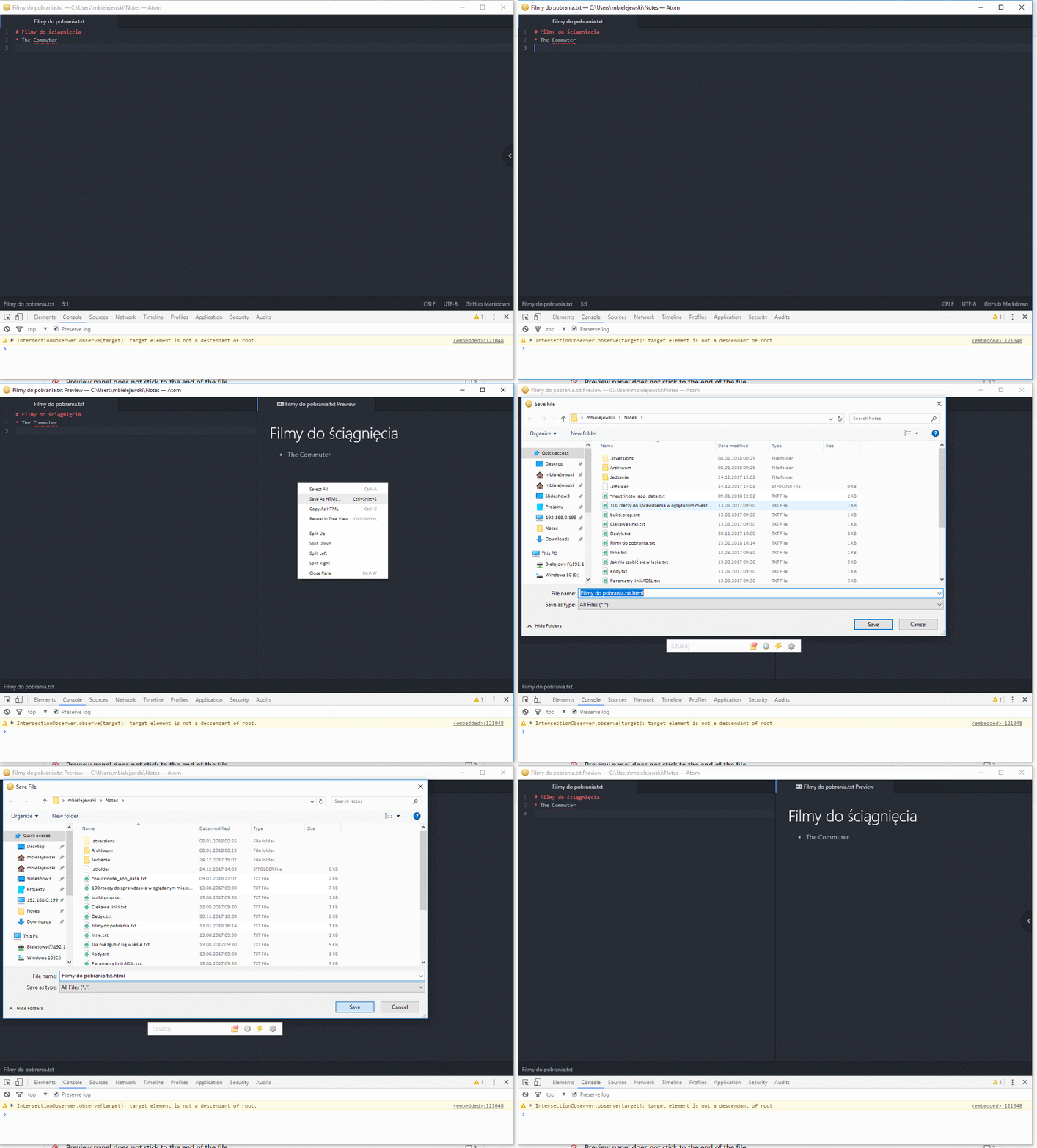
- Open a Markdown file, or create new
- Ctrl + Shift + M
- Context Menu -> Save as HTML...
- Select file
- Click Save
Expected behavior: HTML file get saved and opened in new pane in Atom
Actual behavior: Files is not saved nor opened, nothing is happening actually
I've tried:
- Checking the DevTools console
- Deleting
.atomfolder - Disabling all not built-in packages
- Running Atom in safe mode
Versions
Atom    : 1.24.0-beta3
Electron: 1.6.15
Chrome  : 56.0.2924.87
Node    : 7.4.0