
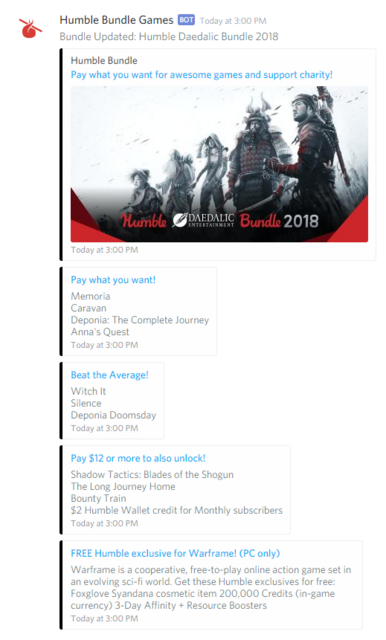
Scrapes HumbleBundle.com for new Bundles and posts new bundles to different webhooks whenever a new Bundle shows up. Each Bundle can be sent to a different webhook, allowing easy organization of messages - in Discord, each channel can have webhooks associated with them for integrations like this.
Scraping is done once and results are sent to all relevant webhooks using Serverless Functions and Azure Queue, making the system extremely cheap to run and highly scalable.

1/8/2019 - In response to popular demand, you can now optionally register a Humble Bundle Partner referral that will be attached to all messages for your webhook only. This means that if you're a streamer who runs your own Discord and want your audience to be able to throw some of their purchase money at you, you can signup with Humble Bundle and register your partner name here to make it happen!
Not a Partner and want to support me for developing this service? Use cswendrowski for the Partner value when signing up, as the example will show. Thank you!
11/8/2018 - You can now opt-in to Developer Messages - we will only send these out in case of major outages to indicate when the Bot is down for maintenance and when it is back up. This message type is currently only valid for Discord webhooks.
5/23/2018 - We now support the ability to register any webhook instead of just Discord webhooks.
If you register a Discord webhook the experience is still the same and you will receive Discord formatted messages.
If you have already registered a webhook before this date, your webhook registration has been defaulted to Discord.
If you register a webhook of type RawJson (1), you will receive a BundleQueue payload that looks similiar to the following:
{
  "Bundle": {
    "Name": "Humble Indie Bundle 19",
    "URL": "https://www.humblebundle.com/games/humble-indie-bundle-19",
    "Description": "SUPERHOT, JYDGE, SOMA, and more – cross-platform, DRM-free, and on Steam!",
    "ImageUrl": "https://humblebundle.imgix.net/misc/files/hashed/632a3bceaaede04cf3d0dee88cfaa7f473cc3fb8.png?auto=compress&h=630&w=1200&s=98e4c242fff7139eceb2bee5740b605b",
    "Type": 0,
    "Sections": [
      {
        "Title": "Pay what you want!",
        "Items": [
          {
            "Name": "Halcyon 6: Lightspeed Edition"
          }
        ]
      },
      {
        "Title": "Beat the Average!",
        "Items": [
          {
            "Name": "Keep Talking and Nobody Explodes"
          }
        ]
      },
      {
        "Title": "Pay $14 or more to also unlock!",
        "Items": [
          {
            "Name": "SUPERHOT"
          },
          {
            "Name": "$2 Humble Wallet credit for Monthly subscribers"
          }
        ]
      }
    ],
    "Items": [
      {
        "Name": "Halcyon 6: Lightspeed Edition"
      }
      {
        "Name": "Keep Talking and Nobody Explodes"
      },
      {
        "Name": "SUPERHOT"
      },
      {
        "Name": "$2 Humble Wallet credit for Monthly subscribers"
      }
    ]
  },
  "IsUpdate": false
}All requests to the endpoints require a header of Content-Type: application/json
Make a HTTP POST request to https://humblebundlenotifications.azurewebsites.net/api/RegisterWebhook with a Body of the following format:
{
    "type": <Valid Bundle Type Code>,
    "webhook": "<YOUR DISCORD WEBHOOK URL>",
    "sendUpdates": <true|false>,
    "webhookType": <Valid Webhook Type Code>,
    "partner": "<YOUR PARTNER NAME OF CHOICE>"
}
The following Bundle types are valid:
| Type | Type Code |
|---|---|
| Games | 0 |
| Books | 1 |
| Mobile | 2 |
| Software | 3 |
| Mixed | 4 |
| Developer Messages (Valid for Discord only) | 5 |
The following Webhook types are valid:
| Type | Type Code |
|---|---|
| Discord | 0 |
| RawJson | 1 |
Example of subscribing to the Games Bundle with a Discord webhook with a Partner link of me (Thanks if you do this!):
{
    "type": 0,
    "webhook": "https://discordapp.com/api/webhooks/abcd123...",
    "sendUpdates": true,
    "webhookType": 0,
    "partner": "cswendrowski"
}
Webhook URLs are encrypted before they are stored.
A Partner link will add a header to the page indicating who referred the user to the bundle:

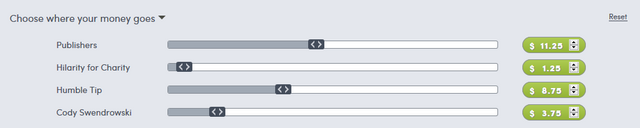
It will also add a slider bar to the "Choose where your money goes section" where users can adjust how much the Partner receives (even down to nothing!)
Are you signed up as a Partner and confused about what value to use when registering?
You can find your Partner name at on the Partner Dashboard, under the "Active partner" section:

All requests to the endpoints require a header of Content-Type: application/json
Make a HTTP POST request to https://humblebundlenotifications.azurewebsites.net/api/RegisterWebhook with a Body of the following format:
{
    "type": <Valid Bundle Type Code>,
    "webhook": "<YOUR DISCORD WEBHOOK URL>",
    "sendUpdates": <true|false>,
    "webhookType": <Valid Webhook Type Code>
}
Example of subscribing to the Games Bundle with a Discord webhook:
{
    "type": 0,
    "webhook": "https://discordapp.com/api/webhooks/abcd123...",
    "sendUpdates": true,
    "webhookType": 0
}
Webhook URLs are encrypted before they are stored.
All requests to the endpoints require a header of Content-Type: application/json
Make a HTTP DELETE request to https://humblebundlenotifications.azurewebsites.net/api/DeleteWebhook with a Body of the following format:
{
    "type": <Valid Bundle Type Code>,
    "webhook": "<YOUR SUBSCRIBED WEBHOOK URL>",
    "webhookType": 0
}