



Full-featured Unity integration for Antigravity IDE — IntelliSense, debugging, Roslyn analyzers, and optimized project generation.
- Optimized for speed: Only generates
.csprojfor user-editable assemblies (Assets/ + local Packages/), skipping read-only package internals. Typical Unity projects drop from ~155 to ~10-15 project files. - Auto-cleanup: Removes orphaned
.csprojand competing.slnxfiles automatically - DotRush-compatible references: Emits both
<Reference>with<HintPath>(for Roslyn type resolution) and<ProjectReference>(for IDE navigation) - Response file support: Parses
.rspfiles for defines, references, and unsafe flags - Non-script assets: Includes
.uxml,.uss,.shader,.asmdefas<None>items for navigation
- Full IntelliSense, autocomplete, and error checking powered by Roslyn
- Supports all Unity assemblies including
UnityEngine.UI,TextMeshPro, etc. - Fast startup: filtered solution loads in seconds, not minutes
- Auto-install: prompts to install DotRush on first activation if not present
- ShaderLab (
.shader) - HLSL/CG (
.cginc,.hlsl,.cg,.compute) - USS — Unity Style Sheets (
.uss) - UXML — Unity XML (
.uxml) - Assembly Definitions (
.asmdef,.asmref)
Antigravity: Regenerate Project Files— regenerate all.csprojand.slnfrom UnityAntigravity: Attach Unity Debugger— attach to running Unity instance (experimental)Antigravity: Unity API Reference— quick access to Unity docs- Unity C# code snippets (MonoBehaviour methods, attributes, etc.)
Add to your Unity project's Packages/manifest.json:
{
  "dependencies": {
    "com.antigravity.ide": "https://github.com/billythekidz/UnityAntigravityIDE.git"
  }
}
Or use Unity Package Manager → Add package from git URL:
https://github.com/billythekidz/UnityAntigravityIDE.git
The extension provides Unity debugger, syntax highlighting for shaders, and deep IDE integration.
- Option A (Marketplace): Search for "Antigravity Unity" in the Extensions Marketplace (or Open VSX) and install.
- Option B (Manual VSIX): Download the latest
.vsixfrom our GitHub Releases and install viaExtensions: Install from VSIX....
DotRush is REQUIRED for C# IntelliSense and debugging.
- Marketplace: Search for "DotRush" or install
nromanov.dotrush. - Manual install: Download from Open VSX if using an offline environment.
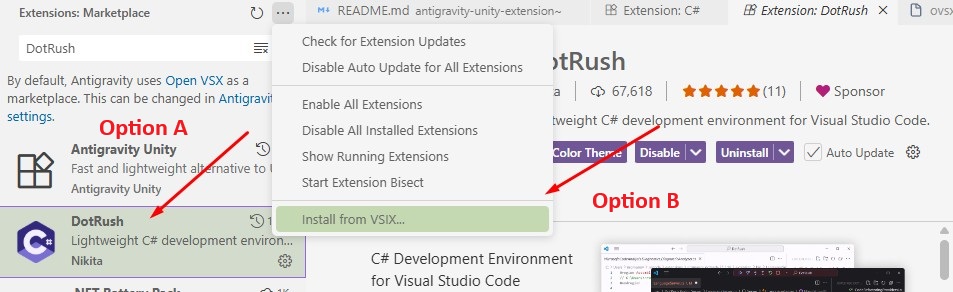
- Install the Unity package (see above)
- Open your Unity project in Antigravity IDE
- Install DotRush when prompted (or manually)
- In Unity Editor: Edit → Preferences → External Tools → External Script Editor → Antigravity IDE
- Click "Regenerate project files" in the Antigravity IDE preferences panel
- Done! IntelliSense, debugging, and syntax highlighting are ready.
- ~155
.csprojfiles for a typical Unity project - Roslyn loads ALL assemblies including read-only packages
- Load time: 30-60 seconds
- ~10-15
.csprojfiles (user-editable only) - Package types resolved via DLL HintPaths (no source parsing needed)
- Load time: 2-5 seconds ⚡
UnityAntigravityIDE/
├── Editor/                          # Unity Editor scripts (the UPM package)
│   ├── AntigravityScriptEditor.cs   # IDE integration, preferences UI
│   ├── ProjectGeneration.cs         # .csproj/.sln generation engine
│   ├── UnityAnalyzerConfig.cs       # Roslyn analyzer configuration
│   └── UnityDebugBridge.cs          # Debug bridge for Unity
├── package.json                     # UPM package manifest
├── .githooks/                       # Local git hooks
│   └── pre-commit                   # Auto-increment patch version on commit
├── antigravity-unity-extension~/    # VS Code extension (local dev only)
│   └── release-extension.py         # Cross-platform release automator
├── DotRush~/                        # DotRush reference (local dev only)
├── com.unity.ide.vscode~/           # VS Code IDE reference (local dev only)
└── vscode-unity-debug~/             # Unity debugger reference (local dev only)
Note: Folders ending with
~are ignored by Unity Package Manager and are not tracked in git (dev-only references).
{
  "dotnet.defaultSolution": "YourProject.sln",
  "dotrush.roslyn.projectOrSolutionFiles": ["path/to/YourProject.sln"],
  "dotrush.msbuildProperties": {
    "DefineConstants": "UNITY_EDITOR"
  }
}- External Script Editor: Antigravity IDE
- Editor arguments: customizable in preferences
- Generate .csproj: automatic on script/asset changes
Version is auto-incremented via a local git pre-commit hook:
- Patch bumps on every commit (e.g.,
2.1.7→2.1.8) - Uses
.githooks/pre-commit(cross-platform bash, works on macOS and Linux) - Set up:
git config core.hooksPath .githooks
This is the most common issue. Check these in order:
| Check | Fix |
|---|---|
| DotRush not installed | Install nromanov.dotrush from Extensions or Open VSX |
| Antigravity Unity extension not installed | Install from Marketplace or GitHub Releases |
| Wrong solution file selected | When DotRush prompts, pick the .sln file — not .csproj or .slnx |
No .sln file exists |
In Unity: Edit → Preferences → External Tools → Regenerate project files |
| DotRush not activated | Check Extensions panel — it must be enabled, not just installed |
After fixing, run Ctrl+Shift+P → Developer: Reload Window.
If any folder in your Unity project path contains special characters like &, +, #, or non-ASCII characters, DotRush/Roslyn may fail to parse .csproj files. Rename the folder to use only alphanumeric characters, dashes, and underscores.
Microsoft's C#, C# Dev Kit, and Unity extensions are licensed exclusively for Visual Studio Code. They cannot be installed on Antigravity IDE, VSCodium, or any other VS Code fork. This is a Microsoft licensing policy, not a bug.
Our solution: DotRush — an open-source, MIT-licensed C# language server built on Roslyn that provides the same core IntelliSense features.
Cause: Your Unity project has compile errors in C# scripts. When scripts fail to compile, Unity cannot load the Antigravity package properly, so it falls back to showing "(internal)".
Fix:
- Open Unity's Console window and look for red error messages.
- Fix all C# compilation errors in your project.
- Once scripts compile successfully, go to Edit → Preferences → External Tools — the dropdown should now show "Antigravity" (not "internal").
Tip: Common culprits include
[SerializeField]on auto-properties (not supported on some Unity versions), missing assembly references, or outdated third-party packages.
| Cause | Fix |
|---|---|
| Antigravity IDE is not installed | Install from Antigravity Downloads or your package manager |
App is not in /Applications/ (macOS) |
Move Antigravity.app to /Applications/ |
| Unity package not installed | Add the git URL to Packages/manifest.json (see Installation) |
| Project has compile errors | Fix all C# errors first (see above) |
- Confirm DotRush is installed: open Extensions in Antigravity IDE and search for
nromanov.dotrush. - In Unity: Edit → Preferences → External Tools → Regenerate project files.
- Make sure
.vscode/settings.jsoncontains"dotnet.defaultSolution"pointing to your.sln. - Restart Antigravity IDE after regenerating project files.
DotRush requires the .NET SDK to be installed and accessible:
- Download from dotnet.microsoft.com (SDK, not just Runtime).
- After installation, restart Antigravity IDE (not just reload window).
- Verify in terminal:
dotnet --versionshould return a version number. - If
dotnetis still not found, add it to your PATH manually:C:\Program Files\dotnet\
Unity projects nested deep in folders can hit Windows' 260-character path limit:
- Open Registry Editor →
HKEY_LOCAL_MACHINE\SYSTEM\CurrentControlSet\Control\FileSystem - Set
LongPathsEnabledto1 - Or run in an elevated PowerShell:
New-ItemProperty -Path "HKLM:\SYSTEM\CurrentControlSet\Control\FileSystem" -Name "LongPathsEnabled" -Value 1 -PropertyType DWORD -Force
- Restart your machine.
Some corporate/school environments block Open VSX or GitHub:
- Download
.vsixfiles manually from Open VSX or GitHub Releases. - Install via
Ctrl+Shift+P→Extensions: Install from VSIX....
Unity projects generate thousands of files in Library/ and Temp/. Add these exclusions to your workspace settings:
{
  "files.watcherExclude": {
    "**/Library/**": true,
    "**/Temp/**": true,
    "**/obj/**": true
  }
}Some antivirus software (especially Windows Defender) may quarantine DotRush's language server binary. Add an exclusion for your Antigravity IDE installation folder and the .dotnet tools directory.
- Ensure
Antigravity.appis in/Applications/(not~/Downloads/). - If Gatekeeper blocks the app, right-click → Open to bypass.
- The Unity package handles macOS
.appbundles automatically — you don't need to point to the innerContents/MacOS/binary.
- Make sure Unity Editor is running with your project open.
- In Antigravity IDE:
Ctrl+Shift+P→Antigravity: Attach Unity Debugger. - If no instances appear, check that Unity's Script Debugging is enabled in Build Settings.
- On Windows, ensure your firewall isn't blocking the debugger port.
Run this once after cloning the repo:
git config core.hooksPath .githooksThis enables the pre-commit hook that auto-bumps the Unity package version.
MIT

