

Pass console outputs to the screen
npm i console-in-browser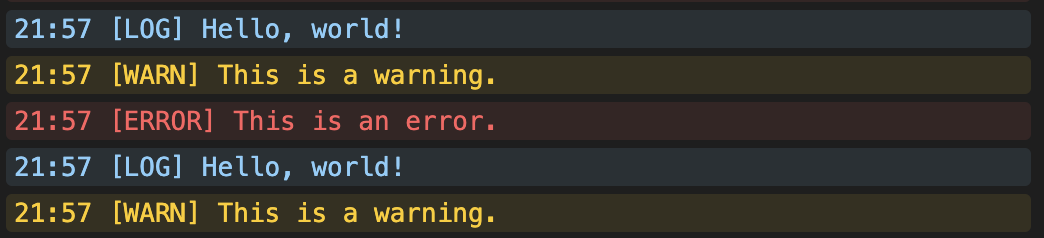
This module provides utilities to intercept console messages and display them in a custom-styled console within a web page.
import { createConsoleDOM, consolePipe } from 'console-in-browser'

// Get the container element where the custom console will be rendered
const container = document.getElementById('consoleContainer')

// Create the custom DOM-based console inside the container
const domConsole = createConsoleDOM(container)

// Intercept console.log, console.warn, console.error,
// as well as uncaught exceptions and unhandled promise rejections,
// redirecting all of them to the custom console's printMessage() function
consolePipe(domConsole.printMessage)
This setup captures all console output and displays it in a custom, styled console element.
This module provides two key utilities for working with browser consoles:
-
consolePipe(): Hooks intoconsole.log,console.warn, andconsole.errorto intercept and forward messages to a callback. It also listens for globalerrorandunhandledrejectionevents to forward uncaught errors. -
createConsoleDOM(): Creates a custom DOM-based console UI element to display messages, styled for easy readability.
consolePipe intercepts console.log, console.warn, and console.error calls, forwarding their content to the provided callback. It also listens for uncaught exceptions and unhandled promise rejections, passing those errors to the same callback.
consolePipe(callback)| Parameter | Type | Description |
|---|---|---|
callback |
function |
A function that handles intercepted messages, receiving (time, type, message) arguments. All arguments are strings. |
consolePipe((time, type, message) => {
    // don't call console.log here or you'll run into infinite recursion
    window.alert(`[${time}] ${type.toUpperCase()}: ${message}`)
});createConsoleDOM adds a scrollable console UI to the provided container element. It styles messages differently based on their type (log, warn, error), and supports color customization via the colors parameter.
createConsoleDOM(container)
createConsoleDOM(container, colors)| Parameter | Type | Description |
|---|---|---|
container |
HTMLElement |
Parent element where the console UI will be attached. |
colors |
object (optional) |
Custom color overrides for different message types. See below. |
The colors object can include:
| Key | Description | Default |
|---|---|---|
logText |
Text color for log messages |
#87cefa |
logBg |
Background color for log messages |
rgba(135, 206, 250, 0.1) |
warnText |
Text color for warn messages |
#ffcc00 |
warnBg |
Background color for warn messages |
rgba(255, 204, 0, 0.1) |
errorText |
Text color for error messages |
#ff5f5f |
errorBg |
Background color for error messages |
rgba(255, 95, 95, 0.1) |
consoleText |
Default text color | #d4d4d4 |
consoleBg |
Default background color | #1e1e1e |
An object with:
| Method | Description |
|---|---|
printMessage() |
Function to append a message to the console UI manually. Accepts different argument combinations for flexibility. |
printMessage(message)
printMessage(type, message)
printMessage(time, type, message)

// type: 'log', 'warn', 'error' or [custom type]const container = document.getElementById('consoleContainer');
// create a console with custom colors
const domConsole = createConsoleDOM(container, {
logText: 'green',
warnText: '#ffa500',
errorText: 'rgb(255, 0, 0)'
});
domConsole.printMessage('12:34', 'log', 'This is a log message');
domConsole.printMessage('12:35', 'warn', 'This is a warning');
domConsole.printMessage('12:36', 'error', 'This is an error');This module is licensed under MPL-2.0.