- 1. Change the Pink Page (Mary)
- 2. Create a Patch
- 3. Add a Pink Block (Mary)
- 4. Create Patch of Entire Branch (Mary)
- 5. Mail the Patches (Mary)
- 6. Apply the Patches (you)
- 7. Integrate The Patches (you)
- 8. Update Mary's Repository (Mary)
- 9. Conclusion
- 10. Quick Reference
Thus, far, all of the collaboration workflows we have seen rely heavily on branches. For example, in the last module, a contributor had to publish an entire branch for us to merge into our project. However, it is also a possible to communicate directly on the commit level using a patch.
A patch file represents a single set of changes (i.e. a commit) that can be applied to any branch, in any orderi. In this sense, the patch workflow is akin (parecido) to interactive rebasing, except you can easily share patches with other developers. This kind of communication lessens (aminora) the importance of a project's branch structure and gives complete control to the project maintainer (at least with regards to incorporating contributions).
Integrating on the commit level will also give us a deeper understanding of how a Git repository records project history.
Wed Jun 24 ~/iOS/RysGitTutorialRepository
$ git remote add origin https://C4rl0sS4nt14g0@bitbucket.org/C4rl0sS4nt14g0/rysgittutorialrepository.git
fatal: remote origin already exists.
Wed Jun 24 ~/iOS/RysGitTutorialMarysRepository
$ git remote add origin https://C4rl0sS4nt14g0@bitbucket.org/C4rl0sS4nt14g0/rysgittutorialrepository.git
fatal: remote origin already exists.Both exist, reverse if needed.
We will begin by pretending to be Mary again. Mary didn't like the pink page that John contributed and wants to change it.
Wed Jun 24 ~/iOS/RysGitTutorialRepository
$ cd ../RysGitTutorialMarysRepository/
Wed Jun 24 ~/iOS/RysGitTutorialMarysRepository
$ git checkout -b pink-page
Switched to a new branch 'pink-page'Developing in a new branch not only gives Mary an isolated environment, it also makes it easier to create a series of patches once she is done editing the pink page. Find these lines in pink.html
<p>Pink is <span style="color: #F0F">girly,
flirty and fun</span>!</p>
And change them to the following:
<p>Only <span style="color: #F0F">real men</span> wear pink!</p>Stage and commit the update as normal.
Wed Jun 24 ~/iOS/RysGitTutorialMarysRepository
$ git commit -a -m "Change pink to a manly color"
[pink-page 58b51cb] Change pink to a manly color
 1 file changed, 1 insertion(+), 3 deletions(-)
Note that Mary's local development process does not change at all. Patches - like the centralized and integrator workflow - are merely a way to share changes amongst developers. It has little effect on the core Git concepts introduced in the first portion of this tutorial.
Mary can create a patch from the new commit using the git format-patch command.
Wed Jun 24 ~/iOS/RysGitTutorialMarysRepository
$ git format-patch master
0001-Change-pink-to-a-manly-color.patch
This creates a file called 0001-Change-pink-to-a-manly-color.patch that contains enough information to recreate the commit from the last step. The master parameter tells Git to generate patches for every commit in the current branch that is missing from master.
Open up the patch file in a text editor. As shown by the address in the top of the file, it is actually a complete email. This makes it incredible easy to send patches to other developer. Further down, you should see the following.
Wed Jun 24 ~/iOS/RysGitTutorialMarysRepository
$ cat 0001-Change-pink-to-a-manly-color.patch
From 58b51cbb457cf6fe142cd8bc5f11c2caec9b0212 Mon Sep 17 00:00:00 2001
From: Mary <c.santiago.cruz@gmail.com>
Date: Wed, 24 Jun 2020 13:16:13 -0500
Subject: [PATCH] Change pink to a manly color

---
 pink.html | 4 +---
 1 file changed, 1 insertion(+), 3 deletions(-)

diff --git a/pink.html b/pink.html
index 47ea234..c349233 100644
--- a/pink.html
+++ b/pink.html
@@ -7,9 +7,7 @@
 </head>
 <body>
   <h1 style="color: #F0F">The Pink Page</h1>
-  <p>Pink is <span style="color: #F0F">girly,
-  flirty and fun</span>!</p>
-
+  <p>Only <span style="color: #F0F">real men</span> wear pink!</p>
   <p><a href="index.html">Return to home page</a></p>
 </body>
 </html>
--
2.25.0
Now with vim syntax
From 58b51cbb457cf6fe142cd8bc5f11c2caec9b0212 Mon Sep 17 00:00:00 2001
From: Mary <c.santiago.cruz@gmail.com>
Date: Wed, 24 Jun 2020 13:16:13 -0500
Subject: [PATCH] Change pink to a manly color

---
 pink.html | 4 +---
 1 file changed, 1 insertion(+), 3 deletions(-)

diff --git a/pink.html b/pink.html
index 47ea234..c349233 100644
--- a/pink.html
+++ b/pink.html
@@ -7,9 +7,7 @@
 </head>
 <body>
   <h1 style="color: #F0F">The Pink Page</h1>
-  <p>Pink is <span style="color: #F0F">girly,
-  flirty and fun</span>!</p>
-
+  <p>Only <span style="color: #F0F">real men</span> wear pink!</p>
   <p><a href="index.html">Return to home page</a></p>
 </body>
 </html>
--
2.25.0
Now the following:
index 47ea234..c349233 100644
--- a/pink.html
+++ b/pink.html
@@ -7,9 +7,7 @@
 </head>
 <body>
   <h1 style="color: #F0F">The Pink Page</h1>
-  <p>Pink is <span style="color: #F0F">girly,
-  flirty and fun</span>!</p>
-
+  <p>Only <span style="color: #F0F">real men</span> wear pink!</p>
   <p><a href="index.html">Return to home page</a></p>
 </body>
 </html>
This unique formatting is called a diff, because it shows the difference between two versions of a file. In our case, it tells us what happened to the pink.html file between the 47ea234 and c349233 commits (your patch will contain different commit ID's). The @@ -7,9 +7,7 @@ portion describes the lines affected in the respective versions of the file, and the rest of the text shows us the content that has been changed. The lines beginning with - have been deleted in the new version, and the line starting with + has been added.
While you don't have to know the ins-add-outs of diffs to make use of patches, you do need to understand that a single patch file represents a complete commit. And, since it is a normal file (and also an email), it is much easier to pass around than a Git branch.
Delete the patch file for now (we will re-create it later).
Before learning how to turn patches back into commits, Mary will add one more snapshot.
In pink.html, add the following on the line after meta tag.
<style>
  div {
    width: 300px;
    height: 50px;
  }
</style>
And, add the next line of HTML after only real men wear pink!:
<div style="background-color: #F0F"></div>stage and commit the snapshot.
Sun Jun 28 ~/iOS/RysGitTutorialMarysRepository
$ git commit -a -m "Add a pink block of color"
[pink-page da81d4a] Add a pink block of color
 1 file changed, 7 insertions(+)
Mary's repository now contains two commits after the tip of master:
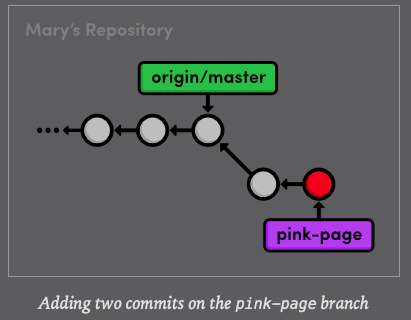
Mary can use the same command as before to generate patches for all commits in her pink-branch.
Mon Jun 29 ~/iOS/RysGitTutorialMarysRepository
$ git format-patch master
0001-Change-pink-to-a-manly-color.patch
0002-Add-a-pink-block-of-color.patch
The first patch is the exact same as we previously examined, but we also have a new one called 0002-Add-a-pink-block-of-color.patch. Note that the first line of the commit message will always be used to make a descriptive filename for the patch. You should find the following diff in the second patch.
index c349233..431492b 100644
--- a/pink.html
+++ b/pink.html
@@ -4,10 +4,17 @@
   <title>The Pink Page</title>
   <link rel="stylesheet" href="style.css" />
   <meta charset="utf-8" />
+  <style>
+  div {
+    width: 300px;
+    height: 50px;
+  }
+  </style>
 </head>
 <body>
   <h1 style="color: #F0F">The Pink Page</h1>
   <p>Only <span style="color: #F0F">real men</span> wear pink!</p>
+  <div style="background-color: #F0F"></div>
   <p><a href="index.html">Return to home page</a></p>
 </body>
 </html>
--
2.25.0
This is the same formatting as the first patch, except its lack of - lines indicate that we only added HTML during the second commit. As you can see, this patch is really just a machine-readable summary of our actions from the previous section.
Now that Mary has prepared a series of patches, she can send them to the program maintainer (us). In the typical patch workflow, she would send them via email using one of the following methods:
- Copying and pasting the contents of the patch files into an email client. If she uses this method, Mary would have to make sure that her email application does not change the whitespace in the patch upon email.
- Sending the patch file as an attachment to a normal email.
- Using the convenient git send-email command and specifying a file or a directory of files to send. For example, git send-email, will send all the patches in the current directory. Git also requires some special configurations for this command. Please consult the official Git documentation for details.
The point is, the .patch files need to find their way into the Git repository of whoever wants to add it to their project. For our example, all we need to do is copy the patches into my-git-repo directory that represents our local version of the project.
Copy the two patches files from RysGitTutorialMaryRepository into RysGitTutorialRepository. Using the new git am command, we can use these patches to add Mary's commits to our repository.
Wed Jul 01 ~/iOS/RysGitTutorialMarysRepository
$ cd ../RysGitTutorialRepository/
Wed Jul 01 ~/iOS/RysGitTutorialRepository
$ git checkout -b patch-integration
Switched to a new branch 'patch-integration'Wed Jul 01 ~/iOS/RysGitTutorialRepository
$ git am < 0001-Change-pink-to-a-manly-color.patch
Applying: Change pink to a manly colorWed Jul 01 ~/iOS/RysGitTutorialRepository
$ git log master..HEAD --stat
commit 958cd59173a387d6b9c3d3a78aa6370dce0318ca (HEAD -> patch-integration)
Author: Mary <c.santiago.cruz@gmail.com>
Date: Wed Jun 24 13:16:13 2020 -0500
Change pink to a manly color
pink.html | 4 +---
1 file changed, 1 insertion(+), 3 deletions(-)First, notice that we are doing our integrating in a new topic branch. Again, this ensures that we won't destroy our existing functionality and gives us a chance to approve changes. Second, the git am command takes a patch file and creates a new commit from it. The log output shows us that our integration branch contains Mary's update, along with her author information.
Let's repeat the process for the second commit.
Wed Jul 01 ~/iOS/RysGitTutorialRepository
$ git am < 0002-Add-a-pink-block-of-color.patch
Applying: Add a pink block of color
Wed Jul 01 ~/iOS/RysGitTutorialRepository
$ git log master..HEAD --stat
commit 56599780e162975562da46742664c1132a24b78e (HEAD -> patch-integration)
Author: Mary <c.santiago.cruz@gmail.com>
Date: Sun Jun 28 08:36:02 2020 -0500
Add a pink block of color
pink.html | 7 +++++++
1 file changed, 7 insertions(+)
commit 958cd59173a387d6b9c3d3a78aa6370dce0318ca
Author: Mary <c.santiago.cruz@gmail.com>
Date: Wed Jun 24 13:16:13 2020 -0500
Change pink to a manly color
pink.html | 4 +---
1 file changed, 1 insertion(+), 3 deletions(-)The git am command is configured to read from something called "Standard input", and the "< character" we can turn file's contents into standard input. As it is really more of an operating system topic, you can just think of this syntax as a quick of the git am command.
After applying this patch, our integration branch now looks exactly like Mary's pink-page branch. We applied Mary's patches in the same order she did, but that didn't necessarily have to be the case. The whole idea behind patches is that let you isolate a commit and move it around as you please.
Once again, we are in the familiar situation of integrating a topic branch into the stable master branch.
Thu Jul 02 ~/iOS/RysGitTutorialRepository
$ git checkout master
Switched to branch 'master'
Thu Jul 02 ~/iOS/RysGitTutorialRepository
$ git merge patch-integration
Updating 51f9d9e..5659978
Fast-forward
pink.html | 11 ++++++++---
1 file changed, 8 insertions(+), 3 deletions(-)Thu Jul 02 ~/iOS/RysGitTutorialRepository
$ git branch -d patch-integration
Deleted branch patch-integration (was 5659978).Thu Jul 02 ~/iOS/RysGitTutorialRepository
$ git clean -f
Removing 0001-Change-pink-to-a-manly-color.patch
Removing 0002-Add-a-pink-block-of-color.patchThu Jul 02 ~/iOS/RysGitTutorialRepository
$ git push origin master
Enumerating objects: 8, done.
Counting objects: 100% (8/8), done.
Delta compression using up to 4 threads
Compressing objects: 100% (6/6), done.
Writing objects: 100% (6/6), 834 bytes | 278.00 KiB/s, done.
Total 6 (delta 3), reused 0 (delta 0)
To https://bitbucket.org/C4rl0sS4nt14g0/rysgittutorialrepository.git
51f9d9e..5659978 master -> masterMary's updates are now completely integrated into our local repository, so we ca get rid of the patch files with git clean. This was also appropiate time to push changes to the public repository so other developers can access the most up-to-date version of the project.
Mary might be tempted to merge her pink-page branch directly into her master branch, but this would be a mistake. Her master branch must track the "official" repository's master, as discussed in the previous module.
Fri Jul 03 ~/iOS
$ cd RysGitTutorialMarysRepository/
Fri Jul 03 ~/iOS/RysGitTutorialMarysRepository
$ git checkout master
Switched to branch 'master'Fri Jul 03 ~/iOS/RysGitTutorialMarysRepository
$ git fetch origin
remote: Counting objects: 6, done.
remote: Compressing objects: 100% (6/6), done.
remote: Total 6 (delta 3), reused 0 (delta 0)
Unpacking objects: 100% (6/6), 814 bytes | 67.00 KiB/s, done.
From https://bitbucket.org/C4rl0sS4nt14g0/rysgittutorialrepository
51f9d9e..5659978 master -> origin/masterFri Jul 03 ~/iOS/RysGitTutorialMarysRepository
$ git rebase origin/master
First, rewinding head to replay your work on top of it...
Applying: Add CSS styles for headings and linksFri Jul 03 ~/iOS/RysGitTutorialMarysRepository
$ git branch -D pink-page
Deleted branch pink-page (was da81d4a).Fri Jul 03 ~/iOS/RysGitTutorialMarysRepository
$ git clean -f
Removing 0001-Change-pink-to-a-manly-color.patch
Removing 0002-Add-a-pink-block-of-color.patchPatches are a convenient way to share commits amongst developers, but the patch workflow still requires an "official" repository that contains everybody's changes. What would happen if Mary was not the only one sending patches to us ?. We may very well have applied several different patches or applied Mary's contributions in a different order. Using Mary's pink-page to update her master branch would completely ignore all these updates.
Taking this into consideration, our final patch workflow resembles the following.
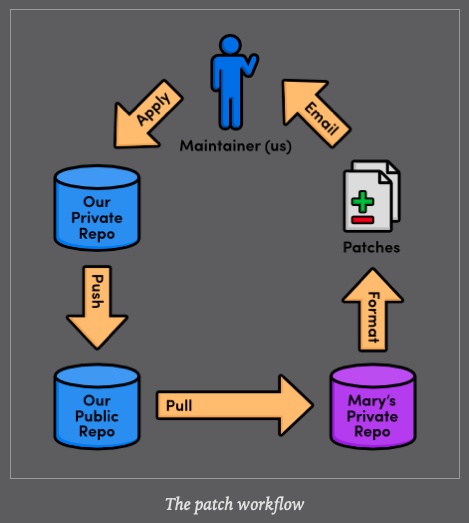
Whereas remote repositories are a way to share entire branches, patches are a way to send individual commits to another developer. Keep in mind that patches are usually only sent to a project maintainer, who then integrates them into the "official" project for all to see. It would be impossible for everyone to communicate using only patches, as no one would be applying them in the same order. Eventually, everyone's project history would look entirely different.
In many ways, patches are a simpler way to accept contributions than the integrator workflow from the previous module. Only the project maintainer needs a public repository, and he will never have to peek at anyone else's repository. Form the maintainer's perspective, patches also provide the same security as the integrator workflow: he still won't have to give anyone access to his "official" repository. But now he won't have to keep track of everybody's remote repositories, either.
As a programmer, you are most likely to use patches when you want to fix a bug in someone else's project. After fixing it, you can send them a patch of the resulting commit. For this kind of one-time-fix, it's much more convenient for you to generate a patch than to set up a public Git repository.
This module concludes our discussion of the standard Git workflows. Hopefully you have a good idea of how Git can better manage your personal and professional software projects using a centralized, integrator, or patch workflow. In then next module, we will switch gears and introduce a variety of practical Git commands.
$ git format-patch branchNameCreate a patch for each commit contained in the current branch but not in branchName. You can also specify a commit ID instead of branchName
$ git am < patchFileApply a patch to the current branch