- 1. Create an About Section
- 2. Add an About Page
- 3. Another emergency update!
- 4. Publish News Hotfix
- 5. Rebase the about Branch
- 7. Add a Personal Bio
- 8. Add Dummy Page for Mary
- 9. Link to the About Section
- 10. Clean up the Commit History
- 11. Stop to Amend a Commit
- 12. Continue the Interactive Rebase
- 13. Publish the About Section
- 14. Conclusion
- 15. Quick References
- 16. git squash older commits (not last one)
Let's start this module by taking an in-depth look at our history. The six commits asterisked below are part of the same train thought.
We even developed them in their own feature branch. However, they show up interspersed with commits from other branches, along with a superfluous merge commit (b9f2b14).
In other words, our repository's history is kind of messy:
$ git log --oneline
f79223d (HEAD -> master) Merge branch 'crazy'
* ebb4171 Add news item for rainbow
049c9d9 Add 1st news item
* 4310454 Link index.html to rainbow.html
* 6a43f42 add CSS stylesheet to rainbow.html
b9f2b14 Merge branch 'master' into crazy
1a27d0e link HTML pages to stylesheet
019e981 Add CSS stylesheet
* 95a36a7 Rename crazy.html to rainbow.html
* e1bc771 add a rainbow to crazy.html
3553479 Revert "Add a crazzy experiment"
* 12e24f0 Add a crazzy experiment
453c8a4 (tag: v1.0) Add navigation links
1047951 t Add blue an orange html files
6a442fc Create index page for the message
Fortunately, Git includes a tool to help us clean up our commits: git rebase. Rebasing lets us move branches around by changing the commit that they are based on. Conceptually, this is what it allows us to do:
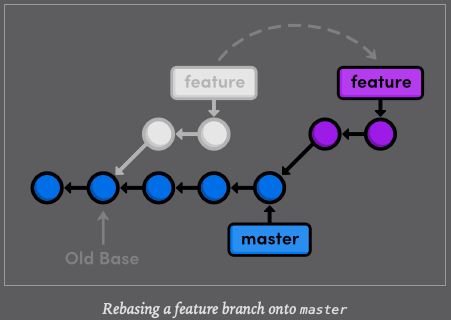
After rebasing, the feature branch has a new parent commit, which is the same commit pointed to by master. Instead of joining the branches with a merge commit, rebasing integrates the feature branch by building on top of master. The result is a perfectly linear history that reads more like a story than the hodgepodge of unrelated edits shown above.
To explore Git's rebasing capabilities, we will need to build up our example project so that we have something to work with. Then, we will go back and rewrite history using git rebase
We will begin by creating an about page for the website. Remember, we should be doing all of our work in isolated branches so that we don't cause any unintended changes to the stable version of the project.
$ git branch about$ git checkout about
Switched to branch 'about'The next few steps break this feature into several unnecessarily small commits so that we can see the effects of a rebase.
First, make a new directory in your repository called about. Then, create the empty file about/index.html. Stage and commit a snapshot.
mkdir about$ git add about$ git status$ git commit -m "Add empty page in about section"
[about 27b0924] Add empty page in about section
1 file changed, 0 insertions(+), 0 deletions(-)
create mode 100644 about/index.htmlNext, we will add some HTML to about/index.html
<!DOCTYPE html>
<html lang="en">
<head>
<title>About Us</title>
<link rel="stylesheet" href="../style.css" />
<meta charset="utf-8" />
</head>
<body>
<h1>About Us</h1>
<p>We're a small, colorful website with just two employees:</p>
<ul>
<li><a href="me.html">Me: The Developer</a></li>
<li><a href="mary.html">Mary: The Graphic Designer</a></li>
</ul>
<p><a href="../index.html">Return to home page</a></p>
</body>
</html>Stage and commit the snapshot
$ git status
On branch about
Changes not staged for commit:
(use "git add <file>..." to update what will be committed)
(use "git restore <file>..." to discard changes in working directory)
modified: about/index.html
no changes added to commit (use "git add" and/or "git commit -a")$ git commit -a -m "Add contents to about page"
[about c94fb42] Add contents to about page
1 file changed, 19 insertions(+)After a few commits on this branch, our history looks like the following.
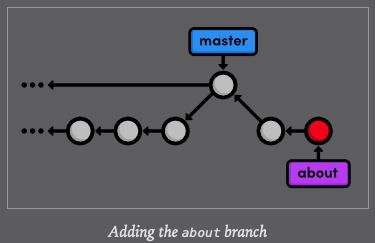
Our boss just gave us some more breaking news ! Again, we will use a hotfix branch to update the site without affecting our about page developments. Make sure to base the updates on master, not the about branch.
$ git checkout master
Switched to branch 'master'$ git branch news-hotfix$ git checkout$ git checkout news-hotfix
Switched to branch 'news-hotfix'$ git branch
about
master
* news-hotfixCommit a snapshot:
$ git status
On branch news-hotfix
Changes not staged for commit:
(use "git add <file>..." to update what will be committed)
(use "git restore <file>..." to discard changes in working directory)
modified: index.html
no changes added to commit (use "git add" and/or "git commit -a")
$ git commit -a -m "Add 2nd news item to index page"
[news-hotfix 5142364] Add 2nd news item to index page
1 file changed, 1 insertion(+)Then, create a new page called news-2.html
<!DOCTYPE html>
<html lang="en">
<head>
<title>A Red Rebellion</title>
<link rel="stylesheet" href="style.css" />
<meta charset="utf-8" />
</head>
<body>
<h1 style="color: #C03">A Red Rebellion</h1>
<p>Earlier today, several American design firms
announced that they have completely rejected the use
of blue in any commercial ventures. They have
opted instead for <span style="color: #C03">Red</span>.</p>
<p><a href="index.html">Return to home page</a></p>
</body>
</html>Stage and commit another snapshot:
$ git add news-2.html$ git status
On branch news-hotfix
Changes to be committed:
(use "git restore --staged <file>..." to unstage)
new file: news-2.html$ git commit -m "Add article for 2nd news item"
[news-hotfix 74afd90] Add article for 2nd news item
1 file changed, 17 insertions(+)
create mode 100644 news-2.htmlWe are ready to merge the news update back into master
$ git checkout master
Switched to branch 'master'$ git merge news-hotfix
Updating f79223d..74afd90
Fast-forward
index.html | 1 +
news-2.html | 17 +++++++++++++++++
2 files changed, 18 insertions(+)
create mode 100644 news-2.html$ git branch -d news-hotfix
Deleted branch news-hotfix (was 74afd90).The master branch has not been altered since we created news-hotfix, so Git can perform a fast-forward merge. Our repository now looks like the following.
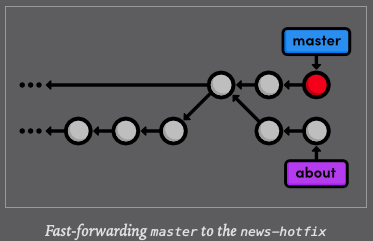
This puts us in the exact position as we were in before our first 3-way merge.
We want to pull changes from master into a feature branch, only this time we will do it with a rebase instead of a merge.
$ git checkout about
Switched to branch 'about'$ git rebase master
First, rewinding head to replay your work on top of it...
Applying: Add empty page in about section
Applying: Add contents to about page$ git log --oneline
ebfbefc (HEAD -> about) Add contents to about page
edff70e Add empty page in about section
74afd90 (master) Add article for 2nd news item
5142364 Add 2nd news item to index page
f79223d Merge branch 'crazy'
ebb4171 Add news item for rainbow
049c9d9 Add 1st news item
4310454 Link index.html to rainbow.html
6a43f42 add CSS stylesheet to rainbow.html
b9f2b14 Merge branch 'master' into crazy
1a27d0e link HTML pages to stylesheet
019e981 Add CSS stylesheet
95a36a7 Rename crazy.html to rainbow.html
e1bc771 add a rainbow to crazy.html
3553479 Revert "Add a crazzy experiment"
12e24f0 Add a crazzy experiment
453c8a4 (tag: v1.0) Add navigation links
1047951 t Add blue an orange html files
6a442fc Create index page for the messageOriginally, the about branch was based on the Merge branch 'crazy-experiment' commit. The rebase took the entire about branch and plopped it onto the tip of the master branch, which is visualized in the following diagram. Also notice that, like the git merge command, git rebase requires you to be on the branch that you want to move.
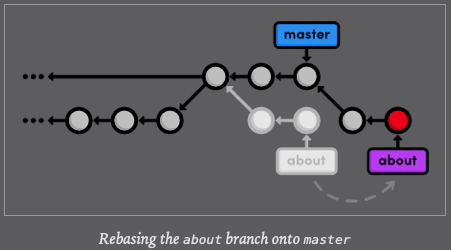
- After the rebase, about is a linear extension of the master branch, enabling us to do a fast-forward merge later on.
- Rebasing also allowed us to integrate the most up-to-date version of master without a merge commit.
- First modify links that makes go back to content menu on master branch.
- After that, go back to the last commit and create a new branch called: boldNewSentences.
- In boldNewSentences create two commits, grap two sections and make the changes to each section.
- Then, on boldNewSentences branch execute:
$ git rebase master. - Still on boldNewSentences brancg execute
$ git log --onelineto see the two commits created and the commit created on branch master with the modification of the links. WoooW !!!!!i
Print the output here:
$ git rebase master
Successfully rebased and updated refs/heads/BoldSentencesInSections.Then see the commits from master on BoldSentencesInSections branch:
$ git log —oneline
7a942bd (HEAD -> BoldSentencesInSections) Bold sentences in < Add Dummy Page for Mary>
8e82ab3 Bold sentences in <Add a Personal Bio> section
8016a81 (origin/master, origin/HEAD, master) Modify links to go back to content menu
33bab45 Add the goals of the new example to see how rebase works out
77d96da Bold important sentences as part of the new rules of project documentation
63e34af remove bolded words to start bolding sentences, according to new rules of how to document a project
b1b0228 Update content links to improve project performance
c583496 Move this information to this repository to improve organization
ff4b5be Initial commitNow BoldSentencesInSections contains the changes of master.
Go back to master and merge BoldSentencesInSections on master. You will be able to do a fast-forward merge.
$ git add .
$ git commit -m "Add conclusions to the new example to see how rebase works out"
[BoldSentencesInSections 9753597] Add conclusions to the new example to see how rebase works out
1 file changed, 22 insertions(+)
$ git checkout master
Switched to branch 'master'
Your branch is up to date with 'origin/master'.
$ git merge BoldSentencesInSections
Updating 8016a81..9753597
Fast-forward
README.md | 30 ++++++++++++++++++++++++++----
1 file changed, 26 insertions(+), 4 deletions(-)Nice !!!!!!!!!!!
With our news hotfix out of the way, we can now continue work on our about section. Create the file about/me.html with the following contents:
<!DOCTYPE html>
<html lang="en">
<head>
  <title>About Me</title>
  <link rel="stylesheet" href="../style.css" />
  <meta charset="utf-8" />
</head>
<body>
  <h1>About Me</h1>
  <p>I'm a big nerd.</p>

  <h2>Interests</h2>
  <ul>
    <li>Computers</li>
    <li>Mathematics</li>
    <li>Typography</li>
  </ul>

  <p><a href="index.html">Return to about page</a></p>
</body>
</html>
$ git add about/me.html$ git commit -m "Add HTML page for personal bio"
[about fbe3d49] Add HTML page for personal bio
1 file changed, 21 insertions(+)
create mode 100644 about/me.html$ git log --oneline
fbe3d49 Add HTML page for personal bio
ebfbefc Add contents to about page
edff70e Add empty page in about section
74afd90 Add article for 2nd news item
5142364 Add 2nd news item to index page
f79223d Merge branch 'crazy'
ebb4171 Add news item for rainbow
049c9d9 Add 1st news item
4310454 Link index.html to rainbow.html
6a43f42 add CSS stylesheet to rainbow.html
b9f2b14 Merge branch 'master' into crazy
1a27d0e link HTML pages to stylesheet
019e981 Add CSS stylesheet
95a36a7 Rename crazy.html to rainbow.html
e1bc771 add a rainbow to crazy.html
3553479 Revert "Add a crazzy experiment"
12e24f0 Add a crazzy experiment
453c8a4 Add navigation links
1047951 t Add blue an orange html files
6a442fc Create index page for the messageRemember that thanks to the rebase, about rests on top of master. So, All of our about section commits are grouped together, which would not be the case had we merged instead of rebase. This also eliminates an unnecessary fork in our project history.
Once again, the next two snapshots are unneccessarily trivial. However, we will use an interactive rebase to combine them into a single commit later on. That's right, git rebase not only lets you move branches around, it enables you to manipulate individual commits as you do so.
Create a new empty file in the about section about/mary.html.
$ vim about/mary.html$ git status
On branch about
Changes to be committed:
(use "git restore --staged <file>..." to unstage)
new file: about/mary.html$ git commit -m "Add empty HTML page for Mary's bio"
[about 5f022e1] Add empty HTML page for Mary's bio
1 file changed, 0 insertions(+), 0 deletions(-)
create mode 100644 about/mary.htmlThen, add a link to the about page in index.html so that its "Navigation" section looks like the following:
<!DOCTYPE html>
<html lang="en">
<head>
  <title>A Colorful Website</title>
	<link rel="stylesheet" href="style.css" />
  <meta charset="utf-8" />
</head>
<body>
  <h1 style="color: #07F">A Colorful Website</h1>
  <p>This is a website about color!</p>

  <h2 style="color: #C00">News</h2>
  <ul>
	  <li><a href="news-1.html">Blue Is The New Hue</a></li>
		<li><a href="rainbow.html">Our New Rainbow</a></li>
    <li><a href="news-2.html">A Red Rebellion</a></li>
  </ul>
</body>
</html>
<h2>Navigation</h2>
<ul>
	<li>
    <a href="about/index.html">About Us</a>
  </li>
  <li style="color: #F90">
    <a href="orange.html">The Orange Page</a>
  </li>
  <li style="color: #00F">
<a href="blue.html">The Blue Page</a>
  </li>
	<li>
    <a href="rainbow.html">The Rainbow Page</a>
  </li>
</ul>
Don't forget to commit the change:
$ git commit -a -m "Add link to about section in home page"
[about ce9d652] Add link to about section in home page
1 file changed, 3 insertions(+)Before we merge into the master branch, we should make sure we have a clean, meaningful history in our feature branch. By rebasing interactively, we can choose how each commit is transferred to the new base. Specify an interactive rebase by passing the -i flag to the rebase command:
$ git rebase -i masterThis should open up a text editor populated with all of the commits introduced in the about branch, listed from the oldest to newest. The listing defines exactly how Git will transfer the commits to the new base. Leaving it as is will do a normal git rebase, but if we move the lines around, we can change the order in which commits are applied.
In addition, we can replace the pick command before each line to edit it or combine it with other commits. All of the available commands are shown in the comment section of the rebase listing, but right now, we only need the squash command. This will condensate our unnecessarily small commits into a single, meaningful snapshot. Change your listing to match the following:
pick edff70e Add empty page in about section
squash ebfbefc Add contents to about page
pick fbe3d49 Add HTML page for personal bio
squash 5f022e1 Add empty HTML page for Mary's bio
pick ce9d652 Add link to about section in home page
Then get inside editor vi
pick edff70e Add empty page in about section
squash ebfbefc Add contents to about page
pick fbe3d49 Add HTML page for personal bio
squash 5f022e1 Add empty HTML page for Mary's bio
pick ce9d652 Add link to about section in home page

# Rebase 74afd90..ce9d652 onto 5f022e1 (5 commands)
#
# Commands:
# p, pick <commit> = use commit
# r, reword <commit> = use commit, but edit the commit message
# e, edit <commit> = use commit, but stop for amending
# s, squash <commit> = use commit, but meld into previous commit
# f, fixup <commit> = like "squash", but discard this commit's log message
# x, exec <command> = run command (the rest of the line) using shell
# b, break = stop here (continue rebase later with 'git rebase --continue')
# d, drop <commit> = remove commit
# l, label <label> = label current HEAD with a name
# t, reset <label> = reset HEAD to a label
# m, merge [-C <commit> | -c <commit>] <label> [# <oneline>]
# .       create a merge commit using the original merge commit's
# .       message (or the oneline, if no original merge commit was
# .       specified). Use -c <commit> to reword the commit message.
#
# These lines can be re-ordered; they are executed from top to bottom.
#
# If you remove a line here THAT COMMIT WILL BE LOST.
#
# However, if you remove everything, the rebase will be aborted.
#
# Note that empty commits are commented out
After you edit, save and quit, it will appear the following 2 commit message:
# This is a combination of 2 commits.
# This is the 1st commit message:

Add empty page in about section

# This is the commit message #2:

Add contents to about page

# Please enter the commit message for your changes. Lines starting
# with '#' will be ignored, and an empty message aborts the commit.
#
# Date:      Tue May 26 11:32:08 2020 -0500
#
# interactive rebase in progress; onto 74afd90
# Last commands done (2 commands done):
#    pick edff70e Add empty page in about section
#    squash ebfbefc Add contents to about page
# Next commands to do (3 remaining commands):
#    pick fbe3d49 Add HTML page for personal bio
#    squash 5f022e1 Add empty HTML page for Mary's bio
# You are currently rebasing branch 'about' on '74afd90'.
#
# Changes to be committed:
#	new file:   about/index.html
#
After the two message:
$ git rebase -i master
[detached HEAD 97a4a22] Add empty page in about section
 Date: Tue May 26 11:32:08 2020 -0500
 1 file changed, 19 insertions(+)
 create mode 100644 about/index.html
[detached HEAD 1260437] Add HTML page for personal bio
 Date: Tue May 26 17:52:52 2020 -0500
 2 files changed, 21 insertions(+)
 create mode 100644 about/mary.html
 create mode 100644 about/me.html
Successfully rebased and updated refs/heads/about.
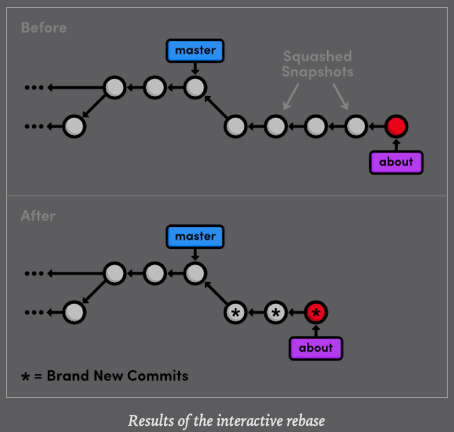
The following list describes the rebasing process in-depth and tells you what you need to change along the way.
pick edff70e Add empty page in about section
squash ebfbefc Add contents to about page
pick fbe3d49 Add HTML page for personal bio
squash w5f022e1 Add empty HTML page for Mary's bio
pick ce9d652 Add link to about section in home page- Git moves the edff70e commit to the tip of master
- Git combines the snapshots of ebfbefc and 5f022e1
- Git stops to ask you what commit message to use for the combined snapshot. It automatically includes the messages of both commits, but you can delete that and simplify it to just Create the about page. Save and exit the text editor to continue.
- Git repeats this process for commits ce9d652 and 5f022e1. Use Begin creating bio pages for the message.
- Git adds the final commit ce9d652 on top of the commits created in the previous steps.
You can see the result of all this activity with git log --oneline
def4be5 (HEAD -> about) Add link to about section in home page
c5c692e Begin creating bio pages
f4bb8c3 Create the about page
74afd90 (master) Add article for 2nd news item
5142364 Add 2nd news item to index page
f79223d Merge branch 'crazy'
ebb4171 Add news item for rainbow
049c9d9 Add 1st news item
4310454 Link index.html to rainbow.html
6a43f42 add CSS stylesheet to rainbow.html
b9f2b14 Merge branch 'master' into crazy
1a27d0e link HTML pages to stylesheet
019e981 Add CSS stylesheet
95a36a7 Rename crazy.html to rainbow.html
e1bc771 add a rainbow to crazy.html
3553479 Revert "Add a crazzy experiment"
12e24f0 Add a crazzy experiment
453c8a4 (tag: v1.0) Add navigation links
1047951 t Add blue an orange html files
6a442fc Create index page for the message
As well in the diagram before
Interactive rebasing gives you complete control over your project history, but this can also be very dangerous.
For example, if you were to delete a line from the rebase listing, the associated commit would not be transferred to the new base, and its content would be lost forever. In a future module, we will also see how rewriting history can get you in trouble with the public Git repositories.
The previous rebase only stopped us to edit the messages of each commit. We can take this one step further and alter a snapshot during the rebase. Start by running another interactive rebasing session. Note that we have still been using master as the new base because it selects the desired commits from the about branch.
$ git rebase -i masterSpecify the edit command for the second commit, as shown below:
pick f4bb8c3 Create the about page
edit c5c692e Begin creating bio pages
pick def4be5 Add link to about section in home page
When Git starts to move the second commit to the new base, it will still stop to do some "amending" (enmendar, rectificar). This gives you the opportunity to alter the staged snapshot before committing it.
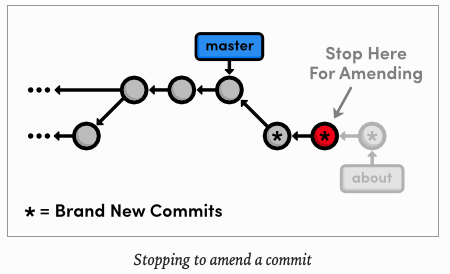
We will leave a helpful note for Mary, whom we will meet in the Remotes module. Open up about/mary.html and add the following.
[Mary, please update the bio!]When you save and close
$ git rebase -i master
Stopped at c5c692e...  Begin creating bio pages
You can amend the commit now, with

  git commit --amend

Once you are satisfied with your changes, run

  git rebase --continue
then open the file and add the required message
$ vim about/mary.htmlnow, that your changes are ready.
$ git add about/mary.html $ git status
interactive rebase in progress; onto 74afd90
Last commands done (2 commands done):
pick f4bb8c3 Create the about page
edit c5c692e Begin creating bio pages
Next command to do (1 remaining command):
pick def4be5 Add link to about section in home page
(use "git rebase --edit-todo" to view and edit)
You are currently editing a commit while rebasing branch 'about' on '74afd90'.
(use "git commit --amend" to amend the current commit)
(use "git rebase --continue" once you are satisfied with your changes)
Changes to be committed:
(use "git restore --staged <file>..." to unstage)
modified: about/mary.html$ git commit --amend
[detached HEAD 71153c2] Begin creating bio pages (added message to mary)
Date: Tue May 26 17:52:52 2020 -0500
2 files changed, 22 insertions(+)
create mode 100644 about/mary.html
create mode 100644 about/me.html$ git log --oneline
71153c2 (HEAD) Begin creating bio pages (added message to mary)
f4bb8c3 Create the about page
74afd90 (master) Add article for 2nd news item
5142364 Add 2nd news item to index page
f79223d Merge branch 'crazy'
ebb4171 Add news item for rainbow
049c9d9 Add 1st news item
4310454 Link index.html to rainbow.html
6a43f42 add CSS stylesheet to rainbow.html
b9f2b14 Merge branch 'master' into crazy
1a27d0e link HTML pages to stylesheet
019e981 Add CSS stylesheet
95a36a7 Rename crazy.html to rainbow.html
e1bc771 add a rainbow to crazy.html
3553479 Revert "Add a crazzy experiment"
12e24f0 Add a crazzy experiment
453c8a4 (tag: v1.0) Add navigation links
1047951 t Add blue an orange html files
6a442fc Create index page for the messageYou can use the default message created by git commit. The new --amend flag tell Git to replace the existing commit with the staged snapshot instead of creating a new one. This is also very useful for existing premature commits that often occur during normal development.
Remember that we are in the middle of a rebase, and Git still has one more commit that it needs to re-play. Tell Git that we are ready to move on with the continue flag:
$ git rebase --continue
Successfully rebased and updated refs/heads/about.
$ git log --oneline
20b9d5d (HEAD -> about) Add link to about section in home page
71153c2 Begin creating bio pages (added message to mary)
f4bb8c3 Create the about page
74afd90 (master) Add article for 2nd news item
5142364 Add 2nd news item to index page
f79223d Merge branch 'crazy'
ebb4171 Add news item for rainbow
049c9d9 Add 1st news item
4310454 Link index.html to rainbow.html
6a43f42 add CSS stylesheet to rainbow.html
b9f2b14 Merge branch 'master' into crazy
1a27d0e link HTML pages to stylesheet
019e981 Add CSS stylesheet
95a36a7 Rename crazy.html to rainbow.html
e1bc771 add a rainbow to crazy.html
3553479 Revert "Add a crazzy experiment"
12e24f0 Add a crazzy experiment
453c8a4 (tag: v1.0) Add navigation links
1047951 t Add blue an orange html files
6a442fc Create index page for the messageThe point of all this interactive rebasing is to generate a meaningful history that we can merge back into master. And, since we have rebased about onto the tip of master, Git will be able to perform a fast-forward merge instead of using a merge commit to join the two branches.
$ git checkout master$ git log --oneline
74afd90 (HEAD -> master) Add article for 2nd news item
5142364 Add 2nd news item to index page
f79223d Merge branch 'crazy'
ebb4171 Add news item for rainbow
049c9d9 Add 1st news item
4310454 Link index.html to rainbow.html
6a43f42 add CSS stylesheet to rainbow.html
b9f2b14 Merge branch 'master' into crazy
1a27d0e link HTML pages to stylesheet
019e981 Add CSS stylesheet
95a36a7 Rename crazy.html to rainbow.html
e1bc771 add a rainbow to crazy.html
3553479 Revert "Add a crazzy experiment"
12e24f0 Add a crazzy experiment
453c8a4 (tag: v1.0) Add navigation links
1047951 t Add blue an orange html files
6a442fc Create index page for the message$ git merge about
Updating 74afd90..20b9d5d
Fast-forward
about/index.html | 19 +++++++++++++++++++
about/mary.html | 1 +
about/me.html | 21 +++++++++++++++++++++
index.html | 3 +++
4 files changed, 44 insertions(+)
create mode 100644 about/index.html
create mode 100644 about/mary.html
create mode 100644 about/me.html$ git log --oneline
20b9d5d (HEAD -> master, about) Add link to about section in home page
71153c2 Begin creating bio pages (added message to mary)
f4bb8c3 Create the about page
74afd90 Add article for 2nd news item
5142364 Add 2nd news item to index page
f79223d Merge branch 'crazy'
ebb4171 Add news item for rainbow
049c9d9 Add 1st news item
4310454 Link index.html to rainbow.html
6a43f42 add CSS stylesheet to rainbow.html
b9f2b14 Merge branch 'master' into crazy
1a27d0e link HTML pages to stylesheet
019e981 Add CSS stylesheet
95a36a7 Rename crazy.html to rainbow.html
e1bc771 add a rainbow to crazy.html
3553479 Revert "Add a crazzy experiment"
12e24f0 Add a crazzy experiment
453c8a4 (tag: v1.0) Add navigation links
1047951 t Add blue an orange html files
6a442fc Create index page for the messageDon't forget to delete the obsolete about branch.
$ git branch -d about
Deleted branch about (was 20b9d5d).
Our final history is shown in the figure below. As you can see, a linear history is much easier to comprehend that the back-and-forth merging of the previous module. But on the other hand, we don't have the slightest notion of how we got to our current state.
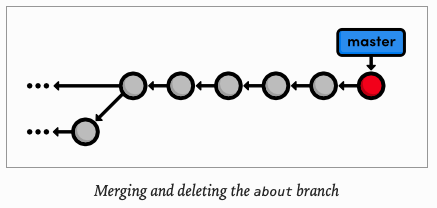
Rebasing enables fast-forward merges by moving a branch to the tip of another branch. It effectively eliminates the need for merge commits, resulting in a completely linear history. To an outside observer, it will seem as though you created every part of your project in a neatly (pulcramente) planned sequence, even though you may have explored various alternatives or developed unrelated features in parallel. Rebasing gives you the power to choose exactly what gets stored in you repositories.
This can actually be a bit of a controversial topic within the Git community. Some believe that the benefits discussed in this module are not worth the hassle (molestia) of rewriting history. They take a more "pure" approach to Git by saying that your history should reflect exactly what you have done, ensuring that no information is ever lost. Furthermore, an advance configuration o git log can display a linear history from a highly-branched repository.
But, others contend that merge commits should be meaningful. Instead of merging at arbitrary points just to access updates, they claim that merge commits should represent a symbolic joining of two branches. In particular, large software projects (such as the Linux Kernel) typically advocate interactive rebasing to keep the repository as clean and straightforward as possible.
The use of git rebase is entirely up to you. Customizing the evolution of your project can be very beneficial, but it might not be worth the trouble when you can accomplish close to the same functionality using merges exclusively. As a related note, you can use the following command to force a merge commit when Git would normally do a fast-forward merge.
$ git merge --no-ff branchNameThe next module will get a little bit more involved in our project history. We will try fixing mistakes via complex rebases end even learn how to recover deleted commits.
$ git rebase newBaseMove the current branch's commits to the tip of new-base, which can be either a branch name or a commit ID.
$ git rebase -i newBasePerform an interactive rebase and select actions for each commit.
$ git commit --amendAdd staged changes to the most recent commit instead of creating a new one.
$ git rebase --continueContinue a rebase after amending a commit.
$ git rebase abortAbandon the current interactive rebase and return the repository to its former state.
$ git merge --no-ff branchNameForce a merge commit even if Git could do a fast-forward merge.
In this case that I am going to document I found that I wanted to commit in my history a commit which contains a work that I didn't want to lose. So first, I tried to rebase main with C1 and C2, but C1 had merge conflicts with the last commit on main branch.

This branch was not essential for the project because the idea was too complex, so I just wanted to commit the executed work. So in order to commit this work you have to squash C1 and C2 in one commit. You can do this doing an interactive rebase.
Solution 1:
- Remove last commit (it has minimum changes on main branch)
- Then try to do the interactive rebase.
- Once you rebase the main branch you are able to marge this branch.
- After merging, you are able to revert this commit, which contains the "executed work" and keep it in the history.
The interactive rebase was successful, because it is a fast forward. In this case last commit had minimum changes so I was able to discard them.
Solution 2:
- In order to keep "last commit". You have to rebase your branch with minimum number of commits, I mean one commit. So then try to do the rebase.
- Once you are able to do the rebase, you merge this branch and then revert this commit, remember, this commit it is juts to insert this effort in the history line.
- Start an interactive rebase:
git rebase -i HEAD~nn: is how far do you want to go back in history
- Your default text editor will open. At the top, a list of your latest
ncommits will be displayed, in reverse order.
pick a5f4a0d commit-1
pick 19aab46 commit-2
pick 1733ea4 commit-3
pick 827a099 commit-4
pick 10c3f38 commit-5
pick d32d526 commit-6- replace
pickkeyword withsquashkeyword in order to try to squash those commits:
pick a5f4a0d commit-1
squash 19aab46 commit-2
squash 1733ea4 commit-3
squash 827a099 commit-4
squash 10c3f38 commit-5
pick d32d526 commit-6-
Save and exit.
-
Git will apply all changes and will open again your editor to merge the three commit messages. You can modify your commit messages or leave it as it is (if so, the commit messages of all commits will be concatenated).