- 1. Create the Red Page
- 2. Create the Yellow Page
- 3. Link and Commit the New Pages
- 4. Create and commit the Green Page
- 5. Begin an Interactive Rebase
- 6. Undo the Generic Commit
- 7. Split the Generic Commit
- 8. Remove the last Commit
- 9. Open the Reflog
- 10. Revive the Lost Commit
- 11. Filter the Log History
- 12. Merge in the Revived Branch
- 13. Conclusion
- 14. Quick Reference
The previuous module on rebasing taught us how to move commits around and perform some basic edits while doing so, but now we are going to really get our hands dirty We Will learn how to split up commits, revive lost snapshots, and completely rewrite a repository's history to our exact specifications.
Hopefully, this module will get you much more comfortable with the core Git components, as we will be inspecting and editing the internal makeup of our project.
First, let's create a new branch and add a few more HTML pages.
$ git checkout -b new-pages
Switched to a new branch 'new-pages'
$ git branch
masterNotice that we created a new branch and check it out in a single step by passing the -b flag to the git checkout command.
Next, create the file red.html and add the following content:
<!DOCTYPE html>
<html lang="en">
<head>
  <title>The Red Page</title>
  <link rel="stylesheet" href="style.css" />
  <meta charset="utf-8" />
</head>
<body>
  <h1 style="color: #C00">The Red Page</h1>
  <p>Red is the color of <span style="color: #C00">passion</span>!</p>

  <p><a href="index.html">Return to home page</a></p>
</body>
</html>
We will hold off on committing this page for the moment.
Create a file called yellow.html, which should look like the following.
<!DOCTYPE html>
<html lang="en">
<head>
  <title>The Yellow Page</title>
  <link rel="stylesheet" href="style.css" />
  <meta charset="utf-8" />
</head>
<body>
  <h1 style="color: #FF0">The Yellow Page</h1>
  <p>Yellow is the color of <span style="color: #FF0">the sun</span>!</p>

  <p><a href="index.html">Return to home page</a></p>
</body>
</html>Next, We will link both new pages to the home page. Add the following items to the "Navigation" section in index.html
<li style="color: #C00">
  <a href="red.html">The Red Page</a>
</li>
<li style="color: #FF0">
  <a href="yellow.html">The Yellow Page</a>
</li>
Then commit all of these changes in a single snapshot.
$ git add red.html yellow.html index.html $ git status
On branch new-pages
Changes to be committed:
(use "git restore --staged <file>..." to unstage)
modified: index.html
new file: red.html
new file: yellow.html$ git commit -m "add new HTML Pages"
[new-pages 4a5bfc9] add new HTML Pages
3 files changed, 35 insertions(+), 1 deletion(-)
create mode 100644 red.html
create mode 100644 yellow.htmlThis is an example of a bad commit. It perform multiple unrelated tasks, and it has a relatively generic commit message. Thus far, we have not really specified when ti is appropriate to commit changes, but the general rules are essentially the same as for branch creation:
- Commit a snapshot for each significant addition to your project.
- Don't commit a snapshot if you cannot come up with a single, specific message for it.
This will ensure that your project has a meaningful commit history, which gives you the ability to see exactly when and where a feature was added or a piece of functionality was broken. However, in practice, you will often wind up committing several changes in a single snapshot, since you will not always know what constitutes a "well-defined" addition as you are developing a project. Fortunately, Git, lets us go back and fix up these problem commits after the fact.
Let's create one more page before splitting that "bad" commit: Add the following HTML to a file called green.html
<!DOCTYPE html>
<html lang="en">
<head>
  <title>The Green Page</title>
  <link rel="stylesheet" href="style.css" />
  <meta charset="utf-8" />
</head>
<body>
  <h1 style="color: #0C0">The Green Page</h1>
  <p><span style="color: #0C0">Green</span> is the color of earth.</p>

  <p><a href="index.html">Return to home page</a></p>
</body>
</html>
Add a link to index.html in the "Navigation" section:
<li style="color: #0C0">
  <a href="green.html">The Green Page</a>
</li>
And finally, stage the green page and commit the snapshot.
$ git add green.html index.html $ git status
On branch new-pages
Changes to be committed:
(use "git restore --staged <file>..." to unstage)
new file: green.html
modified: index.html$ git commit -m "Add green page"
[new-pages 49fd8bf] Add green page
2 files changed, 17 insertions(+)
create mode 100644 green.htmlThe commits introduced in our new-pages branch are:
49fd8bf (HEAD -> new-pages) Add green page
4a5bfc9 add new HTML Pages
But, we want these commits to look more like:
49fd8bf Add green page
XXXXXXX Add yellow page
XXXXXXX Add red page
To achieve this, we can use the same interactive rebasing method covered in the previous module, only this time we will actually create commits in the middle of the rebasing procedure.
git rebase -i masterChange the rebase listing to the following, then save the file and exit the editor to begin the rebase.
edit 4a5bfc9 add new HTML Pages
pick 49fd8bf Add green pageFirst, let's take a look at where we are with git log --oneline:
4a5bfc9 (HEAD) add new HTML Pages
20b9d5d (master) Add link to about section in home page
When Git encountered the edit command in the rebase configuration, it stopped to let us edit the commit. As a result, the green page commit does not appear in our history yet. This should be familiar from the previous module. But instead of amending the current commit, we are going to completely remove it:
$ git reset --mixed HEAD~1
Unstaged changes after reset:
M	index.html
The git reset command moves the checked out snapshot to a new commit, and the HEAD~1 parameter tells it to reset to the commit that occurs immediately before the current HEAD (likewise, HEAD~2 would refer to second commit before HEAD). In this particular case, HEAD~1 happens to coincide with master. The effect on our repository can be visualized as:
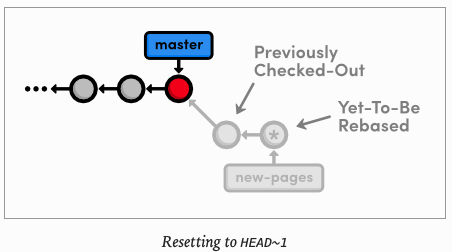
You may recall from Undoing Changes that we used git reset --hard to undo uncommitted changes to our project. The --hard flag told Git to make the working directory look exactly like the most recent commit, giving us the intended effect of removing uncommitted changes.
But, this time we use the --mixed flag to preserve the working directory, which contains the changes we want to separate. That is to say, the HEAD moved, but the working directory remained unchanged. Of course, this results in a repository with uncommitted modifications. We now have the opportunity to add the red.html and yellow.html files to distinct commits.
Let's start with the red page. Since we only want to commit content that involves the red page, we will have to manually go in and remove the yellow page's link from the "Navigation" section. In index.html, change this section to match the following.
<h2>Navigation</h2>
<ul>
  <li>
    <a href="about/index.html">About Us</a>
  </li>
  <li style="color: #F90">
    <a href="orange.html">The Orange Page</a>
  </li>
  <li style="color: #00F">
    <a href="blue.html">The Blue Page</a>
  </li>
  <li>
    <a href="rainbow.html">The Rainbow Page</a>
  </li>
  <li style="color: #C00">
    <a href="red.html">The Red Page</a>
  </li>
</ul>
Now, we can group the red page' updates into an independent commit.
git add red.html index.html$ git status
interactive rebase in progress; onto 20b9d5d
Last command done (1 command done):
edit 4a5bfc9 add new HTML Pages
Next command to do (1 remaining command):
pick 49fd8bf Add green page
(use "git rebase --edit-todo" to view and edit)
You are currently editing a commit while rebasing branch 'new-pages' on '20b9d5d'.
(use "git commit --amend" to amend the current commit)
(use "git rebase --continue" once you are satisfied with your changes)
Changes to be committed:
(use "git restore --staged <file>..." to unstage)
modified: index.html
new file: red.html
Untracked files:
(use "git add <file>..." to include in what will be committed)
yellow.html$ git commit -m "Add red page"
[detached HEAD cb8d72b] Add red page
2 files changed, 18 insertions(+), 1 deletion(-)
create mode 100644 red.htmlNext up is the yellow page. Go ahead and add it back to the "Navigation" section in index.html
$ vim index.html <li style="color: #FF0">
<a href="yellow.html">The Yellow Page</a>
</li>And again, stage and commit the snapshot
$ git add yellow.html index.html interactive rebase in progress; onto 20b9d5d
Last command done (1 command done):
edit 4a5bfc9 add new HTML Pages
Next command to do (1 remaining command):
pick 49fd8bf Add green page
(use "git rebase --edit-todo" to view and edit)
You are currently editing a commit while rebasing branch 'new-pages' on '20b9d5d'.
(use "git commit --amend" to amend the current commit)
(use "git rebase --continue" once you are satisfied with your changes)
Changes to be committed:
(use "git restore --staged <file>..." to unstage)
modified: index.html
new file: yellow.html$ git commit -m "Add yellow page"
[detached HEAD 1b2f067] Add yellow page
2 files changed, 17 insertions(+)
create mode 100644 yellow.htmlWe have successfully split up the contents of a single commit into two new snapshots, as shown below.
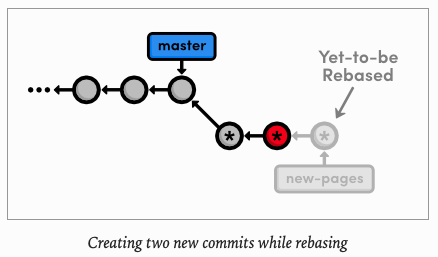
But, do not forget that the rebase still needs to transfer the green page:
$ git rebase --continue
Successfully rebased and updated refs/heads/new-pages.
To summarize, we removed the "bad" commit from the current branch with git reset, keeping the contained HTML files intact with the --mixed flag. Then, we committed them in separate snapshots with the usual git add and git commit commands. The point to remember is that during a rebase you can add, delete, and edit commits to your heart's content, and the entire result will be moved to the new base.
let's show
$ git log --oneline
d417237 (HEAD -> new-pages) Add green page
1b2f067 Add yellow page
cb8d72b Add red page
20b9d5d (master) Add link to about section in home page
71153c2 Begin creating bio pages (added message to mary)
f4bb8c3 Create the about page
74afd90 Add article for 2nd news item
5142364 Add 2nd news item to index page
f79223d Merge branch 'crazy'
ebb4171 Add news item for rainbow
049c9d9 Add 1st news item
4310454 Link index.html to rainbow.html
6a43f42 add CSS stylesheet to rainbow.html
b9f2b14 Merge branch 'master' into crazy
1a27d0e link HTML pages to stylesheet
019e981 Add CSS stylesheet
95a36a7 Rename crazy.html to rainbow.html
e1bc771 add a rainbow to crazy.html
3553479 Revert "Add a crazzy experiment"
12e24f0 Add a crazzy experiment
453c8a4 (tag: v1.0) Add navigation links
1047951 t Add blue an orange html files
6a442fc Create index page for the messageNext, we are going to "accidentally" remove the green page commit so we can learn how to retrieve it via Git's internal repository data.
$ git log --oneline
d417237 Add green page
1b2f067 Add yellow page
cb8d72b Add red page
20b9d5d Add link to about section in home page
71153c2 Begin creating bio pages (added message to mary)
f4bb8c3 Create the about page
74afd90 Add article for 2nd news item
5142364 Add 2nd news item to index page
f79223d Merge branch 'crazy'
ebb4171 Add news item for rainbow
049c9d9 Add 1st news item
4310454 Link index.html to rainbow.html
6a43f42 add CSS stylesheet to rainbow.html
b9f2b14 Merge branch 'master' into crazy
1a27d0e link HTML pages to stylesheet
019e981 Add CSS stylesheet
95a36a7 Rename crazy.html to rainbow.html
e1bc771 add a rainbow to crazy.html
3553479 Revert "Add a crazzy experiment"
12e24f0 Add a crazzy experiment
453c8a4 Add navigation links
1047951 t Add blue an orange html files
6a442fc Create index page for the message
$ git reset --hard HEAD~
HEAD is now at 1b2f067 Add yellow page$ git status
On branch new-pages
nothing to commit, working tree clean$ git log --oneline
1b2f067 (HEAD -> new-pages) Add yellow page
cb8d72b Add red page
20b9d5d (master) Add link to about section in home page
71153c2 Begin creating bio pages (added message to mary)
f4bb8c3 Create the about page
74afd90 Add article for 2nd news item
5142364 Add 2nd news item to index page
f79223d Merge branch 'crazy'
ebb4171 Add news item for rainbow
049c9d9 Add 1st news item
4310454 Link index.html to rainbow.html
6a43f42 add CSS stylesheet to rainbow.html
b9f2b14 Merge branch 'master' into crazy
1a27d0e link HTML pages to stylesheet
019e981 Add CSS stylesheet
95a36a7 Rename crazy.html to rainbow.html
e1bc771 add a rainbow to crazy.html
3553479 Revert "Add a crazzy experiment"
12e24f0 Add a crazzy experiment
453c8a4 (tag: v1.0) Add navigation links
1047951 t Add blue an orange html files
6a442fc Create index page for the messageThis moves the checked-out commit backward by one snapshot, along with the new-pages pointer. Note that git status tells us that we have nothing to commit, since the --hard flag obliterated (remove) any changes in the working directory. And of course, the git log output shows that the new-pages branch no longer contains the green commit.
This behavior is slightly different from the reset we used in the interactive rebase: this time the branch moved with the new HEAD. Since we were on (no branch) during the rebase, there was no branch tip to move. However, in general, git reset is used to move branch tips around and optionally alter the working directory via one of its many flags. (e.g. --mixed or --hard).
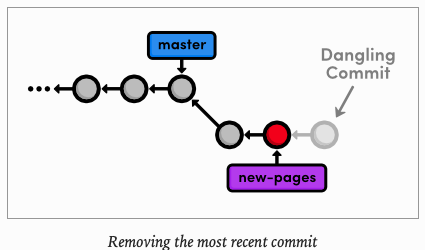
The commit that we removed from the branch is now a dangling commit. Dangling commits are those that cannot be reached from any branch and are thus in danger of being lost forever.
Git uses something called the reflog to record every change you make to your repository. Let's take a look at what it contains:
$ git reflog
1b2f067 HEAD@{0}: reset: moving to HEAD~
d417237 HEAD@{1}: rebase -i (finish): returning to refs/heads/new-pages
d417237 HEAD@{2}: rebase -i (pick): Add green page
1b2f067 HEAD@{3}: commit: Add yellow page
cb8d72b HEAD@{4}: commit: Add red page
20b9d5d HEAD@{5}: reset: moving to HEAD~1
4a5bfc9 HEAD@{6}: rebase -i: fast-forward
20b9d5d HEAD@{7}: rebase -i (start): checkout master
49fd8bf HEAD@{8}: commit: Add green page
4a5bfc9 HEAD@{9}: commit: add new HTML Pages
20b9d5d HEAD@{10}: checkout: moving from master to new-pages
20b9d5d HEAD@{11}: merge about: Fast-forward
74afd90 HEAD@{12}: checkout: moving from about to master
20b9d5d HEAD@{13}: rebase -i (finish): returning to refs/heads/about
20b9d5d HEAD@{14}: rebase -i (pick): Add link to about section in home page
71153c2 HEAD@{15}: commit (amend): Begin creating bio pages (added message to mary)
c5c692e HEAD@{16}: rebase -i: fast-forward
f4bb8c3 HEAD@{17}: rebase -i (start): checkout master
def4be5 HEAD@{18}: rebase -i (finish): returning to refs/heads/about
def4be5 HEAD@{19}: rebase -i (pick): Add link to about section in home page
c5c692e HEAD@{20}: rebase -i (reword): Begin creating bio pages
c0ae323 HEAD@{21}: rebase -i (reword): Add HTML page for personal bio
f4bb8c3 HEAD@{22}: rebase -i (reword): Create the about page
a6d6855 HEAD@{23}: rebase -i: fast-forward
74afd90 HEAD@{24}: rebase -i (start): checkout master
7d4c122 HEAD@{25}: rebase -i (finish): returning to refs/heads/about
7d4c122 HEAD@{26}: rebase -i (pick): Add link to about section in home page
5a3bbf7 HEAD@{27}: rebase -i (reword): Add HTML page for personal bio
a6d6855 HEAD@{28}: rebase -i (reword): Add empty page in about section
97a4a22 HEAD@{29}: rebase -i: fast-forward
74afd90 HEAD@{30}: rebase -i (start): checkout master
a72282b HEAD@{31}: rebase -i (finish): returning to refs/heads/about
a72282b HEAD@{32}: rebase -i (start): checkout master
a72282b HEAD@{33}: checkout: moving from master to about
74afd90 HEAD@{34}: checkout: moving from about to master
a72282b HEAD@{35}: rebase -i (finish): returning to refs/heads/about
a72282b HEAD@{36}: rebase -i (start): checkout master
a72282b HEAD@{37}: reset: moving to HEAD
a72282b HEAD@{38}: rebase -i (finish): returning to refs/heads/about
a72282b HEAD@{39}: rebase -i (start): checkout master
a72282b HEAD@{40}: checkout: moving from master to about
74afd90 HEAD@{41}: checkout: moving from about to master
a72282b HEAD@{42}: rebase -i (finish): returning to refs/heads/about
a72282b HEAD@{43}: rebase -i (pick): Add link to about section in home page
1260437 HEAD@{44}: rebase -i (squash): Add HTML page for personal bio
8de18d7 HEAD@{45}: rebase -i (pick): Add HTML page for personal bio
97a4a22 HEAD@{46}: rebase -i (squash): Add empty page in about section
edff70e HEAD@{47}: rebase -i (start): checkout master
ce9d652 HEAD@{48}: checkout: moving from master to about
74afd90 HEAD@{49}: checkout: moving from about to master
ce9d652 HEAD@{50}: rebase -i (finish): returning to refs/heads/about
ce9d652 HEAD@{51}: rebase -i (start): checkout master
ce9d652 HEAD@{52}: rebase -i (finish): returning to refs/heads/about
ce9d652 HEAD@{53}: rebase -i (start): checkout master
ce9d652 HEAD@{54}: commit: Add link to about section in home page
5f022e1 HEAD@{55}: commit: Add empty HTML page for Mary's bio
fbe3d49 HEAD@{56}: commit: Add HTML page for personal bio
ebfbefc HEAD@{57}: rebase finished: returning to refs/heads/about
ebfbefc HEAD@{58}: rebase: Add contents to about page
edff70e HEAD@{59}: rebase: Add empty page in about section
74afd90 HEAD@{60}: rebase: checkout master
c94fb42 HEAD@{61}: checkout: moving from master to about
74afd90 HEAD@{62}: merge news-hotfix: Fast-forward
f79223d HEAD@{63}: checkout: moving from news-hotfix to master
74afd90 HEAD@{64}: commit: Add article for 2nd news item
5142364 HEAD@{65}: commit: Add 2nd news item to index page
f79223d HEAD@{66}: checkout: moving from master to news-hotfix
f79223d HEAD@{67}: checkout: moving from about to master
c94fb42 HEAD@{68}: commit: Add contents to about page
27b0924 HEAD@{69}: commit: Add empty page in about section
f79223d HEAD@{70}: checkout: moving from master to about
f79223d HEAD@{71}: commit (merge): Merge branch 'crazy'
049c9d9 HEAD@{72}: checkout: moving from crazy to master
ebb4171 HEAD@{73}: commit: Add news item for rainbow
4310454 HEAD@{74}: checkout: moving from master to crazy
049c9d9 HEAD@{75}: merge news-hotfix: Fast-forward
1a27d0e HEAD@{76}: checkout: moving from news-hotfix to master
049c9d9 HEAD@{77}: commit: Add 1st news item
1a27d0e HEAD@{78}: checkout: moving from master to news-hotfix
1a27d0e HEAD@{79}: checkout: moving from crazy-alt to master
d247771 HEAD@{80}: commit: Make a REAL rainbow
4310454 HEAD@{81}: checkout: moving from crazy to crazy-alt
4310454 HEAD@{82}: commit: Link index.html to rainbow.html
6a43f42 HEAD@{83}: commit: add CSS stylesheet to rainbow.html
b9f2b14 HEAD@{84}: merge master: Merge made by the 'recursive' strategy.
95a36a7 HEAD@{85}: checkout: moving from master to crazy
1a27d0e HEAD@{86}: merge css: Fast-forward
3553479 HEAD@{87}: checkout: moving from css to master
1a27d0e HEAD@{88}: commit: link HTML pages to stylesheet
019e981 HEAD@{89}: commit: Add CSS stylesheet
3553479 HEAD@{90}: checkout: moving from master to css
3553479 HEAD@{91}: checkout: moving from crazy to master
95a36a7 HEAD@{92}: commit: Rename crazy.html to rainbow.html
e1bc771 HEAD@{93}: reset: moving to HEAD
e1bc771 HEAD@{94}: commit: add a rainbow to crazy.html
12e24f0 HEAD@{95}: checkout: moving from 12e24f0c4e03b3c991b287230548d8bdad3882d7 to crazy
12e24f0 HEAD@{96}: checkout: moving from master to 12e24f0
3553479 HEAD@{97}: reset: moving to HEAD
3553479 HEAD@{98}: revert: Revert "Add a crazzy experiment"
12e24f0 HEAD@{99}: checkout: moving from 453c8a4db079c3d235e3470754a79a22ea0f0afd to master
453c8a4 HEAD@{100}: checkout: moving from master to v1.0
12e24f0 HEAD@{101}: commit: Add a crazzy experiment
453c8a4 HEAD@{102}: checkout: moving from 6a442fcc4ab51362713f09ed5eadc7af767db833 to master
6a442fc HEAD@{103}: checkout: moving from 1047951bab2636a3bc90682e48d9fb32644da036 to 6a442fc
1047951 HEAD@{104}: checkout: moving from master to 1047951
453c8a4 HEAD@{105}: commit: Add navigation links
1047951 HEAD@{106}: commit: t Add blue an orange html files
6a442fc HEAD@{107}: commit (initial): Create index page for the message
The resulting output should look something like the following. Depending on your version of Git, the message might be slightly different. You can press space to scroll through the content or q to exit.
The above listing reflects our last few actions. For example, the current HEAD, denoted by HEAD@{0}, resulted from reseting HEAD to HEAD~1. Four actions ago, the yellow page was applied during our rebase, as shown in HEAD@{3}.
The reflog is a chronological listing of our history, without regard for the repository's branch structure. This lets us find dangling commits that would otherwise be lost from the project history.
At the beginning of each reflog entry, you will find a commit ID representing, the HEAD~ after that action. Check out the commit at HEAD@{2}, which should be where the rebase added the green page (change the ID below to the ID from your reflog)
$ git checkout d417237
Note: switching to 'd417237'.

You are in 'detached HEAD' state. You can look around, make experimental
changes and commit them, and you can discard any commits you make in this
state without impacting any branches by switching back to a branch.

If you want to create a new branch to retain commits you create, you may
do so (now or later) by using -c with the switch command. Example:

  git switch -c <new-branch-name>

Or undo this operation with:

  git switch -

Turn off this advice by setting config variable advice.detachedHead to false

HEAD is now at d417237 Add green page
This puts us in a detached HEAD state, which means our HEAD is no longer on the tip of a branch. We are actually in the opposite situation as we were in Undoing Changes when we checked our a commit before the branch tip. Now, we are looking at a commit after the tip of the branch, but we still have a detached HEAD:
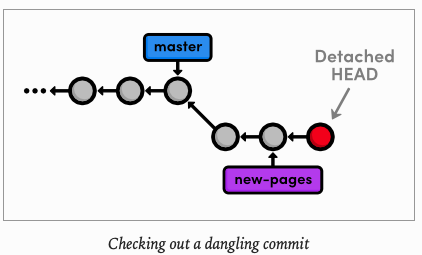
To turn our dangling commit into a full-fledged branch, all we have to do is create one.
$ git checkout -b green-page
Switched to a new branch 'green-page'
We now have a branch that can be merged back into the project:
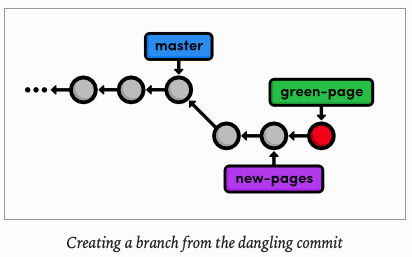
The above diagram makes it easy to see that the green-page branch is a extension of new-pages, but how would we figure this out if we weren't drawing out the state of our repository every step of the way ?
To view the differences between branches, we can use Git's log-filtering syntax.
$ git log new-pages..green-page
commit d41723777cff192f4b4453fe6115a997e3aeb1a5 (HEAD -> green-page)
Author: c4arl0s <c.santiago.cruz@gmail.com>
Date:   Sat May 30 13:19:55 2020 -0500

    Add green page
This will display all commits contained in green-page that are not in the new-pages branch. The above command tells us the green-page contains one more snapshot than new-pages: our dangling commit (although, it is not really dangling any more since we created a branch for it).
You can also use this syntax to limit the output of git log. For example, to display the ast 4 commits on the current branch, you could use.
$ git log HEAD~4..HEAD
commit d41723777cff192f4b4453fe6115a997e3aeb1a5 (HEAD -> green-page)
Author: c4arl0s <c.santiago.cruz@gmail.com>
Date:   Sat May 30 13:19:55 2020 -0500

    Add green page

commit 1b2f067a2b67f40fc8a50b1d21d49469b3ff50d2 (new-pages)
Author: c4arl0s <c.santiago.cruz@gmail.com>
Date:   Sat May 30 17:46:40 2020 -0500

    Add yellow page

commit cb8d72bc066d0a4f60110a9cbd7351421cfe463c
Author: c4arl0s <c.santiago.cruz@gmail.com>
Date:   Sat May 30 17:43:00 2020 -0500

    Add red page

commit 20b9d5d6d3bdb09d440f9067bc9b3bbdfa308446 (master)
Author: c4arl0s <c.santiago.cruz@gmail.com>
Date:   Tue May 26 18:50:56 2020 -0500

    Add link to about section in home page
However, this is a bit verbose for such a common task, so Git developers added the -n flag as an easier way to limit output.
$ git log -n 4
commit d41723777cff192f4b4453fe6115a997e3aeb1a5 (HEAD -> green-page)
Author: c4arl0s <c.santiago.cruz@gmail.com>
Date:   Sat May 30 13:19:55 2020 -0500

    Add green page

commit 1b2f067a2b67f40fc8a50b1d21d49469b3ff50d2 (new-pages)
Author: c4arl0s <c.santiago.cruz@gmail.com>
Date:   Sat May 30 17:46:40 2020 -0500

    Add yellow page

commit cb8d72bc066d0a4f60110a9cbd7351421cfe463c
Author: c4arl0s <c.santiago.cruz@gmail.com>
Date:   Sat May 30 17:43:00 2020 -0500

    Add red page

commit 20b9d5d6d3bdb09d440f9067bc9b3bbdfa308446 (master)
Author: c4arl0s <c.santiago.cruz@gmail.com>
Date:   Tue May 26 18:50:56 2020 -0500

    Add link to about section in home page
The -n 4 parameter tells Git to show only the last four commits from the current HEAD, making it the equivalent of the HEAD~4..HEAD syntax shown above. Similarly, -n 3, -n 2, and -n 1 would display three, two, and one commit, respectively. This feature becomes very useful once a repository grows beyond one screenful of history.
We have revived our lost commit, and now we are ready to merge everything back into the master branch. Before we do the merge, let's see exactly what we are merging:
$ git checkout master
Switched to branch 'master'
$ git log HEAD..green-page --stat
commit d41723777cff192f4b4453fe6115a997e3aeb1a5
Author: c4arl0s <c.santiago.cruz@gmail.com>
Date:   Sat May 30 13:19:55 2020 -0500

    Add green page

 green.html | 14 ++++++++++++++
 index.html |  3 +++
 2 files changed, 17 insertions(+)
commit 1b2f067a2b67f40fc8a50b1d21d49469b3ff50d2
Author: c4arl0s <c.santiago.cruz@gmail.com>
Date: Sat May 30 17:46:40 2020 -0500
Add yellow page
index.html | 3 +++
yellow.html | 14 ++++++++++++++
2 files changed, 17 insertions(+)
commit cb8d72bc066d0a4f60110a9cbd7351421cfe463c
Author: c4arl0s <c.santiago.cruz@gmail.com>
Date: Sat May 30 17:43:00 2020 -0500
Add red page
index.html | 5 ++++-
red.html | 14 ++++++++++++++
2 files changed, 18 insertions(+), 1 deletion(-)The $ git log HEAD..green-page command shows us only those commits in green-page that are not in master (since master is the current branch, we can refer to it as HEAD). The new --stat flag includes information about which files have been changed in each commit. For example, the most recent commit tells us that 14 lines were added to the green.html file and 3 lines were added to index.html:
commit d41723777cff192f4b4453fe6115a997e3aeb1a5
Author: c4arl0s <c.santiago.cruz@gmail.com>
Date: Sat May 30 13:19:55 2020 -0500
Add green page
green.html | 14 ++++++++++++++
index.html | 3 +++
2 files changed, 17 insertions(+)If we didn't already know what was in this new commit, the log output would tell us which files we needed to look at. But, we authored all these changes, so we can skip right to the merge.
$ git merge green-page
Updating 20b9d5d..d417237
Fast-forward
 green.html  | 14 ++++++++++++++
 index.html  | 11 ++++++++++-
 red.html    | 14 ++++++++++++++
 yellow.html | 14 ++++++++++++++
 4 files changed, 52 insertions(+), 1 deletion(-)
 create mode 100644 green.html
 create mode 100644 red.html
 create mode 100644 yellow.html
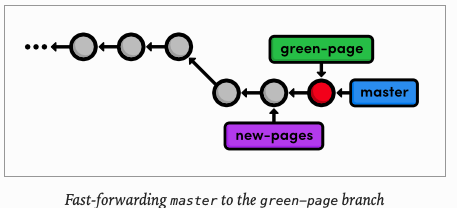
The following diagram shows us the state our repository after the merge.
d417237 Add green page
1b2f067 Add yellow page
cb8d72b Add red page
20b9d5d Add link to about section in home page
71153c2 Begin creating bio pages (added message to mary)
f4bb8c3 Create the about page
74afd90 Add article for 2nd news item
5142364 Add 2nd news item to index page
f79223d Merge branch 'crazy'
ebb4171 Add news item for rainbow
049c9d9 Add 1st news item
4310454 Link index.html to rainbow.html
6a43f42 add CSS stylesheet to rainbow.html
b9f2b14 Merge branch 'master' into crazy
1a27d0e link HTML pages to stylesheet
019e981 Add CSS stylesheet
95a36a7 Rename crazy.html to rainbow.html
e1bc771 add a rainbow to crazy.html
3553479 Revert "Add a crazzy experiment"
12e24f0 Add a crazzy experiment
453c8a4 Add navigation links
1047951 t Add blue an orange html files
6a442fc Create index page for the message
Note that the green-page branch already contains all the history of new-pages, which is why we merged the former instead of the latter. It this was not the case, Git would complain when we try to run the following command:
$ git branch -d new-pages
Deleted branch new-pages (was 1b2f067).
We can go ahead and delete the green
$ git branch -d green-page
Deleted branch green-page (was d417237).This module took an in-depth look at rebasing, resetting, and the reflog. We learned how to split old commits into one or more new commits, and how to revive "lost" commits. Hopefully, this has given you a better understanding of the interaction between the working directory, the stage, branches, and commited snapshots. We also explored some new options for displaying our commit history, which will become an important skill as our project grows.
WE did a lot of work with the branch tips this module. It is important to realize that Git uses the tip of a branch to represent entire branch. That is to say, a branch is actually a pointer to a single commit- not a containter for a series of commits. This idea has been implicitly reflected in our diagrams:
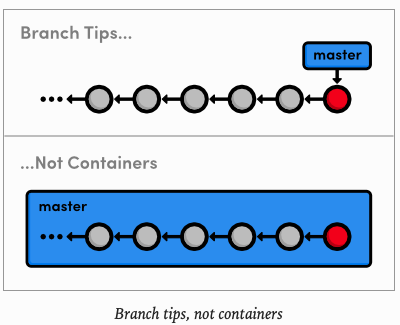
The history is represented by the parent of each commit (designated by arrows), not the branch itself. So, to request a new branch, all Git has to do is create a reference to the current commit. And, to add a snapshot to a branch, it just has to move the branch reference to the new commit. An understanding of Git's branch representation should make it easier to wrap your head around merging, rebasing, and other kinds of branch manipulation.
We will revisit Git's internal representation of a repository in the final module of his tutorial. But now, we are finally ready to discuss multi-user development, which happens to rely entirely on Git branches.
$ git reflog$ git reset --mixed HEAD~nMove the HEAD backward n commits, but do not change the working directory
$ git reset --hard HEAD~nMove the HEAD backward n commits, and change the working directory to match.
$ git log since..untilDisplay the commits reachable from until but not from since. These parameters can be either commit ID's o branch names.
$ git log --statInclude extra information about altered files in the log output.
I used to do git reset HEAD~ to include insignificant changes in the last commit. But after including those changes, I did included important changes. These important changes were not good, so I was losing my functional version of the project. To revive the commit you have to do this:
git reflog- Look for the commit you remember have the functional version.
- go to the commit with the functional version:
git checkout <commitWithFuncionalVersion> - Then:
git checkout -b functionalBranch - Now: go back to the main branch:
git checkout main. - Finally merge the functional branch:
git merge functionalBrancg - Remember: with git you don't miss any information.