- 1. Create a Bare Repository (Central)
- 2. Update Remotes (Mary and You)
- 3. Push the Master Branch
- 4. Add News Update (You)
- 5. Publish the News Item (You)
- 6. Update CSS Styles (Mary)
- 7. Update another CSS Style
- 8. Clean up Before Publishing (Mary
- 9. Publish CSS Changes (Mary
- 10. Pull in Changes (Mary)
- 11. Pull in Changes (you)
- 12. Conclusion
- 13. Quick Reference
In the previous module, we shared information directly between two developers repositories: my git repository and mary's repository. This works for very small teams developing simple programs, but larger projects call for a more structured environment. This module Introduces one such environment the centralized workflow.
We will use a third Git Repository to act as a central communication hub between us and Mary. Instead of pulling changes into my git repository from mary's repository and vice versa, we will push to an fetch from a dedicated storage repository. After this module, our workflow will look like the following.
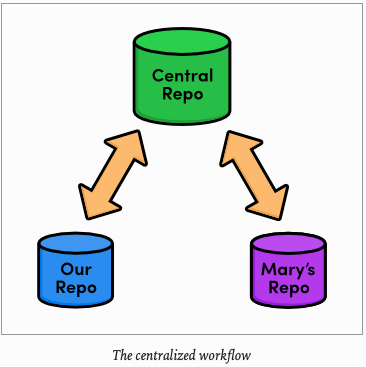
Typically, you would store the central repository on a server to allow internet-based collaboration. Unfortunately, server configuration can vary among hosting providers, making it hard to write universal step-by-step instructions. So, we will continue exploring remote repositories using our local filesystems, just like in the previous module.
If you have access to server, feel free to use it to host the central repository that we are about to create. You will have to provide SSH paths to your server repository in place of the paths provided below, but other than that, you can follow this module's instructions as you find them. For everyone else, our network-based Git experience will begin in the next module.
First, let's create our central "Communication Hub". Again, make sure to change /path/to/my-git-repo to the actual path to your repository. If you have decided to host the central repository on your server, you should SSH into it an run the git init command wherever you would like to store the repository.
The instructions leads you to the container directory of your git repository
$ cd RysGitTutorialRepository/$ cd ..$ git init --bare central-repo.git
Initialized empty Git repository in /Users/carlossantiagocruz/Documents/SWIFT-PROGRAMMING/central-repo.git/As in the very first module, git init creates a new repository. But this time, we used the bare flag to tell Git that we don't want a working directory. This will prevent us from developing in the central repository, which eliminates the possibility of messing up another user's environment with git push. A central repository is only supposed to act as a storage facility - not a development environment.
If you examine the contest of the resulting central-repo.git folder, you will notice that it contains the exact same files as the .git folder in our my-git-repo project. Git has literally gotten rid of our working directory. The conventional .git extension in the directory name is a way to convey this property.
We have successfully set up a central repository that can be used to share updates between us, Mary, and any other developers. Next, we should add it as a remote to both mary's repository and my git repository.
Fri Jun 12 ~/iOS
$ cd RysGitTutorialMarysRepository/
Fri Jun 12 ~/iOS/RysGitTutorialMarysRepository
$ git remote rm origin
Fri Jun 12 ~/iOS/RysGitTutorialMarysRepository
$ git remote add origin ../central-repo.git
Now for our repository
$ cd ../RysGitTutorial
Fri Jun 12 ~/iOS/RysGitTutorialMarysRepository
$ cd ../RysGitTutorialRepository/
Fri Jun 12 ~/iOS/RysGitTutorialRepository
$ git remote add origin ../central-repo.git/
Fri Jun 12 ~/iOS/RysGitTutorialRepository
$ git remote rm mary
Note that we deleted the remote connections between Mary and our git repository with git remote rm. For the rest of this module we will only use the central repository to share updates.
If you decided to host the central repository on a server, you will need to change the ../centra-repo.git path to: ssh://user@example.com/to/central-repo.git substituting your SSH username and Server location for user@example.com and the central repository's location for path/to/central-repo.git.
We didn't clone the central repository -We just initialized it as a bare repository. This means it does not have any of our project history yet. We can fix that using the git push command introduced the last module.
Sat Jun 13 ~/iOS/RysGitTutorialRepository
$ git push origin master
Enumerating objects: 80, done.
Counting objects: 100% (80/80), done.
Delta compression using up to 4 threads
Compressing objects: 100% (77/77), done.
Writing objects: 100% (80/80), 9.48 KiB | 422.00 KiB/s, done.
Total 80 (delta 35), reused 0 (delta 0)
To ../central-repo.git/
 * [new branch]      master -> master
Our central repository now contains our entire master branch which can double-check with the following.
Sat Jun 13 ~/iOS/central-repo.git
$ cd ../central-repo.git/
$ git log
commit 49baa6e81a7ad87714540ec9ce9fceaaa12409c1
Author: Mary <c.santiago.cruz@gmail.com>
Date: Fri Jun 5 11:34:45 2020 -0500
Add bio page for Mary
commit d41723777cff192f4b4453fe6115a997e3aeb1a5
Author: c4arl0s <c.santiago.cruz@gmail.com>
Date: Sat May 30 13:19:55 2020 -0500
Add green page
commit 1b2f067a2b67f40fc8a50b1d21d49469b3ff50d2
Author: c4arl0s <c.santiago.cruz@gmail.com>
Date: Sat May 30 17:46:40 2020 -0500
Add yellow page
commit cb8d72bc066d0a4f60110a9cbd7351421cfe463c
Author: c4arl0s <c.santiago.cruz@gmail.com>
Date: Sat May 30 17:43:00 2020 -0500
Add red page
commit 20b9d5d6d3bdb09d440f9067bc9b3bbdfa308446
Author: c4arl0s <c.santiago.cruz@gmail.com>
Date: Tue May 26 18:50:56 2020 -0500
Add link to about section in home page
commit 71153c2e6ce3bdf5de20145c74a7e03dce3e689a
Author: c4arl0s <c.santiago.cruz@gmail.com>
Date: Tue May 26 17:52:52 2020 -0500
Begin creating bio pages (added message to mary)
Add empty HTML page for Mary's bio
commit f4bb8c3c896c970fe8eb4a20c1322763bf42ba19
Author: c4arl0s <c.santiago.cruz@gmail.com>
Date: Tue May 26 11:32:08 2020 -0500
Create the about page
Add contents to about page
commit 74afd9060deceb1ab2c8e66959cb97082aaa7450
Author: c4arl0s <c.santiago.cruz@gmail.com>
Date: Tue May 26 16:32:13 2020 -0500
Add article for 2nd news item
commit 514236461070f0cb3416a36985003636b49aa6c5
Author: c4arl0s <c.santiago.cruz@gmail.com>
Date: Tue May 26 16:20:09 2020 -0500
Add 2nd news item to index page
commit f79223d618f18d4ef58743e8f48e9abdd8b757cc
Merge: 049c9d9 ebb4171
Author: c4arl0s <c.santiago.cruz@gmail.com>
Date: Mon May 25 18:45:20 2020 -0500
Merge branch 'crazy'
commit ebb417105d308a3aaee55459b180d60b95a1b182
Author: c4arl0s <c.santiago.cruz@gmail.com>
Date: Mon May 25 17:55:21 2020 -0500
Add news item for rainbow
commit 049c9d941dfe20fc707fd3aa1eaf2b534a652368
Author: c4arl0s <c.santiago.cruz@gmail.com>
Date: Mon May 25 09:15:43 2020 -0500
Add 1st news item
commit 43104541f20a65f00d1c21679236ea0798353f19
Author: c4arl0s <c.santiago.cruz@gmail.com>
Date: Mon May 25 08:11:35 2020 -0500
Link index.html to rainbow.html
commit 6a43f42a003090aa434e7ec799c33dc2f29e5095
Author: c4arl0s <c.santiago.cruz@gmail.com>
Date: Sun May 24 12:51:34 2020 -0500
add CSS stylesheet to rainbow.html
commit b9f2b14a3cd8f7ba33c363d60fedb1392154e46e
Merge: 95a36a7 1a27d0e
Author: c4arl0s <c.santiago.cruz@gmail.com>
Date: Sun May 24 11:43:32 2020 -0500
Merge branch 'master' into crazy
commit 1a27d0e627f00920537126b1a7f460c656f993ad
Author: c4arl0s <c.santiago.cruz@gmail.com>
Date: Sun May 24 09:06:08 2020 -0500
link HTML pages to stylesheet
commit 019e981718d56c5cfb26b335d5c9e935075588e6
Author: c4arl0s <c.santiago.cruz@gmail.com>
Date: Sun May 24 08:50:16 2020 -0500
Add CSS stylesheet
commit 95a36a77010605d457a9e45b3ba3bba77ef02c6f
Author: c4arl0s <c.santiago.cruz@gmail.com>
Date: Sat May 23 10:52:39 2020 -0500
Rename crazy.html to rainbow.html
commit e1bc77119319d8b38ff46dbddd968f669cc37a4c
Author: c4arl0s <c.santiago.cruz@gmail.com>
Date: Sat May 23 09:01:08 2020 -0500
add a rainbow to crazy.html
commit 355347981e8da24d922766b60f33d93d96e0a1ba
Author: c4arl0s <c.santiago.cruz@gmail.com>
Date: Fri May 22 21:07:02 2020 -0500
Revert "Add a crazzy experiment"
This reverts commit 12e24f0c4e03b3c991b287230548d8bdad3882d7.
commit 12e24f0c4e03b3c991b287230548d8bdad3882d7
Author: c4arl0s <c.santiago.cruz@gmail.com>
Date: Fri May 22 20:34:06 2020 -0500
Add a crazzy experiment
commit 453c8a4db079c3d235e3470754a79a22ea0f0afd
Author: c4arl0s <c.santiago.cruz@gmail.com>
Date: Fri May 22 16:53:53 2020 -0500
Add navigation links
commit 1047951bab2636a3bc90682e48d9fb32644da036
Author: c4arl0s <c.santiago.cruz@gmail.com>
Date: Fri May 22 13:45:14 2020 -0500
t Add blue an orange html files
commit 6a442fcc4ab51362713f09ed5eadc7af767db833
Author: c4arl0s <c.santiago.cruz@gmail.com>
Date: Fri May 22 12:54:21 2020 -0500
Create index page for the messageThis should output the familiar history listing of the master branch.
Recall that git push creates local branches in the destination repository. We said it was dangerous to push to a friend's repository, as they probably wouln't appreciate new branches appearing at random. However, it is safe to create local branches in central-repo.git because it has no working directory, which means it's impossible to disturb anyone's development.
Let's see our new centralized collaboration workflow in action by commiting a few more snapshots.
Sat Jun 13 ~/iOS/central-repo.git
$ cd ../RysGitTutorialRepository/
at Jun 13 ~/iOS/RysGitTutorialRepository
$ git checkout -b news-item
Switched to a new branch 'news-item'Create a file called news-3.html in my git repository and add the following HTML
<!DOCTYPE html>
<html lang="en">
<head>
<title>Middle East's Silent Beast</title>
<link rel="stylesheet" href="style.css" />
<meta charset="utf-8" />
</head>
<body>
<h1 style="color: #D90">Middle East's Silent Beast</h1>
<p>Late yesterday evening, the Middle East's largest
design house—until now, silent on the West's colorful
disagreement—announced the adoption of
<span style="color: #D90">Yellow</span> as this year's
color of choice.</p>
<p><a href="index.html">Return to home page</a></p>
</body>
</html>Next, add a link to the "News" section of index.html so that it looks like:
<!DOCTYPE html>
<html lang="en">
<head>
  <title>A Colorful Website</title>
	<link rel="stylesheet" href="style.css" />
  <meta charset="utf-8" />
</head>
<body>
  <h1 style="color: #07F">A Colorful Website</h1>
  <p>This is a website about color!</p>

  <h2 style="color: #C00">News</h2>
  <ul>
	  <li><a href="news-1.html">Blue Is The New Hue</a></li>
		<li><a href="rainbow.html">Our New Rainbow</a></li>
    <li><a href="news-2.html">A Red Rebellion</a></li>
	  <li><a href="news-3.html">Middle East's Silent Beast</a></li>
  </ul>
</body>
</html>
<h2>Navigation</h2>
<ul>
	<li>
    <a href="about/index.html">About Us</a>
  </li>
  <li style="color: #F90">
    <a href="orange.html">The Orange Page</a>
  </li>
  <li style="color: #00F">
		<a href="blue.html">The Blue Page</a>
  </li>
	<li>
    <a href="rainbow.html">The Rainbow Page</a>
  </li>
	<li style="color: #C00">
  	<a href="red.html">The Red Page</a>
	</li>
	<li style="color: #FF0">
  	<a href="yellow.html">The Yellow Page</a>
	</li>
	<li style="color: #0C0">
  	<a href="green.html">The Green Page</a>
	</li>
</ul>
Stage and commit a snapshot
Sat Jun 13 ~/iOS/RysGitTutorialRepository
$ git add news-3.html index.html
Sat Jun 13 ~/iOS/RysGitTutorialRepository
$ git status
On branch news-item
Changes to be committed:
(use "git restore --staged <file>..." to unstage)
modified: index.html
new file: news-3.htmlSat Jun 13 ~/iOS/RysGitTutorialRepository
$ git commit -m "Add 3rd news item"
[news-item 450182a] Add 3rd news item
2 files changed, 19 insertions(+)
create mode 100644 news-3.htmlPreviously "publishing" mean merging with the local master branch. But since we are only interacting with the central repository, our master branch is private again. There is no chance of Mary pulling content directly from our repository.
Instead, everyone accesses updates through the public master branch, so "publishing" means pushing to the central repository.
Mon Jun 15 ~/iOS/RysGitTutorialRepository
$ git checkout master
Switched to branch 'master'
$ git merge news-item
Updating 49baa6e..450182a
Fast-forward
index.html | 1 +
news-3.html | 18 ++++++++++++++++++
2 files changed, 19 insertions(+)
create mode 100644 news-3.htmlMon Jun 15 ~/iOS/RysGitTutorialRepository
$ git branch -d news-item
Deleted branch news-item (was 450182a).Mon Jun 15 ~/iOS/RysGitTutorialRepository
$ git push origin master
Enumerating objects: 6, done.
Counting objects: 100% (6/6), done.
Delta compression using up to 4 threads
Compressing objects: 100% (4/4), done.
Writing objects: 100% (4/4), 703 bytes | 703.00 KiB/s, done.
Total 4 (delta 2), reused 0 (delta 0)
To ../central-repo.git/
49baa6e..450182a master -> masterAfter merging into master as we normally would, git push updates the central repository's master branch to reflect our local master. From our perspective, the push can be visualized as the following:
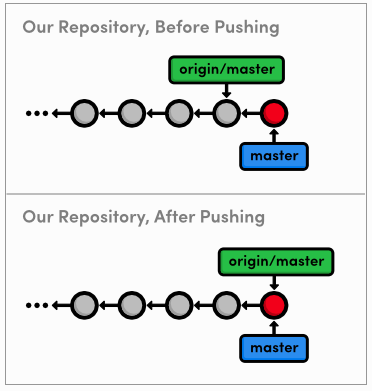
Note that this accomplishes the exact same thing as going into the central repository and doing a fetch/fast-forward merge, except git push allows us to do everything from inside my git repository. We will see some other convenient features of this command later in the module.
Next, let's pretend to be Mary again and add some CSS formatting (she is our graphic designer, after all).
Mon Jun 15 ~/iOS/RysGitTutorialRepository
$ cd ../RysGitTutorialMarysRepository/
Mon Jun 15 ~/iOS/RysGitTutorialMarysRepository
$ git checkout -b css-edits
Switched to a new branch 'css-edits'Add the following to the end of style.css
h1 {
  font-size: 32px;
}

h2 {
  font-size: 24px;
}

a:link, a:visited {
  color: #03C;
}
And, stage ad commit a snapshot.
Mon Jun 15 ~/iOS/RysGitTutorialMarysRepository
$ git commit -a -m "Add CSS styles for headings and links"
[css-edits 85d575c] Add CSS styles for headings and links
1 file changed, 12 insertions(+)Opps, Mary forgot to add some formatting. Append the h3 styling to style.css:
h3 {
  font-size: 18px;
  margin-left: 20px;
}
And of course, stage and commit the updates.
Mon Jun 15 ~/iOS/RysGitTutorialMarysRepository
$ git commit -a -m "Add CSS styles for 3rd level headings"
[css-edits ecc9090] Add CSS styles for 3rd level headings
1 file changed, 1 insertion(+)Before Mary considers pushing her updates to the central repository, she needs to make sure she has a clean history. This must be done by Mary, because it is near-impossible to change history after it has been made public.
Mon Jun 15 ~/iOS/RysGitTutorialMarysRepository
$ git rebase -i master
pick 85d575c Add CSS styles for headings and links
squash ecc9090 Add CSS styles for 3rd level headingsWhen Git stops to ask for the combined commit message, just use the first commit's message:
Add CSS styles for 3rd level headingsConsider what would have happened had Mary rebase after pushing to the central repository. She would be re-writing commits that other developers may have already pulled into their project. To Git, Mar's re-written commits look like entirely new commits (since they have different ID's). This situation is shown below.
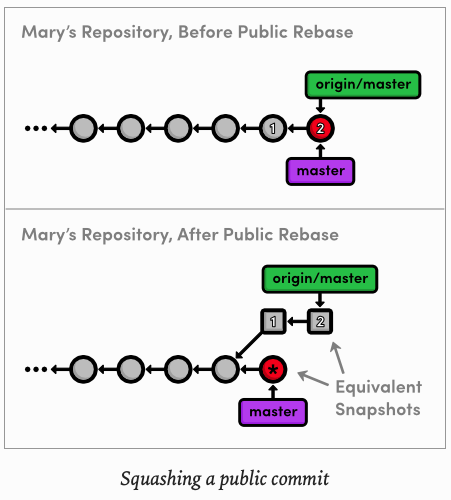
The commits labeled 1 and 2 are the public commits that Mary would be rebasing. Afterwards, the public history is still the exact same as Mary's original history, but now her local master branch has diverged from origin/master - even though they represent the same snapshot.
So, to publish her rebased master branch to the central repository, Mary would have to merge with origin/master. This cannot be a fast-forward merge, and the resulting merge commit is likely to confuse her collaborators and disrupt their workflow.
**This brings us to the most important rule to remember while rebasing: Never, ever rebase commits that have been pushed to a shared **repository
If you need to change a public commit, use the git revert command that we discussed in Undoing Changes. This creates a new commit with the required modifications instead of re-writing old snapshots.
Now that her history is cleaned up, Mary can publish the changes.
Tue Jun 16 ~/iOS/RysGitTutorialMarysRepository
$ git checkout master
Switched to branch 'master'
Tue Jun 16 ~/iOS/RysGitTutorialMarysRepository
$ git merge css-edits
Updating 49baa6e..61377ba
Fast-forward
style.css | 13 +++++++++++++
1 file changed, 13 insertions(+)Then:
Tue Jun 16 ~/iOS/RysGitTutorialMarysRepository
$ git branch -d css-edits
Deleted branch css-edits (was 61377ba).
She shouldn't push the css-edits branch to the server, since it is no longer under development, and other collaborators wouldn't know what it contains. However, if we had all decided to develop the CSS edits together and wanted an isolated environment to do so, it would make sense to publish it as an independent branch.
Mary still needs to push the changes to he central repository. But first, let's take a look at the state of everyone's project.
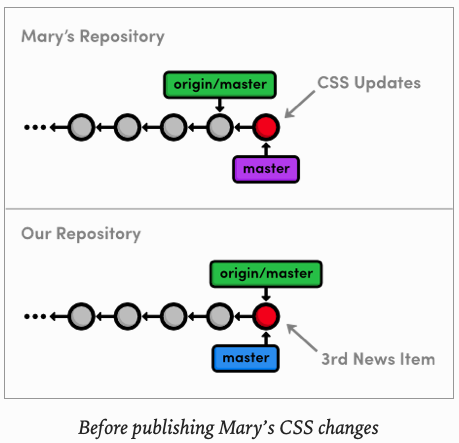
You might be wondering how Mary can push her local maser up to the central repository, since it has progressed since Mary last fetch from it. This is common situation when many people developers are working on a project simultaneously. Let's see how Git handles it:
Tue Jun 16 ~/iOS/RysGitTutorialMarysRepository
$ git push origin master
To ../central-repo.git
 ! [rejected]        master -> master (fetch first)
error: failed to push some refs to '../central-repo.git'
hint: Updates were rejected because the remote contains work that you do
hint: not have locally. This is usually caused by another repository pushing
hint: to the same ref. You may want to first integrate the remote changes
hint: (e.g., 'git pull ...') before pushing again.
hint: See the 'Note about fast-forwards' in 'git push --help' for details.
This will output a verbose rejection message. It seems that Git won't let anyone push to a remote server if it doesn't result in a fast-forward merge. This prevents us from losing the "Add 3rd news" item commit that would need to be overwritten for origin/master to match mary/master.
Mary can solve this problem by pulling in the central changes before trying to push her CSS changes. First, she needs the most up-to-date version of the origin/master branch.
Tue Jun 16 ~/iOS/RysGitTutorialMarysRepository
$ git fetch origin
remote: Enumerating objects: 6, done.
remote: Counting objects: 100% (6/6), done.
remote: Compressing objects: 100% (4/4), done.
remote: Total 4 (delta 2), reused 0 (delta 0)
Unpacking objects: 100% (4/4), 683 bytes | 85.00 KiB/s, done.
From ../central-repo
 * [new branch]      master     -> origin/master
Remember that Mary can see what's in origin/master and not in the local master using the .. syntax:
Tue Jun 16 ~/iOS/RysGitTutorialMarysRepository
$ git log master..origin/master
commit 450182ac3baacbcf473d42f100b058d1f64bf1bd (origin/master)
Author: c4arl0s <c.santiago.cruz@gmail.com>
Date:   Sat Jun 13 12:30:08 2020 -0500

    Add 3rd news item
And she can also see what's in her master that's not in origin/master:
Tue Jun 16 ~/iOS/RysGitTutorialMarysRepository
$ git log origin/master..master
commit 61377ba417dc0ea0dde974e03ae8b3683f5cb260 (HEAD -> master)
Author: Mary <c.santiago.cruz@gmail.com>
Date:   Mon Jun 15 11:07:51 2020 -0500

    Add CSS styles for headings and links

    Add CSS styles for 3rd level headings
Since both of these output a commit, we can tell that Mary's history diverged. This should also be clear from the diagram below, which shows the updated origin/master branch.
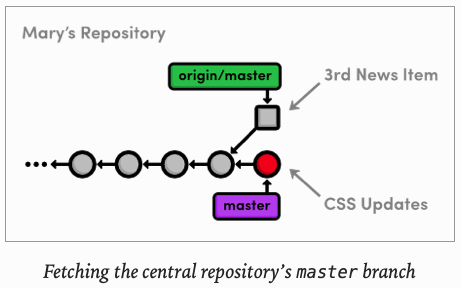
Mary is now in the familiar position of having to pull in changes from another branch. She can either merge, which cannot be fast-forwarded, or she can rebase for a linear history.
Typically, you will want to rebase your changes on top of those found in your central repository. This is equivalent of saying, "I want to add my changes to what everyone else has already done"
As previously discussed, rebasing also eliminates superfluous merge commits. For these reasons, Mary will opt for a rebase.
$ git rebase origin/master
First, rewinding head to replay your work on top of it...
Applying: Add CSS styles for headings and links
After the rebase, Mary's master branch contains everything from the central repository, so she can do a fast-forward push to publish her changes.
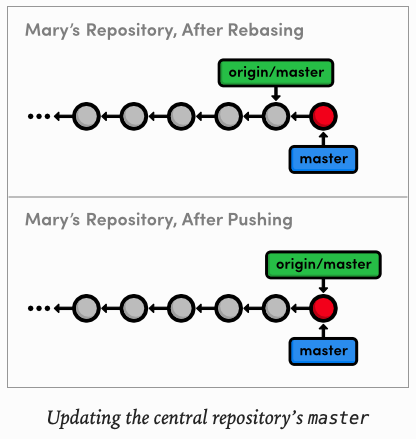
Finally, we will switch back to our repository and pull in Mary's CSS formatting.
Tue Jun 16 ~/iOS/RysGitTutorialRepository
$ git fetch origin
Tue Jun 16 ~/iOS/RysGitTutorialRepository
$ git log master..origin/master --statTue Jun 16 ~/iOS/RysGitTutorialRepository
$ git log origin/master..master --statOf course, the second log command won't output anything, since we haven't added any new commits while Mary was adding her CSS edits. It is usually a good idea to check this before trying to merge in a remote branch.
Otherwise, you might en up with some extra merge commits when you thought you were fast-forwarding your branch.
Tue Jun 16 ~/iOS/RysGitTutorialRepository
$ git merge origin/master
Already up to date.
Our repository is now synchronized with the central repository. Note that Mary may have moved on and added some new content that we don't know about, but it does not matter. The only changes we need to know about are those in central-repo.git. While this does not make a huge difference when we are working with just one another developer, imagine having to keep track of a dozen different developer's repositories in real-time.
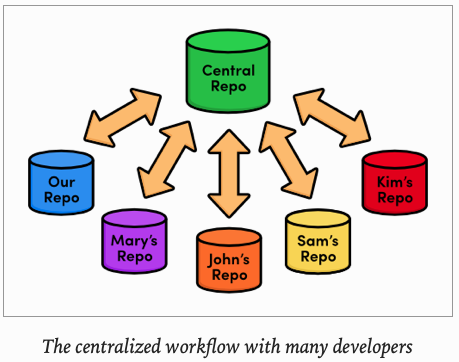
This kind of chaos is precisely the problem a centralized collaboration workflow is designed to solve:
The presence of a central communication hub condenses all this development into a single repository and ensures that no one overwrites another's content, as we discovered while trying to push Mary's CSS updates.
In this module, we introduced another remote repository to serve as the central storage facility for our project. We also discovered bare repositories, which are just like ordinary repositories -minus the working directory. Bare repositories provide "safe" location to push branches to, as long as you remember not to rebase the commits that it already contains.
We hosted the central repository on our local filesystem, right next to both ours and Mary's projects. However, most real-world central repositories reside on a remote server with internet access. This lets any developer fetch from or push to the repository over the internet, making Git a very powerful multi-user development platform. Having the central repository on a remote server is also an affordable, convenient way to back up a project.
Next up, we will configure a network-based repository using a service called GitHub. In addition to introducing network access for Git repositories, this will open the door for another collaboration standard: the integrator workflow.
$ git init --bare <repositoryName>Create a Git repository, but omit the working directory
$ git remote rm <remoteName>Remove the specified remote from your book-marked connections.