Fragment
在Vue3中,组件可以没有根标签, 内部会将多个标签包含在一个Fragment虚拟元素中,可以减少标签层级, 和内存的占用
Teleport
将组件的html结构移动到指定位置。用得比较多的是弹窗的组件。
<template>
	<div>
		<button @click="isShow = true">显示弹窗</button>
		<teleport to="body">
			<div v-if="isShow" class="mask">
				<div class="dialog">
                                    <div class="header">
                                      弹窗标题
                                    </div>
                                    <div class="content">
                                      <h4>弹窗内容</h4>
                                      <h4>弹窗内容</h4>
                                      <h4>弹窗内容</h4>
                                    </div>
                                    <div class="footer">
                                          <button @click="isShow = false">关闭弹窗</button>
                                    </div>
                          	</div>
                          </div>
		</teleport>
	</div>
</template>

<script setup>
import {ref} from 'vue'

let isShow = ref(false)
</script>

<style>
  .mask{
    position: absolute;
    top: 0;bottom: 0;left: 0;right: 0;
    background-color: rgba(0, 0, 0, 0.5);
  }
  .dialog{
    position: absolute;
    top: 50%;
    left: 50%;
    transform: translate(-50%,-50%);
    text-align: center;
    width: 300px;
    height: 300px;
    background: #fff;
    border-radius: 6px;
    display: flex;
    flex-direction: column;
  }
  .header{
    border-bottom: 1px solid #ccc;
    border-bottom: 1px solid #ccc;
    margin: 0;
    height: 40px;
    line-height: 40px;
    text-align: left;
    padding:0 20px;
  }
  .content{
    flex:1;
  }
  .footer{
    text-align: right;
    padding: 10px 20px;
    border-top: 1px solid #ccc;
  }
</style>
这样添加,dialog就没在 .test里面,而是在body里面。
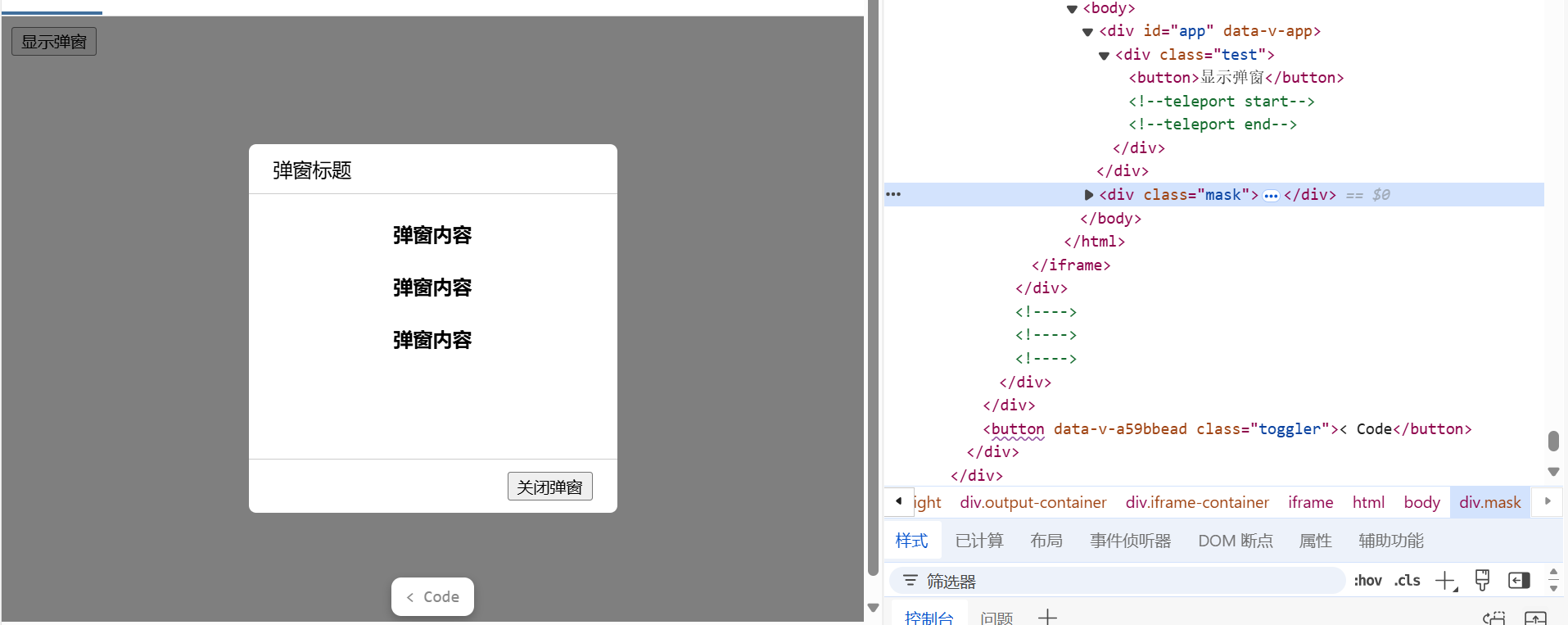
如果觉得代码多,以及无法复用,抽取一下就可以了。
Dialog.vue
<template>
	<div class="test">
		<teleport to="body">
			<div v-if="isShow" class="mask">
				<div class="dialog">
                                    <div class="header">
                                      弹窗标题
                                    </div>
                                    <div class="content">
                                      <h4>弹窗内容</h4>
                                      <h4>弹窗内容</h4>
                                      <h4>弹窗内容</h4>
                                    </div>
                                    <div class="footer">
                                        <button @click="onClose">关闭弹窗</button>
                                    </div>
				</div>
			</div>
		</teleport>
	</div>
</template>

<script setup>
import {defineProps, defineEmits} from 'vue'
const props = defineProps({
  isShow: Boolean,
});

const emit = defineEmits(['close']);
function onClose(){
  emit('close')
}

</script>

<style>
  .mask{
    position: absolute;
    top: 0;bottom: 0;left: 0;right: 0;
    background-color: rgba(0, 0, 0, 0.5);
  }
  .dialog{
    position: absolute;
    top: 50%;
    left: 50%;
    transform: translate(-50%,-50%);
    text-align: center;
    width: 300px;
    height: 300px;
    background: #fff;
    border-radius: 6px;
    display: flex;
    flex-direction: column;
  }
  .header{
    border-bottom: 1px solid #ccc;
    border-bottom: 1px solid #ccc;
    margin: 0;
    height: 40px;
    line-height: 40px;
    text-align: left;
    padding:0 20px;
  }
  .content{
    flex:1;
  }
  .footer{
    text-align: right;
    padding: 10px 20px;
    border-top: 1px solid #ccc;
  }
</style>
App.vue
<template>
	<div class="test">
		<button @click="isShow = true">显示弹窗</button>
    	        <myDialog :isShow="isShow" @close="isShow = false"/>
	</div>
</template>

<script setup>
  import {ref} from 'vue'
  import myDialog from './Dialog.vue'
  let isShow = ref(false)
</script>
Suspense
等待异步组件时渲染一些额外内容,让应用有更好的用户体验。(目前正在实验阶段,不一定会支持)

Fragment
在Vue3中,组件可以没有根标签, 内部会将多个标签包含在一个Fragment虚拟元素中,可以减少标签层级, 和内存的占用
Teleport
将组件的html结构移动到指定位置。用得比较多的是弹窗的组件。
这样添加,dialog就没在 .test里面,而是在body里面。
如果觉得代码多,以及无法复用,抽取一下就可以了。
Dialog.vue
App.vue
Suspense
等待异步组件时渲染一些额外内容,让应用有更好的用户体验。(目前正在实验阶段,不一定会支持)