



To ensure the long-term sustainability of this project, users of this package who generate revenue must pay an Open Source Maintenance Fee. While the source code is freely available under the terms of the License, this package and other aspects of the project require adherence to the Maintenance Fee.
To pay the Maintenance Fee, become a Sponsor at the proper OSMF tier. A single fee covers all of Devlooped packages.
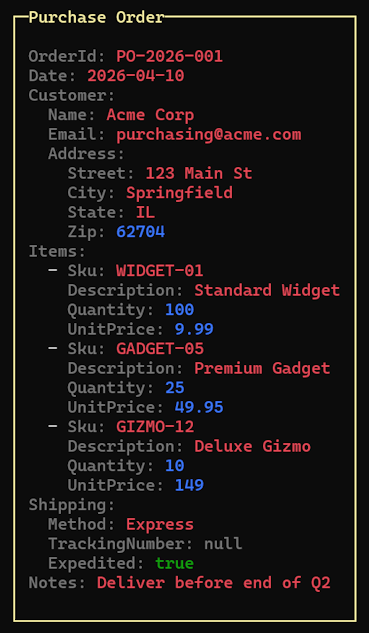
Devlooped.Spectre.Yaml adds a YamlText renderable to Spectre.Console
that displays YAML with syntax-highlighted tokens (keys, strings, numbers, booleans, nulls, and
comments). It also accepts JSON and arbitrary .NET objects, automatically converting them to YAML
before rendering.
using Spectre.Console;

AnsiConsole.Write(new YamlText("""
    server:
      host: localhost
      port: 8080
      tls: true
"""));using Spectre.Console;
var config = new
{
Server = new { Host = "localhost", Port = 8080, Tls = true },
Retries = 3,
Tags = new[] { "web", "api" },
};
AnsiConsole.Write(new YamlText(config));System.Text.Json.JsonSerializer serializes the object; the resulting JSON is then converted
to YAML. JsonNode and JsonElement overloads are also available.
using Spectre.Console;

AnsiConsole.Write(
    new Panel(new YamlText(myObject))
        .Header("Configuration")
        .BorderColor(Color.Yellow)
.Padding(1, 1));Each token type has a configurable Style. Use the fluent extension methods for the most
concise syntax:
var text = new YamlText(yaml)
    .KeyColor(Color.Yellow)
    .StringColor(Color.Cyan1)
    .NumberColor(Color.Blue)
    .BooleanColor(Color.Green)
    .NullColor(Color.Grey)
    .CommentColor(Color.DarkSlateGray1);

AnsiConsole.Write(text);
Or assign Style objects directly when you need full control (foreground, background,
decorations):
var text = new YamlText(yaml)
{
    KeyStyle    = new Style(Color.Yellow, decoration: Decoration.Bold),
    StringStyle = new Style(Color.Cyan1),
};| Token | Default |
|---|---|
| Key | Color.Grey |
| String | Color.Red |
| Number | Color.Blue |
| Boolean | Color.Green |
| Null | Color.Grey |
| Comment | Color.Grey + Dim |


