The rapid advancement of large language models (LLMs) has accelerated progress toward universal AI assistants. However, existing benchmarks for personalized assistants remain misaligned with real-world user-assistant interactions, failing to capture the complexity of external contexts and users' cognitive states.
To bridge this gap, we propose LifeSim, a user simulator that models user cognition through the Belief-Desire-Intention (BDI) model within physical environments for coherent life trajectories generation, and simulates intention-driven user interactive behaviors. Based on LifeSim, we introduce LifeSim-Eval, a comprehensive benchmark for multi-scenario, long-horizon personalized assistance.

Create a conda environment and install dependencies:
conda create -n lifesim python=3.10.12
conda activate lifesim
pip install -r requirements.txt
Note: The provided
requirements.txtis comprehensive and includes GPU/vLLM-related packages. For a lightweight setup (e.g., API-only models without local GPU inference), you only need the core packages:openai,chromadb,sentence-transformers,flask,flask-cors,pyyaml,tqdm,numpy.
The pipeline expects the following directory layout under data/:
data/
├── single_session/
│   ├── events.jsonl          # Event sequences
│   └── users.jsonl           # User profiles
├── long_horizon/
│   ├── events.jsonl          # Event sequences
│   └── users.jsonl           # User profiles
└── language_templates.json   # Preference dimension templates
LifeSim requires two LLM backends — a user model (simulates the user) and an assistant model (the AI system under evaluation) — plus an embedding model for the retrieval memory.
Launch vLLM servers for the user and assistant models separately. For example:
# Launch user model (e.g., Qwen3-32B)
CUDA_VISIBLE_DEVICES=0,1 vllm serve /path/to/Qwen3-32B \
  --host 0.0.0.0 --port 8001 \
  --tensor-parallel-size 2 \
  --api-key your_api_key

# Launch assistant model (e.g., Llama-3-70B)
CUDA_VISIBLE_DEVICES=2,3 vllm serve /path/to/Llama-3-70B \
  --host 0.0.0.0 --port 8002 \
  --tensor-parallel-size 2 \
--api-key your_api_keyNo local deployment is needed. Supported model names (passed via --assistant_model_path):
| Provider | Model Name |
|---|---|
| OpenAI | gpt-4o, gpt-4o-mini, gpt-5, gpt-5-mini |
| DeepSeek | deepseek-chat, deepseek-reasoner |
| Anthropic | claude-sonnet-4-5-20250929 |
Pass the corresponding API key via --assistant_model_api_key.
An embedding model is required for the ChromaDB-based retrieval memory. We recommend Qwen3-Embedding-0.6B (or any model compatible with sentence-transformers). Download it to a local path and pass it via --retriever_model_path.
Use src/main_mp.py as the main entrypoint. All scripts are run from the repository root with PYTHONPATH=src.
PYTHONPATH=src python src/main_mp.py \
  --user_model_path      /path/to/User_Model \
  --user_model_url       your_user_model_url \
  --user_model_api_key   your_api_key \
  --assistant_model_path /path/to/Assistant_Model \
  --assistant_model_url  your_assistant_model_url \
  --assistant_model_api_key your_api_key \
  --retriever_model_path /path/to/Qwen3-Embedding-0.6B \
  --exp_setting          single_session \
  --n_events_per_sequence 10 \
  --n_threads            4 \
  --chromadb_root        ./chromadb \
--logs_root ./logsEvaluation is a two-step pipeline using an LLM-as-a-judge approach across 7 dimensions:
| Metric | Type | Description |
|---|---|---|
ir |
Intent Recognition | Whether the assistant correctly identifies the user's intent |
ic |
Intent Completion | Whether the assistant's reply fulfills each intent dimension |
nat |
Naturalness | Fluency and conversational naturalness (1–5) |
coh |
Coherence | Logical consistency and contextual continuity (1–5) |
pa |
Preference Alignment | Whether the reply aligns with the user's preference profile |
ea |
Environment Alignment | Scene/environment feasibility and constraint awareness (1–5) |
rr |
Rigid Reasoning | Binary flag for failure to adapt after new constraints |
Run once per evaluator model. Results are saved under ./eval_outputs/{evaluator}/{theme}/.
for EVALUATOR in qwen3_32b; do
  PYTHONPATH=src python src/evaluation/eval.py \
    --logs_root   ./logs \
    --themes      main_user_Qwen3-32B_assistant_Qwen3-8B_total \
    --output_root ./eval_outputs/${EVALUATOR} \
    --evaluator   ${EVALUATOR} \
    --model_path  /path/to/evaluator_model \
    --base_url    http://0.0.0.0:8000/v1 \
    --api_key     your_api_key \
    --metrics     ir ic nat coh pa ea rr \
    --max_workers 32
donePass all evaluators to --evaluators; scores are averaged across them automatically.
PYTHONPATH=src python src/evaluation/metric.py \
  --results_root ./eval_outputs \
  --models       main_user_Qwen3-32B_assistant_Qwen3-8B_total \
  --evaluators   qwen3_32b \
  --metrics      ir ic nat coh pa ea rr \
  --output_root  ./metric_outputs
Scores are printed to stdout and saved as {output_root}/{model}/scores.json.
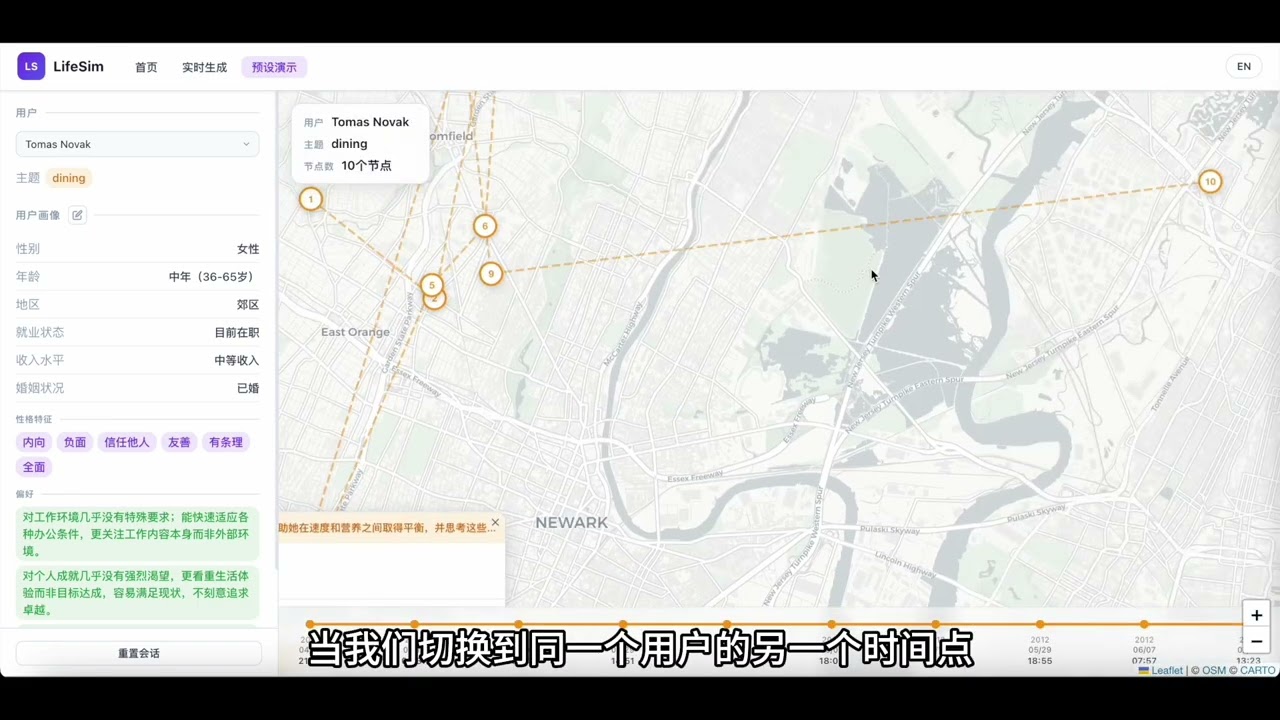
The web demo provides an interactive UI for two usage modes:
- Live Generation — dynamically generates life events driven by the BDI model and lets you interact directly with the simulated user in real time.
- Preset Demo — replays pre-generated trajectory data with an animated map timeline; click any node to view event details and chat with the simulated user.
A full annotated template is provided at demo/config_template.yaml. Copy it and fill in your model paths, API keys, and retriever settings. The config is only required for the Live Generation mode (real-time user-model chat); the Preset Demo mode works without it.
cd /path/to/lifesim/demo

python app.py \
  --events-path /path/to/data/single_session/events.jsonl \
  --users-path  /path/to/data/single_session/users.jsonl \
  --config      /path/to/config.yaml \
  --port        5020
Then open http://localhost:5020 in your browser.
If you use LifeSim or LifeSim-Eval in your research, please cite:
@misc{duan2026lifesimlonghorizonuserlife,
  title={LifeSim: Long-Horizon User Life Simulator for Personalized Assistant Evaluation},
  author={Feiyu Duan and Xuanjing Huang and Zhongyu Wei},
  year={2026},
  eprint={2603.12152},
  archivePrefix={arXiv},
  primaryClass={cs.CL},
  url={https://arxiv.org/abs/2603.12152},
}