- Implement different deep learning models for segementation on human placenta tissue spectral image dataset from hospital.
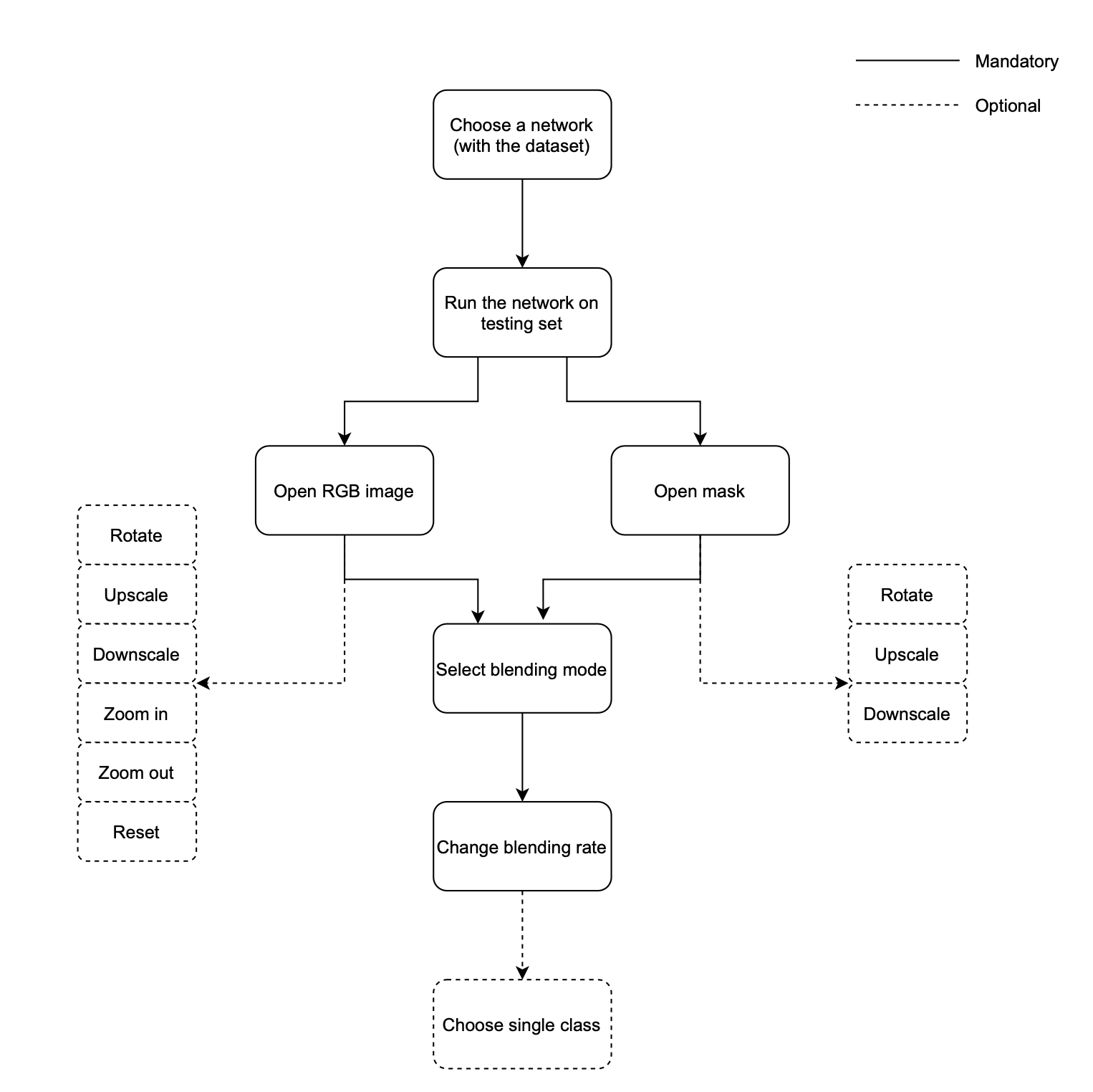
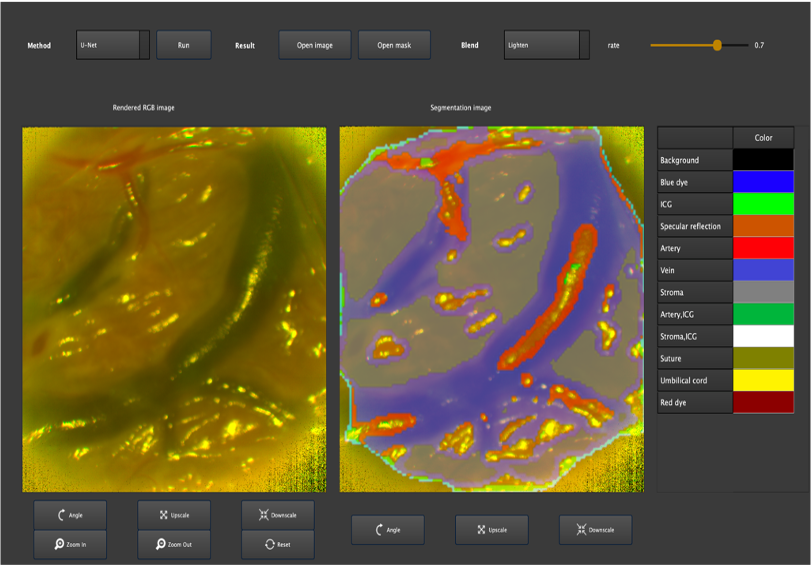
- Design UI for showing the segmented results with original rendered color images and implement basic image processing functions.
This file is to clarify the usage of our codes & files in Industrial Project Course.
In the code folder, there are segmentation part and GUI part
- Have Python installed.
- OS version: Mac, Windows 10, Linux
- Download the folder in OneDrive
- The input spectral images (in tif format) should put into path:'\DataSets\OriginalDataSet\Set_1_images'
- The input mask (in tif format) should put into path:'\DataSets\OriginalDataSet\Set_1_masks'
- Put DataSets folder inside of the folder which is downloaded from OneDrive
- Using
pipenv
Creating python dev environment and installing dependencies:
pipenv install
Running codes:
pipenv run
If using the conda
- Creating a New Environment
conda create -n IDP_COSI python=3.8.8
- Activate Environment
For Windows :
conda activate IDP_COSI
For Mac :
conda activate IDP_COSI
- Installing a Python Kernel
pip install ipykernel
- Using pip
pip install -r requirements.txt
-
Note: First time to Run the Code. When runing the main_gui.py, the new datasets (RGB, PCA, MNF, ICA) will be generated automatically in the same path as original data. This process will take from couple minutes to more than 10 minutes (depending on the hardware). When it finishes, the final size of folder DataSets will go up to 7.27GB. Those datasets will be used for GUI method functions: U-Net-RGB, U-Net-PCA, U-Net-MNF, U-Net-ICA.
-
Run the GUI Software
python main_gui.py
-
Run Without Generate the New Datasets If you want run GUI without generating the new datasets mentioned above, and don’t care to use U-Net-RGB, U-Net-PCA, U-Net-MNF, U-Net-ICA:
-
Comment the line below in file segmentImagesWithAPreTrainedModel.py
createPcaMnfRgbIcaDirectories()
- Then Run
python main_gui.py
- generalLibrary .py
- This is the general library that contains different functions and methods for this project.
- cnnModelsLibrary .py
- This contains the definition of the architecture of the original UNet Model. Source: arXiv:1505.04597.
- dataGeneratorLibrary .py
- This is the library that contains the function to generate the PCA, RGB, MNF, and ICA versions of the original data set.
- This code is executed automatically when running "mainTrainAndTest" or "segmentImagesWithAPreTrainedModel "
- mainTrainAndTest .py
- Code used to train and test the UNet CNN segmentation models (All the variants: Hypercube, PCA, MNF, ICA, RGB).
- The input images should be placed in this folder: '\DataSets\OriginalDataSet\Set_1_images', and they should be in .tif format.
- The input masks should be placed in this folder: '\DataSets\OriginalDataSet\Set_1_masks', and they should be in .tif format with the same name as their corresponding images.
- segmentImagesWithAPreTrainedModel .py
- Code is used to segment a complete directory of images using a pre-trained CNN model.
- The input images should be placed in this folder '\DataSets\OriginalDataSet\Set_1_images' and they should be in .tif format.
- Then, the segmentation output will be saved in this folder '\SegmentationResults'.
- SavedModels
- This folder is automatically generated after executing "mainTrainAndTest".
- It contains the weights of the segmentation networks.
- Then, those weights will be loaded while running "segmentImagesWithAPreTrainedModel ".
- utils
- This folder contains the auxiliary function "spectral_tiffs" and "vec_spim" used in "dataGeneratorLibrary"
- AuxVariables
- This folder contains other auxiliary variables generated while running "mainTrainAndTest".
- TrainingPlots
- This folder contains some graph generated during the training
- spectral_tiffs.py
- Functions to read and write spectral image data
- dataPrep_random.py
- Contains functions to read spectral image and mask data, downscale the images into smaller size acceptable by the DL networks, and save numerical data in generated .npy files in
/data_arraysdirectory
- Contains functions to read spectral image and mask data, downscale the images into smaller size acceptable by the DL networks, and save numerical data in generated .npy files in
- generate_image.py
- A python script designed to read input image data, and output segmentations using pre-trained netwrok weights saved in
/saved_modeldirectory - For a standalone use, run:
python generate_image.py --model 'INSERT_MODEL_NAME' --img_dr 'PATH_TO_IMAGES'- Possible choice between 'unet3plus' and 'swinUnet' architectures
- Results saved into
/output_images
- A python script designed to read input image data, and output segmentations using pre-trained netwrok weights saved in
- for_gui.py
- An adaptation of the
generate_image.pyscript for GUI implementation
- An adaptation of the
- train. py
- Code to train 'unet3plus' and 'swinUnet' models. Outputs plotted training progress into
/training_resultsand saves model weights into/saved_models - For a standalone use, run:
python train.py --model 'INSERT_MODEL_NAME' --img_dr 'PATH_TO_IMAGES' --mask_dir 'PATH_TO_MASKS'
- Code to train 'unet3plus' and 'swinUnet' models. Outputs plotted training progress into
- eval. py
- Code to evaluate a trained model. Outputs confusion matrices, metrics scores, and IoU barplots into
/training_results - For a standalone use, run:
python train.py --model 'INSERT_MODEL_NAME' --img_dr 'PATH_TO_IMAGES' --mask_dir 'PATH_TO_MASKS
- Code to evaluate a trained model. Outputs confusion matrices, metrics scores, and IoU barplots into
- unet3plus_complete_workflow.sh
- Shell script to train a 'unet3plus' model, evaluate and generate segmented images
- swinUnet_complete_workflow.sh
- Shell script to train a 'swinUnet' model, evaluate and generate segmented images
- requirements.txt
- This requirements file includes all the python packages are required to run the projectgraphs and plots generated after training the UNet segmentation models.
- DataSets
- The input data needed for segmentation in this folder.
- SegmentationResults
- The segmentation results saved in this folder
-
UI
- In this folder, there are several files about layout of GUI
-
main_gui.py
- This is main python file to run the GUI
Dong Han
Ronny Velastegui Sandoval
Linna Yang
Zolbayar Shagdar
Maria Jose Rueda Montes