.NET MAUI Blazor tutorial (PR 2)#24977
Conversation


 danroth27
left a comment
danroth27
left a comment
danroth27
left a comment
There was a problem hiding this comment.
Great start! A few comments.

|
UPDATE: @danroth27 ... Read this first, then my next comment. In addition to the inline remarks ... I mentioned yesterday that I had an Android emulator-video card hardware acceleration error that prevented me from running the app. This morning, I tried again on a lark. It still doesn't run, but the hardware accelration error went away. Perhaps, there was a background thing running/installing that prevented the emulator from working yesterday 😕. Now, the emulator runs but deploying the app breaks for some other reason. On my 10-year old hardware 🙈, the Android emulator/emulated phone takes a very long time to get running. I mean like 15 minutes (or more). Along the way I noted that ...
[Perhaps, a NOTE on the potentially long delay should be part of the tutorial.] While waiting on all of that ... perhaps part of that "ADB" popup error ... the app threw the following twice ...
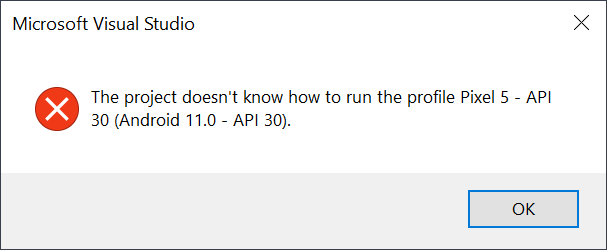
After the Pixel phone was fully running in the emulator, that error ☝️ went away (on the third run), but then the deployment still breaks with ...
I'm not sure what to do about the broken deployment process. |
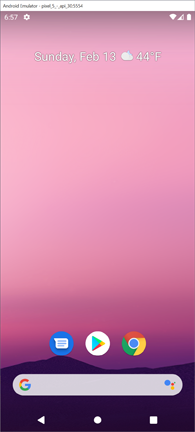
🎉 Ah, ha!So ... again ... tinkering ... I left the Android emulator running with the Pixel 5 phone fully loaded (Home screen) ...
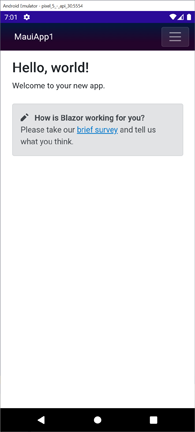
Then, I shutdown VS. I re-opened VS. I selected the Pixel 5 profile and hit the start button again. Bingo! ...
... running well. Soooo ... there are long delays, various strange bugs and warnings along the way, the requirement here to wait until the emulator is fully loaded/setup/running before re-starting VS. Do you want the tutorial to discuss any of this because I think you know what's going to happen if we put this up without saying anything. Devs will sharpen their 🔪 for ME! 😨 |
|
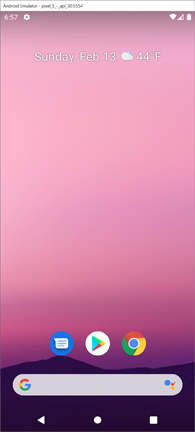
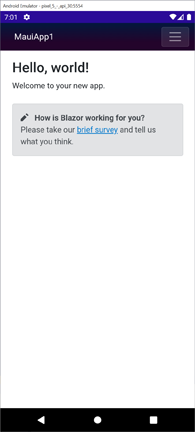
... and btw ... I did remove the Windows running image on the last commit. I have the Pixel 5 images now ... the stable "Home" screen and an image of the running MauiApp1 ...
These aren't in the tutorial. Do you want that one (or perhaps both images if we discuss the dev waiting until the phone is fully running) added at the end of the Android section? If so, do you want me to return the running app Windows image to the end of the Windows section? I think if we get further into the weeds that the sequence would be something like ...
|
|
UPDATE: WRT the upcoming WinForms Blazor tutorial PR. Yes! I now have a basic tutorial written (locally). However ...
|

|
Regarding the Android emulator issues you're seeing, that's typically due to not having hardware acceleration setup: https://docs.microsoft.com/xamarin/android/get-started/installation/android-emulator/hardware-acceleration. I'm surprised the .NET MAUI docs don't currently say anything about this. @maddymontaquila Do you know how .NET MAUI devs are supposed to figure out that they need to setup hardware acceleration to get the Android emulator to be usable? I assume this is still a manual process for the user, correct? |
|
I'll see about the hardware acceleration situation here in the morning. I made the recommended updates. We could circle back around on adding hardware acceleration to this tomorrow (on a new PR). I'd like to get this in tonight so that I'm unblocked on loading the WinForms one. If you weren't going to look at that tonight tho, then there's no rush on anything ... this PR or the next one. I'll just proceed with the WPF one in the morning and load the WinForms tutorial tomorrow afternoon/evening. |
Yeah, we should show the app running in the Android section at the end of the Android section. The screen shot you have above is fine. |
danroth27
left a comment
danroth27
left a comment
There was a problem hiding this comment.
A couple of additional minor nits. Otherwise, looks good.
2 participants


Addresses #24956
Internal Review Topic
Rather rough, rough, ROUGH 🐶 at the moment.
I currently have a local Android Emulator problem with my video card's hardware acceleration. I'll troubleshoot that Sunday morning and then confirm the Android section.
WRT the Android section ... I'm confused by the .NET MAUI version of the tutorial ending with a screen that looks like a custom component ... not the standard Blazor
Countercomponent. I think the screenshot they have is incorrect. It's Step 13 at ...https://docs.microsoft.com/en-us/dotnet/maui/get-started/first-app#get-started-with-visual-studio-2022-171-preview