Add table of differences to Migrate from Newtonsoft.Json doc #16704
Conversation


 ahsonkhan
left a comment
ahsonkhan
left a comment
ahsonkhan
left a comment
There was a problem hiding this comment.
Some thoughts about table ordering/grouping.
docs/standard/serialization/system-text-json-migrate-from-newtonsoft-how-to.md
Show resolved
Hide resolved
docs/standard/serialization/system-text-json-migrate-from-newtonsoft-how-to.md
Show resolved
Hide resolved
| ## Table of differences between Newtonsoft.Json and System.Text.Json | ||
|
|
||
| | `Newtonsoft.Json` feature | `System.Text.Json` equivalent | | ||
| |-----------------------------------------------------|-------------------------------| |
There was a problem hiding this comment.
Should we sort these grouping all the Supported, Not Supported and other categories in the System.Text.Json equivalent column? Knowing all the things that are in the "not supported" category might be helpful.
Alternatively (or in addition to), we do something like annotate the text with images in front of the text):
green checkmark - supported (but maybe differently)
yellow checkmark - supported/possible (workaround
red x - not supported
There was a problem hiding this comment.
I'll group them by supported, workaround with sample, workaround no sample, not supported. I'm looking into getting the color-coded checkmark and X icons to add.
| | `DefaultValueHandling` setting on `[JsonProperty]` attribute | [Requires a custom converter, sample provided](#conditionally-ignore-a-property) | | ||
| | Callbacks | [Requires a custom converter, sample provided](#callbacks) | | ||
| | Support for a broad range of types | [Some types require custom converters](#types-without-built-in-support) | | ||
| | Support for public and non-public fields | [Requires a custom converter](#public-and-non-public-fields) | |
There was a problem hiding this comment.
Other type of ordering we could consider is what's more common. In that case, items like these should be more on the top where as some of the other/less used features at the bottom. What were you thinking in terms of sort order?
There was a problem hiding this comment.
Also, I thought things like these are in the "not supported" column (they are in the Scenarios that JsonSerializer currently doesn't support heading), no?
There was a problem hiding this comment.
The overall order now is by groups: supported, workaround with sample, workaround without sample, no workaround practical. Within each grouping ideally we'd go from more common to less common, but it's not always easy to differentiate on that basis. I'm open to suggestions on changing the order.
The Scenarios that JsonSerializer currently doesn't support section originally was two sections that got conflated -- workaround-no-sample and workaround-not-practical. We could split it up again, which would more closely match the groupings in the table.
There was a problem hiding this comment.
The overall order now is by groups: supported, workaround with sample, workaround without sample, no workaround practical. Within each grouping ideally we'd go from more common to less common, but it's not always easy to differentiate on that basis.
Perfect.
I'm open to suggestions on changing the order.
Provided some thoughts. Thanks.
We could split it up again, which would more closely match the groupings in the table.
This doc will likely keep evolving, especially until we ship 5.0. So, let's leave that change out for now.
docs/standard/serialization/system-text-json-migrate-from-newtonsoft-how-to.md
Outdated
Show resolved
Hide resolved
docs/standard/serialization/system-text-json-migrate-from-newtonsoft-how-to.md
Outdated
Show resolved
Hide resolved

|
This looks super nice! ❤️ |


docs/standard/serialization/system-text-json-migrate-from-newtonsoft-how-to.md
Outdated
Show resolved
Hide resolved
docs/standard/serialization/system-text-json-migrate-from-newtonsoft-how-to.md
Outdated
Show resolved
Hide resolved
ahsonkhan
left a comment
ahsonkhan
left a comment
There was a problem hiding this comment.
Other than some ordering suggestions, looks great!
docs/standard/serialization/system-text-json-migrate-from-newtonsoft-how-to.md
Outdated
Show resolved
Hide resolved
docs/standard/serialization/system-text-json-migrate-from-newtonsoft-how-to.md
Outdated
Show resolved
Hide resolved
docs/standard/serialization/system-text-json-migrate-from-newtonsoft-how-to.md
Outdated
Show resolved
Hide resolved
docs/standard/serialization/system-text-json-migrate-from-newtonsoft-how-to.md
Outdated
Show resolved
Hide resolved
docs/standard/serialization/system-text-json-migrate-from-newtonsoft-how-to.md
Outdated
Show resolved
Hide resolved
| | `JsonTextReader` |  [Utf8JsonReader](#utf8jsonreader-compared-to-jsontextreader) | | ||
| | `JsonTextWriter` |  [Utf8JsonWriter](#utf8jsonwriter-compared-to-jsontextwriter) | | ||
| | Support for a broad range of types |  [Some types require custom converters](#types-without-built-in-support) | | ||
| | Deserialize inferred type to `object` properties |  [Not supported, workaround, sample](#deserialization-of-object-properties) | |
There was a problem hiding this comment.
Here's the ordering for this section (most of it looks good):
Support for a broad range of types
Deserialize inferred type to object properties
Deserialize strings as numbers
Deserialize Dictionary with non-string key
Polymorphic serialization
Polymorphic deserialization
Deserialize JSON null literal to non-nullable types
Deserialize to immutable classes and structs
[JsonConstructor] attribute
Required setting on [JsonProperty] attribute
NullValueHandling setting on [JsonProperty] attribute
DefaultValueHandling setting on [JsonProperty] attribute
DefaultValueHandling global setting
DefaultContractResolver to exclude properties
DateTimeZoneHandling, DateFormatString settings
Callbacks
| | `JsonConvert.PopulateObject` method |  [Not supported, workaround](#populate-existing-objects) | | ||
| | `ObjectCreationHandling` global setting |  [Not supported, workaround](#reuse-rather-than-replace-properties) | | ||
| | Add to collections without setters |  [Not supported, workaround](#add-to-collections-without-setters) | | ||
| | `PreserveReferencesHandling` global setting |  [Not supported](#preserve-object-references-and-handle-loops) | |
There was a problem hiding this comment.
the ordering of the Not supported section looks good to me.
docs/standard/serialization/system-text-json-migrate-from-newtonsoft-how-to.md
Outdated
Show resolved
Hide resolved
| | Deserialize `Dictionary` with non-string key |  [Not supported, workaround, sample](#dictionary-with-non-string-key) | | ||
| | Polymorphic serialization |  [Not supported, workaround, sample](#polymorphic-serialization) | | ||
| | Polymorphic deserialization |  [Not supported, workaround, sample](#polymorphic-deserialization) | | ||
| | `Required` setting on [JsonProperty] attribute |  [Not supported, workaround, sample](#required-properties) | |
There was a problem hiding this comment.
Consistency with others:
| | `Required` setting on [JsonProperty] attribute |  [Not supported, workaround, sample](#required-properties) | | |
| | `Required` setting on `[JsonProperty]` attribute |  [Not supported, workaround, sample](#required-properties) | |
Also, consider adding a sentence referencing the attribute there - In Newtonsoft.Json you would specifiy that a property is required by setting Required on the the [JsonProperty] attribute.
docs/standard/serialization/system-text-json-migrate-from-newtonsoft-how-to.md
Outdated
Show resolved
Hide resolved
docs/standard/serialization/system-text-json-migrate-from-newtonsoft-how-to.md
Outdated
Show resolved
Hide resolved
| During serialization, `Newtonsoft.Json` is relatively permissive about letting characters through without escaping them. That is, it doesn't replace them with `\uxxxx` where `xxxx` is the character's code point. Where it does escape them, it does so by emitting a `\` before the character (for example, `"` becomes `\"`). <xref:System.Text.Json> escapes more characters by default to provide defense-in-depth protections against cross-site scripting (XSS) or information-disclosure attacks and does so by using the six-character sequence. `System.Text.Json` escapes all non-ASCII characters by default, so you don't need to do anything if you're using `StringEscapeHandling.EscapeNonAscii` in `Newtonsoft.Json`. `System.Text.Json` also escapes HTML-sensitive characters, by default. For information about how to override the default `System.Text.Json` behavior, see [Customize character encoding](system-text-json-how-to.md#customize-character-encoding). | ||
| Custom converters can be implemented for types that don't have built-in support. | ||
|
|
||
| ### Deserialization of object properties |
There was a problem hiding this comment.
I am fine with the table ordering for this section, but the doc section order doesn't match for this. Move this section down below the polymorphic deserialization section.
docs/standard/serialization/system-text-json-migrate-from-newtonsoft-how-to.md
Outdated
Show resolved
Hide resolved
ahsonkhan
left a comment
ahsonkhan
left a comment
There was a problem hiding this comment.
One leftover feedback. Otherwise, look's great!
docs/standard/serialization/system-text-json-migrate-from-newtonsoft-how-to.md
Outdated
Show resolved
Hide resolved

…onsoft-how-to.md

Co-Authored-By: Ahson Khan <ahkha@microsoft.com>
| |-------------------------------------------------------|-----------------------------| | ||
| | Case-insensitive deserialization by default | ✔️ [PropertyNameCaseInsensitive global setting](#case-insensitive-deserialization) | | ||
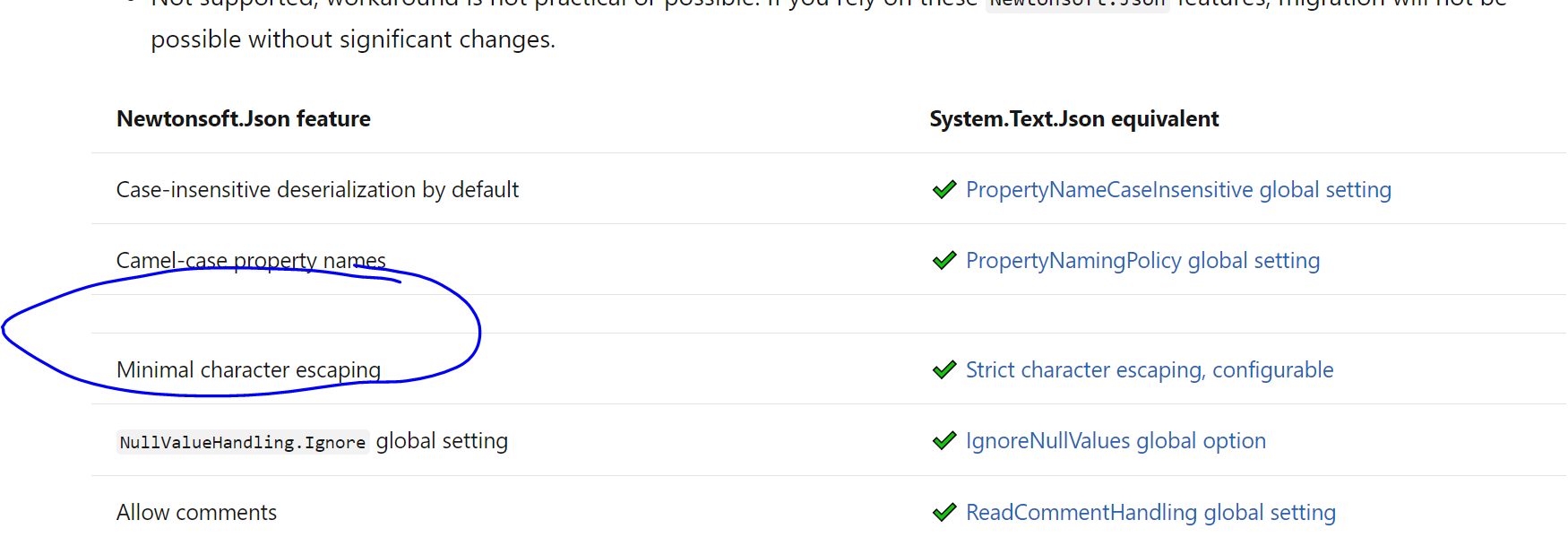
| | Camel-case property names | ✔️ [PropertyNamingPolicy global setting](system-text-json-how-to.md#use-camel-case-for-all-json-property-names) | ||
| | |
There was a problem hiding this comment.
This shouldn't be on a new line. It shows up as an empty row:

 BillWagner
left a comment
BillWagner
left a comment
BillWagner
left a comment
There was a problem hiding this comment.
This really looks great @tdykstra
You can  when ready.
7 participants


Fixes #16309
Internal review URL