Cannot open any project in FSharp.sln anymore #10193

Description

After a fresh update to latest in main and a git clean -xdf, running build.cmd in the root (no errors), trying to open FSharp.sln in Visual Studio 2019 16.7.4 (latest RTM), none of the projects load.
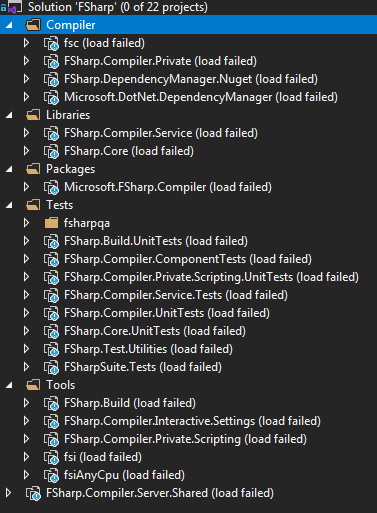
The output window for "solution" shows this log:
D:\Projects\OpenSource\FSharp\src\fsharp\FSharp.Compiler.Server.Shared\FSharp.Compiler.Server.Shared.fsproj : error  : The project file cannot be opened. Unable to locate the .NET Core SDK. Check that it is installed and that the version specified in global.json (if any) matches the installed version.
D:\Projects\OpenSource\FSharp\src\fsharp\fsc\fsc.fsproj : error  : The project file cannot be opened. Unable to locate the .NET Core SDK. Check that it is installed and that the version specified in global.json (if any) matches the installed version.
D:\Projects\OpenSource\FSharp\src\fsharp\FSharp.Compiler.Interactive.Settings\FSharp.Compiler.Interactive.Settings.fsproj : error  : The project file cannot be opened. Unable to locate the .NET Core SDK. Check that it is installed and that the version specified in global.json (if any) matches the installed version.
D:\Projects\OpenSource\FSharp\src\fsharp\fsi\fsi.fsproj : error  : The project file cannot be opened. Unable to locate the .NET Core SDK. Check that it is installed and that the version specified in global.json (if any) matches the installed version.
D:\Projects\OpenSource\FSharp\src\fsharp\fsiAnyCpu\fsiAnyCpu.fsproj : error  : The project file cannot be opened. Unable to locate the .NET Core SDK. Check that it is installed and that the version specified in global.json (if any) matches the installed version.
D:\Projects\OpenSource\FSharp\tests\FSharp.Test.Utilities\FSharp.Test.Utilities.fsproj : error  : The project file cannot be opened. Unable to locate the .NET Core SDK. Check that it is installed and that the version specified in global.json (if any) matches the installed version.
D:\Projects\OpenSource\FSharp\tests\fsharp\FSharpSuite.Tests.fsproj : error  : The project file cannot be opened. Unable to locate the .NET Core SDK. Check that it is installed and that the version specified in global.json (if any) matches the installed version.
D:\Projects\OpenSource\FSharp\tests\FSharp.Compiler.UnitTests\FSharp.Compiler.UnitTests.fsproj : error  : The project file cannot be opened. Unable to locate the .NET Core SDK. Check that it is installed and that the version specified in global.json (if any) matches the installed version.
D:\Projects\OpenSource\FSharp\tests\FSharp.Core.UnitTests\FSharp.Core.UnitTests.fsproj : error  : The project file cannot be opened. Unable to locate the .NET Core SDK. Check that it is installed and that the version specified in global.json (if any) matches the installed version.
D:\Projects\OpenSource\FSharp\src\fsharp\FSharp.Compiler.Private\FSharp.Compiler.Private.fsproj : error  : The project file cannot be opened. Unable to locate the .NET Core SDK. Check that it is installed and that the version specified in global.json (if any) matches the installed version.
D:\Projects\OpenSource\FSharp\src\fsharp\FSharp.Build\FSharp.Build.fsproj : error  : The project file cannot be opened. Unable to locate the .NET Core SDK. Check that it is installed and that the version specified in global.json (if any) matches the installed version.
D:\Projects\OpenSource\FSharp\src\fsharp\FSharp.Core\FSharp.Core.fsproj : error  : The project file cannot be opened. Unable to locate the .NET Core SDK. Check that it is installed and that the version specified in global.json (if any) matches the installed version.
D:\Projects\OpenSource\FSharp\tests\FSharp.Build.UnitTests\FSharp.Build.UnitTests.fsproj : error  : The project file cannot be opened. Unable to locate the .NET Core SDK. Check that it is installed and that the version specified in global.json (if any) matches the installed version.
D:\Projects\OpenSource\FSharp\src\fsharp\Microsoft.FSharp.Compiler\Microsoft.FSharp.Compiler.csproj : error  : The project file cannot be opened. Unable to locate the .NET Core SDK. Check that it is installed and that the version specified in global.json (if any) matches the installed version.
D:\Projects\OpenSource\FSharp\src\fsharp\FSharp.DependencyManager.Nuget\FSharp.DependencyManager.Nuget.fsproj : error  : The project file cannot be opened. Unable to locate the .NET Core SDK. Check that it is installed and that the version specified in global.json (if any) matches the installed version.
D:\Projects\OpenSource\FSharp\src\fsharp\FSharp.Compiler.Private.Scripting\FSharp.Compiler.Private.Scripting.fsproj : error  : The project file cannot be opened. Unable to locate the .NET Core SDK. Check that it is installed and that the version specified in global.json (if any) matches the installed version.
D:\Projects\OpenSource\FSharp\tests\FSharp.Compiler.Private.Scripting.UnitTests\FSharp.Compiler.Private.Scripting.UnitTests.fsproj : error  : The project file cannot be opened. Unable to locate the .NET Core SDK. Check that it is installed and that the version specified in global.json (if any) matches the installed version.
D:\Projects\OpenSource\FSharp\src\fsharp\Microsoft.DotNet.DependencyManager\Microsoft.DotNet.DependencyManager.fsproj : error  : The project file cannot be opened. Unable to locate the .NET Core SDK. Check that it is installed and that the version specified in global.json (if any) matches the installed version.
D:\Projects\OpenSource\FSharp\tests\FSharp.Compiler.ComponentTests\FSharp.Compiler.ComponentTests.fsproj : error  : The project file cannot be opened. Unable to locate the .NET Core SDK. Check that it is installed and that the version specified in global.json (if any) matches the installed version.
D:\Projects\OpenSource\FSharp\tests\fsharpqa\testenv\src\PEVerify\PEVerify.csproj : error  : The project file cannot be opened. Unable to locate the .NET Core SDK. Check that it is installed and that the version specified in global.json (if any) matches the installed version.
D:\Projects\OpenSource\FSharp\tests\FSharp.Compiler.Service.Tests\FSharp.Compiler.Service.Tests.fsproj : error  : The project file cannot be opened. Unable to locate the .NET Core SDK. Check that it is installed and that the version specified in global.json (if any) matches the installed version.
D:\Projects\OpenSource\FSharp\src\fsharp\FSharp.Compiler.Service\FSharp.Compiler.Service.fsproj : error  : The project file cannot be opened. Unable to locate the .NET Core SDK. Check that it is installed and that the version specified in global.json (if any) matches the installed version.
Note that I do have latest VS RTM and latest VS Preview installed. Loading the prj in Preview works, but compiling fails with dozens of these lines:
C:\Program Files\dotnet\sdk\5.0.100-rc.1.20452.10\Sdks\Microsoft.NET.Sdk\targets\Microsoft.NET.Sdk.DefaultItems.targets(349,5): error NETSDK1141: Unable to resolve the .NET SDK version as specified in the global.json located at D:\Projects\OpenSource\FSharp\global.json.