Underscores or special names with backticks are problematic with auto-completion #3406

Description

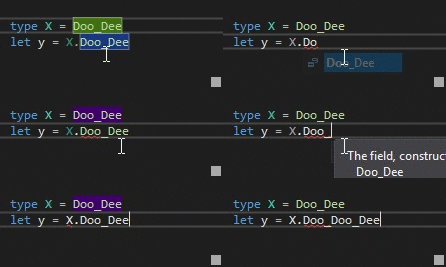
When you have a name of an identifier, field etc that has an underscore in it, auto-completion does not work as expected:
Special names (or whatever the term is for escaped names like these):
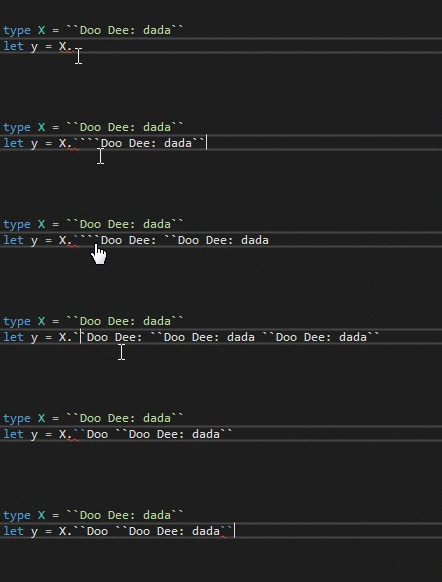
Names in backticks are especially useful when writing unit tests, and auto-complete can help tremendously with those readable, but awkward-to-type descriptive test-case names.
Repro steps
- Have an identifier with an underscore (fieldname, class name, let binding etc)
- Start typing until after the underscore, and hit Ctrl-space
- Instead of automatic completion, you will get a dropdown list of one item
- Selecting it will add it to the already typed partial name, instead of completing it.
Similar things happen with escaped names, the backticks are sometimes even doubled.
Expected behavior
Whether or not there's an underscore in the name, auto-completion should work the same way.
Actual behavior
As described above and in the vidcap. Ctrl-space doesn't work properly when names have underscores in them or when they are specially escaped with double backticks.
Known workarounds
None. Or don't use autocomplete when names are created with backticks, or have underscores.
Related information
- Visual Studio 2017 any version (VS2015 wasn't much better though)
- F# 4.4.0.0 and F# 4.4.1.0 (didn't check older versions)
- any runtime or Core