Scheduled tasks stop working after 2023.04.14 1:41:36 UTC #85473


Description

Is there an existing issue for this?
- I have searched the existing issues
Describe the bug
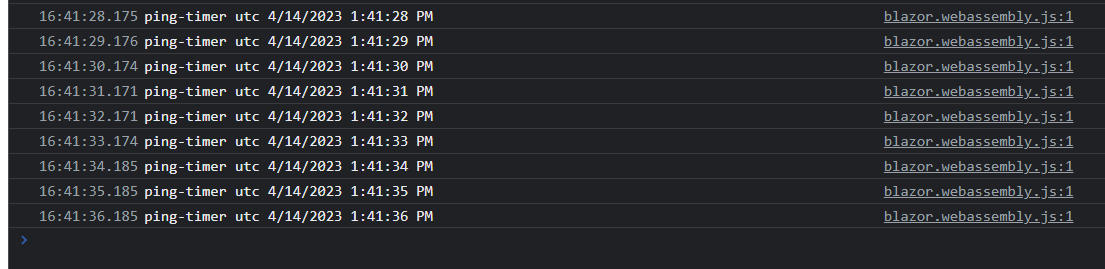
I've blazor wasm app that i need to run scheduled task periodically in the background. I'm triggering new Task after first render of MainLayout's OnAfterRender method. Lets say this task will print out current date every 1 second to browser console. Exactly at 2023.04.14 1:41.36 PM UTC task stops without any exception. I am able to reproduce the same error by changing the Date and time settings on my Windows 11 device. So far i've tried while loop, periodic timer, System.Threading.Timer, System.Timers.Timer or another approach that i found at stack overflow, but all of them stops working at exactly same time.
We have customers who use this app and are in different time zones. This task stopped working on all of them at the same time.
By the way this approach is working almost three years without any issues. We couldn't find any solution to this problem and we don't know when or will its going to happen in the future.
sample repo: https://github.com/ugurdal/BlazorWasmBackgroundTaskDemo
Expected Behavior
Loops will work without any issue
Steps To Reproduce
- create new blazor wasm project via
dotnet new blazorwasm -n MyBlazorApp - add following lines to MainLayout.Razor ( you can try while loop or periodic timer. they will both behave the same )
protected override void OnAfterRender(bool firstRender)
{
    if (firstRender)
    {
        _ = Task.Run(async () =>
        {
            while (true)
            {
                await Task.Delay(1 * 1000);
                Console.WriteLine("ping-timer utc {0}", DateTime.UtcNow.ToUniversalTime());
            }

            // var timer = new PeriodicTimer(TimeSpan.FromSeconds(1));
            // while (await timer.WaitForNextTickAsync())
            // {
            //     Console.WriteLine("ping-timer utc {0}", DateTime.UtcNow.ToUniversalTime());
            // }
        });
    }

    base.OnAfterRender(firstRender);
}
- set the date time to 2023.04.14 and a few seconds before 1:41:36 PM UTC ( give app a couple second to start, e.g 1:41.20 )
- start application via
dotnet watch run, and new browser tab will open - app will print out current date to browser console
- exactly at 1:41:36 UTC you'll see that nothing prints out to console
this screenshot was taken from the Microsoft Edge console
Exceptions (if any)
No response
.NET Version
7.0.203
Anything else?
No response