Add a benchmark program for kiva graphics contexts#647
Conversation


| import numpy as np | ||
|
|
||
| _MAX_DURATION = 1.0 | ||
| _SIZE = (512, 512) |
There was a problem hiding this comment.
Should we be working with larger screen sizes e.g. (1024, 1024) given that we are regularly working with larger screens now? Not sure how much of an effect that will have on the benchmarking.
There was a problem hiding this comment.
Yeah... Doing this might lead to better results since you're drawing more pixels and spending more time in lower-level non-Kiva code. Only downside I see is that it results in larger images which we plan to upload along with the HTML output (when adding benchmarking results to documentation). We maybe don't need to worry about it too much. Images can be made smaller by making them easier to compress ("less noise").

|
The text rendering stands out to me (On Windows + PyQt5)
|
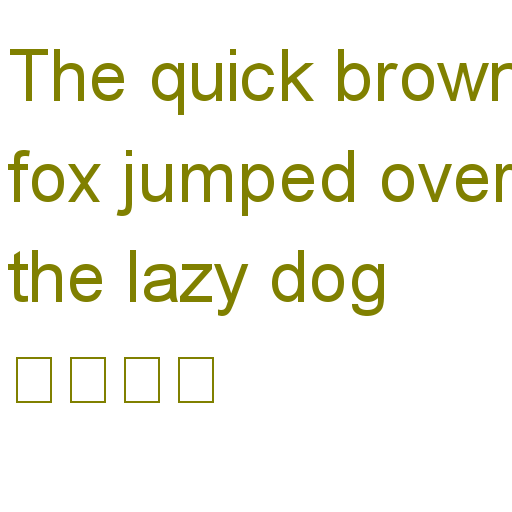
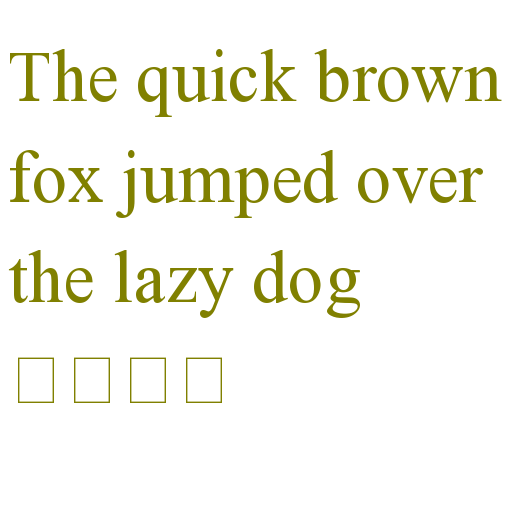
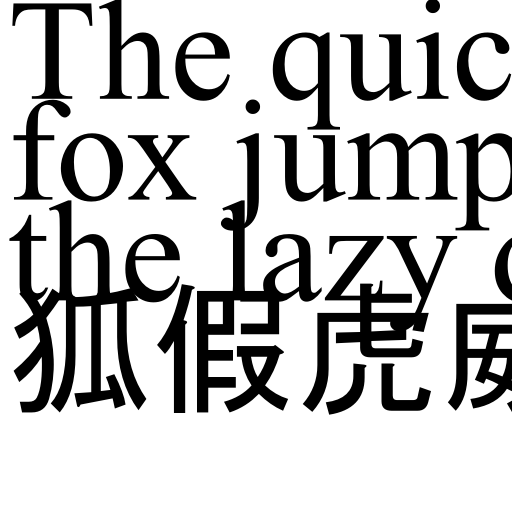

Whoa. That Ah, but the color issue is related to #648. There's confusion about whether stroke color or fill color applies to text. I'm tempted to just make whatever AGG does the "correct" way and make sure the other backends match. |
|
I'm curious how Celiagg is ending up with a sans-serif font... |
|
I'll open issues for the other stuff. Merging now. Thanks for the review |

I found the non-black color surprising because I thought Black fill color would be the default. I'm happy with QPainter overall - apart from the issue with space between lines.
Isn't this a known issue with font usage on windows + celiagg? |
Yes, but I would still expect celiagg to use the same font as |
2 participants


This is a small program which collects timing information for key drawing methods of
GraphicsContextfor each [available] backend and then optionally generates a report in HTML format.I'd like to continue to improve this program, but I wanted to keep this initial PR under 500 LOC. Ideas for future improvements: