Acknowledgements & Notes: This project is a derivative work based on xueqiu/rdr. Many thanks to the original authors and the community! On top of it, we added an
exportcommand (supporting JSON/HTML) and extended thekeyscommand (to include expiry, type, and size in bytes).
👉 If you find this project helpful, please consider giving it a Star on GitHub!
RDR (redis data reveal) is a tool to parse Redis RDB files. Compared with redis-rdb-tools, RDR is implemented in Go and runs much faster (on my PC, a 5GB RDB file takes less than 2 minutes).
Requires Go 1.21+ (recommended to use the toolchain 1.23.2 as declared in go.mod). On first build, you must generate embedded assets.
# 1) Install go-bindata (ensure the binary is in your PATH)
$ go install github.com/go-bindata/go-bindata/...@latest

# 2) Download dependencies
$ go mod tidy

# 3) Generate embedded static assets and templates (MUST do)
$ go generate ./...$ go build -o bin/rdr .PS> go build -o bin/rdr.exe .# Build Windows binary from Linux
$ GOOS=windows GOARCH=amd64 CGO_ENABLED=0 go build -o bin/rdr-windows-amd64.exe .
# Build Linux/amd64 and Linux/arm64 binaries from Linux
$ GOOS=linux GOARCH=amd64 CGO_ENABLED=0 go build -o bin/rdr-linux-amd64 .
$ GOOS=linux GOARCH=arm64 CGO_ENABLED=0 go build -o bin/rdr-linux-arm64 .
# Build Linux binary from Windows (PowerShell)
PS> setx GOOS linux
PS> setx GOARCH amd64
PS> setx CGO_ENABLED 0
PS> go build -o bin/rdr-linux-amd64 .Note: If you skip go generate ./..., the files static/static.go and views/views.go will be missing, causing go build to fail.
Latest binaries are attached to GitHub Releases. Use the following direct links to always fetch the latest version:
- Linux amd64: https://github.com/ericdong2012/rdr/releases/latest/download/rdr-linux-amd64
- Linux arm64: https://github.com/ericdong2012/rdr/releases/latest/download/rdr-linux-arm64
- macOS amd64: https://github.com/ericdong2012/rdr/releases/latest/download/rdr-darwin-amd64
- macOS arm64 (Apple Silicon): https://github.com/ericdong2012/rdr/releases/latest/download/rdr-darwin-arm64
- Windows amd64 (.exe): https://github.com/ericdong2012/rdr/releases/latest/download/rdr-windows-amd64.exe
Checksums: https://github.com/ericdong2012/rdr/releases/latest/download/checksums.sha256
NAME:
   rdr - a tool to parse redis rdbfile

USAGE:
   rdr [global options] command [command options] [arguments...]

VERSION:
   v0.0.1

COMMANDS:
     dump     dump statistical information of rdbfile to STDOUT
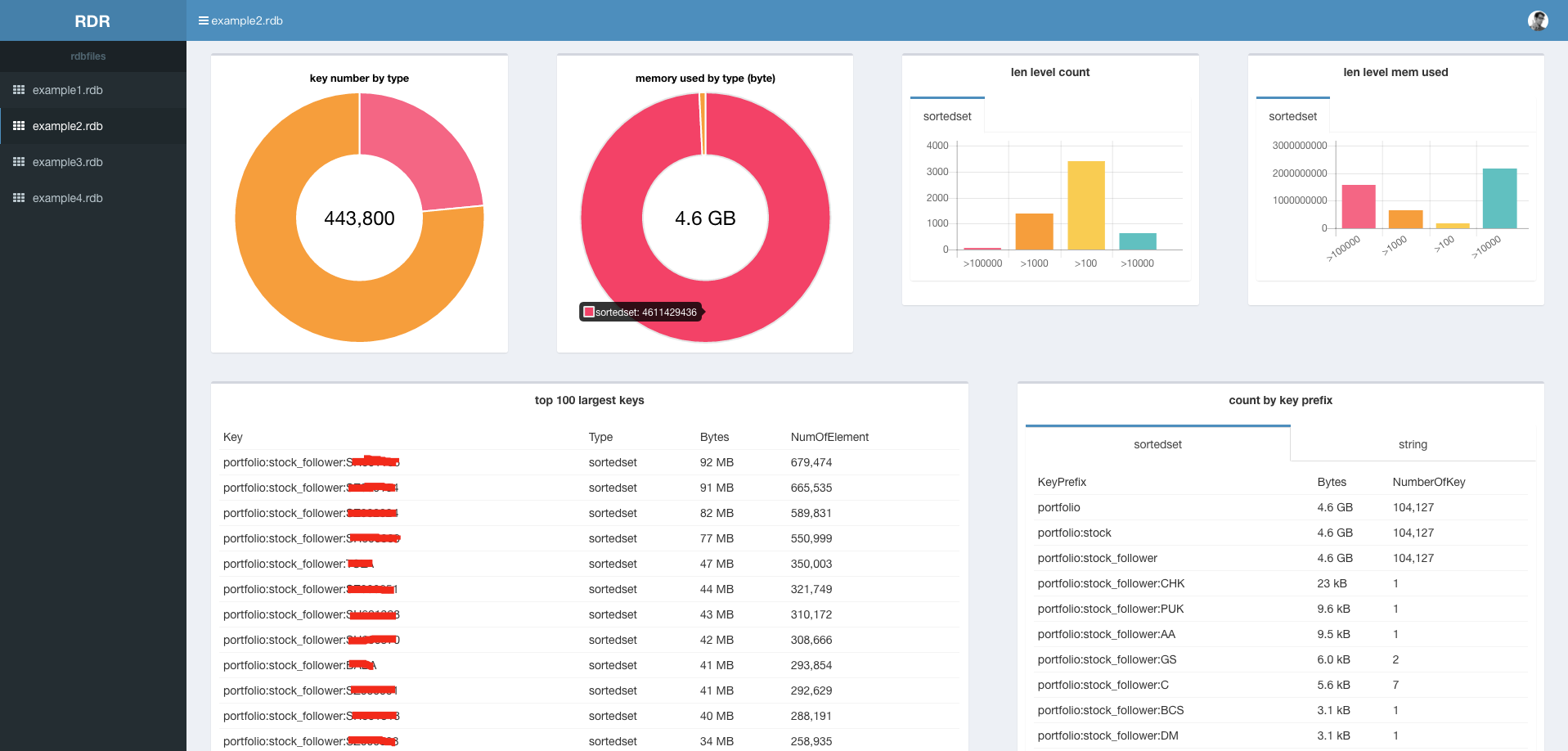
     show     show statistical information of rdbfile by webpage
     export   export statistical information of rdbfile to local JSON or HTML
     keys     get all keys from rdbfile
     help, h  Shows a list of commands or help for one command

GLOBAL OPTIONS:
   --help, -h     show help
   --version, -v  print the version
NAME:
   rdr show - show statistical information of rdbfile by webpage

USAGE:
   rdr show [command options] FILE1 [FILE2] [FILE3]...

OPTIONS:
   --port value, -p value  Port for rdr to listen (default: 8080)
Example:
$ ./rdr show -p 8080 *.rdbNote: memory usage is approximate.
NAME:
   rdr dump - dump statistical information of rdbfile to STDOUT

USAGE:
   rdr dump FILE1 [FILE2] [FILE3]...
Quick example:
$ ./rdr dump a.rdb b.rdb > out/report.jsonNote: When multiple RDB inputs are provided, the output is a JSON array; each element contains fields like LargestKeys, LargestKeyPrefixes, TypeBytes/TypeNum, TotleNum/TotleBytes, LenLevelCount, and SlotBytes/SlotNums.
NAME:
   rdr export - export statistical information of rdbfile to local JSON or HTML

USAGE:
   rdr export [command options] FILE1 [FILE2] [FILE3]...

OPTIONS:
   --format value, -f value  export format: json or html (default: "json")
   --out value, -o value     output file path (single input) or directory (multiple inputs)
Quick example:
$ ./rdr export -f html -o out/report.html a.rdb b.rdbExamples and notes:
# 1) Export JSON (default format=json). With multiple RDB inputs, the output is a JSON array:
$ ./rdr export -o out/report.json a.rdb b.rdb
# Output: exported JSON -> out/report.json

# 2) Export HTML (single input). If -o ends with .html, output that file; static assets go to sibling static/:
$ ./rdr export -f html -o out/report.html a.rdb
# Output: exported HTML -> out/report.html
# Files: out/report.html and out/static/...

# 3) Export HTML (multiple inputs). Prefer using a directory for -o; each RDB gets a .html; static assets go to static/ under that directory:
$ ./rdr export -f html -o out/reports a.rdb b.rdb
# Output:
# exported HTML -> out/reports/a.rdb.html
# exported HTML -> out/reports/b.rdb.html
# Files: out/reports/static/...

# 4) Notes:
# - --out/-o is required.
# - --format/-f supports json or html, default json.
# - When -o does not exist:
#   * If it ends with .html, treat as a file (create its parent directory if needed).
#   * Otherwise treat as a directory and create it.
# - If -o is an existing directory, or there are multiple inputs, export as a directory (one .html per input).
# - HTML export writes static assets to static/ for offline viewing.NAME:
rdr keys - get all keys from rdbfile
USAGE:
rdr keys FILE1 [FILE2] [FILE3]...
OPTIONS:
--with-expire, -e Only output entries that have an expiry
--no-expire Only output entries that do NOT have an expiry
Default (no filter flag): output ALL entries.
Output format is always:
key, <type>, <size_in_bytes>, <expiry(2006-01-02T15:04:05.000000)>
If there is no expiry, it prints the trailing comma after size:
key, <type>, <size_in_bytes>,
Quick examples:
# 1) Output all entries (both with and without expiry), CSV format
$ ./rdr keys a.rdb

# 2) Only entries with expiry
$ ./rdr keys -e a.rdb b.rdb

# 3) Only entries without expiry
$ ./rdr keys --no-expire a.rdb
Example (default output):
$ ./rdr keys example.rdb | head -3
some:key, string, 1234,
another:key, hash, 2048, 2025-11-27T18:23:50.752000
set:key, set, 512,
With filter "only with expiry":
$ ./rdr keys -e example.rdb | head -1
EXPRESS_COMPANY_SCORE_TIME:Guangdong:Guangzhou:Huadu:Jilin:Siping, string, 920, 2025-11-27T18:23:50.752000
Multiple inputs:
$ ./rdr keys a.rdb b.rdb
# Output prints all entries of the provided RDB files in order; by default there is no filename prefixThis project is under the Apache v2 License. See the LICENSE file for the full license text.
If you think this project is useful, you can buy me a coffee:

Note: Please place your WeChat payment QR image at docs/wechat_pay.png so that it renders correctly in readers.