Web Advanced Space Developer Interface
Full documentation: https://wasdi.readthedocs.io/en/latest/
- What is WASDI?
- WASDI Libraries
- WASDI Applications
- Software Architecture
- Processor Engines
- Launcher Operations
- High-Level Code Architecture
- Repository Structure
- Developer Instructions
- Mini-WASDI
WASDI is an Earth Observation (EO) Platform designed to let scientists concentrate on science — not on IT infrastructure. It provides a cloud environment where EO processing algorithms can be developed locally and then deployed as scalable cloud services with minimal effort.

- Getting started tutorial: WASDI Tutorial
- User manual: Signing Up and Signing In
The idea is that the application Developer can work using the same language and tool as is used to, integrating in the code the appropriate WASDI library. Once the code is ready to be tested, it can be zipped and uploaded in WASDI that will turn it in a scalable cloud service, with fast access to all the relevant Satellite data archives.
The application owner can always decide if the app is private, if share it with specific user or make it public. The owner can also decide if the application is available for free or if the users have to pay for it.
The WASDI web-application itself is where the users can search and execute the EO applications that has been published. It offers also functionalities to:
- Search Space and not Space Data Catalogues
- Import images in a workspace of the platform
- Search for future image acquisitions
- Browse a workspace, visualize the products in 2D or 3D maps, view the processing history of the workspace with all the operations executed and logs of the applications ran
- Export the results downloading, or sharing WxS addresses or push in an external (s)ftp server
- Upload and run SNAP graphs (often called Workflows in WASDI)
- Upload and apply your own SLD styles for visualization
- Share with other users applications, workflows, styles, workspaces
- Save pre-defined set of parameters to run specific applications
- Run a Jupyter Notebook directly in your Workspace in the cloud
WASDI supports a huge set of Data, including:
- Sentinel-1
- Sentinel-2
- Sentinel-3
- Sentinel-5P
- Sentinel-6
- Landsat-5
- Landsat-7
- Landsat-8
- Envisat
- VIIRS
- ERA5
- Copernicus Atmosphere Services
- Copernicus Data Store
- Copernicus DEM
- ESA Land Use / Land Cover
- JRC GHSL
- Ecostress
- Copernicus Marine
- SWOT
- GFS
- Globathy
The system supports also custom and private Data Providers.
Application Developers guide to search and ingest data by code
WASDI provides client libraries for the most common scientific and development languages:
| Language | Install | Documentation | Tutorial |
|---|---|---|---|
| Python | pip install wasdi |
waspy | Python Tutorial |
| JavaScript | npm install wasdi |
wasdi-js | JavaScript Tutorial |
| TypeScript | npm i wasdi |
wasdi-ts | TypeScript Tutorial |
| Java | Download ZIP | WasdiLib | Getting Started |
| C# | Install-Package WasdiLib -Version 0.0.3.5 |
C# Docs | C# Tutorial |
| Octave | Download ZIP | Octave Docs | Octave Tutorial |
The only adaptation needed to make existing code run on WASDI is to never use hard-coded file paths. Instead, always resolve paths through the library:
# Python example
import wasdi
file_path = wasdi.getPath("myfile.tif")
This single change is all that is required. The code will continue to work on your local machine exactly as before — and once dragged and dropped into WASDI, it automatically becomes a scalable cloud service.
Beyond path resolution, the WASDI libraries offer a rich set of features:
- Search EO and non-EO images — query satellite data catalogues
- Ingest images into the workspace — download and stage data for processing
- Run another application — chain WASDI apps together via
wasdi.executeProcessor() - Run a SNAP workflow — execute ESA SNAP graph processing tool chains
- Mosaic / subset images — spatial operations on raster data
Every WASDI application, regardless of the language it is written in:
- Takes a JSON file as input — parameters are passed as a structured JSON object
- Produces output files in the workspace — typically geospatial files such as GeoTIFF, GeoPackage, or Shapefile
- Can optionally store a JSON payload in the database — a structured result object accessible after execution
All apps, in all supported languages, can interoperate with each other using:
wasdi.executeProcessor("another-app-id", oParameters)This makes it straightforward to build complex multi-step pipelines by composing independent applications.
Please refer to the documentation center for the tutorials for different languages and also look our Python Cookbook section, with many ready-to-use code snippets for common operations.
WASDI uses a configurable persistence layer. The default in production is MongoDB, but the system can also be configured to run with H2 (embedded, suited for development/testing) or SQLite.
The main entities stored in the database are:
| Entity | Description |
|---|---|
| Users | Registered WASDI accounts |
| Workspaces | Isolated environments where users store data and run processing |
| Processors | WASDI applications (user-provided code packaged as a service) |
| Workflows | ESA SNAP graph processing workflows; the XML files exported by SNAP can be uploaded directly into WASDI |
| Styles | SLD files uploaded by users to control the visual rendering of images on the map |
| ProductWorkspace | The list of products (files) present in each workspace |
| ProcessWorkspace | A task — any operation executed in a workspace (app execution, workflow run, download, mosaic, etc.) |
ProcessWorkspace is the central concept of the WASDI execution model. When a user triggers any operation, the Web Server creates a ProcessWorkspace record in the database with state CREATED. The Scheduler picks it up as soon as capacity is available and drives it through its lifecycle.
Possible states:
| State | Meaning |
|---|---|
CREATED |
The task has been registered and is waiting to be scheduled |
WAITING |
The task is queued, waiting for a dependency or a free slot |
READY |
The task has been assigned to a node and is about to start |
RUNNING |
The task is actively executing |
DONE |
The task completed successfully |
ERROR |
The task terminated with an error |
STOPPED |
The task was explicitly stopped by the user |
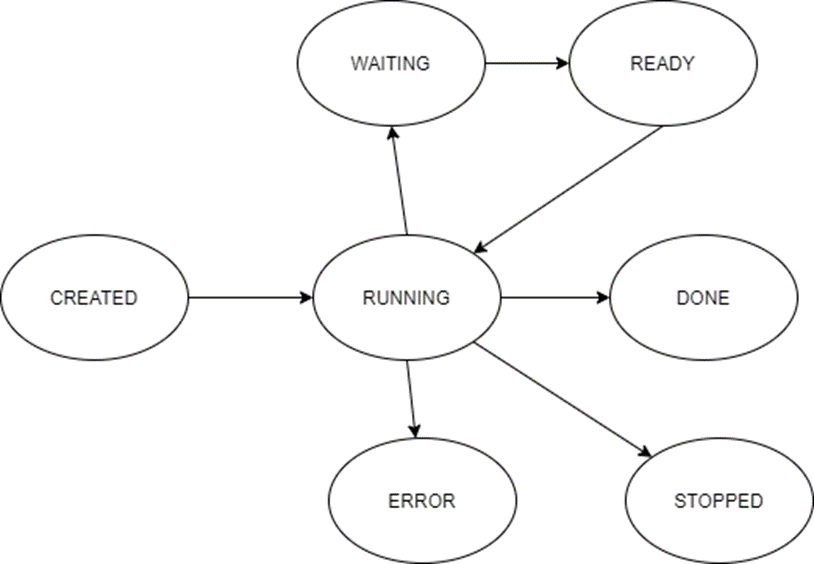
See the Synchronous and Asynchronous operations documentation for details on how to work with process states from your application code.
┌─────────────┐        ┌───────────┐        ┌────────────┐
│   Client    │──────▶│  Server   │──────▶ │ Database   │
│  (Angular)  │        │  (Java)   │        │ (MongoDB)  │
└─────────────┘        └───────────┘        └────────────┘
                                                   ▲
                              ┌────────────────────┘
                              │
                        ┌─────────────┐
                        │  Scheduler  │
                        │   (Java)    │
                        └──────┬──────┘
                               │ spawns
                        ┌──────▼──────┐
                        │  Launcher   │
                        │   (Java)    │
                        └──────┬──────┘
                               │ wraps
                  ┌────────────┴────────────┐
                  │                         │
          Built-in operations        User application
          (download, mosaic,         (Python / Java /
           run workflow…)             C# / JS / TS…)

                        ┌─────────────┐
                        │   Trigger   │
                        │   (Java)    │
                        └─────────────┘
                     (scheduled app execution)
| Component | Tech | Role |
|---|---|---|
| WASDI Shared | Java | Shared library included by all other Java components. Declares all entities, the data layer, and the view models. Also provides cross-cutting utility functions (logging, HTTP helpers, Docker utilities, etc.) |
| Server | Java | REST API — the main entry point for the web UI and the WASDI libraries. Handles authentication, workspace management, and registers operations as ProcessWorkspace records |
| Scheduler | Java | Continuously monitors the database and orchestrates operations across nodes. Picks up CREATED tasks, assigns them to an available node, and updates process states |
| Launcher | Java | Started by the Scheduler for each operation. Executes built-in operations directly (download, mosaic, subset, SNAP workflow execution). For user applications it acts as a wrapper: it sets up the runtime environment and then runs the user-provided code as a separate process |
| Trigger | Java | Lightweight component responsible for starting WASDI applications on a schedule (cron-style) |
| Client | Angular | Browser-based web UI — lets users manage workspaces, browse products, launch processors, visualise results on a map, and monitor process states |
| Component | Tech | Role |
|---|---|---|
| dbUtils | Java | Command-line maintenance tool packaged as a JAR (dbUtils.jar). Built as a secondary Maven artifact associated with the Launcher. Used to perform administrative and maintenance tasks on the database directly from the command line |
| ogcprocesses | Java | Additional server that exposes all WASDI applications through the OGC API — Processes 2.0 standard, enabling interoperability with any OGC-compliant client |
| openeo-java-server | Java | Additional server that implements the openEO API, allowing openEO workflows and applications to be executed inside WASDI |
| Component | Version (from codebase) | Role | Links |
|---|---|---|---|
| MongoDB | driver 5.6.1 |
Default production database. Stores all WASDI entities (users, workspaces, processors, process tasks, etc.) | mongodb.com |
| Nitrite DB (no2) | 4.3.2 |
Embedded NoSQL alternative to MongoDB, useful for lightweight or standalone deployments | nitrite-java |
| SQLite | JDBC driver 3.47.1.0 |
Embedded SQL alternative for development or single-node deployments | sqlite.org |
| Keycloak | 21.0.2 |
Optional identity and access management server. Can be used to store users and passwords and to handle authentication and single sign-on | keycloak.org |
| RabbitMQ | AMQP client 5.29.0 |
Message broker used for asynchronous communication between the Server, the Launcher, and the Client | rabbitmq.com |
| GeoServer | manager lib 1.7.0 |
Used to publish geospatial images and expose them via OGC web services (WMS, WFS, WCS) | geoserver.org |
| Nexus Repository | — | Artifact repository used to store and distribute WASDI application packages | sonatype.com/nexus |
| Docker | java client 3.4.0 |
Container runtime used to isolate and execute WASDI applications. Different execution modes are available (covered in a dedicated section) | docker.com |
The execution of third-party applications is the real core of WASDI. The basic idea is that a user uploads a ZIP file containing their code, and WASDI automatically turns it into a scalable cloud service — typically by building a Docker container from the uploaded code.
The abstraction that models this is the WasdiProcessorEngine interface, defined in the Launcher.
| Method | Description |
|---|---|
deploy |
Install a new processor for the first time (build image, register, etc.) |
run |
Execute the processor for a given set of parameters |
redeploy |
Update an existing processor (rebuild/re-register) |
delete |
Remove the processor and all associated resources |
libraryUpdate |
Update only the WASDI client library inside the processor environment |
stopApplication |
Stop a currently running processor instance |
environmentUpdate |
(Optional) Trigger a full environment update (OS packages, runtime, etc.) |
refreshPackagesInfo |
(Optional) Refresh the packagesInfo.json file that describes installed packages — relevant for engines that expose a remote package manager |
WASDI processors are not tied to a single runtime. The architecture supports multiple execution targets:
- Docker — the standard production target; each app runs in an isolated container on the WASDI node
- Local — runs directly on the host (or MiniWasdi container) without building a Docker image
- Kubernetes (k8s) — supported in other branches; follows the same
WasdiProcessorEngineinterface - EOEPCA — delegates execution to an external EOEPCA platform instance
WasdiProcessorEngine  (abstract — launcher)
│
├── LocalProcessorEngine
│     Runs Python apps directly on the host using a per-processor
│     virtual environment managed by uv. No Docker image required.
│     Type: local_python312
│
└── DockerProcessorEngine  (abstract)
      Base for all Docker-based engines. Handles container lifecycle
      (start, stop, inspect) via the Docker Java client.
      │
      ├── JupyterNotebookProcessorEngine
      │     Runs Jupyter notebooks inside a Docker container.
      │     Type: jupyter-notebook
      │
      ├── EoepcaProcessorEngine
      │     Delegates processor execution to an external EOEPCA node.
      │     Type: eoepca
      │
      └── PipProcessorEngine
            Docker engine with pip package manager support. Builds a
            container at deploy time and manages pip packages remotely.
            │
            ├── UbuntuPython37ProcessorEngine  (legacy)
            │     Ubuntu + Python 3.7 + ESA SNAP. The original WASDI
            │     processor type, still supported.
            │     Type: ubuntu_python37_snap
            │
            └── DockerBuildOnceEngine
                  Variant that builds the Docker image once and stores
                  it in the Nexus registry. Nodes pull the pre-built
                  image instead of building it locally.
                  │
                  ├── PythonPipProcessorEngine2
                  │     Updated pip-based Python engine (v2).
                  │     Type: python_pip_2
                  │
                  ├── PipOneShotProcessorEngine
                  │     Pip-based engine where the container is started
                  │     fresh for each execution (one-shot model).
                  │     Type: pip_oneshot
                  │     │
                  │     └── Python312Ubuntu24ProcessorEngine
                  │           Python 3.12 on Ubuntu 24.
                  │           Type: python312
                  │
                  ├── Ubuntu20Pip2ProcessorEngine
                  │     Pip v2 engine on Ubuntu 20 (Focal).
                  │     Type: python_pip_2_ubuntu_20
                  │
                  ├── Java17Ubuntu22ProcessorEngine
                  │     Java 17 applications on Ubuntu 22.
                  │     Type: java_17_Ubuntu_22
                  │
                  ├── CSharpProcessorEngine
                  │     C# / .NET applications.
                  │     Type: csharp
                  │
                  ├── IDL2ProcessorEngine
                  │     IDL (Interactive Data Language) applications.
                  │     Type: ubuntu_idl372
                  │
                  ├── OctaveProcessorEngine
                  │     GNU Octave applications.
                  │     Type: octave
                  │
                  ├── CondaProcessorEngine
                  │     Python applications using a Conda environment.
                  │     Type: conda
                  │
                  └── PersonalizedDockerProcessor
                        User-supplied Dockerfile. The user provides their
                        own full Docker image definition.
                        Type: personalized_docker
When a user uploads a ZIP file, the deploy procedure follows these steps:
- Check existence — verify that no processor with the same name exists yet for this user
- Create processor folder — create
<basePath>/processors/<appName>/on the node filesystem - Unzip user code — extract the uploaded ZIP into the processor folder
- Copy template files — copy the contents of
<basePath>/dockertemplate/<processorType>/into the processor folder (Dockerfile, executor scripts, bundled libraries, etc.) - Build Docker image — trigger
docker buildin the processor folder, producing a tagged image - Push to registry — push the resulting image to one or more configured registries (typically the WASDI Nexus instance)
- Register — record the processor metadata and image reference in the database
On subsequent nodes (for DockerBuildOnceEngine-based engines), the build step is skipped: the node pulls the pre-built image directly from the registry.
Each processor type has a dedicated template folder under processorTypes/. Its contents are copied into the new processor folder at deploy time.
| Template folder | Processor type | Key template files |
|---|---|---|
python312/ |
python312 |
Dockerfile, wasdiProcessorExecutor.py |
pipOneShotDocker/ |
pip_oneshot |
Dockerfile, wasdiProcessorExecutor.py |
wasdiPythonPip2/ |
python_pip_2 |
Dockerfile, wasdiProcessorExecutor.py, wasdiProcessorServer.py |
wasdiUbuntuFocalPython/ |
python_pip_2_ubuntu_20 |
Dockerfile, wasdiProcessorExecutor.py |
wasdiPython37Docker/ |
ubuntu_python37_snap |
Dockerfile, executor scripts |
wasdiCondaDocker/ |
conda |
Dockerfile, wasdiProcessorExecutor.py, wasdiProcessorServer.py, myProcessor.py |
wasdiJava17Docker/ |
java_17_Ubuntu_22 |
Dockerfile, jwasdilib-0.7.4.jar, wasdiProcessorServer.py |
wasdiCSharpDocker/ |
csharp |
Dockerfile, WasdiLib.dll, WasdiRunner.dll, wasdiProcessorServer.py |
wasdiIDLDocker/ |
ubuntu_idl372 |
Dockerfile, wasdiProcessorServer.py, runProcessor.sh, docker-entrypoint.sh |
wasdiOctaveDocker/ |
octave |
Dockerfile, jwasdilib-0.7.4.jar, wasdiProcessorServer.py |
wasdiJupyterNotebookDocker/ |
jupyter-notebook |
Dockerfile, traefik_notebook.yml.j2 |
eoepcaDocker/ |
eoepca |
Dockerfile, appDeployBody.json.j2, wasdi-processor.cwl.j2, eoepcaProcessorExecutor.py |
local_python312/ |
local_python312 |
wasdiProcessorExecutor.py (no Docker build) |
The two recurring scripts are:
wasdiProcessorServer.py— a small HTTP server (Flask/Gunicorn) that wraps the user code and exposes a/runendpoint; used by container-based types where the container stays alive across callswasdiProcessorExecutor.py— a one-shot runner that launches the user code directly and exits; used by one-shot types where a fresh container is started per execution
The Launcher is a Java process started by the Scheduler. It accepts three arguments:
| Argument | Description |
|---|---|
-o <OPERATION> |
Uppercase operation code (e.g. RUNPROCESSOR, DOWNLOAD) — must match a value in wasdi.shared.LauncherOperations |
-p <guid> |
GUID of the ProcessWorkspace record created by the Server. The parameters for the operation are read from the database by this GUID |
-c <path> |
Path to the WASDI JSON configuration file (e.g. /etc/wasdi/config.json) |
- The Server receives a user request, creates a
ProcessWorkspacerecord in the database with stateCREATED, and stores the operation parameters there - The Scheduler detects the
CREATEDrecord, picks a node, and spawns the Launcher process passing-o,-p, and-c - The Launcher reads its arguments, loads the config, and fetches the
ProcessWorkspacefrom the database - It sets the
ProcessWorkspacestate toRUNNING - It instantiates the correct
Operationsubclass using reflection — the class name is derived from the operation code (first letter uppercased, rest lowercase) under the packagewasdi.operations - It calls
operation.executeOperation(parameter, processWorkspace) - On success the state transitions to
DONE; on failure toERROR
All operation classes live in wasdi.operations, extend Operation, and their names match the LauncherOperations enum value with only the first letter capitalised.
| Operation code | Class | Description |
|---|---|---|
DOWNLOAD |
Download |
Downloads an EO product from a data provider. Checks for an existing local copy first, then delegates to the appropriate DataProvider implementation. Registers the file in the database and adds it to the workspace |
INGEST |
Ingest |
Ingests a file already present on the node into a WASDI workspace |
SHARE |
Share |
Copies a product from one workspace to another on the same node. Adds the file to the target workspace in the database |
PUBLISHBAND |
Publishband |
Publishes a file (or a specific band) to GeoServer so it can be visualised on the map via WMS/WCS |
GRAPH |
Graph |
Executes an ESA SNAP graph processing workflow (XML) on one or more input products |
MOSAIC |
Mosaic |
Creates a mosaic from multiple input raster files |
SUBSET |
Subset |
Extracts a spatial subset from a raster product |
MULTISUBSET |
Multisubset |
Applies a subset operation to multiple input products in one task |
REGRID |
Regrid |
Reprojects or resamples a raster product to a target grid |
DEPLOYPROCESSOR |
Deployprocessor |
Deploys a user-uploaded application on the local node using the appropriate WasdiProcessorEngine |
RUNPROCESSOR |
Runprocessor |
Executes a deployed processor (user application) on the node |
RUNIDL |
Runidl |
Runs an IDL application; extends Runprocessor with IDL-specific handling |
REDEPLOYPROCESSOR |
Redeployprocessor |
Re-deploys a processor (update) on the local node |
DELETEPROCESSOR |
Deleteprocessor |
Removes a processor and its associated files/image from the local node |
LIBRARYUPDATE |
Libraryupdate |
Updates only the WASDI client library inside a running processor container |
ENVIRONMENTUPDATE |
Environmentupdate |
Triggers a full environment update inside a processor container (OS packages, runtime dependencies, etc.) |
FTPUPLOAD |
Ftpupload |
Uploads a workspace file to a remote FTP server |
COPYTOSFTP |
Copytosftp |
Copies a workspace file to the user's SFTP folder on the local node. Supports a user;path syntax to target another user's account |
LAUNCHJUPYTERNOTEBOOK |
Launchjupyternotebook |
Starts a Jupyter Notebook container for interactive use |
TERMINATEJUPYTERNOTEBOOK |
Terminatejupyternotebook |
Stops and removes a running Jupyter Notebook container |
KILLPROCESSTREE |
Killprocesstree |
Forcefully kills a running process and its entire child process tree |
READMETADATA |
Readmetadata |
Reads and stores metadata from a product file |
SEN2COR |
Sen2cor |
Runs the ESA Sen2Cor atmospheric correction processor on a Sentinel-2 product |
WASDI follows a Model → ViewModel → View / Controller pattern across its Java codebase. The shared library (wasdishared) provides the model, data layer, and view models; the web server (wasdiwebserver) provides the controllers (REST resources); the Angular client is the view.
┌──────────────────────────────────────────────────────────┐
│                      wasdishared                         │
│                                                          │
│  business/       ← Entities (Model)                      │
│  data/           ← Repositories (Data Layer)             │
│  viewmodels/     ← View Models                           │
│  config/         ← Configuration classes                 │
│  parameters/     ← Launcher operation parameters         │
│  payloads/       ← Launcher operation payloads           │
│  queryexecutors/ ← EO catalogue query adapters           │
│  packagemanagers/← Pip / Conda package manager impls     │
│  geoserver/      ← GeoServer utilities                   │
│  rabbit/         ← RabbitMQ utilities                    │
│  utils/          ← General-purpose utilities             │
└──────────────────────────────────────────────────────────┘
         ▲                        ▲
         │                        │
┌────────┴──────────┐   ┌─────────┴──────────┐
│   wasdiwebserver  │   │      launcher       │
│  it.fadeout.rest  │   │   wasdi.operations  │
│    .resources/    │   │                     │
│  (Controllers)    │   │  (Operation classes)│
└───────────────────┘   └─────────────────────┘
Entities are plain Java classes serialised to and from the database. Key entities:
| Entity class | Description |
|---|---|
users/ |
User accounts and authentication data |
Workspace |
An isolated working environment per user |
processors/ |
Processor (application) metadata |
ProcessWorkspace |
A task instance — any operation executed in a workspace |
ProductWorkspace |
A product (file) registered in a workspace |
SnapWorkflow |
An ESA SNAP graph processing workflow |
Style |
An SLD style file for map rendering |
Schedule |
A cron-based scheduled app execution |
Node |
A WASDI computing node |
Organization, Project, Subscription |
Multi-tenancy and billing entities |
Each entity has a corresponding *Repository class. The repository hierarchy is:
*Repository          ← public API (one per entity)
    │
    ├── interfaces/I*RepositoryBackend   ← interface defining backend operations
    │
    ├── mongo/       ← MongoDB implementation
    ├── no2/         ← Nitrite (no2) implementation
    └── sqlite/      ← SQLite implementation
The active backend is selected via the dbProvider field in WasdiConfig. All higher-level code depends only on the public *Repository class, never on a specific backend.
View models are the data structures exchanged between the Server and its clients (web UI, libraries). Each view model is designed to match exactly what a particular client screen or library method needs. A single entity may have multiple view models (e.g. a full detail VM and a compact list VM), and a single VM may aggregate data from several entities.
All configuration is read from a single JSON file (path passed as -c to the Launcher, or configured in Tomcat for the Server). The JSON is deserialised directly into strongly-typed configuration classes. The resulting object is available globally as WasdiConfig.Current.
parameters/— one parameter class per Launcher operation. The web server serialises the parameters to the database when creating aProcessWorkspace; the Launcher reads them back before executing the operation.payloads/— payload classes for the result of each operation. After execution, the Launcher can write a structured JSON payload back to theProcessWorkspacerecord, queryable by the client
Each supported EO data catalogue has its own QueryExecutor sub-package. The factory (QueryExecutorFactory) instantiates the correct executor based on the requested data provider. Currently supported catalogues include:
Copernicus Dataspace · CREODIAS 2 · CDS (Copernicus Climate) · ADS · DLR · EODC · ESA · Globathy · GPM · JRC · LP DAAC · LSA Data Center · ONDA · Planet · ProbaV · SINA · SkyWatch · Sobloo · Terrascope · VIIRS · web plugin
| Sub-package / class | Purpose |
|---|---|
runtime/RunTimeUtils |
Abstracts execution of external processes. Depending on configuration can issue host shell calls or Docker API calls — the rest of the codebase calls this without caring about the actual runner |
docker/ |
Docker Java client wrappers (build, push, run, stop, inspect) |
log/ |
Logging utilities (wraps Log4j) |
gis/ |
GIS / raster helper functions |
jinja/ |
Jinja2-style template rendering (used for Dockerfiles and config templates) |
HttpUtils |
HTTP client helpers |
MailUtils |
Email notification helpers |
JsonUtils |
JSON serialisation/deserialisation helpers |
WasdiFileUtils / ZipFileUtils / TarUtils |
File and archive utilities |
The web server exposes a JAX-RS REST API.
The API are documented here https://wasdi.readthedocs.io/en/latest/Api/index.html
Each resource class handles one area of the API:
| Resource class | Base path | Responsibility |
|---|---|---|
AuthResource |
/auth |
Login, logout, session management |
WorkspaceResource |
/ws |
Workspace CRUD and sharing |
ProductResource |
/product |
Product (file) management within a workspace |
ProcessorsResource |
/processors |
Processor (app) registration, deploy, run, search |
ProcessWorkspaceResource |
/process |
Query and manage ProcessWorkspace task records |
ProcessingResources |
/processing |
Trigger built-in processing operations (mosaic, subset, etc.) |
CatalogResources |
/catalog |
EO catalogue search (proxies to QueryExecutors) |
OpenSearchResource |
/search |
OpenSearch catalogue interface |
OpportunitySearchResource |
/searchorbit |
Orbit-based opportunity search |
WorkflowsResource |
/workflows |
SNAP workflow upload and execution |
StyleResource |
/styles |
SLD style upload and management |
ImagesResource |
/images |
Published band / image layer management |
NodeResource |
/node |
Computing node management |
PackageManagerResource |
/packageManager |
Remote package manager operations on processors |
ProcessorsMediaResource |
/processormedia |
Processor logo / media management |
ProcessorParametersTemplateResource |
/processorParamTempl |
Saved parameter templates for processors |
OrganizationResource |
/organizations |
Organisation management |
ProjectResource |
/projects |
Project management |
SubscriptionResource |
/subscriptions |
Subscription and billing |
CreditsPackageResource |
/credits |
Credits package management |
ConsoleResource |
/console |
Real-time process log streaming |
FileBufferResource |
/filebuffer |
Chunked file upload/download buffer |
PrinterResource |
/print |
Map printing utilities |
AdminDashboardResource |
/admin |
Admin-only operations (user management, metrics, queue management) |
WasdiResource |
/wasdi |
General WASDI info and health check endpoints |
A quick reference to every top-level folder in this repository.
| Folder | Description |
|---|---|
MiniWasdi |
Dockerfile and seed data for the MiniWASDI all-in-one container. Not built locally — copy the pre-built JARs wasdi-mini-server.jar, launcher-1.0.jar, and scheduler-1.0.jar into MiniWasdi/dataToCopy/ before building the image. |
configuration |
Ansible-compatible Jinja2 templates (.j2) for all service configuration files. Used by the CI/CD chain to generate environment-specific configs at deploy time. |
docker |
Docker images used in the WASDI CI/CD chain, with heavy use of templates. Covers base images and per-service containers. |
docs |
Source of the Read the Docs documentation centre — available at wasdi.readthedocs.io. |
jenkinsfile |
Jenkins declarative pipeline definitions for building, testing, and deploying every WASDI component. |
keycloak |
Customised Keycloak login/account theme used by WASDI deployments. |
launcher |
Java source code for the Launcher micro-service, which pulls tasks from the queue and executes them inside processor containers. |
libraries |
One subfolder per WASDI client library: |
• c#wasdilib — .NET / C# library |
|
• idlwasdilib — IDL library |
|
• jswasdilib — JavaScript library |
|
• jwasdilib — Java client library |
|
• matlabwasdilib — MATLAB library |
|
• octavewasdilib — GNU Octave library |
|
• waspy — Python library (main) |
|
• waspyTEST — test suite for the Python library |
|
• wpasdi — WordPress plugin |
|
• wpsclient — WPS client library |
|
ogcprocesses |
Optional server implementing the OGC Processes API 2.0 on top of WASDI. |
openeo-java-server |
Optional server that lets users run openEO scripts inside WASDI. |
processorCommon |
Shared files (base scripts, entrypoints, utilities) included in every processor engine template. |
processorTypes |
One subfolder per supported processor type. Each contains the files the engine uses to auto-generate the application Docker image (or equivalent artefact). |
scheduler |
Java source code for the Scheduler micro-service, which monitors the database, assigns tasks to nodes, and manages capacity. |
scripts |
Utility shell scripts for maintenance, deployment, and development tasks. |
service/updateMetric |
Service used in federated WASDI installations to probe the health and metrics of remote nodes. |
test |
JMeter test plans for end-to-end API and operation testing. |
utils |
Maven POM for the optional dbUtils command-line tool (database inspection and maintenance). |
wasdishared |
Java library (wasdishared) shared by the Launcher, Scheduler, and Web Server. Contains domain model, data-access layer, query executors, and business logic. |
wasditrigger |
Code for the WASDI Trigger service, which lets users schedule WASDI applications on a time or event basis. |
wasdiwebserver |
Main WASDI REST server source code. |
- Java 21 (JDK)
- Maven 3.x
- A running database — MongoDB locally, a cloud-hosted instance, a Docker container (
docker run -p 27017:27017 mongo), or SQLite for the simplest setup - (Optional) Eclipse IDE for Java EE Developers or VS Code with the Extension Pack for Java
All server-side projects are Maven modules declared in the root pom.xml. Each module's pom.xml uses the ${revision} property inherited from the parent. You must set this variable when running Maven — either on the command line or in your IDE run configuration.
Build the full project from the repo root:
mvn clean install -Drevision=1.0Build a single module (e.g. wasdiwebserver):
cd wasdiwebserver
mvn clean install -Drevision=1.0
The modules must be built in dependency order. The parent pom declares them in the correct order, so a full build from the root always works. If you need to build only a subset, the dependency order is:
wasdishared → launcher / wasdiwebserver / scheduler / wasditrigger / ogcprocesses / openeo-java-server
WASDI is configured through a single main file: wasdiConfig.json.
For a ready-to-use starting point, use the Mini-WASDI config templates in this repository:
These templates are intentionally provided without credentials (no passwords/API keys), so they are safe to copy and customize.
You can also use configuration/wasdiConfig.json.j2 as an additional reference.
WASDI can run:
- on a single machine, or
- in a federated multi-node environment.
In federated mode:
- the main node must be named
wasdi - computational nodes can have any name
- each computational node must be installed and able to reach the main MongoDB (directly or through an SSH tunnel)
- each node must be inserted in the
nodestable in DB
Node entries should include fields such as:
nodeCode(unique node id)nodeBaseAddress(base URL)nodeDescriptionnodeGeoserverAddressdefaultProvideractivecloudProvidershared
The config always contains a mongoMain section.
- On the main node,
mongoMainpoints to the main DB. - On a computational node, define both:
mongoMain: address/credentials of the main node DBmongoLocal: local MongoDB used for node-local optimized tables
Computational nodes typically keep only a subset of tables locally (for distributed performance), for example:
processworkspaceparamsprocessorLogs
To configure the database engine to use
processorLogs= ["mongo"|"sqlite"|"no2"]
In any case WASDI will read mongoMain. For sqlite and no2 just keep the dbName="wasdi". For mongo instead add also your credentials. It supports eventually also a Mongo replica.
paths defines the base filesystem layout.
downloadRootPath is the main WASDI folder where the system creates:
- one subfolder per user
- one subfolder per workspace inside each user folder
loadBalancer is used in more complex multi-node installations.
catalogues defines which external catalogues can be queried for each platform (mission/data type) and in which order.
- WASDI tries the first provider for a query
- if it fails, it falls back to the next configured provider(s)
dataProviders declares and configures provider definitions.
- each provider has a unique code (used by
catalogues) - providers are instantiated via reflection
- for this reason each provider specifies:
queryExecutorClasspathproviderAdapterClasspath
Roles:
- Query executors are used by the server to query external catalogues
- Provider adapters are used by the launcher to download files
Each provider can reference additional sub-config files:
parserConfig(query side)adapterConfig(download side)
Depending on provider, credentials may include user, password, and/or apiKey.
Template files are provided with no credentials. We will come back to provider credentials in a dedicated section.
geoserver config is optional.
It is required only if you use image publication operations (for example publishBand).
The dockers section configures container execution and processor types.
As described in the Processor Engines section, WASDI can run processors locally, in Docker, or in Kubernetes.
In Mini-WASDI, the usual engine is LocalProcessorEngine.
In full WASDI installations, this section should include the processor templates and runtime variables for the enabled engines.
Example processor type entry:
{
  "processorType": "pip_oneshot",
  "additionalMountPoints": [],
  "commands": [],
  "environmentVariables": [
    {
      "key": "WASDI_ONLY_WS_FOLDER",
      "value": "1"
    },
    {
      "key": "WASDI_WEBSERVER_URL",
      "value": "https://YOURWASDI/wasdiwebserver/rest"
    }
  ],
  "image": "",
  "mountOnlyWorkspaceFolder": true,
  "templateFilesToExcludeFromDownload": [
    "installUserPackage.sh",
    "pip_original.txt"
  ],
  "version": ""
}The scheduler behavior is fully configuration-driven.
- without explicit queue configuration, operations go through a single queue
- the template contains a reasonable default, but queue sizing depends on available hardware
To add a dedicated queue, add one element in schedulers, for example:
{
  "name": "DOWNLOAD.LSA",
  "maxQueue": "5",
  "timeoutMs": "3600000",
  "opTypes": "DOWNLOAD",
  "opSubType": "LSA",
  "enabled": "1"
}
This creates a dedicated queue for DOWNLOAD operations with LSA subtype, allowing up to 5 parallel items.
Increasing parallelism can improve throughput, but tune carefully against CPU and RAM.
In most installations, calibrating GRAPH and RUNPROCESSOR queues is especially important.
The full list of configuration fields is documented in wasdishared/src/main/java/wasdi/shared/config/WasdiConfig.java and in the Configuration reference.
The providers below are backed by query executors in wasdishared/src/main/java/wasdi/shared/queryexecutors and represented in the Mini-WASDI template config.
Legacy providers intentionally excluded from this list: EODC, ONDA, SOBLOO.
Some additional executors (for example custom/external providers such as EXT_WEB or CLOUDFERRO) exist in code but are not pre-enabled in the default Mini-WASDI template.
| Provider | Catalogue/API link | Description | Typical credentials in dataProviders |
|---|---|---|---|
| COPERNICUS_DATASPACE | https://dataspace.copernicus.eu/ | Copernicus Data Space Ecosystem catalogue for Sentinel missions via OData search/download. | user, password |
| CREODIAS2 | https://datahub.creodias.eu/odata/v1/Products? | CREODIAS OData catalogue, widely used for Sentinel and other EO products. | user, password |
| LSA | https://www.collgs.lu/ | LSA Data Center catalogue for Sentinel-1/Sentinel-2 and dedicated products. | user, password |
| TERRASCOPE | https://services.terrascope.be/catalogue/products | Terrascope catalogue used for DEM and WorldCover access. | user, password |
| CDS | https://cds.climate.copernicus.eu/api/v2/resources | Copernicus Climate Data Store access (e.g. ERA5 workflows). | apiKey (and/or CDS account credentials, depending on adapter) |
| ADS | https://ads.atmosphere.copernicus.eu/api/v2/resources | Copernicus Atmosphere Data Store access (CAMS datasets). | apiKey (and/or ADS account credentials, depending on adapter) |
| LPDAAC | https://cmr.earthdata.nasa.gov/search/granules | NASA LP DAAC catalogue for MODIS/TERRA and related products. | user, password or token-based credential |
| ESA | https://eocat.esa.int/eo-catalogue | ESA EO-CAT integration (e.g. ERS datasets). | user, password |
| DLR | https://download.geoservice.dlr.de/WSF2019/grid.geojson | DLR provider integration for WSF products. | usually none |
| JRC | https://jeodpp.jrc.ec.europa.eu/ftp/jrc-opendata/ | JRC open-data tiles integration (static products). | usually none |
| VIIRS | https://www.ssec.wisc.edu/flood-map-demo/flood-products/ | VIIRS flood map integration and related flood products. | usually none |
| GPM | https://jsimpsonhttps.pps.eosdis.nasa.gov/imerg/gis/ | GPM IMERG precipitation products integration. | usually none |
| STATICS | https://www.wasdi.cloud/ | WASDI-hosted static files provider. | usually none |
| GFS_NRT | (custom script provider) | Near real-time GFS provider implemented via external Python executor. | depends on custom script/config |
Credential and provider selection recommendations:
- For Sentinel data, strongly configure at least one (preferably two or more) among:
- COPERNICUS_DATASPACE (Copernicus Data Space Ecosystem)
- CREODIAS2
- LSA
- For DEM and WorldCover, configure TERRASCOPE.
- For Copernicus climate/atmosphere datasets, configure the corresponding credentials:
- CDS credentials/key for CDS datasets
- ADS credentials/key for ADS datasets
- Keep credentials out of version control; inject them via environment-specific config files or deployment secrets.
- Install Eclipse IDE for Java EE Developers and the M2Eclipse Maven plugin (usually bundled)
- Clone the repository
- File → Import → Maven → Existing Maven Projects — select the repo root; Eclipse will discover all modules
- In the build/run configuration set the environment variable or system property
-Drevision=1.0 - Make sure Eclipse uses the JRE inside the JDK: Window → Preferences → Java → Installed JREs — add the JDK and set it as default
- Install the Extension Pack for Java (Microsoft)
- Open the repo root folder
- VS Code will detect the Maven projects automatically via the Java extension
- Add
"revision": "1.0"to your Maven runner settings, or pass-Drevision=1.0in the terminal build command - Use the Maven side panel to run
clean installon individual modules
Option 1 — Standalone (recommended for development):
Run it.fadeout.MiniWasdiServer as a plain Java application. The embedded Jetty server starts on port 8080 and exposes the API at:
http://localhost:8080/wasdiwebserver/rest/
Pass the config file path as a VM argument:
-DwasdiConfigFilePath=/path/to/wasdiConfig.json
Option 2 — Tomcat:
Deploy the wasdiwebserver WAR to a local Tomcat instance and configure the config file path in Tomcat's context.xml or as a JNDI resource.
Once the server is running, connect one of:
- WASDI Web Client — clone wasdi-cloud/wasdiClient2 and point it to your local server URL
- WASDI Python Library — configure
wasdi.init("/path/to/wasdi_config.json")pointing tohttp://localhost:8080/wasdiwebserver/rest/ - Any WASDI library — set the base URL to the local server in the library configuration
When you trigger an operation from the client or library, the server stores a ProcessWorkspace record in the database and logs its GUID. You can then run or debug the Launcher directly in your IDE:
- Find the GUID in the server logs (look for
ProcessWorkspace guid:or similar) - Create a run/debug configuration for
wasdi.LauncherMainwith arguments:
-o <OPERATION_CODE> -p <process_workspace_guid> -c /path/to/wasdiConfig.json
For example, to debug a processor execution:
-o RUNPROCESSOR -p fab5028a-341b-4bd3-ba7e-a321d6eb54ca -c /etc/wasdi/wasdiConfig.json
- Set breakpoints in the relevant operation class under
wasdi.operationsor in the processor engine underwasdi.processors - Start the debug session — the Launcher will pick up the
ProcessWorkspace, set its state toRUNNING, and execute the operation
Mini-WASDI is an alternative WASDI deployment based on a single container that hosts the full core system.
It is called Mini-WASDI because it includes only the essential services needed to run WASDI locally or as a small internal service.
- Server
- Scheduler
- Launcher
- SQLite as embedded database
- Client
- RabbitMQ
- MongoDB
- Keycloak
- Nexus
In Mini-WASDI, subscriptions and user authentication are disabled.
This makes it useful when you want to:
- run WASDI applications locally
- run workflows locally
- expose a lightweight internal WASDI service without deploying the full platform
Full Mini-WASDI documentation is available in this repository:
And in the documentation Center: