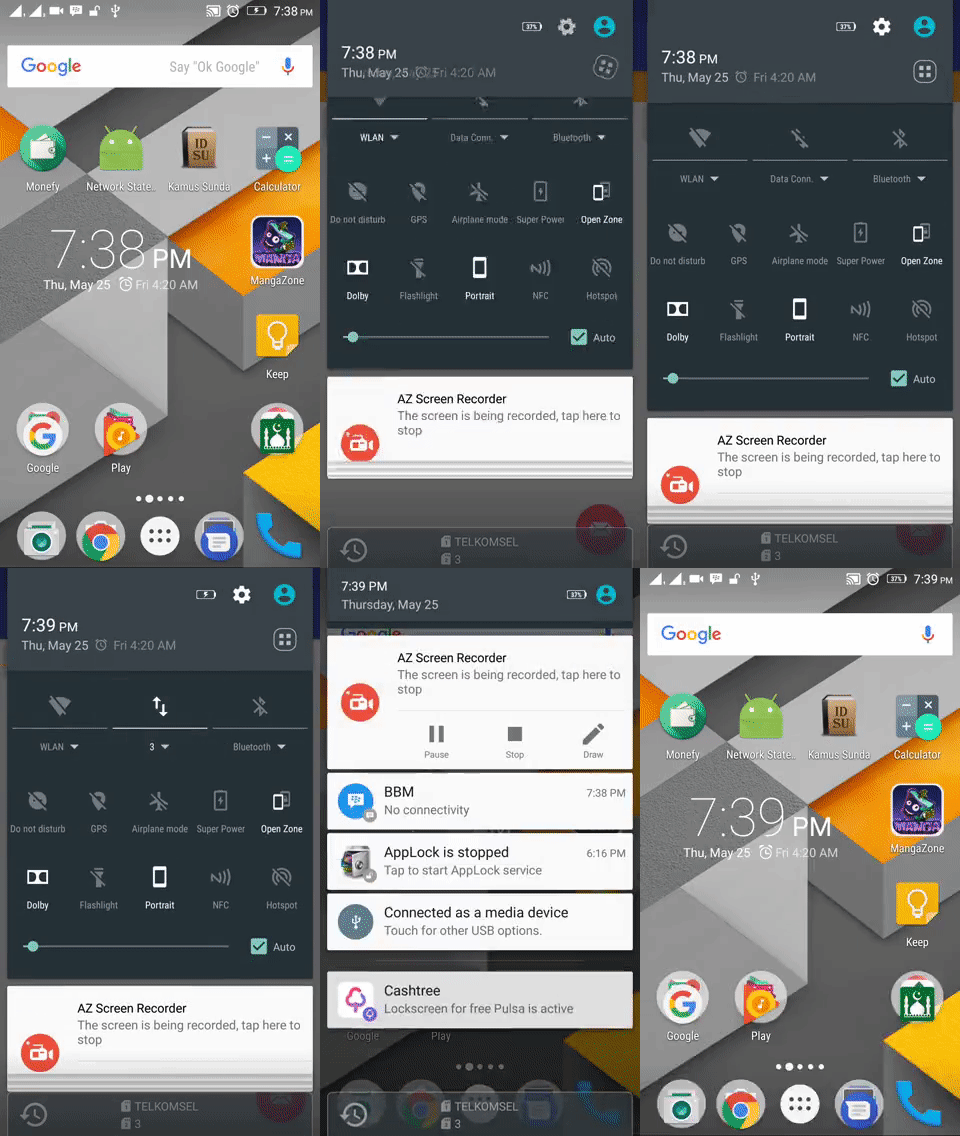
For a working implementation of this project see the sample/ folder.
- Include the following dependency in your
build.gradlefile.
compile 'com.arifian.networkstatelistener:lib:1.0.0'- Add permission to access network state to your project's manifest
<uses-permission android:name="android.permission.ACCESS_NETWORK_STATE"/>- Add
android:tag="nsl_root"toViewGroupof your main content on each layout xml
<android.support.constraint.ConstraintLayout
    xmlns:android="http://schemas.android.com/apk/res/android"
    xmlns:app="http://schemas.android.com/apk/res-auto"
    xmlns:tools="http://schemas.android.com/tools"
    android:tag="nsl_root"
    android:layout_width="match_parent"
    android:layout_height="match_parent" tools:context="com.arifian.myapplication.MainActivity">

    <TextView android:layout_width="wrap_content" android:layout_height="wrap_content"
        android:text="Hello World!" app:layout_constraintBottom_toBottomOf="parent"
        app:layout_constraintLeft_toLeftOf="parent" app:layout_constraintRight_toRightOf="parent"
        app:layout_constraintTop_toTopOf="parent" />

</android.support.constraint.ConstraintLayout>
if you use NoActionBar theme, please add one more ViewGroup inside ViewGroup that has app:layout_behavior
<android.support.constraint.ConstraintLayout
    xmlns:android="http://schemas.android.com/apk/res/android"
    xmlns:app="http://schemas.android.com/apk/res-auto"
    xmlns:tools="http://schemas.android.com/tools"
    android:layout_width="match_parent"
    android:layout_height="match_parent"
    app:layout_behavior="@string/appbar_scrolling_view_behavior"
    tools:context="com.arifian.networkstatelistener.WithNoActionBarActivity"
    tools:showIn="@layout/activity_main">

    <LinearLayout
        android:tag="nsl_root"
        android:layout_width="match_parent"
        android:layout_height="match_parent">
        <TextView
            android:layout_width="wrap_content"
            android:layout_height="wrap_content"
            android:text="Hello World!" />
    </LinearLayout>

</android.support.constraint.ConstraintLayout>- This library start listening when your app is running, but when you run your app and not connected to network it won't display any notification. Instead, you need to add the following line inside each
onResumeof your activities
@Override
protected void onResume() {
    super.onResume();

    NetworkUtil.init(this);
}Default: This library use the following default resource
<resources>
<string name="nsl_no_internet">Internet Not Connected</string>
<string name="nsl_connecting">Connecting…</string>
<color name="nsl_bg">#FFAB40</color>
<color name="nsl_text">#FFFFFF</color>
<dimen name="nsl_padding">8dp</dimen>
</resources>If you want to customize anything, just add resource to your project's resource and name it with the default corresponding name
- Faqih Arifian - faqiharifianaji@gmail.com
Copyright 2017 Faqih Arifian faqiharifianaji@gmail.com
Licensed under the Apache License, Version 2.0 (the "License"); you may not use this file except in compliance with the License. You may obtain a copy of the License at
http://www.apache.org/licenses/LICENSE-2.0
Unless required by applicable law or agreed to in writing, software distributed under the License is distributed on an "AS IS" BASIS, WITHOUT WARRANTIES OR CONDITIONS OF ANY KIND, either express or implied. See the License for the specific language governing permissions and limitations under the License.