Note: This repo is now archived and will be read-only. Please use the following repo moving forward https://github.com/glydways/ext-scalabel
See PER-164 for details
Follow the instructions in glyd/ext-Complex-YOLOv4-Pytorch repo to setup a docker, and launch the docker
For your Yolo repo to function properly with default settings, the folder kitti is located at the root of ~/ext-Complex-YOLOv4-Pytorch/dataset, please make sure the following content exists:
kitti
├── ImageSets
│   ├── test.txt
│   ├── train.txt
│   └── val.txt
└── training
    ├── calib  # calib files in this directory must exist
    ├── label_2  # label files in this directory must exist
    └── velodyne  # velodyne files in this directory must exist
However, scalabel somehow can only read data from ~/ext-Complex-YOLOv4-Pytorch/items, therefore, there are symbolic links in this repository to make it work.
Launch the cyolo4:latest docker, and run the following command inside it:
python -m scalabel.label.from_kitti --split training --data-type detection --nproc 18 --dir dataset/kitti
Outside the docker, run:
docker pull scalabel/www
echo "alias ds='docker run -it -v ~/ext-Complex-YOLOv4-Pytorch/dataset:/opt/scalabel/local-data -p 8686:8686 -p 6379:6379 scalabel/www node app/dist/main.js --config /opt/scalabel/local-data/scalabel/config.yml --max-old-space-size=8192'" >> ~/.bashrc
Note that if you cloned the parent repo to a different directory, change -v ~/ext-Complex-YOLOv4-Pytorch/dataset:/opt/scalabel/local-data to -v <your_directory>:/opt/scalabel/local-data.
If you have completed Step 5:
ds
Otherwise:
docker run -it -v ~/ext-Complex-YOLOv4-Pytorch/dataset:/opt/scalabel/local-data -p 8686:8686 -p 6379:6379 scalabel/www node app/dist/main.js --config /opt/scalabel/local-data/scalabel/config.yml --max-old-space-size=8192
Note that if you cloned the parent repo to a different directory, change -v ~/ext-Complex-YOLOv4-Pytorch/dataset:/opt/scalabel/local-data to -v <your_directory>:/opt/scalabel/local-data.
Go to: http://127.0.0.1:8686/create
Item Type: Point Cloud
Label Type: 3D Bounding Box
Check "Submit single file"
For Dataset, select the file we generated in Step 3, which should be at ~/ext-Complex-YOLOv4-Pytorch/dataset/kitti/detection_training.json.
Set tasksize to something reasonable, (say 100).
Warning: If task is too small, say 1, it would take a very long time for it to pre-process and you may have to kill the web sever, then delete dataset/items/<project_name>, and restart.
Click "Launch Dashboard" then select a row and click on the icon on column "Task Link".
To view the keyboard controls for the visualizer go here: https://github.com/glydways/scalabel/blob/master/doc/src/keyboard.rst Refer to "Point Cloud Bounding Box" Section
We released a new platform for visual learning from human feedback, called nutsh. It is in active development and it covers most of the functionalies of Scalabel with many more features.











Scalabel (pronounced "sca⋅label") is a versatile and scalable annotation platform, supporting both 2D and 3D data labeling. BDD100K is labeled with this tool.
Documentation | Overview Video | Discussion | Contributors
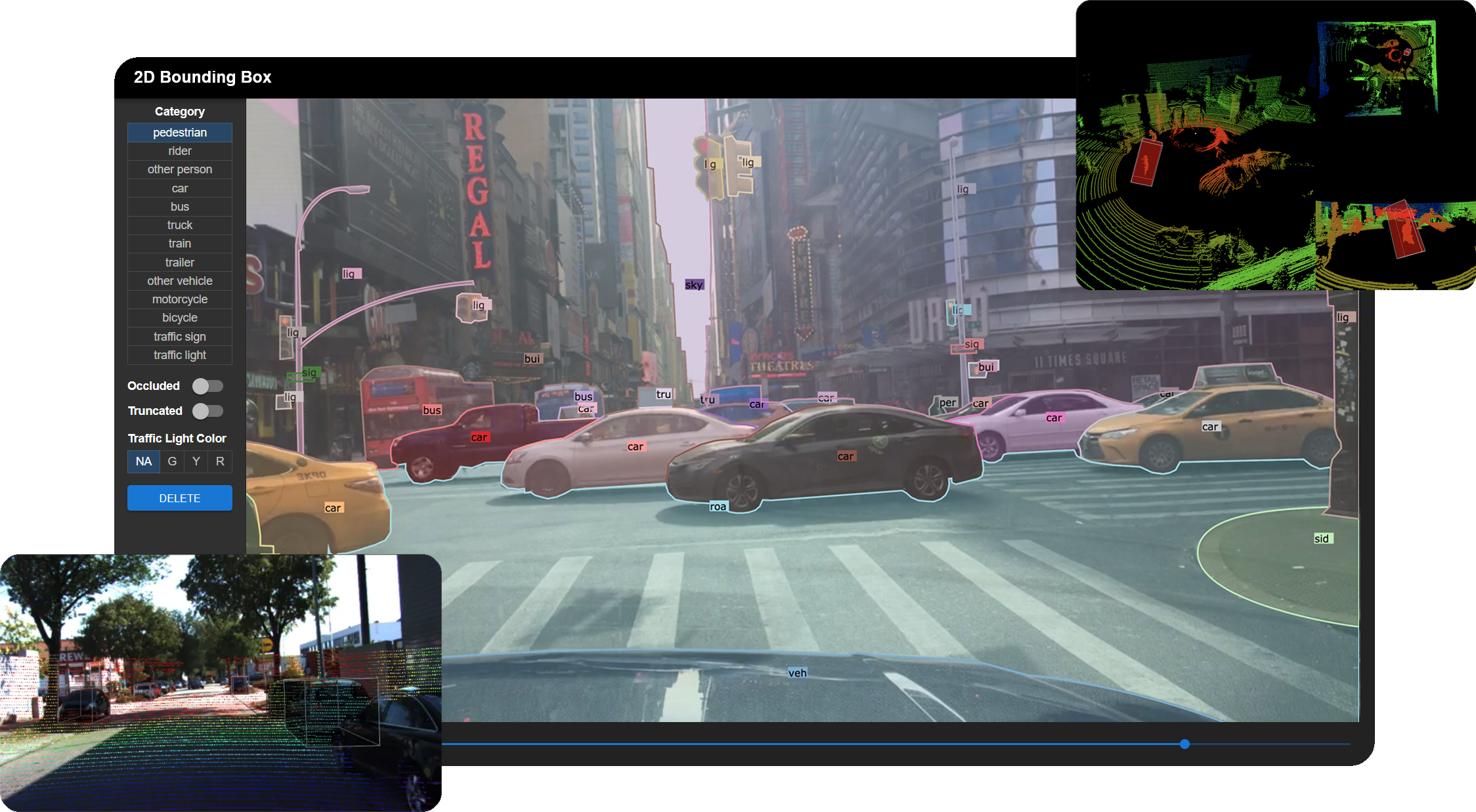
- Creating a new annotation project
- Image tagging
- 2D bounding box detection and tracking annotation
- 2D polygon/polyline and tracking annotation
- 3D bounding box detection and tracking annotation on point clouds
- Real-time session synchronization for seamless collaboration
- Semi-automatic annotation with label pre-loading
- Python API for label handling and visualization
Try Scalabel on your local machine
git clone https://github.com/scalabel/scalabel
cd scalabel

chmod +x scripts/setup_ubuntu.sh scripts/setup_osx.sh scripts/setup_local_dir.sh
# Or run scripts/setup_osx.sh for MacOS
. scripts/setup_ubuntu.sh
. scripts/setup_local_dir.sh
npm run serve
Open your browser and go to http://localhost:8686 to use Scalabel. You can check our project configuration examples to create some sample projects.
We also provide docker image to avoid installing the libraries. To pull the image:
docker pull scalabel/wwwLaunch the server through docker
docker run -it -v "`pwd`/local-data:/opt/scalabel/local-data" -p \
    8686:8686 -p 6379:6379 scalabel/www \
    node app/dist/main.js \
    --config /opt/scalabel/local-data/scalabel/config.yml \
    --max-old-space-size=8192
The Python API can be installed through pip:
python3 -m pip install -U scalabelFor other operating systems or if you wish to use the Docker image, please refer to the installation guide.
- Supporting importing popular data formats such as 2D images and 3D point clouds
- Convenient data uploading using integrated or multiple configuration files for items, categories, and attributes
- Divide a project into multiple tasks using variable task sizes
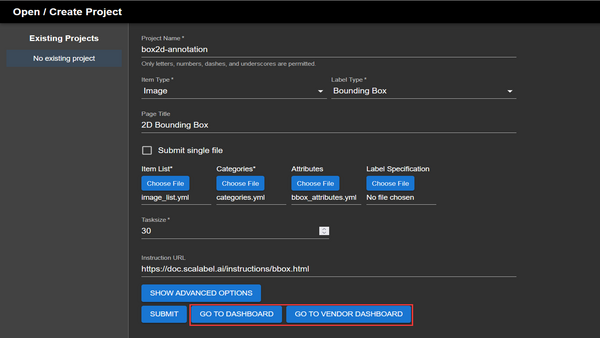
Creating a project consists of filling in the fields that specify the task, data type, and other parameters such as the task size. Item lists, categories, and attributes must be in the Scalabel format when uploaded.
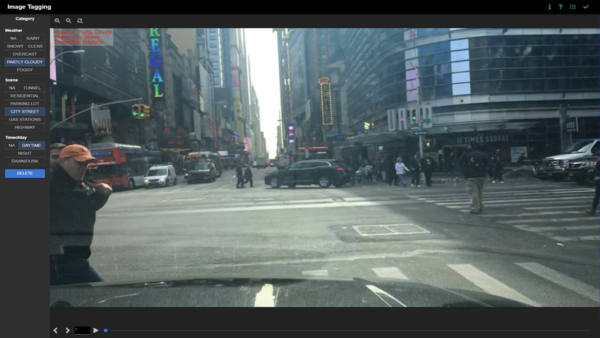
Images can be tagged with multiple attributes. Categories include weather, scene, and time of day as defaults, but can be freely customised.
- Simple click-and-drag area selection
- Group boxes into a wide range of categories
- Provides extra configurable options such as occlusion, truncation, and traffic light colours
- Tracking between keyframes
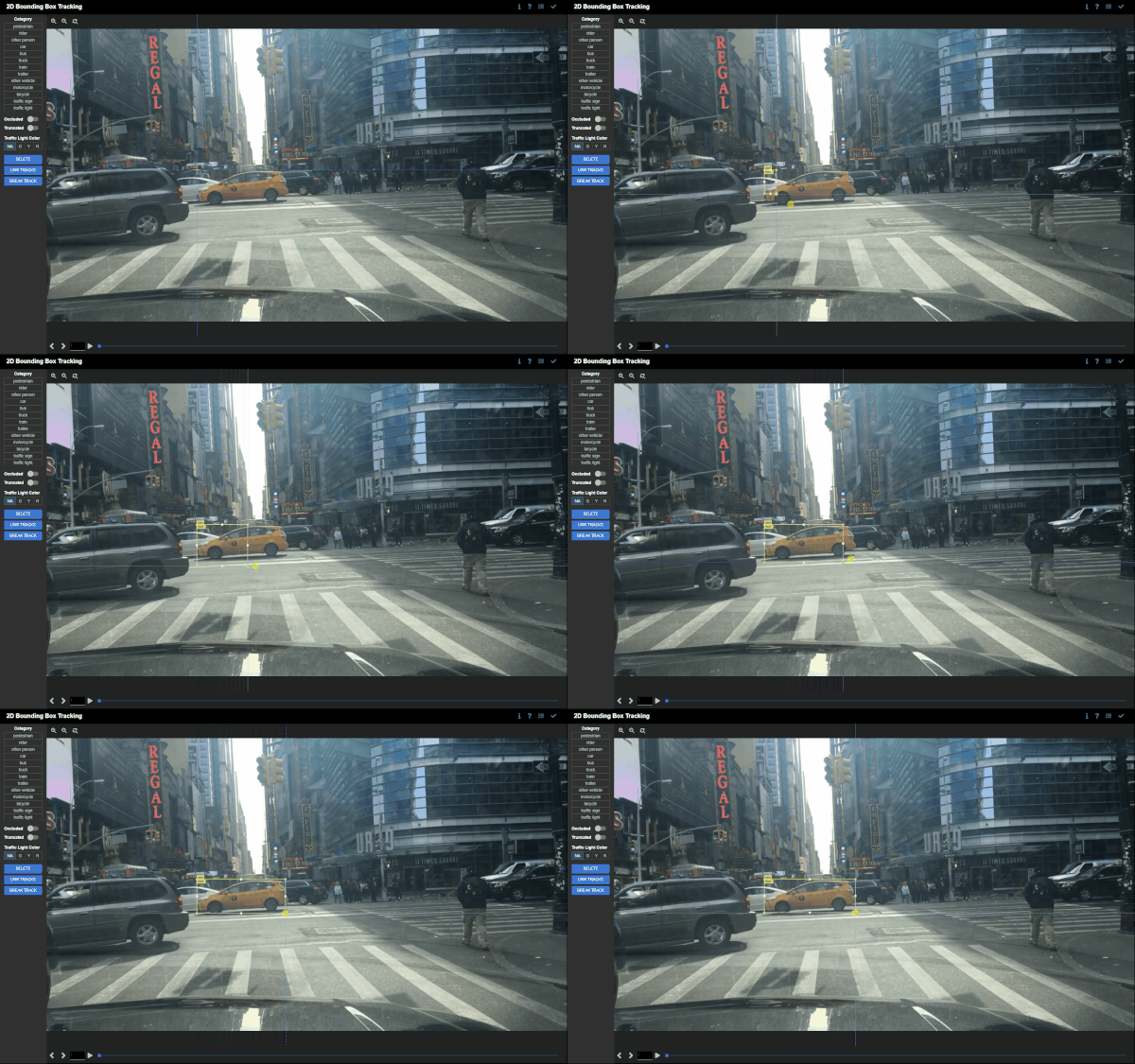
Create bounding boxes by selecting an area on the canvas. Bounding boxes can be freely adjusted and moved around. Categories and attributes of the bounding boxes can be customised. Bounding boxes can be linked between frames if the object disappears and reappears in subsequent frames. Linked bounding boxes are colour-coded to indicate the link.
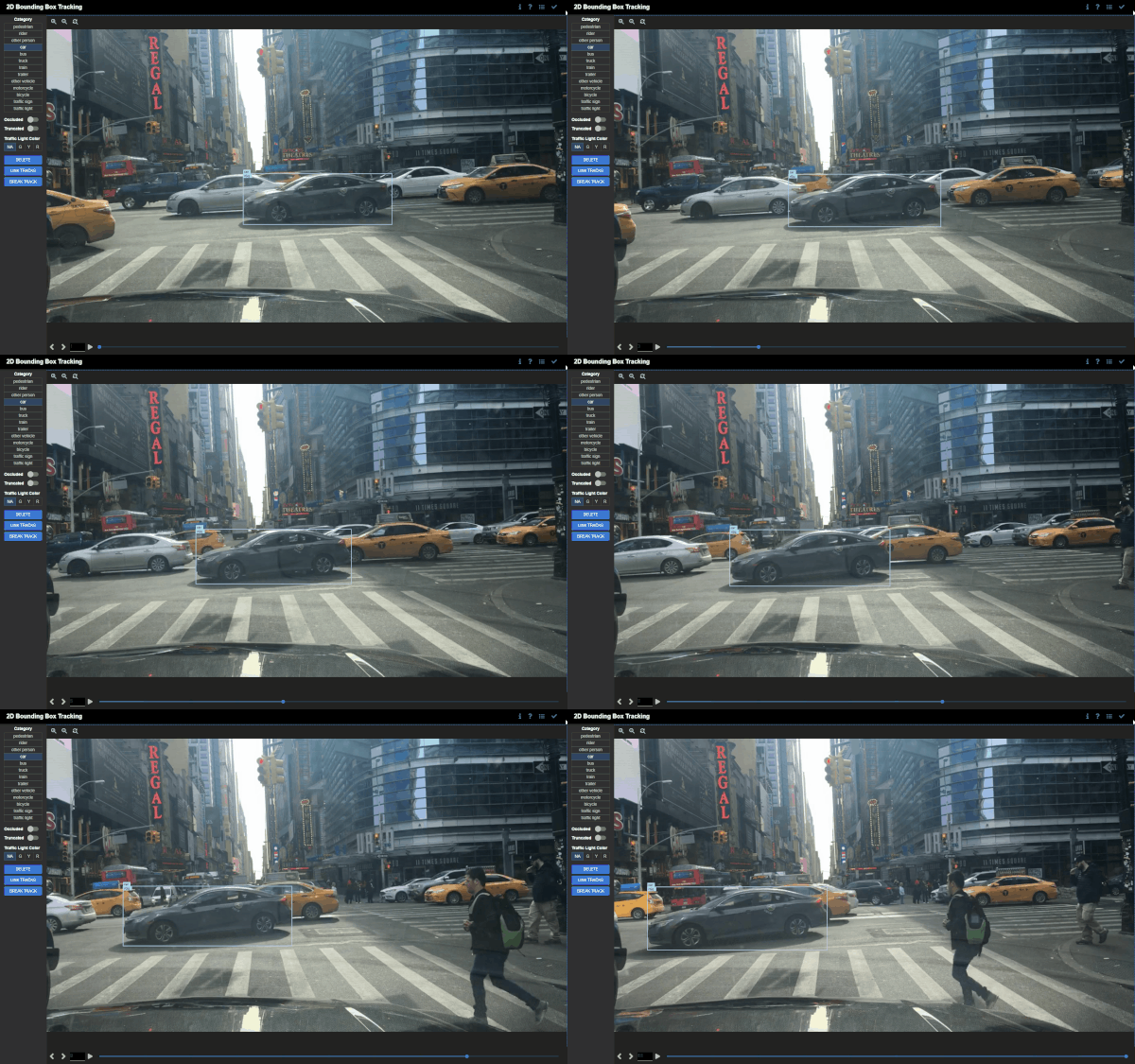
Bounding boxes are interpolated between keyframes if the position, orientation, or scale of the bounding boxes differ. This is useful for tracking objects that move between keyframes.
- Choosing between closed paths for image segmentation or open paths for lane marking
- Supporting bezier curves for precise annotation for round objects
- Tracking interpolation between keyframes
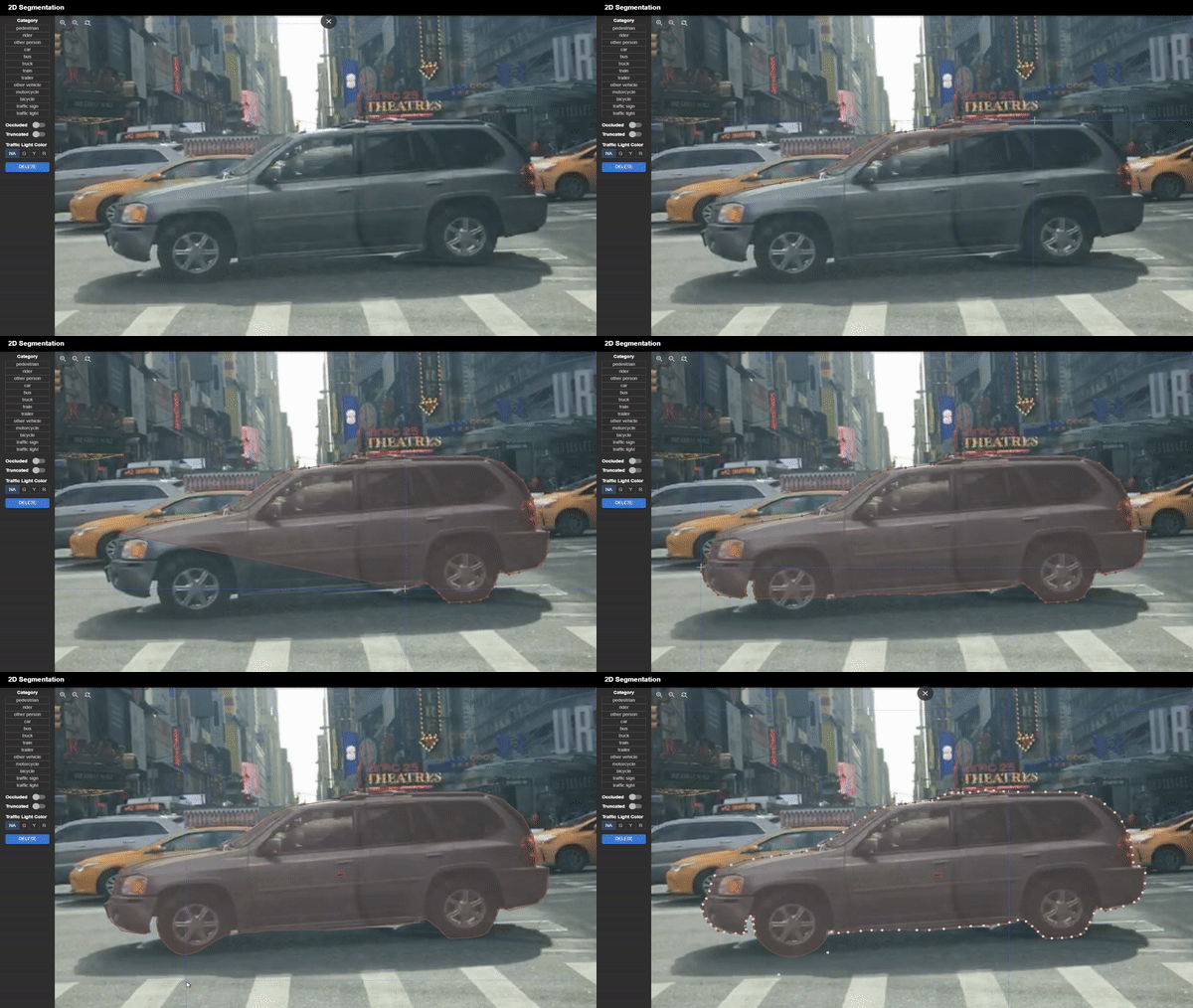
Click on multiple points on the canvas to generate vertices of a polygon. Click on the first vertex to close the polygon. Vertices can be moved around, and new vertices can be added by clicking on the midpoint of the line segment between two vertices. Creating bezier curves is also supported for smoother labeling of curved objects.
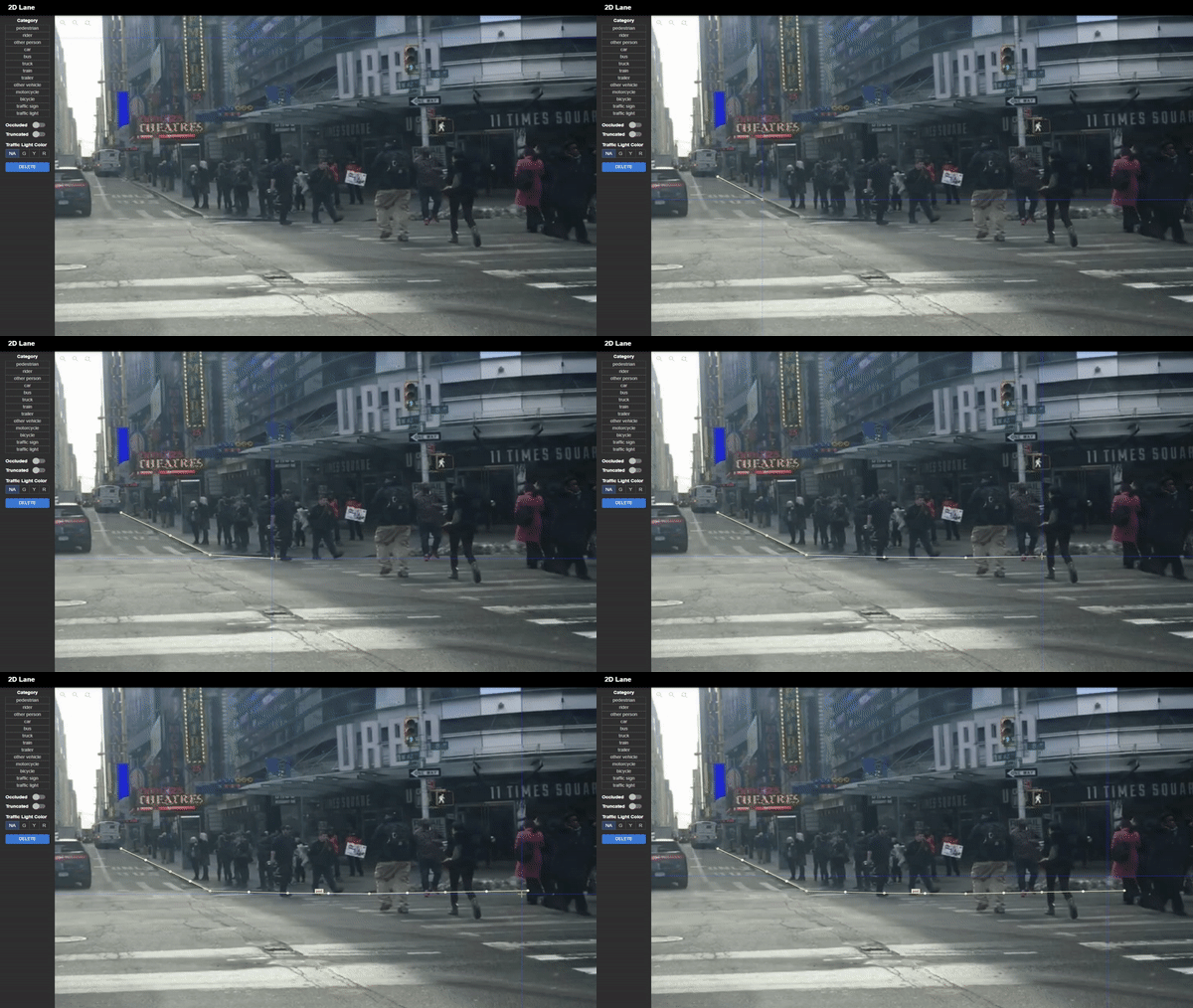
Polylines can be created for lane marking. They support the same functions as polygons, but do not have to be closed.
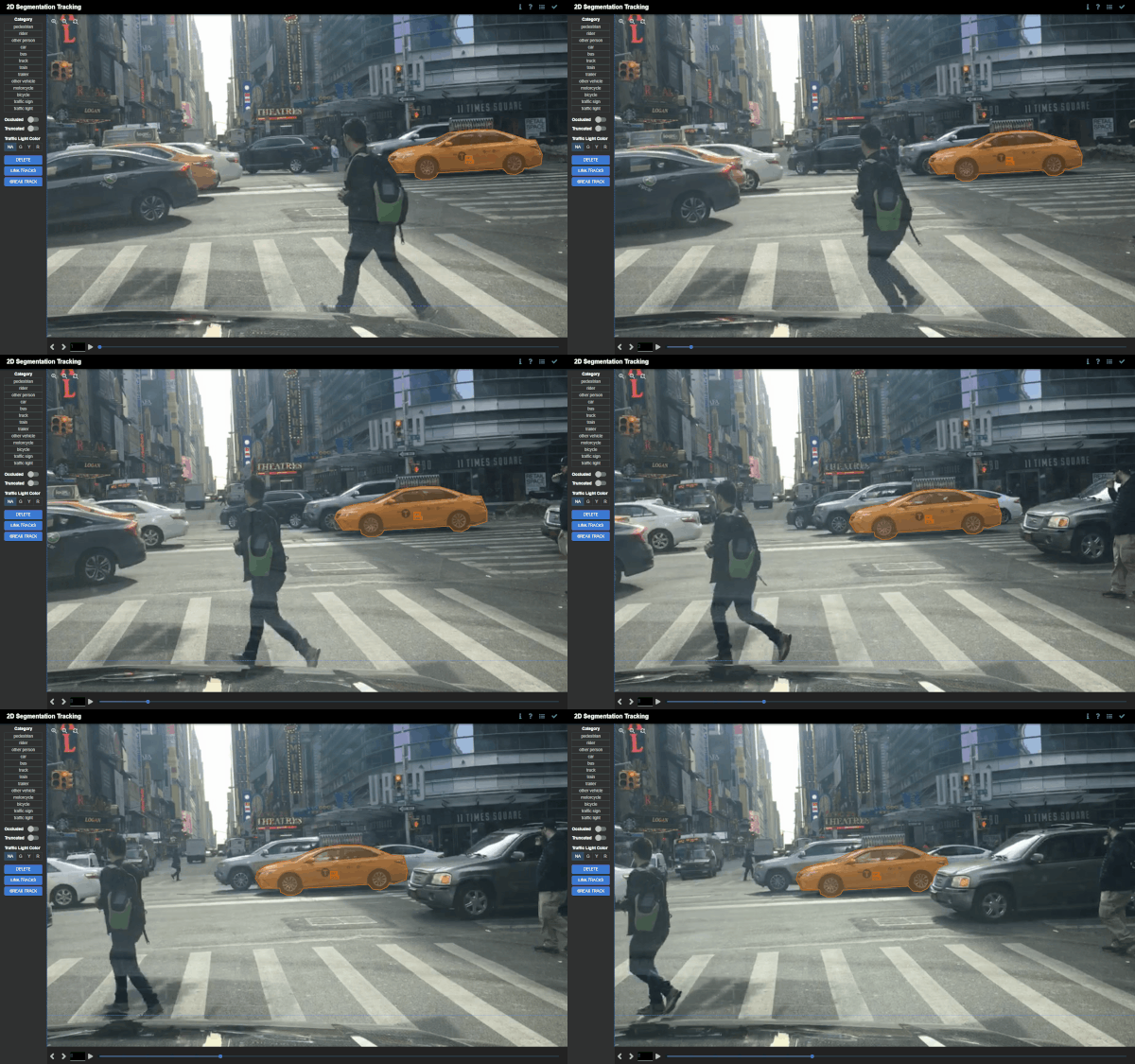
Polygons are interpolated between keyframes if the position, orientation, or scale of the polygons differ. This is useful for tracking objects that move between keyframes.
- Multi-sensor view for side-by-side comparison with corresponding 2D images
- Simple four-point click to generate 3D bounding boxes
- Supporting undo and panning functions during annotation for added precision
- Tracking interpolation between keyframes
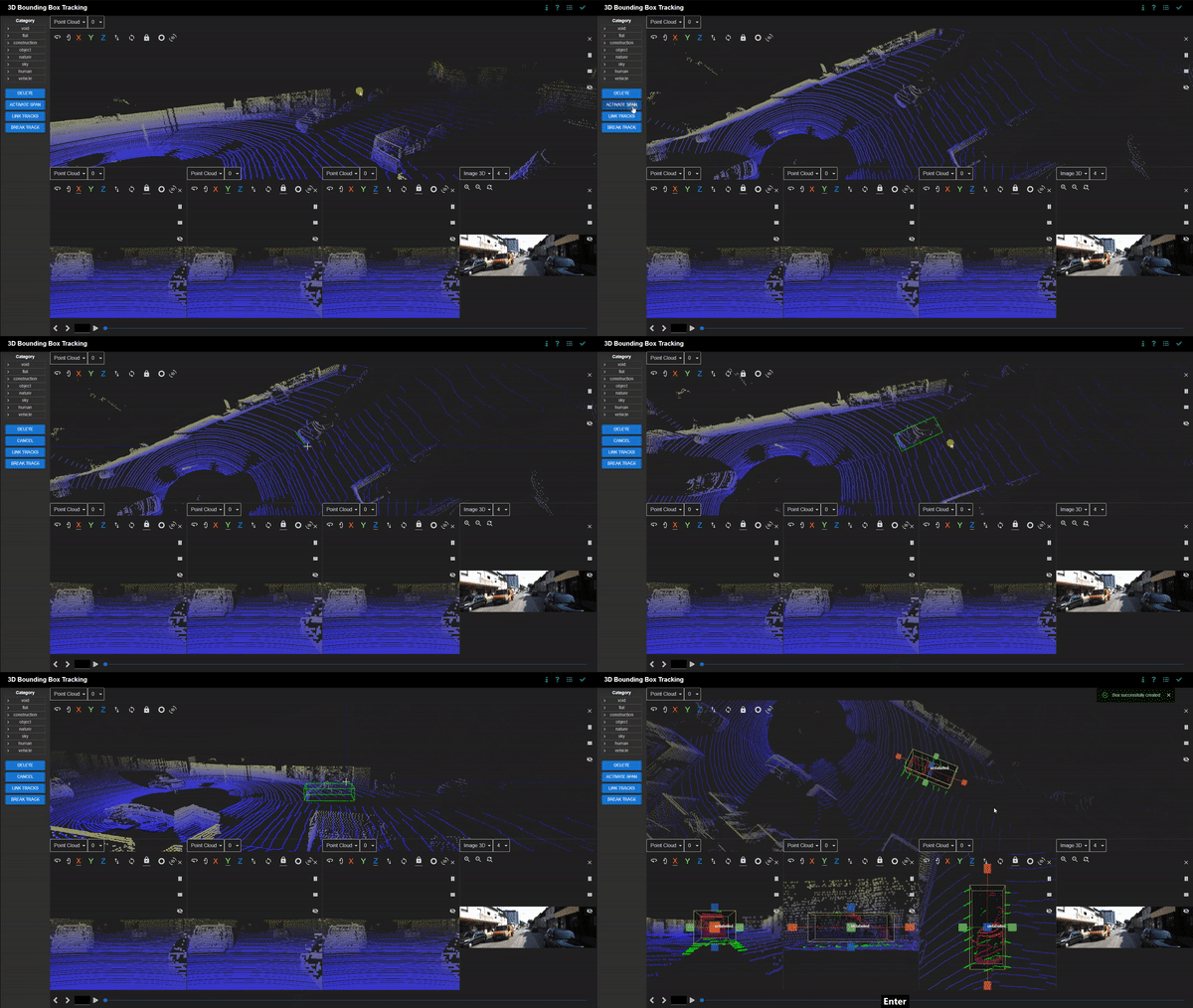
Click on the canvas to define the length, breadth, and height of the 3D bounding box. There is an in-built ground plane prediction that aligns the 3D bounding box with the ground. Bounding boxes can be freely adjusted and moved around. Categories and attributes of the bounding boxes can be customised. Bounding boxes can be linked between frames if the object disappears and reappears in subsequent frames. Linked bounding boxes are colour-coded to indicate the link.
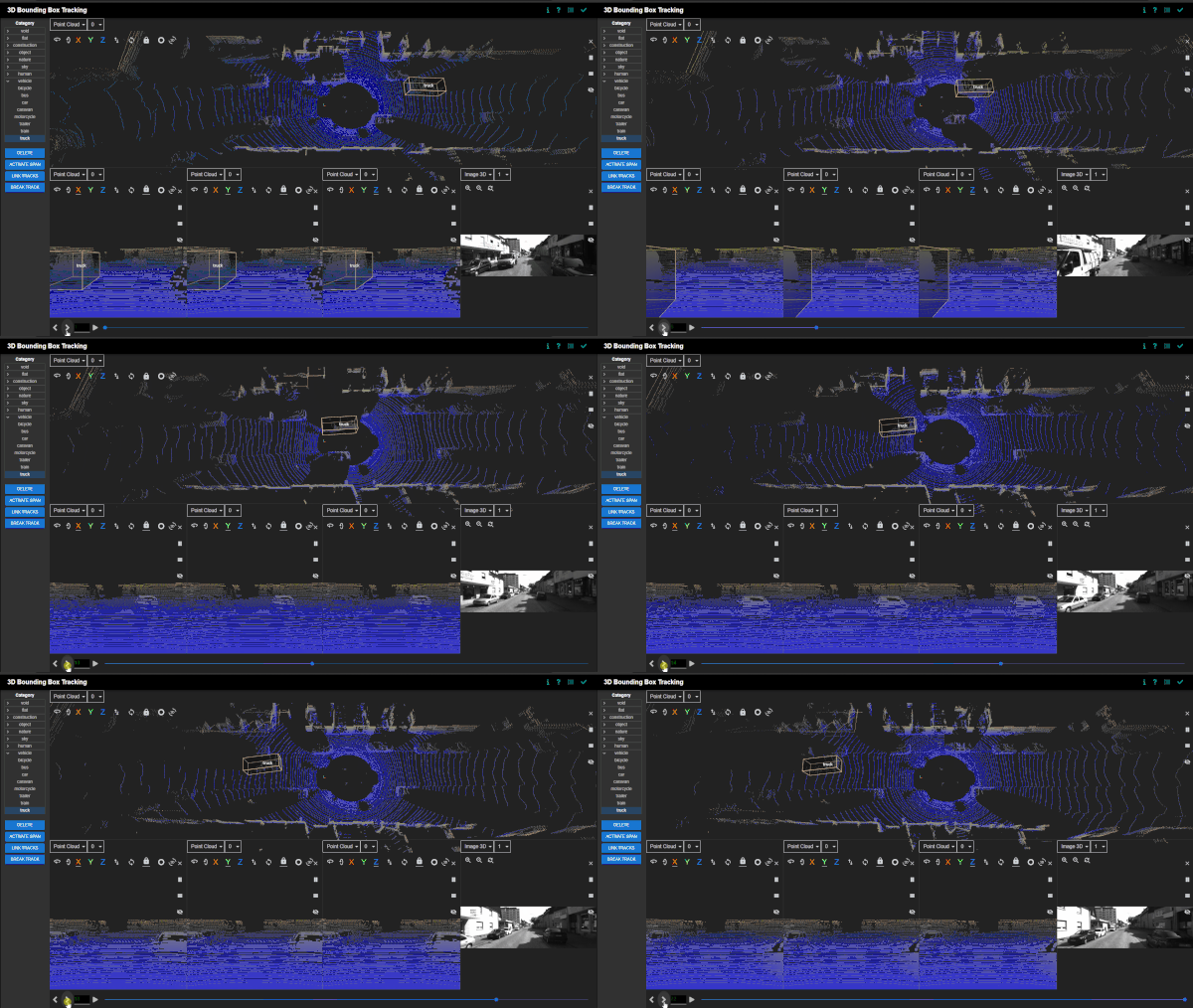
Bounding boxes are interpolated between keyframes if the position, orientation, or scale of the bounding boxes differ. This is useful for tracking objects that move between keyframes.
Multiple sessions can be initialised by opening new windows or tabs. Each session synchronises its changes in labels and tags with the other sessions in real-time. Tracking changes are also updated in real-time as well.
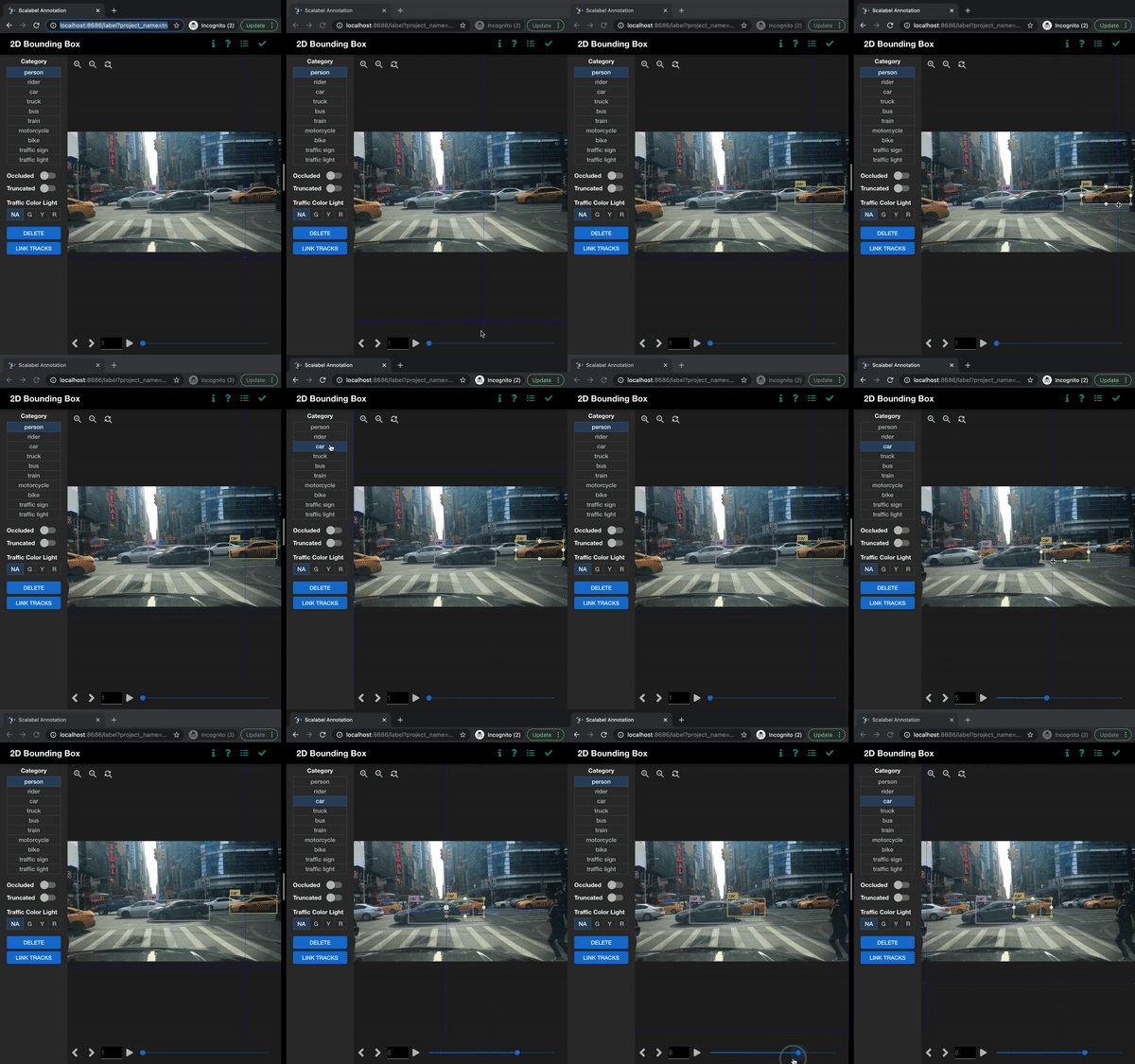
Deep learning models can be used to assist annotation for large batches of data. New models can be trained on a subset of the data, and the remaining data can be uploaded for Scalabel to label automatically. The labels can be preloaded in the backend and can also be manually adjusted in the interface.
- Providing convenience scripts for converting from and to other popular formats, such as COCO, KITTI, Waymo
- Supporting evaluation of various tasks with the Scalabel format
- Image tagging
- Detection
- Pose estimation
- Instance segmentation
- Semantic segmentation
- Panoptic segmentation
- Boundary detection
- Bounding box tracking
- Segmentation tracking
- Contains a visualizer to easily visualize annotations as well as model predictions in Scalabel format
Python backend provides a convenient API for label handling and visualization. For compatibility with Scalabel's interface, datasets can be converted to the appropriate formats via scripts. Algorithms can be evaluated for each task by uploading the predictions and corresponding ground truth annotations in the Scalabel format. The labels can be easily visualised using the Python interface.
Scalabel is currently supported by ETH VIS Group. Many contributors have contributed to the project.