Java sample code for calling Cloud Solution Provider CREST APIs
These are samples in Java for using the commerce APIs for Microsoft Partner Center. These CREST APIs are documented at https://msdn.microsoft.com/en-us/library/partnercenter/dn974944.aspx
A public forum for discussing the APIs is available at https://social.msdn.microsoft.com/Forums/en-US/home?forum=partnercenterapi
Before you build these samples, please update the following in the file - CrestApiCredentials.properties, for your integration sandbox account.
Go to https://partnercenter.microsoft.com/pc/AccountSettings/TenantProfile to get this information
Watch the youtube video which will guide you to fill the details - https://www.youtube.com/watch?v=8RRssasC2Ys&feature=youtu.be
DefaultDomain=xxxxxxxxxxxx.onmicrosoft.com
MicrosoftId=xxxxxxx-xxxx-xxxx-xxxx-xxxxxxxxxxxx
Go to https://partnercenter.microsoft.com/pc/APIIntegration to fill the below details Watch the youtube video which will guide you to fill the details - https://www.youtube.com/watch?v=8RRssasC2Ys&feature=youtu.be AppId=xxxxxxx-xxxx-xxxx-xxxx-xxxxxxxxxxxx Key=xxxxxxxxxxxxxxxxxxxxxxxxxxxxxxxxxxxxxxxxx
ApiEndpoint=https://api.cp.microsoft.com
#Build and run instructions
Follow these steps
- Eclipse IDE is optional to run the Commerce-API-Java project, please download the same from https://www.eclipse.org/downloads/
- If JDK is not installed, download & install latest jdk from http://www.oracle.com/technetwork/java/javase/downloads/jdk8-downloads-2133151.html
- Open the eclipse IDE and click on File->Import
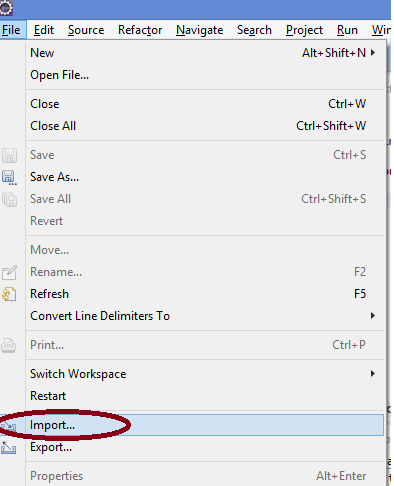
- Select “Maven > Existing Maven Projects” option and click next
- Select the root directory option and browse for the extracted code. Click Finish
- Eclipse should now build the project with no errors.
- To run the sample right click on the file TestCrestApi.java, select Debug-As, and select Java Application.