Change mobile menus on Toolkit page #2171


Description

Overview
We need to adjust the mobile menus on the Toolkit page so that users are only able to select a single practice area at a time in order to simplify development. We also need to adjust styling so that the dropdown menus match those used elsewhere on the site in order to follow our design system and provide a consistent user experience.
Action Items
- Duplicate current Toolkit mobile dropdown menu in Figma in order to work on a new copy.
- Remove checkboxes so that user only has ability to sort by one practice area at a time.
- Remove red background from selected practice area so that menu matches other mobile dropdowns used across the site, for example those here on the Projects page
- Create designs showing each:
- The initial/empty state of the dropdown when a users first lands on the page
- The dropdown menu a user selects from
- The active state when a user selects a practice area to sort by
The current Figma design that requires the above listed changes:
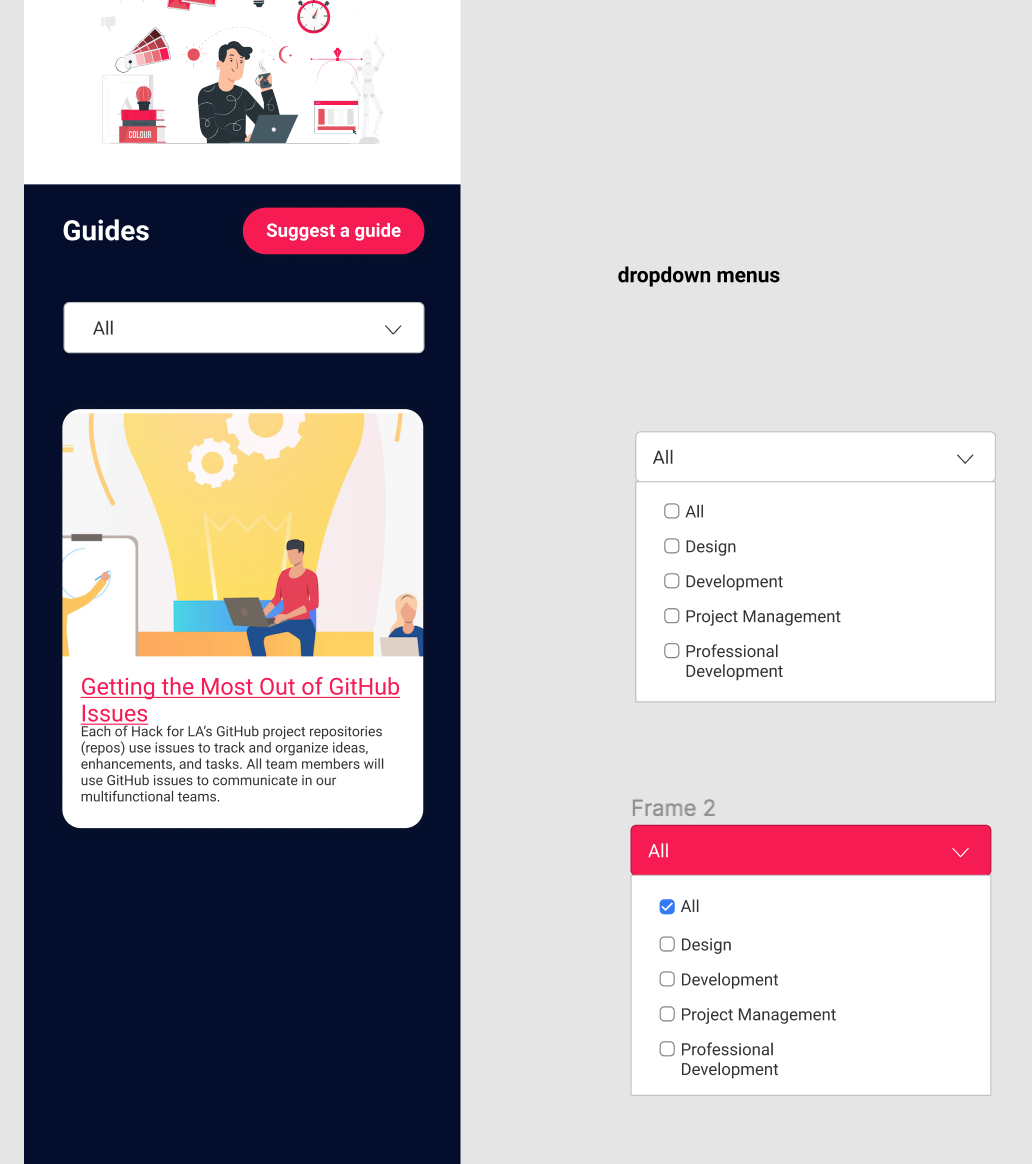
Resources/Instructions
Figma: Design System / Dropdown menus
Figma: Toolkit Page / Mobile