Create Donation gif Component and Integrate into Donate Page Include #4439


Description

Dependency
Overview
As developers, we need to componentize the animated Donate gif and associated text, so that there is a consistent appearance across the site and to promote code reuse.
Details
- Currently the donation animated gif is part of larger Donate include file
_includes/donate-card.html - We need to create a smaller reusable component ("include file") containing the Donation graphic and text, with page-independent styles in a separate SCSS file, and then incorporate the new component into the Donate page include file so that the current appearance of the Donate page is maintained in mobile and desktop views.
Action Items
- Create the new component file
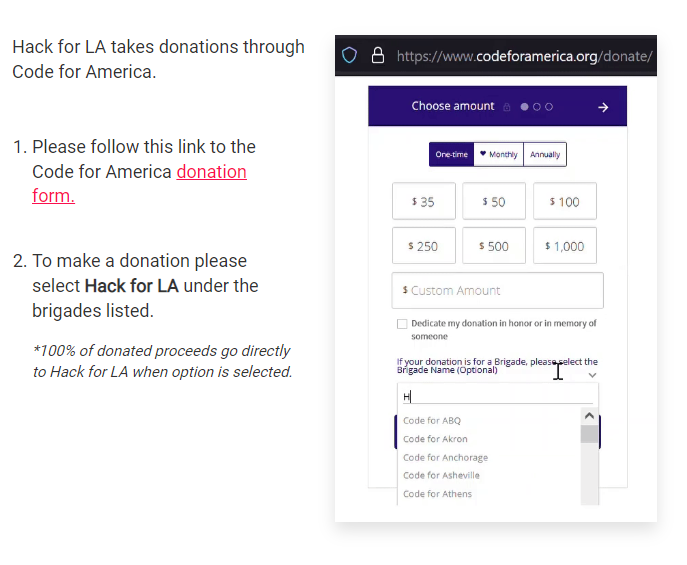
_includes/donation/donate-gif-text.htmland open the Donate include file_includes/donate-card.html. In this issue, elements will be moved from_includes/donate-card.htmlto_includes/donation/donate-gif-text.html. Those elements are depicted in the "Component elements" screenshots below, but before editing, note the following items. - The elements depicted do not include the rounded edge "card" which is rendered from
<div class="page-card card-primary page-card-lg page-card--join page-card--large-icon-container donation-grid">
Because it contains "card" styles, the above div is page-specific and so it must be retained in its current file. It is necessary to refactor the html. One approach might be to remove thedonation-gridclass from this div, then create a new<div class="donation-grid">in the new component file, to wrap the container elements. - The
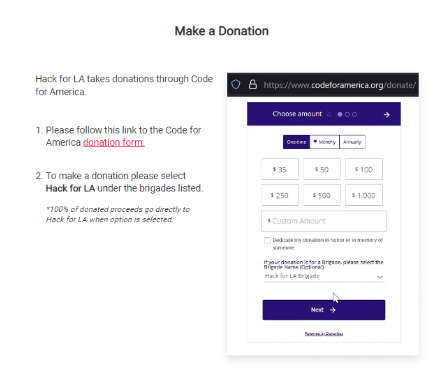
<h3>heading with text "Make a Donation to Hack for LA" is not depicted in the screenshot, because the styling of the header is page-specific, and so it will be retained in its current file. Refactoring will be necessary. One approach might be to move the<h3>so that it becomes the immediate first child of the card div. - Move the remaining depicted elements from
_includes/donate-card.htmlto_includes/donation/donate-gif-text.html, then in_includes/donate-card.html, in place of the moved elements, reference the new component file using the liquid{% include <filename> %}tag. Note that<filename>is relative to the_includesfolder. - The existing SCSS file for the Donate page is
_sass/components/_donate.scss. Styles may have to be added to this file to style the<h3>since its location has changed. The SCSS for styling the new component will be_sass/components/_donate-components.scss. If this file does not exist, create it and add an import statement in_sass/main.scss. Move classes specific to the component from the existing SCSS file to the new SCSS file. Styles in the new SCSS file should be page-independent and unique to the component, so that the component can be included in other pages. Update SCSS classes and HTML as needed so that appearance of the modified Donate page matches the appearance shown in the "Final Appearance" screenshots. Note that the position of the sentence "100% of donated proceeds..." moves below the animated gif in mobile view.
For Merge Team
- Check this issue off as merged in epic Epic: Create reusable donation components and integrate with Donate, Join Us and About pages #4492. If the merged PR closes the last of the issues under "Create New Components", then release dependencies on all the issues listed under "Clean Up".
Screenshots
component elements (desktop)
component elements (mobile)
Final appearance, heading outside the component, together with the component (desktop)
Final appearance, heading outside the component, together with the component (mobile)
Resources/Instructions
- Donate Card Include (html)
- This issue was created as a part of the Epic Epic: Create reusable donation components and integrate with Donate, Join Us and About pages #4492