Rails Engine is an API developed for an E-Commerce Application. The fictitious company utilizes a service-oriented architecture, and thus has a separate back-end service (this API!). This repo exposes the data that powers the company's site through a RESTful JSON API in addition to custom endpoints for Business Intelligence Analytics.
Report Bug
·
Request Feature
Rails Engine exposes business data based on the JSON API Specification via multiple API endpoints allowing other developers access to CRUD functionality for Merchants and Items, obtaining relationship information for Merchants and Items, and exposes more complex endpoints including: merchants with the most revenue, merchants with the most items sold, revenue across a date range, and revenue for a specific merchant.
To use Rails Engine locally, you can fork or clone this repo.
Below are the commands you will need to run in your terminal once you are inside the rails-engine directory.
- Bundle Install
$ bundle exec install
- Set up Database
$ rails db:create
$ rails db:migrate
$ rails db:seed
After running your migrations, your schema will look something like this!
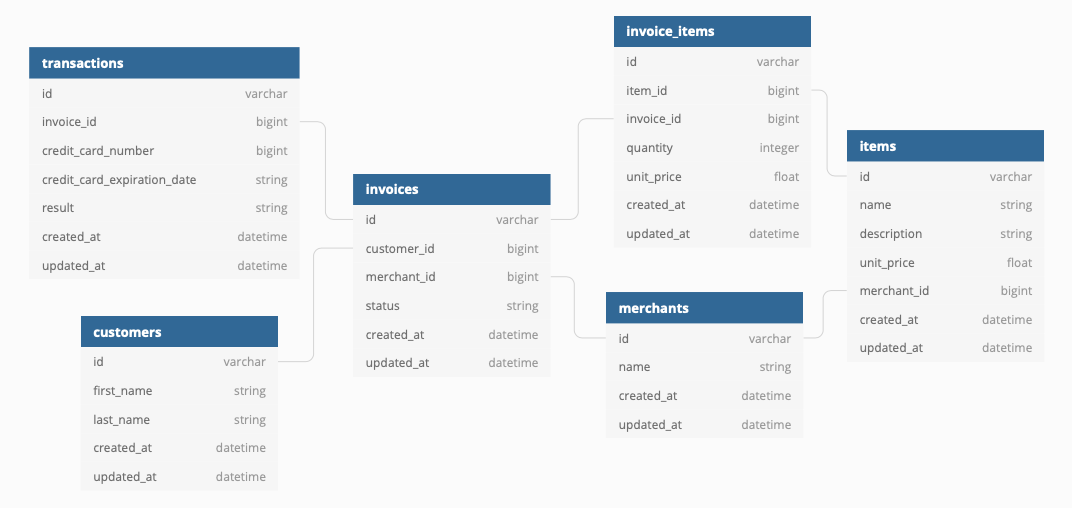
Run rails s in your terminal and utilize http://localhost:3000/ as the base url in your API client of choice (Postman, etc.)
This endpoint renders a JSON representation of all records of the requested resource.
GET /api/v1/<resource> where <resource> is merchants or items
Example JSON response for the Merchant resource:
{
  "data": [
    {
      "id": "1",
        "type": "merchant",
        "attributes": {
          "name": "Mike's Awesome Store",
        }
    },
    {
      "id": "2",
      "type": "merchant",
      "attributes": {
        "name": "Store of Fate",
      }
    }
  ]
}This endpoint renders a JSON representation of the corresponding record.
GET /api/v1/<resource>/:id where <resource> is merchants or items
Example JSON response for the Merchant resource:
{
  "data": {
    "id": "1",
    "type": "merchant",
    "attributes": {
      "name": "Store Name"
    }
  }
}This endpoint creates a record and renders a JSON representation of the new record.
POST /api/v1/<resource> where <resource> is merchants or items
The request body should follow this pattern:
{
  "attribute1": "value1",
  "attribute2": "value2"
}
Example JSON response for the Merchant resource:
{
  "data": {
    "id": "1",
    "type": "merchant",
    "attributes": {
      "name": "Store Name"
    }
  }
}This endpoint updates the corresponding record and renders a JSON representation of the updated record.
PATCH /api/v1/<resource>/:id where <resource> is merchants or items
The request body should follow this pattern:
{
  "attribute1": "value1",
  "attribute2": "value2"
}
Example JSON response for the Merchant resource:
{
  "data": {
    "id": "1",
    "type": "merchant",
    "attributes": {
      "name": "Store Name"
    }
  }
}This endpoint destroys the corresponding record and any associated data.
DELETE /api/v1/<resource>/:id where <resource> is merchants or items
The response returns a 204 HTTP status code.
GET /api/v1/merchants/:id/items - returns all items associated with a merchant.
Example JSON response:
{
    "data": [
        {
            "id": "80",
            "type": "item",
            "attributes": {
                "name": "Item In Sed",
                "description": "Voluptas aliquid dolores deserunt dolor ipsa.",
                "unit_price": 548.08,
                "merchant_id": 4
            }
        },
        {
            "id": "81",
            "type": "item",
            "attributes": {
                "name": "Item Neque Aliquam",
                "description": "Laudantium non rerum rerum consequuntur.",
                "unit_price": 137.74,
                "merchant_id": 4
            }
        }
    ]
}GET /api/v1/items/:id/merchants - returns the merchant associated with an item
Example JSON response:
{
    "data": {
        "id": "1",
        "type": "merchant",
        "attributes": {
            "name": "Schroeder-Jerde"
        }
    }
}This endpoint returns a single record that matches a set of criteria. Criteria will be input through query parameters.
GET /api/v1/<resource>/find?<attribute>=<value>
Example JSON response for GET /api/v1/merchants/find?name=ring
{
  "data": {
    "id": 4,
    "type": "merchant",
    "attributes": {
      "name": "Ring World"
    }
  }
}This endpoint returns all records that match a set of criteria. Criteria will be input through query parameters.
GET /api/v1/<resource>/find_all?<attribute>=<value>
Example JSON response for GET /api/v1/merchants/find_all?name=ring
{
  "data": [
    {
      "id": "4",
      "type": "merchant",
      "attributes": {
        "name": "Ring World"
      }
    },
    {
      "id": "1",
      "type": "merchant",
      "attributes": {
        "name": "Turing School"
      }
    }
  ]
}This endpoint returns a variable number of merchants ranked by total revenue.
GET /api/v1/merchants/most_revenue?quantity=x where x is the number of merchants to be returned.
Example JSON response for GET /api/v1/merchants/most_revenue?quantity=2
{
  "data": [
    {
      "id": "1",
      "type": "merchant",
      "attributes": {
        "name": "Turing School"
      }
    },
    {
      "id": "4",
      "type": "merchant",
      "attributes": {
        "name": "Ring World"
      }
    }
  ]
}This endpoint returns a variable number of merchants ranked by total number of items sold:
GET /api/v1/merchants/most_items?quantity=x where x is the number of merchants to be returned.
Example JSON response for GET /api/v1/merchants/most_items?quantity=2
{
  "data": [
    {
      "id": "1",
      "type": "merchant",
      "attributes": {
        "name": "Turing School"
      }
    },
    {
      "id": "4",
      "type": "merchant",
      "attributes": {
        "name": "Ring World"
      }
    }
  ]
}This endpoint should return the total revenue across all merchants between the given dates.
GET /api/v1/revenue?start=<start_date>&end=<end_date>
Example JSON response for GET /api/v1/revenue?start=2012-03-09&end=2012-03-24
{
  "data": {
    "id": null,
    "attributes": {
      "revenue"  : 43201227.80
    }
  }
}This endpoint should return the total revenue for a single merchant.
GET /api/v1/merchants/:id/revenue
Example JSON response for GET /api/v1/merchants/1/revenue
{
  "data": {
    "id": null,
    "attributes": {
      "revenue"  : 43201227.80
    }
  }
}Contributions are what make this community such an amazing and fun place to learn, grow, and create! Any contributions you make are greatly appreciated.
- Fork the Project
- Create your Feature Branch
git checkout -b feature/NewGreatFeature - Commit your Changes
git commit -m 'Add some NewGreatFeature' - Push to the Branch
git push origin feature/NewGreatFeature - Open a new Pull Request!
Eduardo Parra - 