


A simple way to deploy PaddleOCR based on FastAPI.
| PaddleOCR | Branch | Status |
|---|---|---|
| v3.x (v3.4.0) | main | ✅ Current |
| v2.7 | paddleocr-v2.7 | Legacy |
| v2.5 | paddleocr-v2.5 | Legacy |
Note: The main branch now uses PaddleOCR 3.x with PaddlePaddle 3.0+, featuring improved performance, new model pipelines (PP-OCRv5), and unified inference interfaces.
- PaddleOCR 3.x with PP-OCRv5 models for enhanced accuracy
- PaddlePaddle 3.0+ compatibility with optimized performance
- Local path image recognition
- Base64 data recognition
- Upload file recognition
- URL image recognition
- PDF table extraction with PPStructureV3
- Multi-language support (80+ languages)
-
Copy the project to the deployment path
git clone https://github.com/neozhu/PaddleOCRFastAPI.git
The master branch is the most recent version of PaddleOCR supported by the project. To install a specific version, clone the branch with the corresponding version number.
-
(Optional) Create new virtual environment to avoid dependency conflicts
-
Install required dependencies
pip3 install -r requirements.txt
-
Run FastAPI
uvicorn main:app --host 0.0.0.0
Test completed in Centos 7, Ubuntu 20.04, Ubuntu 22.04, Windows 10, Windows 11, requires Docker to be installed.
For deployment using Dokploy (Docker + GitHub), see:
- 🚀 Quick Start Guide - 5-minute setup
- 📖 Complete Dokploy Guide - Detailed instructions
-
Copy the project to the deployment path
git clone https://github.com/neozhu/PaddleOCRFastAPI.git
The master branch is the most recent version of PaddleOCR supported by the project. To install a specific version, clone the branch with the corresponding version number.
-
Building a Docker Image
cd PaddleOCRFastAPI
# 手工下载模型,避免程序第一次运行时自动下载,实现完全离线,加快启动速度
cd pp-ocrv4/ && sh download_det_cls_rec.sh

# 返回Dockfile所在目录,开始build
cd ..
# 使用宿主机网络
# 可直接使用宿主机上的代理设置,例如在build时,用宿主机上的代理
# docker build -t paddleocrfastapi:latest --network host --build-arg HTTP_PROXY=http://127.0.0.1:8888 --build-arg HTTPS_PROXY=http://127.0.0.1:8888 .
docker build -t paddleocrfastapi:latest --network host .
-
Edit
docker-compose.ymlversion: "3" services: paddleocrfastapi: container_name: paddleocrfastapi # Custom Container Name image: paddleocrfastapi:lastest # Customized Image Name & Label in Step 2 environment: - TZ=Asia/Hong_Kong - OCR_LANGUAGE=ch # support 80 languages. refer to https://github.com/Mushroomcat9998/PaddleOCR/blob/main/doc/doc_en/multi_languages_en.md#language_abbreviations ports: - "8000:8000" # Customize the service exposure port, 8000 is the default FastAPI port, do not modify restart: unless-stopped
-
Create the Docker container and run
docker compose up -d
-
Swagger Page at
localhost:<port>/docs
- Login to Docker Hub
docker login
- Build the Docker Image
docker build -t blazordevlab/paddleocrapi:latest .
- Push the Image to Docker Hub
docker push blazordevlab/paddleocrapi:latest
-
Clone this repo to localhost.
-
Edit
routers/ocr.py, modify the parameter "lang":ocr = PaddleOCR(use_angle_cls=True, lang="ch")
Before modify, read the supported language list.
-
Rebuild the docker image, or run the
main.pydirectly.
API Docs: /docs
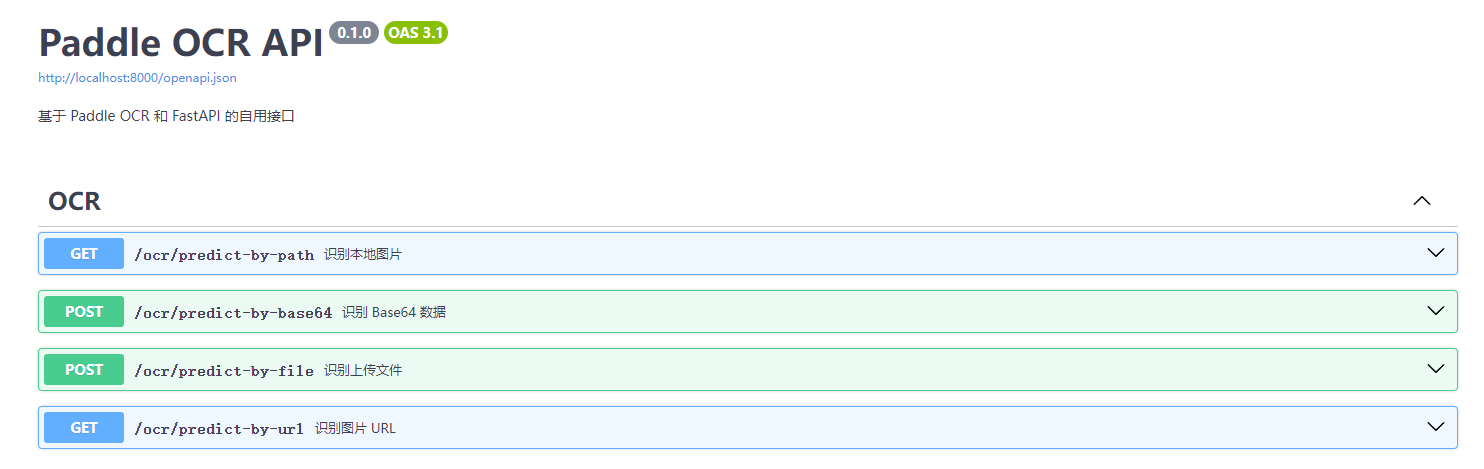
This project has been upgraded to PaddleOCR 3.x, bringing significant improvements:
- New Model Pipelines: PP-OCRv5 with improved recognition accuracy for various text types including handwriting
- Unified Inference Interface: Simplified
predict()API for streamlined usage - PaddlePaddle 3.0 Compatibility: Full support for the latest PaddlePaddle features and optimizations
- Enhanced Table Recognition: PPStructureV3 for better document understanding and table extraction
If you're upgrading from PaddleOCR 2.x:
- The API now uses
predict()method instead ofocr()with parameters show_logparameter is replaced by a new logging systemuse_onnxis replaced by high-performance inference featuresPPStructureis nowPPStructureV3
For more details, see the PaddleOCR 3.x Upgrade Documentation
- 📖 Quick Reference Guide - Quick commands and examples
- 📋 Migration Guide - Detailed migration from 2.x to 3.x
- 📝 Changelog - Complete list of changes
- 💡 Usage Examples - Code examples for 3.x features
- Support PaddleOCR v3.x (PP-OCRv5)
- Image URL recognition
- PDF table extraction
- GPU mode optimization
- Batch processing support
- Real-time streaming OCR
PaddleOCRFastAPI is licensed under the MIT license. Refer to LICENSE for more information.