Skip to content

Conversation

@glonlas
Copy link
Contributor

@glonlas glonlas commented Sep 7, 2022

This PR:

  • Add support of Real ESRGAN for M1 users.
  • Update README-Mac-MPS.md to add commands to install Real ESRGAN for M1 users.
  • Trivial refactoring for the output folder. Using a "constant" instead of repeating the value a two places in the code
  • Add gfpgan/ in .gitignore to avoid pushing GFPGAN model weights

Test
This PR has been manually tested to generate x2 and x4 upscaling via Real ESRGAN, with and without GFPGAN.

@glonlas glonlas mentioned this pull request Sep 7, 2022
@glonlas glonlas changed the title Fix RealESRGAN and add support for Apple M1 Add support of RealESRGAN for Apple M1 Sep 7, 2022
@Any-Winter-4079
Copy link
Contributor

Any-Winter-4079 commented Sep 7, 2022

I'll be updating this comment with several tests
Test 1 superman dancing with a panda bear -U 2 0.6 -m ddim works (2x upscale)
Test 2 superman dancing with a panda bear -U 3 0.6 -m ddim fails (3x upscale) - creates squares
Needs this fix:

if upsampler_scale >= 4:
            cmd.append('-n')
            cmd.append('realesrgan-x4plus')

After the fix, the test works
Test 3 superman dancing with a panda bear -U 4 0.6 -m ddim works (4x upscale w/ realesrgan-x4plus)
Test 4 superman dancing with a panda bear -G 0.8 -m ddim -S 254908250 fails (face restoration only)

GFPGAN - Restoring Faces for image seed:254908250
[W NNPACK.cpp:51] Could not initialize NNPACK! Reason: Unsupported hardware.
Intel MKL FATAL ERROR: This system does not meet the minimum requirements for use of the Intel(R) Math Kernel Library.
The processor must support the Intel(R) Supplemental Streaming SIMD Extensions 3 (Intel(R) SSSE3) instructions.
The processor must support the Intel(R) Streaming SIMD Extensions 4.2 (Intel(R) SSE4.2) instructions.
The processor must support the Intel(R) Advanced Vector Extensions (Intel(R) AVX) instructions.

Test 5 superman dancing with a panda bear -U 3 0.6 -G 0.8 -m ddim -S 254908250 works (3x upscale and face restoration)
Test 6 superman dancing with a panda bear -U 4 0.6 -G 0.8 -m ddim -S 254908250 works (4x upscale w/ realesrgan-x4plus and face restoration)
Tmp images work well too.

Copy link
Contributor

@Any-Winter-4079 Any-Winter-4079 left a comment

Choose a reason for hiding this comment

The reason will be displayed to describe this comment to others. Learn more.

@glonlas @lstein Everything works except for the small fix of >= 4 for 3x upscales. Aside from that, should GFPGAN work on its own too (without upscaling)?. Right now, it only works for me with upscaling (though it's not a big deal because I can always use face restoration if using upscaling).

'-s', str(upsampler_scale)
]

if upsampler_scale > 2:
Copy link
Contributor

Choose a reason for hiding this comment

The reason will be displayed to describe this comment to others. Learn more.

This needs to be upsampler_scale >= 4 or upsampler_scale > 3 to let 3x upscale without -n realesrgan-x4plus kicking in.

@glonlas
Copy link
Contributor Author

glonlas commented Sep 7, 2022

Thank you for the review, I appreciate the quick feedback.
Please DO NOT merge. I will address all comments shortly.

@lstein
Copy link
Collaborator

lstein commented Sep 7, 2022

The face fixing is supposed to work independently of upscaling. Is this not the case with M1?

I won't merge until you give the thumbs up. You might want to convert to a draft to indicate you are still making changes, though!

@Any-Winter-4079
Copy link
Contributor

Any-Winter-4079 commented Sep 8, 2022

The face fixing is supposed to work independently of upscaling. Is this not the case with M1?

I won't merge until you give the thumbs up. You might want to convert to a draft to indicate you are still making changes, though!

@lstein Yes, I agree. Ideally it should be separate, but at least as a last resort we could always use face restoration after upscaling on M1. It's probably a bug somewhere what doesn't let face restoration work on its own, but haven't looked very deeply since @glonlas is on it already. I'm working on doggettx-optimizations for M1 in the meantime.

@glonlas glonlas marked this pull request as draft September 8, 2022 12:25
@glonlas
Copy link
Contributor Author

glonlas commented Sep 8, 2022

The face fixing is supposed to work independently of upscaling. Is this not the case with M1?
It should this code (also below) which is common to all platforms shows that you can have image upscaling and face fixing independently.

That being said I will check and ensure it works (or get fixed).

        for r in image_list:
            image, seed = r
            try:
                if upscale is not None:
                    if len(upscale) < 2:
                        upscale.append(0.75)
                    image = real_esrgan_upscale(
                        image,
                        upscale[1],
                        int(upscale[0]),
                        seed,
                    )
                if strength > 0:
                    image = run_gfpgan(
                        image, strength, seed, 1
                    )

@glonlas
Copy link
Contributor Author

glonlas commented Sep 8, 2022

Update

The last commits fixe:

  1. The assumption that we had only x2 and x4. I missed that x3 was possible since the UI proposes only x2 and x4. A future PR will fix the UI options.
  2. The bash script was indeed not working. I should have tested it.

Test:

Test 1: no face restoration, no upscale superman dancing with a panda bear -m ddim -s 8 -S 254908250
Successful

Test 3: no face restoration, 2x upscale: superman dancing with a panda bear -U 2 0.6 -m ddim -s 8
Successful

Test 3: no face restoration, 3x upscale: superman dancing with a panda bear -U 3 0.6 -m ddim -s 8
Successful

Test 4: no face restoration, 4x upscale: superman dancing with a panda bear -U 4 0.6 -m ddim -s 8
Successful

Test 5: face restoration, no upscale: superman dancing with a panda bear -G 0.8 -m ddim -s 8 -S 254908250
Successful

Test 6: face restoration, 2x upscale: superman dancing with a panda bear -U 2 0.6 -G 0.8 -m ddim -s 8 -S 254908250
Successful

Test 7: face restoration, 3x upscale: superman dancing with a panda bear -U 3 0.6 -G 0.8 -m ddim -s 8 -S 254908250
Successful

Test 8: face restoration, 4x upscale superman dancing with a panda bear -U 4 0.6 -G 0.8 -m ddim -s 8 -S 254908250
Successful

@glonlas glonlas marked this pull request as ready for review September 8, 2022 13:54
@Any-Winter-4079
Copy link
Contributor

Any-Winter-4079 commented Sep 8, 2022

Okay, finally got it to work.
I will post here my results and my journey, because I'm sure more than one will get it wrong.

The error I was getting when running GFPGAN was the following

[W NNPACK.cpp:51] Could not initialize NNPACK! Reason: Unsupported hardware.
Intel MKL FATAL ERROR: This system does not meet the minimum requirements for use of the Intel(R) Math Kernel Library.
The processor must support the Intel(R) Supplemental Streaming SIMD Extensions 3 (Intel(R) SSSE3) instructions.
The processor must support the Intel(R) Streaming SIMD Extensions 4.2 (Intel(R) SSE4.2) instructions.
The processor must support the Intel(R) Advanced Vector Extensions (Intel(R) AVX) instructions.

MKL? Tried conda remove mkl, but didn't work.
Also, I was like what? Intel? I'm on an M1 chip. But turns out there's more than one architecture for Mac.
I found the useful https://towardsdatascience.com/gpu-acceleration-comes-to-pytorch-on-m1-macs-195c399efcc1
which suggested to run

import platform
platform.platform()

And sure enough, I had the bad architecture. How/when/why, I do not know.

[GOOD] >> macOS-12.4-arm64-arm-64bit
[BAD]  >> macOS-11.8-x86_64-i386-64bit

I decided to set up my environment to use osx-arm64, but I couldn't get away with setting
conda env config vars set CONDA_SUBDIR=osx-arm64 ,
uninstalling some packages (such as PyTorch) and installing again. Because then you end up with packages for both architectures. Ouch.

So I re-create the environment from scratch:
CONDA_SUBDIR=osx-arm64 conda env create -f environment-mac.yaml
then activate my environment conda activate do_not_touch-osx-arm64-stable-diffusion
then set config conda env config vars set CONDA_SUBDIR=osx-arm64
to finally re-activate it to make the changes take effect conda activate do_not_touch-osx-arm64-stable-diffusion

Now, on to setting up GFPGAN. cd GFPGAN and then pip install -r requirements.txt and python setup.py develop

The environment is set up, but because environment-mac.yaml uses pytorch-nightly, I got pytorch-nightly/osx-arm64::torchvision==0.14.0.dev20220908=py39_cpu which was making my system slower (8-10%) and also made seeds not work (result were not reproducible).

So I had to revert to 1.12.1 conda install -c pytorch pytorch=1.12.1 and lo and behold, I got everything to work.
GFPGAN with the arm64 architecture, Faster than ever and Seeds work. Even got k_lms to work!

@Any-Winter-4079
Copy link
Contributor

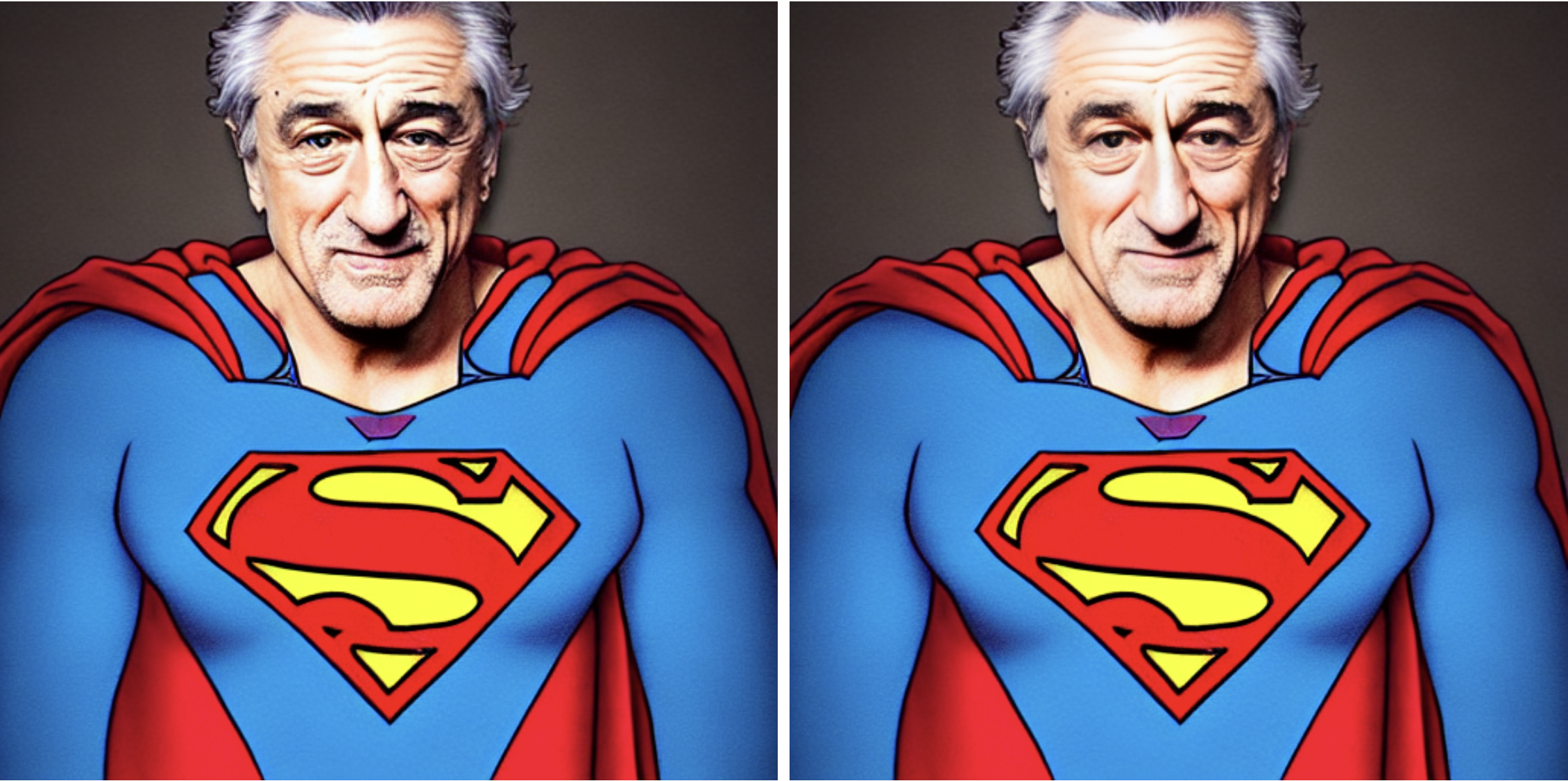
Robert de Niro portrait dressed as Superman -m ddim -s 50 -S 25490825 Left natural, Right -G 0.7 (face restoration)

Screenshot 2022-09-08 at 20 59 23

Copy link
Contributor

@Any-Winter-4079 Any-Winter-4079 left a comment

Choose a reason for hiding this comment

The reason will be displayed to describe this comment to others. Learn more.

As a note on architecture and GFPGAN, I seemingly had to switch to arm64 to run it successfully (while this repo can run with x86 or arm64).

Maybe it was just that my computer that was messed up, but if more people experience the same (can't run GFPGAN, need to switch to arm64), we could potentially update the instructions in the future.

For now, I've tested it and it works. I think it can be merged, although it would be good if @lstein could run it to make sure it still works on CUDA (it should, no change was made).

Awesome job!

@Vrk3ds
Copy link

Vrk3ds commented Sep 8, 2022

just followed your instructions from above and face resto works!, what doesn't for me is still when trying to upscale the image. I get the following error:

Real-ESRGAN Upscaling seed:25490825 : scale:2x

Error running RealESRGAN or GFPGAN. Your image was not upscaled.
'NoneType' object has no attribute 'enhance'

@Any-Winter-4079
Copy link
Contributor

Any-Winter-4079 commented Sep 8, 2022

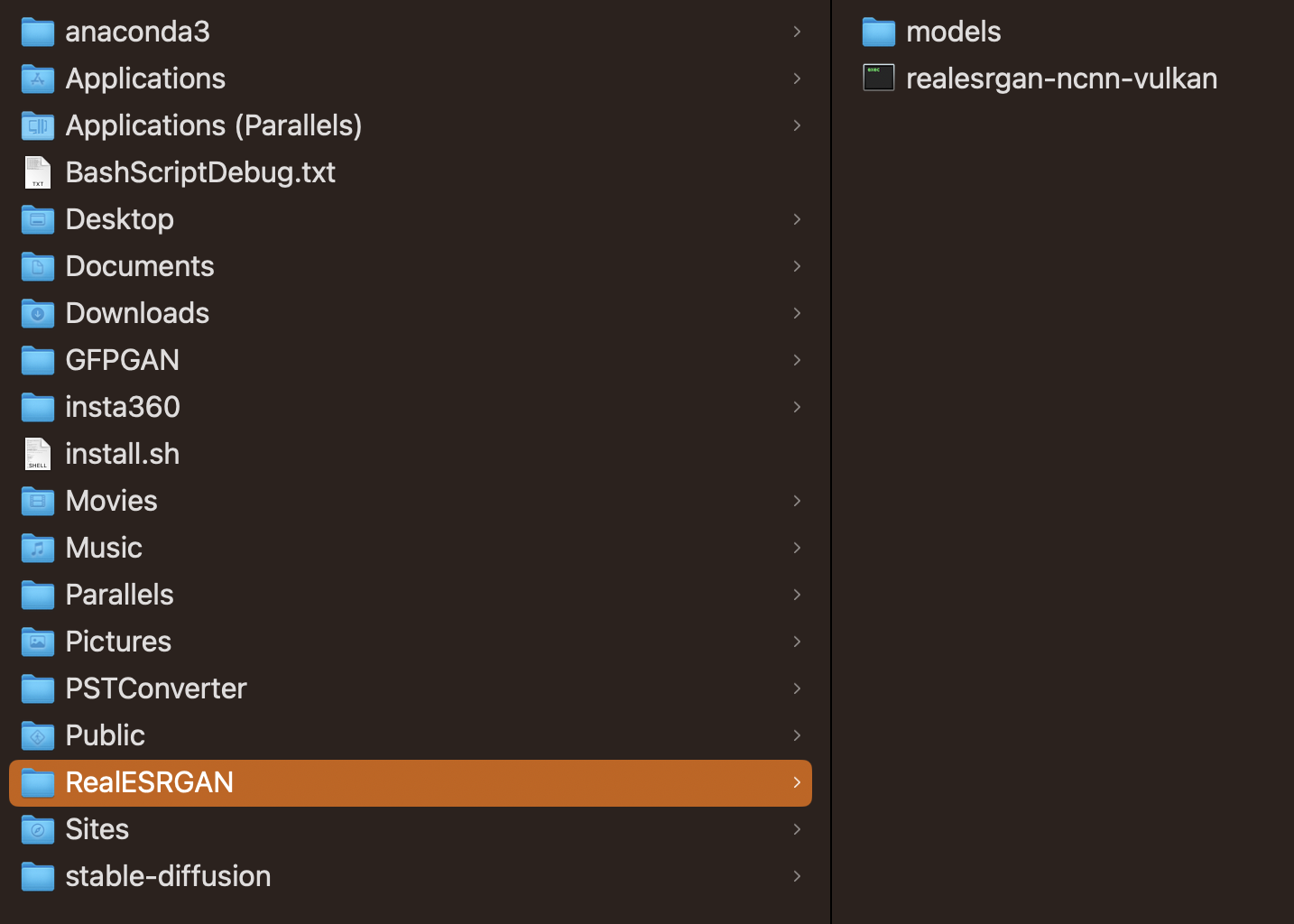
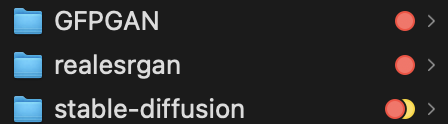
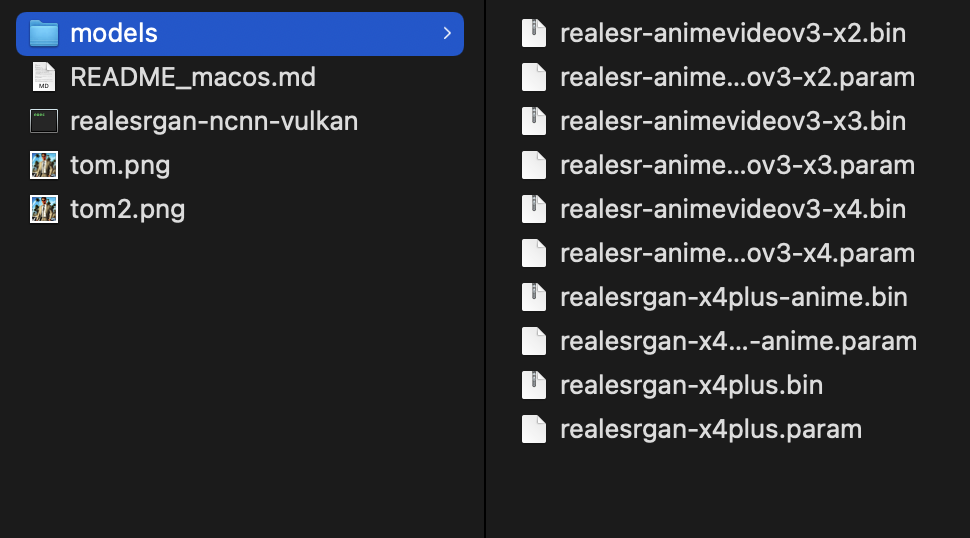
@Vrk3ds Do you have a realesrgan directory sibling of stable-diffusion? With realesrgan-ncnn-vulkan inside (with executable permissions) and the models folder as well.

With that and the 2 files modified in this PR, using the development branch, it should work. Let me know!

@Vrk3ds
Copy link

Vrk3ds commented Sep 8, 2022

@Vrk3ds Do you have a realesrgan directory sibling of stable-diffusion? With realesrgan-ncnn-vulkan inside (with executable permissions) and the models folder as well.

With that and the 2 files modified in this PR, using the development branch, it should work. Let me know!

I don’t have realesgran in a separate directory just in the stable-diffusion one. I’ll move it and test and let you know

@Vrk3ds
Copy link

Vrk3ds commented Sep 8, 2022

@Vrk3ds Do you have a realesrgan directory sibling of stable-diffusion? With realesrgan-ncnn-vulkan inside (with executable permissions) and the models folder as well.

With that and the 2 files modified in this PR, using the development branch, it should work. Let me know!

hmmm I am still getting the same error?

image

this is my folder setup now?

Does that look correct?

@Any-Winter-4079
Copy link
Contributor

Any-Winter-4079 commented Sep 8, 2022

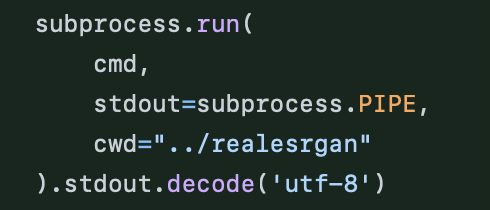
Try with the folder name in lowercase, realesrgan, since the subprocess run searches for lowercase
Screenshot 2022-09-09 at 01 39 33

@Vrk3ds
Copy link

Vrk3ds commented Sep 8, 2022

Try with the name in lowercase, realesrgan, since the subprocess run searches for lowercase
Screenshot 2022-09-09 at 01 39 33

still doesn't work?

Do I need to update any other files to make it work?

@Any-Winter-4079
Copy link
Contributor

Any-Winter-4079 commented Sep 9, 2022

git checkout development
git pull

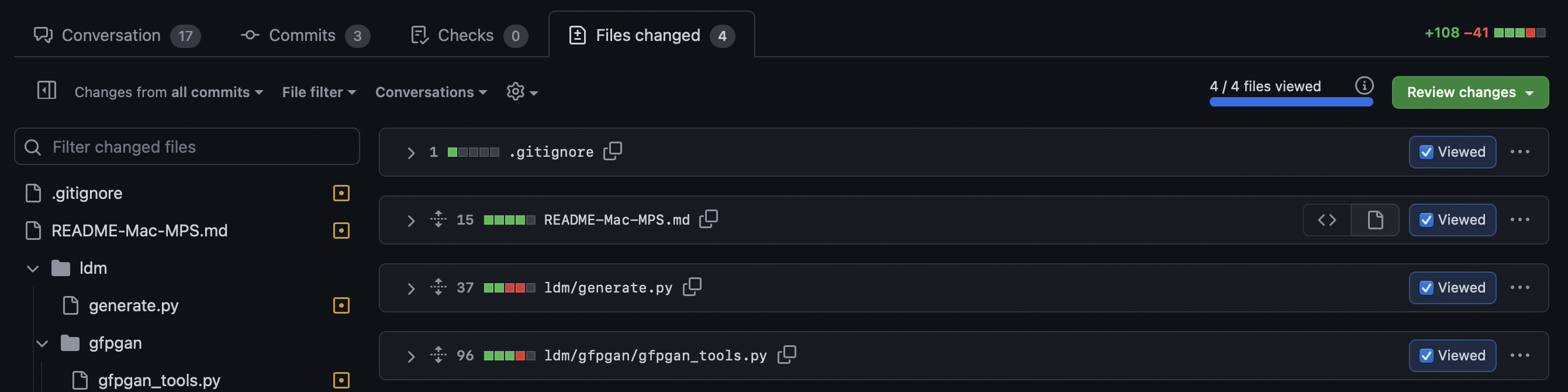
Update
Screenshot 2022-09-09 at 12 49 25

ldm/generate.py and ldm/gfpgan/gfpgan_tools.py with the files from the photo above
With that and the arm64, you should be set there.
You already have these directories

Screenshot 2022-09-09 at 12 48 30

with the model/s inside realesrgan

Screenshot 2022-09-09 at 12 51 45

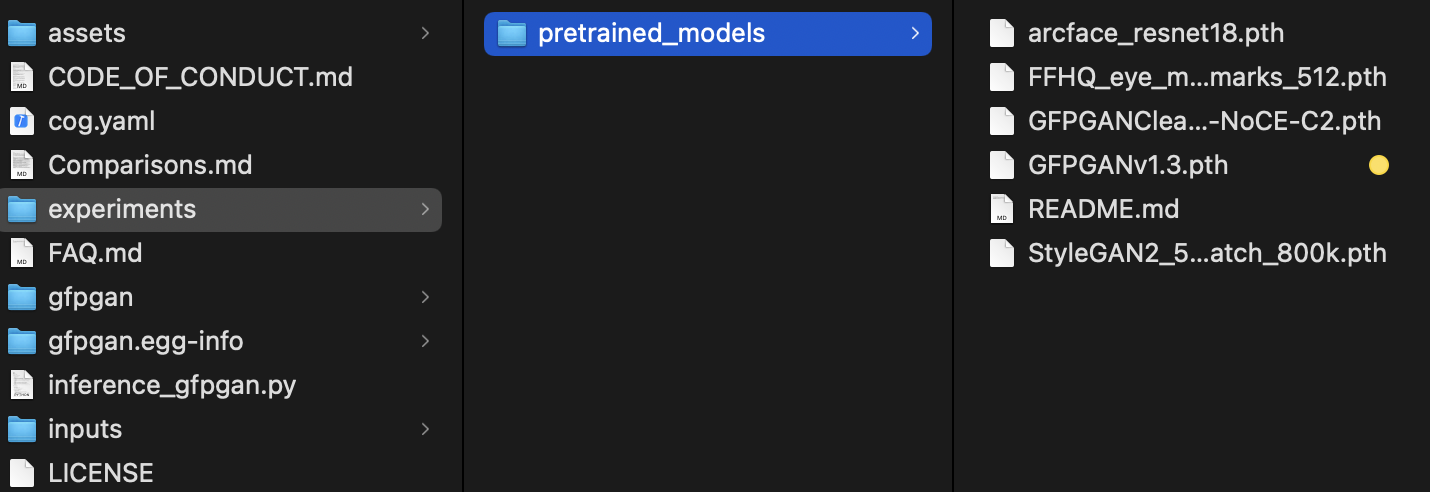
In `GFPGAN/experiments/pretrained_models` I assume you have the model/s too

Screenshot 2022-09-09 at 12 53 27

and I assume with the arm64 environment activated (e.g. conda activate do_not_touch-osx-arm64-stable-diffusion), you did cd GFPGAN, pip install -r requirements.txt and python setup.py develop

If you have all of this let me know.

@Vrk3ds
Copy link

Vrk3ds commented Sep 9, 2022

not sure what was borked but I manually cut and pasted that code into those two files and now everyone is working!

Thank You!

@Any-Winter-4079
Copy link
Contributor

not sure what was borked but I manually cut and pasted that code into those two files and now everyone is working!

Thank You!

Yep, that's what I did. Glad it worked!

@tilmanginzel
Copy link

tilmanginzel commented Sep 9, 2022

Just want to confirm that this pull request works for me on Macbook Air M1. I checked out the branch from glonlas/stable-diffusion:fix_m1_real_esrgan and followed the installation instructions. My tests last night (only x2 x3 x4 upscaling, no face restoration) were successful. :)

@Vrk3ds @Any-Winter-4079 Problem might have been that you checked out the lstein/stable-diffusion:development branch instead of the branch from this pull request glonlas/stable-diffusion:fix_m1_real_esrgan?

git remote add glonlas https://github.com/glonlas/stable-diffusion.git
git fetch glonlas
git checkout glonlas/fix_m1_real_esrgan

@lstein lstein self-requested a review September 9, 2022 18:59
@lstein
Copy link
Collaborator

lstein commented Sep 9, 2022

Will test this later today.

@glonlas
Copy link
Contributor Author

glonlas commented Sep 10, 2022

I will also catchup on the thread today.

@glonlas
Copy link
Contributor Author

glonlas commented Sep 10, 2022

Try with the name in lowercase, realesrgan, since the subprocess run searches for lowercase
Screenshot 2022-09-09 at 01 39 33

still doesn't work?

Do I need to update any other files to make it work?

You might not have all the dependencies installed. Have you followed the instruction in the README to install Real-ESRGAN?
It is the easiest why to install it.

As a reminder:

# download and install Real-ESRGAN
REALESRGAN_GITHUB_URL="https://github.com/xinntao/Real-ESRGAN/releases/download/v0.2.5.0/realesrgan-ncnn-vulkan-20220424-macos.zip"
REALESRGAN_ARCHIVE="realesrgan.zip"
REALESRGAN_PATH="realesrgan"
mkdir $REALESRGAN_PATH
cd $REALESRGAN_PATH
curl -L $REALESRGAN_GITHUB_URL -o $REALESRGAN_ARCHIVE
unzip $REALESRGAN_ARCHIVE
rm $REALESRGAN_ARCHIVE
chmod u+x ./realesrgan-ncnn-vulkan

@glonlas
Copy link
Contributor Author

glonlas commented Sep 10, 2022

If no other concerns, I recommend to +1 and merge so we can move forward and have upscale working on M1 as well :)

@psychedelicious
Copy link
Contributor

Confirmed working on M1, thanks!

@glonlas
Copy link
Contributor Author

glonlas commented Sep 10, 2022

@lstein shall we merge it?

@glonlas
Copy link
Contributor Author

glonlas commented Sep 10, 2022

@lstein @Any-Winter-4079 I am closing this PR as the implementation is too complex while a simpler solution is possible.
If it does not work on MPS/M1 is because a condition we have in the code.

This PR propose a better implementation, but need a better refactoring.

Sign up for free to join this conversation on GitHub. Already have an account? Sign in to comment

Labels

None yet

Projects

None yet

Development

Successfully merging this pull request may close these issues.

6 participants