feat: node_modules out of sync #2885

Description

Description:
Background:
In one project there can be a few active branches that team members are working on. Often it will happen that ionic is updated in one of the branches by a senior and then pulled into some other shared branch where everyone will merge to.
The problem is, often other team members are not aware that packages.json deps or ionic have indeed been updated. They will not know to run npm install unless someone has told them explicitly or they notice that there are dep changes. It happens more often than I would like. They then keep on running with old deps which can then cause problems.
Suggestion:
When running an ionic command, very similar to how you do the update ionic CLI check:
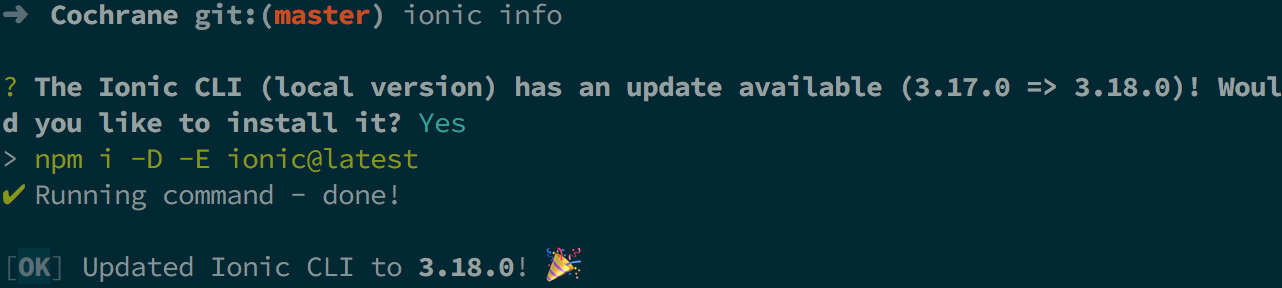
You should compare the ionic versions in node_modules and compare it to what's in packages.json. If there is any mismatch, a message should be shown such as:
"We have detected your installed dependencies are out of sync with packages. Would you like to fix?"
"Y/N"
If Y then simply run npm install.
In this way teams will have a notification that their deps are out of date, enabling much easier development work flow.
My ionic info:
li packages: (/Users/dylan/Desktop/Projects/Cochrane/node_modules)

    @ionic/cli-utils  : 1.18.0
    ionic (Ionic CLI) : 3.18.0

global packages:

    cordova (Cordova CLI) : 7.1.0

local packages:

    @ionic/app-scripts : 3.0.1
    Cordova Platforms  : ios 4.5.3
    Ionic Framework    : ionic-angular 3.8.0

System:

    ios-deploy : 1.9.2
    ios-sim    : 6.1.2
    Node       : v6.11.4
    npm        : 4.6.1
    OS         : macOS Sierra
    Xcode      : Xcode 9.1 Build version 9B55

Environment Variables:

    ANDROID_HOME : not set

Misc:

    backend : legacy