



A modern, lightweight desktop database management tool built with Go, Wails, and Vue 3.
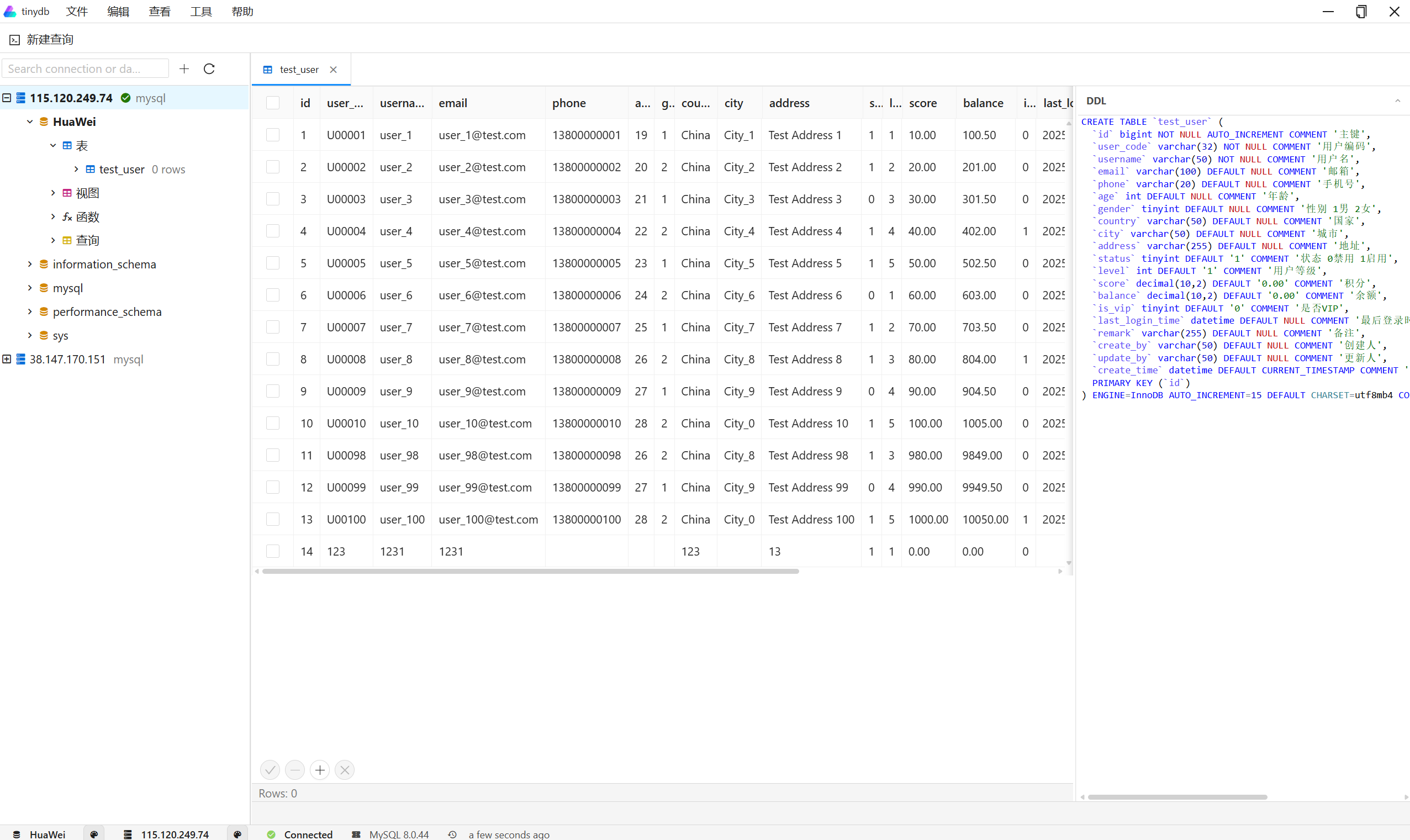
TinyDB is a cross-platform desktop database management application that provides an intuitive interface for managing MySQL and MongoDB databases. Built with modern web technologies (Vue 3) and Go, it offers a native desktop experience with powerful database management capabilities.
-
Multi-Database Support
- MySQL database management
- MongoDB database management
- Easy connection management with saved credentials
-
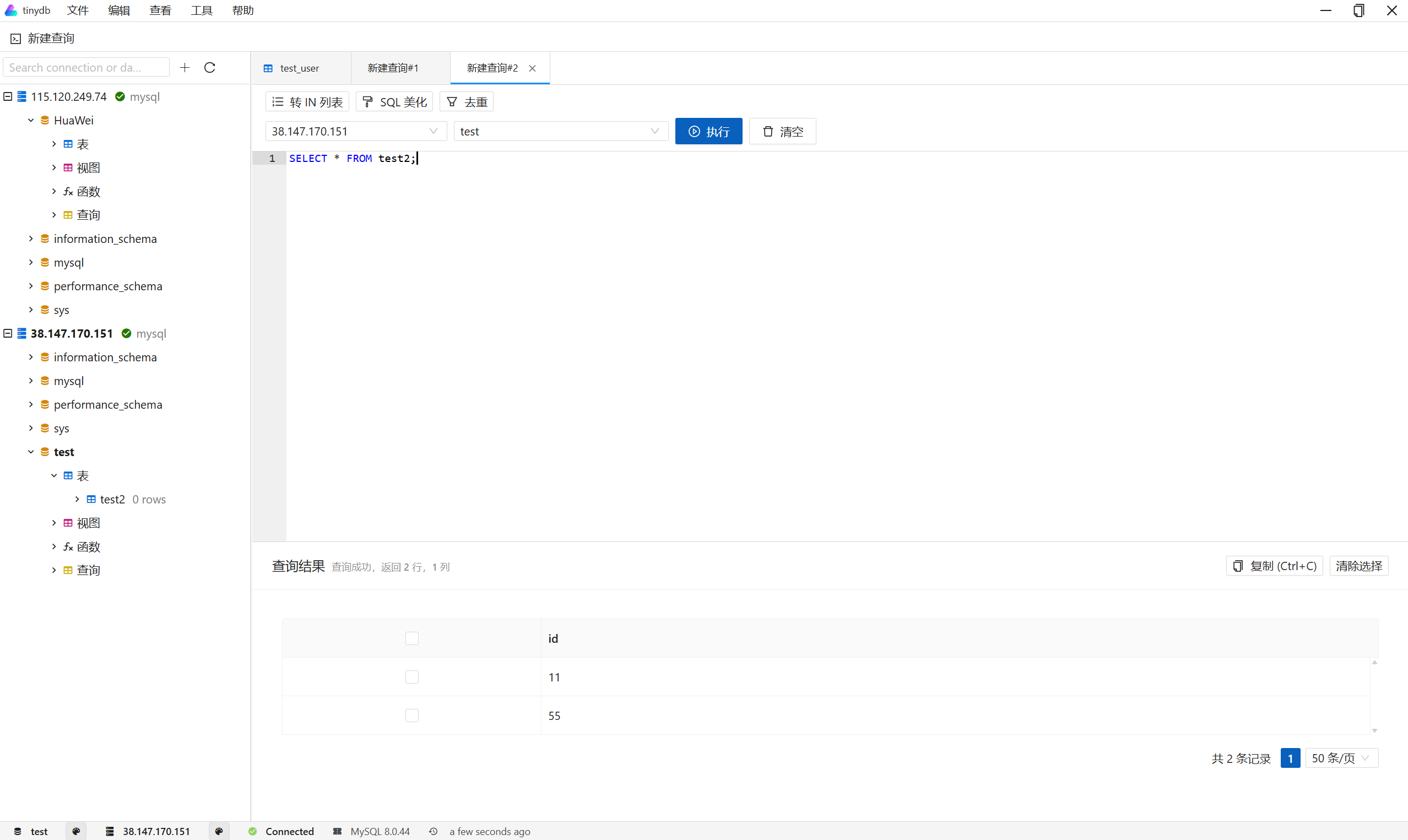
SQL Query Editor
- Syntax highlighting for SQL queries
- Intelligent auto-completion (tables, columns, keywords)
- SQL formatting and beautification
- Convert selection to IN list
- Deduplicate selected rows
- Execute queries with F5 shortcut
- Query result visualization in tables
-
Database Management
- Browse databases, tables, views, functions
- View and edit table data
- Database structure analysis
- Connection status monitoring
-
User Interface
- Clean, modern UI inspired by Navicat
- Light theme with consistent styling
- Menu bar and toolbar for quick access
- Tabbed interface for multiple queries
- Responsive layout
-
Cross-Platform
- Windows support
- macOS support
- Linux support
- Backend: Go 1.22+
- Frontend: Vue 3 + TypeScript
- Framework: Wails v2
- UI Components: Ant Design Vue
- Database Drivers:
- GORM (MySQL)
- MongoDB Go Driver
- Editor: Ace Editor
- Go 1.22 or higher
- Node.js 15.0 or higher
- pnpm (recommended) or npm
- Wails CLI v2
go install github.com/wailsapp/wails/v2/cmd/wails@latestgit clone https://github.com/jycoast/tinydb/tinydb.git
cd tinydbBackend (Go):
go mod downloadFrontend:
cd frontend
pnpm install
# or
npm installcd frontend
pnpm run build
# or
npm run build# From project root directory
wails devwails buildwails buildwails build-
Start the application using
wails dev -
Add a database connection:
- Click "连接" (Connect) button or use File menu
- Enter connection details (host, port, username, password, database)
- Test the connection
- Save the connection
-
Execute SQL queries:
- Click "新建查询" (New Query) to open a SQL editor
- Write your SQL query
- Press F5 or click "执行" (Execute) to run the query
- View results in the table below
-
Use SQL editor features:
- SQL formatting: Click "SQL 美化" (SQL Beautify)
- Convert to IN list: Select values and click "转 IN 列表"
- Deduplicate: Select rows and click "去重" (Deduplicate)
tinydb/
├── app/                    # Backend application code
│   ├── bridge/            # Wails bridge (Go-JS communication)
│   ├── db/                 # Database adapters
│   │   ├── adapter/
│   │   │   ├── mysql/     # MySQL adapter
│   │   │   └── mongo/     # MongoDB adapter
│   ├── analyser/          # Database structure analysis
│   └── utility/           # Utility functions
├── frontend/              # Frontend application
│   ├── src/
│   │   ├── layouts/       # Layout components
│   │   ├── second/        # Main application components
│   │   │   ├── tabs/      # Tab components (SQL editor, etc.)
│   │   │   ├── widgets/   # Widget components
│   │   │   └── plugins/   # Database plugin system
│   │   └── api/           # API bridge functions
├── main.go                # Application entry point
├── wails.json             # Wails configuration
└── go.mod                 # Go dependencies
The application stores connection settings and preferences locally. Connection credentials are encrypted for security.
Contributions are welcome! Please feel free to submit a Pull Request.
- Fork the repository
- Create your feature branch (
git checkout -b feature/AmazingFeature) - Commit your changes (
git commit -m 'Add some AmazingFeature') - Push to the branch (
git push origin feature/AmazingFeature) - Open a Pull Request
This project is licensed under the MIT License - see the LICENSE file for details.
- Wails - For the amazing framework
- Vue.js - Progressive JavaScript framework
- Ant Design Vue - UI component library
- dbgate - Inspiration for database management features
- Ace Editor - Code editor component
- Author: bob
- Email: jycoder@163.com
- GitHub: @jycoder
TinyDB 是一个跨平台的桌面数据库管理工具,为 MySQL 和 MongoDB 数据库提供直观的管理界面。使用现代 Web 技术(Vue 3)和 Go 构建,提供原生桌面体验和强大的数据库管理功能。
-
多数据库支持
- MySQL 数据库管理
- MongoDB 数据库管理
- 便捷的连接管理,支持保存连接信息
-
SQL 查询编辑器
- SQL 语法高亮
- 智能自动补全(表名、字段名、关键词)
- SQL 格式化和美化
- 转换为 IN 列表
- 选中行去重功能
- F5 快捷键执行查询
- 查询结果表格展示
-
数据库管理
- 浏览数据库、表、视图、函数
- 查看和编辑表数据
- 数据库结构分析
- 连接状态监控
-
用户界面
- 简洁现代的 UI,参考 Navicat 设计
- 统一的白色主题风格
- 菜单栏和工具栏快速访问
- 标签页界面支持多个查询
- 响应式布局
-
跨平台支持
- Windows 支持
- macOS 支持
- Linux 支持
- 后端: Go 1.22+
- 前端: Vue 3 + TypeScript
- 框架: Wails v2
- UI 组件: Ant Design Vue
- 数据库驱动:
- GORM (MySQL)
- MongoDB Go Driver
- 编辑器: Ace Editor
- Go 1.22 或更高版本
- Node.js 15.0 或更高版本
- pnpm(推荐)或 npm
- Wails CLI v2
go install github.com/wailsapp/wails/v2/cmd/wails@latestgit clone https://github.com/jycoast/tinydb/tinydb.git
cd tinydb后端 (Go):
go mod download前端:
cd frontend
pnpm install
# 或
npm installcd frontend
pnpm run build
# 或
npm run build# 在项目根目录下运行
wails devwails buildwails buildwails build-
启动应用:使用
wails dev命令 -
添加数据库连接:
- 点击"连接"按钮或使用文件菜单
- 输入连接信息(主机、端口、用户名、密码、数据库)
- 测试连接
- 保存连接
-
执行 SQL 查询:
- 点击"新建查询"打开 SQL 编辑器
- 编写 SQL 查询语句
- 按 F5 或点击"执行"按钮运行查询
- 在下方表格中查看结果
-
使用 SQL 编辑器功能:
- SQL 格式化:点击"SQL 美化"按钮
- 转换为 IN 列表:选中值后点击"转 IN 列表"
- 去重功能:选中行后点击"去重"按钮
tinydb/
├── app/                    # 后端应用代码
│   ├── bridge/            # Wails 桥接层(Go-JS 通信)
│   ├── db/                 # 数据库适配器
│   │   ├── adapter/
│   │   │   ├── mysql/     # MySQL 适配器
│   │   │   └── mongo/     # MongoDB 适配器
│   ├── analyser/          # 数据库结构分析
│   └── utility/           # 工具函数
├── frontend/              # 前端应用
│   ├── src/
│   │   ├── layouts/       # 布局组件
│   │   ├── second/        # 主应用组件
│   │   │   ├── tabs/      # 标签页组件(SQL 编辑器等)
│   │   │   ├── widgets/   # 小部件组件
│   │   │   └── plugins/   # 数据库插件系统
│   │   └── api/           # API 桥接函数
├── main.go                # 应用入口
├── wails.json             # Wails 配置文件
└── go.mod                 # Go 依赖管理
应用程序在本地存储连接设置和偏好设置。连接凭据经过加密以确保安全。
欢迎贡献代码!请随时提交 Pull Request。
- Fork 本仓库
- 创建特性分支 (
git checkout -b feature/AmazingFeature) - 提交更改 (
git commit -m '添加一些新功能') - 推送到分支 (
git push origin feature/AmazingFeature) - 开启 Pull Request
本项目采用 MIT 许可证 - 查看 LICENSE 文件了解详情。
- Wails - 优秀的框架
- Vue.js - 渐进式 JavaScript 框架
- Ant Design Vue - UI 组件库
- dbgate - 数据库管理功能的灵感来源
- Ace Editor - 代码编辑器组件
- 作者: bob
- 邮箱: jycoder@163.com
- GitHub: @jycoder
Made with ❤️ by jycoder