Tip Calculator App is a tip calculator application for iOS.
Submitted by: Kent Brylle Canonigo
Time spent: 10 hours spent in total
The following required functionality is complete:
- User can enter a bill amount, choose a tip percentage, and see the tip and total values.
- User can select between tip percentages by tapping different values on the segmented control and the tip value is updated accordingly
The following optional features are implemented:
- UI animations
- Remembering the bill amount across app restarts (if <10mins)
- Using locale-specific currency and currency thousands separators.
- Making sure the keyboard is always visible and the bill amount is always the first responder. This way the user doesn't have to tap anywhere to use this app. Just launch the app and start typing.
The following additional features are implemented:
- Added split button to decrease/increase number of people to split the total bill with
- Changed background colors of main view controller
- Created slider for tip percentages with initial range of 2 and tip percentages from 0-20%
- Made bill amount first responder
- Changed navigation bar to arrow image
- Settings page
- Allows user to change minimum and maximum tip percentages in slider
- Alerts user to add in valid range value if the interval of maximum - minimum tip is not divisible by the range value given
- Animates new page with changed tip percentages with stable functionality of calculating tip + total bill amounts
Here's a walkthrough of implemented user stories:
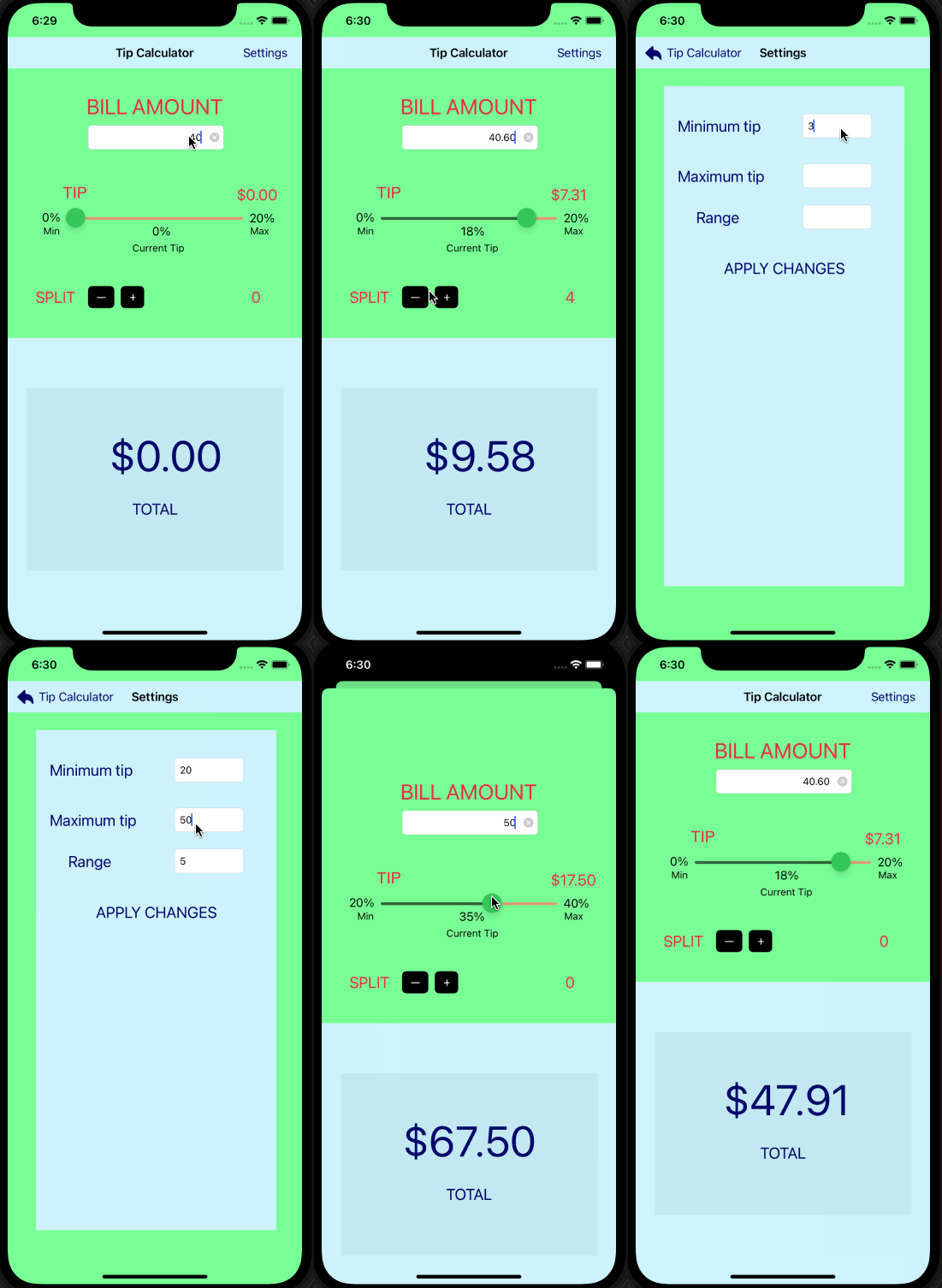
GIF created with LiceCap.
Describe any challenges encountered while building the app.
I had a lot of challenges while building this app, most of which were solved through Googling specific questions on StackOverflow, Youtube videos, exploring the Swift Documentation, and just experimenting on my own. Some of my major obstacles were implementing my tip percentages slider, developing my three main settings (being able to change the minimum and maximum tips as well as its ranges), and accessing data between different view controllers. My most significant challenge in implementing the slider was accessing its values in scope so that the current value of the slider will update both the tip and total amount. Following this implementation was then accessing the slider's minimum and maximum values through the SettingsViewController and changing its values — I learned that I could manipulate this information using controller properties, and I was able to change both the loaded display of the animated "APPLY CHANGES" button to properly reflect the user's changes. Lastly, I wanted to make sure that the interval of the slider was always even, thus I added an alert if the user were to change the minimum and maximum tips that was not divisible by the range value they had given. This made the minimum and maximum slider percentages to be equally spaced at all times and does not go over each min and max if the range was not divisible.
In the future, I'd like to add more features to my Settings page and implement more of the optional features. Also, my UI does not open up the keyboard for an odd reason, and it still could use more animations for a neat aesthetic. Implementing these additional features will help ease the user app experience. I'd also want to reset all the text fields once I return back to the main ViewController in case they wanted to use the default tips.
Copyright [2022] [Kent Brylle Canonigo]

Licensed under the Apache License, Version 2.0 (the "License");
you may not use this file except in compliance with the License.
You may obtain a copy of the License at

    http://www.apache.org/licenses/LICENSE-2.0

Unless required by applicable law or agreed to in writing, software
distributed under the License is distributed on an "AS IS" BASIS,
WITHOUT WARRANTIES OR CONDITIONS OF ANY KIND, either express or implied.
See the License for the specific language governing permissions and
limitations under the License.