







A blazingly fast, type-safe HTML template engine for Kotlin JVM and Multiplatform that transforms .ktml templates into
optimized Kotlin functions.
KTML is designed to make building web applications with Kotlin simple, safe, and fast:
- 🚀 Just HTML - templates are valid HTML
- 🧩 Component Based - Custom tags are trivial to create, making it easy to break down content into reusable components
- 🔒 Type Safety - Full compile-time type checking with nullable types, default parameters, and imported types from your codebase
- 📄 Flexible Template Types - Support for full pages (with
<html>root), custom tags (reusable components), and fragments (embeddable or directly routable) - ⚡ Blazing Fast - Templates compile to pure Kotlin functions with little runtime overhead, even with hundreds of custom tags
- 🎯 Simple API - Only two special attributes (
ifandeach) to learn—the rest is just HTML and Kotlin - 🌍 Kotlin Multiplatform - Works on JVM and Native platforms
- 🔥 Hot Reloading - Instant template updates in dev mode without restarting your server
- 💻 Embedded Kotlin - Use
<script type="text/kotlin">tags for complex processing directly in templates (use with care 🙂)
Custom tags let you build reusable components with type-safe parameters that can be included in other templates:
<!-- card.ktml -->
<card header="${Content? = null}" content="$Content">
    <div class="card">
        <div if="${header != null}" class="card-header">
            $header
        </div>
        <div class="card-body">
            $content
        </div>
    </div>
</card>Pages use <html> as the root and can be rendered from a controller. A template can import types from your code and use
values from a context model. To pull a value from the context model into the template you prefix the attribute name on
the root template tag with a @.
<!-- dashboard.ktml -->
<!DOCTYPE html>

import com.myapp.User

<html lang="en" @user="$User">
<head>
    <title>Dashboard</title>
</head>
<body>
<card>
    <header><h2>Welcome, ${user.name}!</h2></header>
    <p if="${user.type == UserType.ADMIN}">You have admin privileges</p>
</card>
</body>
</html>With integrations for Spring MVC, Ktor, and Javalin, KTML works like other template engines. The Gradle plugin will automatically generate and compile the code from your templates.
Here's an example using Ktor:
fun main() {
    embeddedServer(CIO, port = 8080, host = "0.0.0.0") {
        install(KtmlPlugin)
        configureRouting()
    }.start(wait = true)
}

fun Application.configureRouting() {
    routing {
        get("/") {
            call.respondKtml(path = "dashboard", model = mapOf("user" to User()))
        }
    }
}
Check out other example applications here!
KTML has a Gradle plugin that helps integrate the code generation process into your build. You can find the documentation for it here.
There are a lot of HTML template engines available for the JVM. I've used most of them. The two I like the most are Thymeleaf and Java Template Engine. In a lot of ways KTML is a combination of those two.
From Thymeleaf I really like the concept of a template just being valid HTML, rather than having a bunch of added
declarations in the file. The main issue I had with Thymeleaf is building custom tags was too difficult, and if you use
them too much, it greatly affects page render speed. I also found their replace concept, with the idea of have demo
content in the template, just wasn't practical and wasn't something we ever used. Plus, it makes invoking other
templates rather cumbersome. So, it didn't have the natural composability I wanted and had major performance issues.
I like the type safety that JTE has and the performance. The idea of generating code from the template and compiling it seemed like the best way to go from a performance perspective. I didn't care for how other templates were invoked, or that the template wasn't valid HTML like Thymeleaf. So, it also didn't have the natural composability I was looking for.
Having built a lot of web apps with client side component frameworks like React, I really liked the idea of breaking a site down into reusable pieces of HTML that you use to build pages. I just also think SSR over SPA is often the right choice and leads to an easier development process.
KTML supports three template types, each with a specific purpose:
Templates with <html> as the root element become pages accessible via web routes. All parameters declared on a page
template will be pulled from the context model. Since a page isn't called from another tag, all the parameters to it
have to come from the context model, so all parameter names have to be prefixed with $.
<!DOCTYPE html>
<html lang="en" @userName="$String">
<head><title>My Page</title></head>
<body><h1>Hello, ${userName}!</h1></body>
</html>Templates with custom root elements become reusable components. Since strings are often used in attribute values, and
attributes often use " around the value, KTML lets you use a ' inside the value. It will be changed to a " in
the actual Kotlin code. If you actually need a ' in the value, you can escape it with \'.
<button-primary text="$String" onClick="${String = ''}">
    <button class="btn-primary" onclick="${raw(onClick)}">
        ${text}
    </button>
</button-primary>
Use in other templates: <button-primary text="Click me!" onClick="handleClick()" />
Custom tags can also be labeled as fragments, which allows them to be called from other templates or called directly from a controller like a page. All template parameter values will get populated from the context model.
<user-info fragment userName="$String" userEmail="$String">
    <h3>$userName</h3>
    <p>$userEmail</p>
</user-info>KTML supports Kotlin's type system, including nullable types and default values:
<user-profile
        name="$String"
        bio="${String? = null}"
        role="${String = 'Member'}"
        isActive="${Boolean = true}">

    <div class="profile">
        <h2>$name</h2>
        <p if="${bio != null}">$bio</p>
        <span class="role">$role</span>
    </div>
</user-profile>Import your own Kotlin types for full type safety:
import dev.ktml.User
import dev.ktml.UserType
import dev.ktml.models.Product

<product-card product="Product" user="User">
    <div class="product">
        <h3>${product.name}</h3>
        <p>${product.price}</p>
        <button if="${user.type == UserType.ADMIN}">Edit</button>
    </div>
</product-card>Sometimes templates need to access data that isn't passed directly to them by the calling template but comes from the
context of the request. To have a template define a context value it uses we use $ prefix for the parameter. The
generated code will automatically pull the value from the context object and ensure it's of the correct type:
<sidebar @items="${List<MenuItem> = listOf()}">
    <nav>
        <a each="${item in items}" href="${item.url}">${item.label}</a>
    </nav>
</sidebar>KTML keeps it simple with only two special attributes to learn:
<h2 if="${user.isAdmin}">Admin Panel</h2>
<p if="${user.balance > 0}">Balance: ${user.balance}</p><ul>
<li each="${item in items}">${item.name}</li>
</ul>
<!-- With index -->
<div each="${(index, product) in products.withIndex()}">
${index + 1}. ${product.name}
</div>When you need more than simple expressions, embed Kotlin directly in templates:
<report sales="${List<Sale>}">
    <script type="text/kotlin">
        val totalRevenue = sales.sumOf { it.amount }
        val avgSale = totalRevenue / sales.size
        val topSale = sales.maxByOrNull { it.amount }
    </script>

    <div class="report">
        <h2>Sales Report</h2>
        <p>Total Revenue: $${totalRevenue}</p>
        <p>Average Sale: $${avgSale}</p>
        <p if="${topSale != null}">Top Sale: $${topSale.amount}</p>
    </div>
</report>Pass HTML blocks as parameters for flexible composition:
<modal title="$String" footer="${Content? = null}" content="$Content">
    <div class="modal">
        <div class="modal-header"><h3>${title}</h3></div>
        <div class="modal-body">${content}</div>
        <div if="${footer != null}" class="modal-footer">${footer}</div>
    </div>
</modal><modal title="Confirm Action">
<p>Are you sure you want to proceed?</p>
<footer>
<button>Cancel</button>
<button>Confirm</button>
</footer>
</modal>Use raw() to output unescaped HTML (use carefully!):
<code-block code="String">
    <pre><code>${raw(code)}</code></pre>
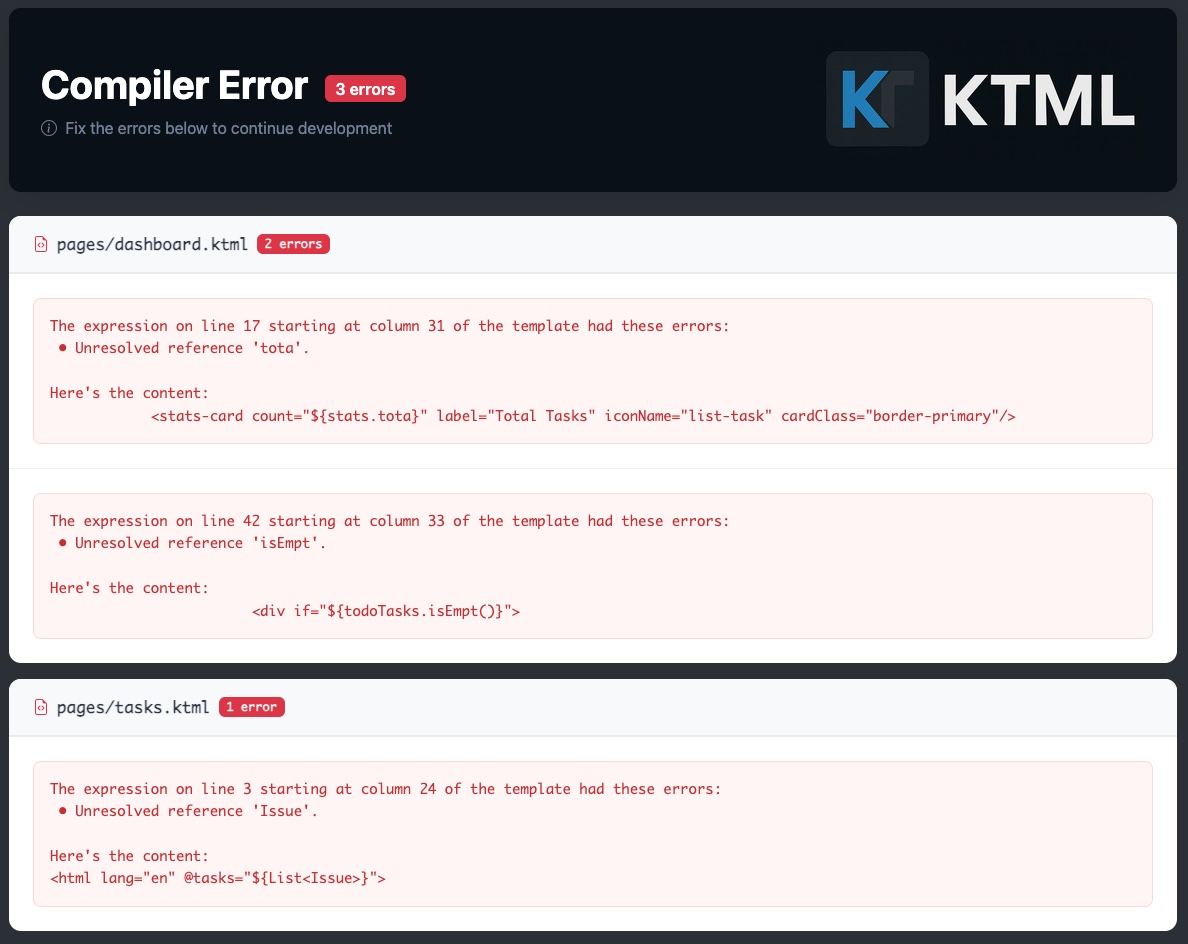
</code-block>When you include the dev-mode dependency for KTML, you can run locally and you're templates will automatically be
compiled as they change. If compilation fails, you'll get messages in the console explaining where the code in the
template is that caused the error. And if you try to render a KTML page in the browser, you'll get the compilation error
screen. Which looks like this:
KTML is designed for speed:
- Zero Runtime Overhead - Templates compile to simple Kotlin functions
- No Reflection - Everything is resolved at compile time
- Efficient Composition - Custom tag calls are just function calls
- Optimized String Building - Direct writer output with minimal allocations
Rendering a complex page with hundreds of custom tags is as fast as manually writing the equivalent Kotlin string concatenation code.
# Build all platforms
./gradlew build# Run all tests
./gradlew test
# Run JVM tests only
./gradlew jvmTest- JVM - Java 22+ required
- Native - Linux x64, macOS x64/ARM64, Windows x64
- Kotlin Multiplatform - Core platform
- Ksoup - HTML parsing and entity handling
- Kotlin Logging - Logging framework
- Kotlinx Coroutines - Async support
- Kotest - Testing framework
KTML processes templates through a clean pipeline:
- HTML Parsing - Parse
.ktmlfiles using Ksoup - AST Generation - Build abstract syntax tree
- Kotlin Code Generation - Generate type-safe Kotlin functions
- Compilation - Compile to bytecode (JVM) or native code
- Execution - Fast function calls at runtime
Key components:
- KtmlEngine - Main orchestrator for template processing
- TemplateParser - Parses HTML templates
- KotlinFileGenerator - Generates type-safe Kotlin functions
- Templates Registry - Manages template dependencies
- Context System - Handles type-safe parameter binding
This project is licensed under the Apache 2.0 License.
Contributions are welcome! Please:
- Fork the repository
- Create a feature branch
- Write tests for your changes
- Ensure all tests pass with
./gradlew test - Submit a pull request