docs: document deployment to Cloud Foundry #1668
Conversation


 hacksparrow
force-pushed
the
docs/cf-deployment
branch
3 times, most recently
from
hacksparrow
force-pushed
the
docs/cf-deployment
branch
3 times, most recently
from
e8d40e2 to
90ab968
Compare

 dhmlau
left a comment
dhmlau
left a comment
dhmlau
left a comment
There was a problem hiding this comment.
I understand this is working in progress, however, I think if we assume the app is running fine locally, we can omit the sections on running cloudant on docker. It's clearer on what this doc trying to accomplish.
I'm thinking the following flow (see if it makes to you):
- clone the
todoexample usinglb4 examplecommand - create the cloudant service and
tododatabase - make the changes in LB4 app
- add cloud foundry artifacts
- vcapService
- datasource, etc.
- deployment to IBM Cloud
| @@ -0,0 +1,244 @@ | |||
| --- | |||
| lang: en | |||
| title: 'How to deploy LoopBack 4 app to Cloud Foundry' | |||
There was a problem hiding this comment.
If putting this as the root layer, the title should be consistent with the rest of the titles.
Suggestion: Deploying to IBM Cloud (or something along that line)
After the title has been finalized, might want to change the file name as well. (typo in the file name as well)
| title: 'How to deploy LoopBack 4 app to Cloud Foundry' | ||
| keywords: LoopBack | ||
| sidebar: lb4_sidebar | ||
| permalink: /doc/en/lb4/Deployment-guide-Cloud-Foundry.html |
There was a problem hiding this comment.
make it consistent with the title after it's been finalized.
| cf push mylb4app | ||
| ``` | ||
|
|
||
| 3. Go to https://mylb4app.eu-gb.mybluemix.net/swagger-ui to load the API |
There was a problem hiding this comment.
- might want to explain a bit that the link is derived from the name and domain in the manifest.yml file.

|
@hacksparrow , @raymondfeng mentioned some time ago that there's IBM Cloud command we can use instead of the |
 hacksparrow
force-pushed
the
docs/cf-deployment
branch
4 times, most recently
from
hacksparrow
force-pushed
the
docs/cf-deployment
branch
4 times, most recently
from
f5e5d34 to
50123b1
Compare

|
@dhmlau I think that was not a separate tool, it was I have updated the doc accordingly. |

 bajtos
left a comment
bajtos
left a comment
bajtos
left a comment
There was a problem hiding this comment.
I like the new code, it's so much simpler!
It would be great if somebody can run through the instructions to verify they are complete and work as described. I am not sure if I'll be able to find time to do that in the next few days.
docs/site/Deploying-to-IBM-Cloud.md
Outdated
|
|
||
| #### Updating datasource | ||
|
|
||
| Update `db.datasource.json` to use the Cloudan connector. |
docs/site/Deploying-to-IBM-Cloud.md
Outdated
| Install the `loopback-connector-cloudant` package. | ||
|
|
||
| ```sh | ||
| $ npm i loopback-connector-cloudant -S |
There was a problem hiding this comment.
-s to save this connector as a regular (production) dependency.
With the proposed -S, the connector will be available only at dev-time.
docs/site/Deploying-to-IBM-Cloud.md
Outdated
| operations. Install `cfenv` in the project directory. | ||
|
|
||
| ```sh | ||
| $ npm i cfenv -S |
There was a problem hiding this comment.
Use -s for --save for production.
docs/site/Deploying-to-IBM-Cloud.md
Outdated
| } else { | ||
| if (!options.rest) options.rest = {}; | ||
| options.rest.port = appEnv.port || options.rest.port; | ||
| } |
There was a problem hiding this comment.
Let's simplify this block a little bit. How about the following?
if (!options) options = {};
if (!options.rest) options.rest = {};
options.rest.port = appEnv.port || options.rest.port;
Also: do we need to check appEnv.isLocal flag before applying appEnv.port?
There was a problem hiding this comment.
Here's my index.ts that I think we can leverage as I think it's simpler. Not the default value being set in the main function.
export async function main(options: ApplicationConfig = {}) {
  options.rest = options.rest || {};
  options.rest.port = appEnv.isLocal ? options.rest.port : appEnv.port;

  const app = new ShoppingApplication(options);

  if (!appEnv.isLocal) {
    userDataSource.url = appEnv.getServiceURL('t-shopping-cloudant');
    userDataSource.connector = 'cloudant';

    app.bind('datasources.config.user').to(userDataSource);
  }

  console.log('cloudant url: ', userDataSource.url);

  await app.boot();
  await app.start();

  const url = app.restServer.url;
  console.log(`Server is running at ${url}`);
  console.log(`Try ${url}/ping`);

  return app;
}
I am making two PRs to propose reading the port from env as a default and setting the options as a {} by default in hopes of simplifying this step.
There was a problem hiding this comment.
Writing to directly userDataSource will have side-effects for other files loading the datasource JSON file. I have uptimized, though.
Good proposals.
docs/site/Deploying-to-IBM-Cloud.md
Outdated
| const cfenv = require('cfenv'); | ||
| const appEnv = cfenv.getAppEnv(); | ||
| // 'myCloudant' is the name of the provisioned Cloudant service | ||
| const dbUrl = appEnv.getServiceURL('myCloudant'); |
There was a problem hiding this comment.
I would personally structure the code slightly differently:
const appEnv = cfenv.getAppEnv();
if (!appEnv.isLocal) {
  // 'myCloudant' is the name of the provisioned Cloudant service
  datasourceDb.url = appEnv.getServiceURL('myCloudant');
}
What do you think?
There was a problem hiding this comment.
Agreed, since we don't need to refer the url anywhere else.
docs/site/Deploying-to-IBM-Cloud.md
Outdated
| const dbUrl = appEnv.getServiceURL('myCloudant'); | ||
|
|
||
| if (!appEnv.isLocal) { | ||
| datasourceDb.url = dbUrl; |
There was a problem hiding this comment.
Modifying the object returned by require('./datasources/db.datasource.json') is a working solution, but I find it rather hacky. When writing a code calling require on a JSON file, most people expect the require call to return the exact data as stored in the file, not a value that was modified by somebody.
A better solution is to create a new object and set the modified properties there.
const appEnv = cfenv.getAppEnv();
if (!appEnv.isLocal) {
  // 'myCloudant' is the name of the provisioned Cloudant service
  datasourceDb = Object.assign({}, datasourceDb, {
    url: appEnv.getServiceURL('myCloudant')
  });
  app.bind('datasources.config.db').to(datasourceDb);
}There was a problem hiding this comment.
It was hacky indeed. Let's have that better implementation.
| cf push mylb4app | ||
| ``` | ||
|
|
||
| 3. Go to https://mylb4app.eu-gb.mybluemix.net/swagger-ui to load the API |
There was a problem hiding this comment.
I have a question regarding a host name and the application nam mylb4app. Shouldn't users pick a unique application name? I don't see how the same domain mylb4app.eu-gb.mybluemix.net can serve every LB4 user trying out cloud deployment by following this guide.
Am I missing something here?
I think the guide should be more clear about the fact that mylb4app is just a placeholder that people need to change to an actual unique application name.
There was a problem hiding this comment.
I think there's one more glitches here. After going to that URL, it got redirect to another url that won't work. I have to remove the "8080" port from the redirected url and change to https. for example:
https://loopback.io/api-explorer/?url=https://loopback4-example-shopping.mybluemix.net/openapi.json
instead of the original:
https://loopback.io/api-explorer/?url=http://loopback4-example-shopping.mybluemix.net:8080/openapi.json
There was a problem hiding this comment.
Good find. This is a bug either in the rest package or loopback.io. Will investigate further and open an issue accordingly.
|
@bajtos I made the changes you suggested. Thanks! |

 virkt25
left a comment
virkt25
left a comment
virkt25
left a comment
There was a problem hiding this comment.
Great guide!! Love how simple it is to read, follow and understand. Just have some questions / feedback.
docs/site/Deploying-to-IBM-Cloud.md
Outdated
|
|
||
| Before we begin make sure the following are installed. | ||
|
|
||
| 1. [Node.js](https://nodejs.org/en/download/) >= 8.9.0. |
There was a problem hiding this comment.
I think it's a safe assumption that if someone is reading this page they already have a working LB4 app and hence have Node.js installed and likely have the LB4 CLI installed as well.
docs/site/Deploying-to-IBM-Cloud.md
Outdated
| Install the `loopback-connector-cloudant` package. | ||
|
|
||
| ```sh | ||
| $ npm i loopback-connector-cloudant -s |
There was a problem hiding this comment.
We don't need to specify -s as npm saves it by default in package.json. That said if you want it then flags should be placed before the connector name: npm i -s loopback-connector-cloudant.
There was a problem hiding this comment.
Maybe use a more explicit --save instead of -s, to make the command easier to understand for people that are not very familiar with npm.
docs/site/Deploying-to-IBM-Cloud.md
Outdated
| operations. Install `cfenv` in the project directory. | ||
|
|
||
| ```sh | ||
| $ npm i cfenv -s |
There was a problem hiding this comment.
Same comment as above for -s
docs/site/Deploying-to-IBM-Cloud.md
Outdated
| if (!appEnv.isLocal) { | ||
| // 'myCloudant' is the name of the provisioned Cloudant service | ||
| datasourceDb = Object.assign({}, datasourceDb, { | ||
| url: appEnv.getServiceURL('myCloudant'), |
There was a problem hiding this comment.
I find it weird that we tell them to use the name myCloudant but we don't provision the service till the next step. I feel like these should be flipped.
|
|
||
| #### Updating npm script | ||
|
|
||
| Remove the `prestart` script from `package.json`, since we don't want to do any |
There was a problem hiding this comment.
I'm not sure I agree with this part! Building locally and deploying (without the node_modules) folder seems weird. What if there is a new dependency released vs. the target your app was built with? Not to mention it seems like a pain to have to build the app yourself before deploying it when the build folder isn't stored in GitHub.
The way I personally see builds working is as follows:
- BASIC: Build the app on the cloud as you would locally.
- Intermediate: Set up a CI/CD pipeline to build / deploy the app, something like Travis / IBM Cloud DevOps offering. This would help limit downtime during a switch if not using blue-green deployments.
Building locally should not be a thing and the deploy should be with the dependencies it's built with IMO.
There was a problem hiding this comment.
Looks like building on IBM Cloud will require lb-tsc to be installed globally. Moving @loopback/build to dependencies does not make lb-tsc available to npm script like it was installed globally.
Any suggestions?
There was a problem hiding this comment.
Really? Because I don't have typescript installed globally and have never had issues with lb-tsc not working locally. @raymondfeng any ideas as to why this might happen? Only thing that comes to my mind is it might be related to Node 8?
There was a problem hiding this comment.
Maybe something to do with the environment on IBM Cloud. I logged in to the shell and checked, there's no node or npm.
There was a problem hiding this comment.
Building locally and deploying (without the node_modules) folder seems weird. What if there is a new dependency released vs. the target your app was built with?
Or what if the public npm registry goes down and our production box cannot install the dependencies?
IMO, if we deploy from a local computer (instead of using a build/deploy pipeline), then we should run the build (TypeScript compilation) locally AND also deploy node_modules dependencies as we have installed them locally.
At least this was our conclusion when we were discussing different deployment options back in 2014/2015. We created https://github.com/strongloop/strong-build to make that process easy to automate.
@rmg could you please chime in? What's your opinion on the deployment process for Node.js apps requiring a build step?
docs/site/Deploying-to-IBM-Cloud.md
Outdated
| const datasourceDb = require('./datasources/db.datasource.json'); | ||
| const cfenv = require('cfenv'); | ||
| const appEnv = cfenv.getAppEnv(); | ||
| if (!appEnv.isLocal) { |
There was a problem hiding this comment.
I think it might be worthwhile to explain in a comment here as to what this is doing aka overriding / re-binding the config if on IBM Cloud from cfenv.
dhmlau
left a comment
dhmlau
left a comment
There was a problem hiding this comment.
@hacksparrow , i was trying to follow your instruction and ran into a few issues. I think I've captured what I know so far, but couldn't get the app to work fully yet. I might have some more comments after getting everything running.
docs/site/Deploying-to-IBM-Cloud.md
Outdated
| $ npm i cfenv -s | ||
| ``` | ||
|
|
||
| Update the `index.ts` file to the following to enable service binding. |
| .vscode/ | ||
| ``` | ||
|
|
||
| To create the `manifest.yml` file, run `cf create-app-manifest` and specify the |
There was a problem hiding this comment.
Need to login first before running this command.
cf login -a <endpoint> -u <user> -o <org> -s <space>
cf login --sso
Actually cf create-app-manifest cannot be run if the app does not exist on IBM cloud already.
| Update the `index.ts` file to the following to enable service binding. | ||
|
|
||
| ```ts | ||
| import {TodoListApplication} from './application'; |
There was a problem hiding this comment.
I got errors when somewhat copying and pasting your code snippet. The 2 errors:
- In the line of
app.bind('datasources.config.db').to(datasourceDb);,apphasn't been defined yet const datasourceDbmeaning it's not changeable but indeed we are assigning another value a few lines after.
For your reference, here is my index.ts:
import {ShoppingApplication} from './application';
import {ApplicationConfig} from '@loopback/core';

// IBM Cloud deployment
let datasourceDb = require('./datasources/user.datasource.json');
const cfenv = require('cfenv');
const appEnv = cfenv.getAppEnv();

export {ShoppingApplication};

export async function main(options?: ApplicationConfig) {
  // Set the port assigned for the app
  if (!options) options = {};
  if (!options.rest) options.rest = {};

  const app = new ShoppingApplication(options);
  if (appEnv.isLocal) options.rest.port = options.rest.port;
  else {
    datasourceDb = Object.assign({}, datasourceDb, {
      url: appEnv.getServiceURL('myCloudant'),
    });
    app.bind('datasources.config.db').to(datasourceDb);
    options.rest.port = appEnv.port;
  }

  await app.boot();
  await app.start();

  const url = app.restServer.url;
  console.log(`Server is running at ${url}`);
  console.log(`Try ${url}/ping`);

  return app;
}
There was a problem hiding this comment.
Fixed in the latest commit. Thanks.
| ``` | ||
| cf push mylb4app | ||
| ``` | ||
|
|
There was a problem hiding this comment.
I think there's a missing step of binding the service in the app (from the IBM Cloud console)
There was a problem hiding this comment.
It is mentioned under "Connecting the database to app".
| cf push mylb4app | ||
| ``` | ||
|
|
||
| 3. Go to https://mylb4app.eu-gb.mybluemix.net/swagger-ui to load the API |
There was a problem hiding this comment.
I think there's one more glitches here. After going to that URL, it got redirect to another url that won't work. I have to remove the "8080" port from the redirected url and change to https. for example:
https://loopback.io/api-explorer/?url=https://loopback4-example-shopping.mybluemix.net/openapi.json
instead of the original:
https://loopback.io/api-explorer/?url=http://loopback4-example-shopping.mybluemix.net:8080/openapi.json

|
So I tried to deploy
Now to work out the database issues.
IBM Toolchain Setup
Back to DataBase.
I'm not a fan of trying to remember to build locally before deploying. I know one can setup local commit hooks or something but I personally like the Toolchain since it updated the app automatically after a merge to master. My GitHub Repo: https://github.com/virkt25/loopback4-example-shopping |

|
Thanks for the findings @virkt25. For someone who just wants to see a basic LB4 app running on IBM Cloud, the overall experience seems overly complex. Thoughts? |

|
@virkt25 to specify the node and npm versions that the buildpack should use you specify them in |
This works for the actual deployed Application to IBM Cloud but IBM Toolchain doesn't seem to honour this. Below is the default build for
|
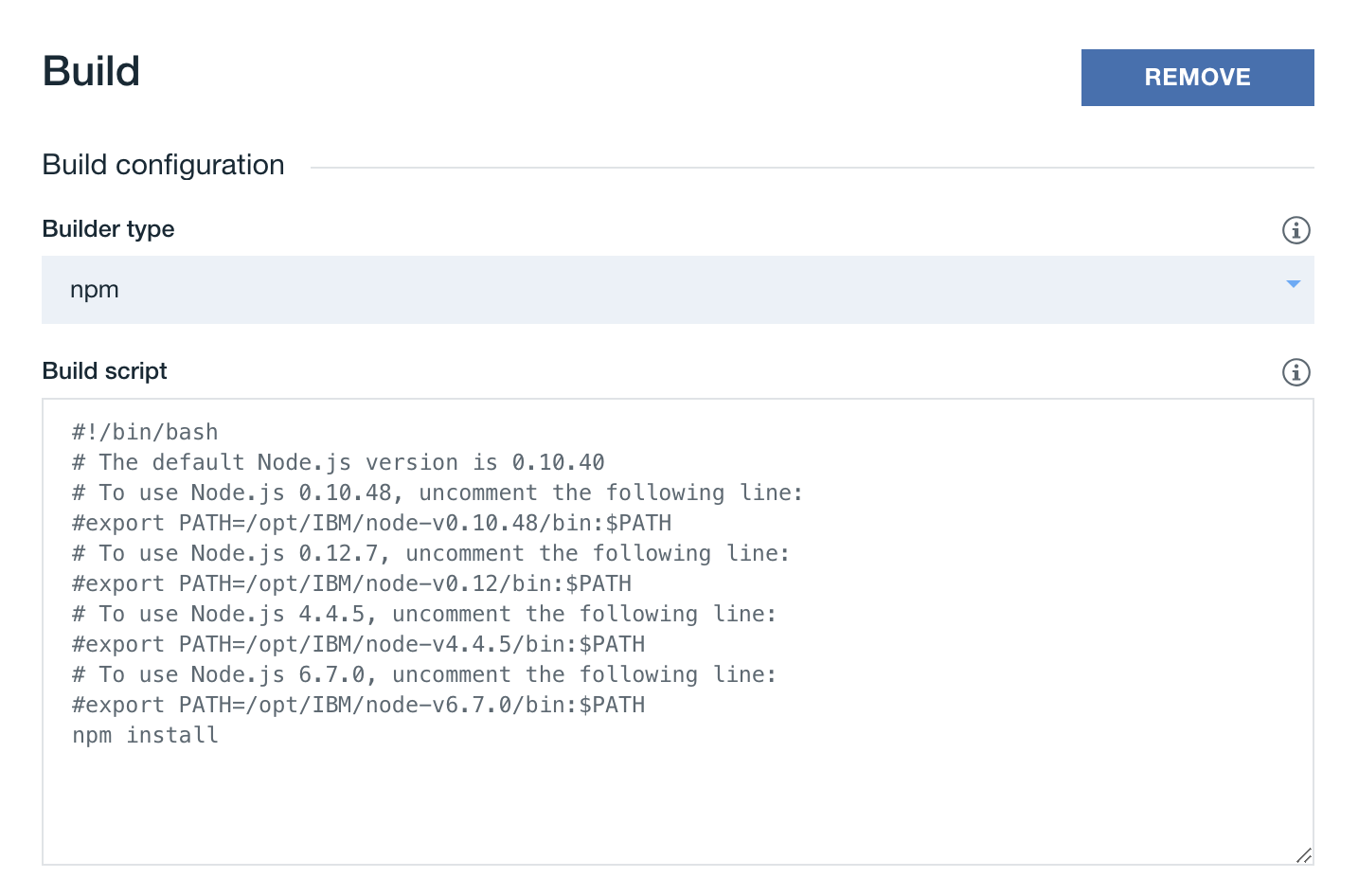
The issue is that the IBM Toolchain environment is very different from IBM Cloud where the app is deployed and hence the need for that script. |
|
I think we can make this round of documentation to be just deploying a LB4 app to IBM Cloud without all the toolchain setup. Keep it minimal and easy to follow so that users know what are the steps involved. As a follow up, we can create an additional section on the toolchain. Even that, I'm thinking whether we can piggyback on some of the existing docs, meaning we only add the instructions specific or additional to LB app deployment. Not sure if it helps in the discussion, with the help of @virkt25, I was able to deploy my own LB4 app to IBM Cloud. Similar to the starting point @virkt25 had above:
I think if we have the above steps (as an outline), it is good for the purpose of telling the users how to deploy to IBM Cloud. Thoughts? |
hacksparrow
force-pushed
the
docs/cf-deployment
branch
from
6c99a5c to
9481f84
Compare
hacksparrow
force-pushed
the
docs/cf-deployment
branch
from
9481f84 to
e06260b
Compare
There was a problem hiding this comment.
We're almost there. Some nitpicks. I'm not sure if we need to talk about the local setup ... at least not in the early part of it.
Also ... why are we discussing cloudant integration / local setup? I find there to be a bit of a disconnect in the flow of the document. If we want to keep things simple then we can do a tutorial along the following lines:
-
Deploy the app as is. Point the limitation that data may be lost between restarts. Gets users comfortable with the idea of deploying.
-
Explain why we are adding Cloudant (persistance). Explain the local setup ... get the app working locally.
-
Show how to deploy with Cloudant on BlueMix.
And OUT OF SCOPE of this PR, but the next step in the deploy to IBM Cloud would be to show them the Pipeline setup so it auto-deploys when merging / pushing to master.
docs/site/Deploying-to-IBM-Cloud.md
Outdated
| explained below, your app will use a local instance of Cloundant when running | ||
| locally, and a provisioned Cloudant service when running on the cloud. | ||
|
|
||
| Before we begin make sure the following are installed. |
There was a problem hiding this comment.
nitpick: sentence should end in : instead of .
docs/site/Deploying-to-IBM-Cloud.md
Outdated
|
|
||
| Before we begin make sure the following are installed. | ||
|
|
||
| 1. [Cloud Foundy CLI](https://docs.cloudfoundry.org/cf-cli/install-go-cli.html). |
There was a problem hiding this comment.
nitpick: lets not add . at the end of the list items.
docs/site/Deploying-to-IBM-Cloud.md
Outdated
|
|
||
| ## Deploying the app | ||
|
|
||
| ### Local |
There was a problem hiding this comment.
I'm not sure how I feel about the local step -- it's not necessary for a deploy of the application.
docs/site/Deploying-to-IBM-Cloud.md
Outdated
| } else { | ||
| if (!options.rest) options.rest = {}; | ||
| options.rest.port = appEnv.port || options.rest.port; | ||
| } |
There was a problem hiding this comment.
Here's my index.ts that I think we can leverage as I think it's simpler. Not the default value being set in the main function.
export async function main(options: ApplicationConfig = {}) {
  options.rest = options.rest || {};
  options.rest.port = appEnv.isLocal ? options.rest.port : appEnv.port;

  const app = new ShoppingApplication(options);

  if (!appEnv.isLocal) {
    userDataSource.url = appEnv.getServiceURL('t-shopping-cloudant');
    userDataSource.connector = 'cloudant';

    app.bind('datasources.config.user').to(userDataSource);
  }

  console.log('cloudant url: ', userDataSource.url);

  await app.boot();
  await app.start();

  const url = app.restServer.url;
  console.log(`Server is running at ${url}`);
  console.log(`Try ${url}/ping`);

  return app;
}
I am making two PRs to propose reading the port from env as a default and setting the options as a {} by default in hopes of simplifying this step.
hacksparrow
force-pushed
the
docs/cf-deployment
branch
from
e06260b to
8d99be0
Compare
hacksparrow
force-pushed
the
docs/cf-deployment
branch
2 times, most recently
from
f3771f1 to
8fda22e
Compare

|
I quickly skimmed through the current version of the deployment guide and it looks good enough to me. I agree the build process and/or deployment pipeline is out of scope of this pull request (and the related user story). Having said that, can we add a note to tell readers that a manual build is not the best approach, they should consider setting up a build pipeline and give them a link to an existing documentation for build pipelines? I think it's good to let them be aware of other solutions, even if we don't provide any additional LoopBack-specific guidelines (yet).
I love this new outline! On the other hand, this pull request has been opened for 9 days already, maybe it's best to land it in the current form and then rework it to the new outline in a follow-up pull request (or even a follow-up user story)? |
hacksparrow
force-pushed
the
docs/cf-deployment
branch
from
8fda22e to
59034d7
Compare
|
@virkt25 @dhmlau added these additional contextual info.
|
|
I'm good with landing this PR as-is too. +1 on the new outline of removing the local setup. As I've mentioned before, it is a bit confusing to have the local set up / deploy instructions because we can assume the prereq is the app running locally already. |
document deployment to IBM Cloud Cloud Foundry
hacksparrow
force-pushed
the
docs/cf-deployment
branch
from
59034d7 to
5b8a9a6
Compare


Document deployment to Cloud Foundry. Addresses #1604.
Checklist
npm testpasses on your machinepackages/cliwere updatedexamples/*were updated