Wide Character problem / Space Between Character problem #790

Description

macvim version:
$ brew info macvim
macvim: stable 8.1-151 (bottled), HEAD
GUI for vim, made for macOS
https://github.com/macvim-dev/macvim
/usr/local/Cellar/macvim/8.1-151 (2,173 files, 34.9MB) *
  Poured from bottle on 2018-11-01 at 21:00:51
From: https://github.com/Homebrew/homebrew-core/blob/master/Formula/macvim.rb
I am running macvim on:
macOS Mojave version 10.14.1
Issue:
I updated macvim to 8.1-151 after Mojave, space in between wide character is not display properly.
For example, when I am trying to display this ascii diagram:
┌───────────────┐              ┌──────────────┐
│               │              │              │
│               │              │              │
│               │              │              │
│               ├─────────────▶│              │
│               │              │              │
│               │              │              │
│               │              │              │
│               │              │              │
└───────────────┘              │              │
                               └──────────────┘
where '┌' ,'└', ','┘', '┐', ' ─', and '▶' are wide character; while '│', and ' ' (space) are normal character.
The rendering in MacVim shows:

my font setting are:
guifont=Inconsolata:h14
guifontwide=
encoding=utf-8
ambiwidth=single
Inconsolata is fix width font the width of charecter should be identical, but the rendering clearly shown otherwise.
Expected correct behaviour
I am expected this to be displayed like:

The above is running vim in terminal that using the same font but different size: Inconsolata Regular 17pt.
I have tried:
set guifontwide=Menlo Regular:h14
Because help: guifontwide seem to indicates that macvim will use font specified in guifontwide when displaying wide character. But setting this does not help either.
I don't think this has to do with guifontwide, it is more likely due to the how macvim render the space between character and I believe that the rendering behaviour has changed since Mojave update..
Here is another example of where wide character display that result in misalignment:

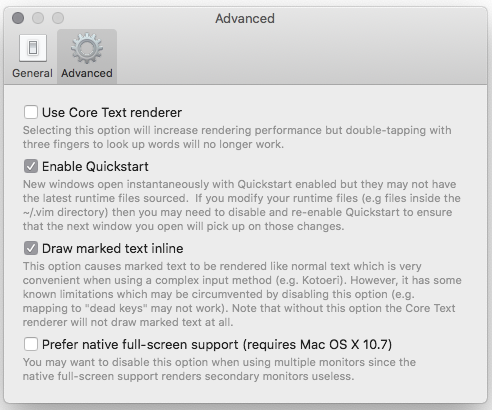
I am not using 'Core Text renderer', here is my preference for macvim: