A self-contained web application for browsing, playing, and practicing Rocksmith 2014 Custom DLC (CDLC). Runs entirely in Docker — no local dependencies required.
Looking for a desktop app? Slopsmith Desktop is a standalone native app for non-technical users — no Docker required. It includes everything in the web version plus a built-in audio engine with VST3/AU/LV2 plugin hosting, Neural Amp Modeler (NAM) for amp simulation, cabinet IR loading, and automatic tone switching that changes your signal chain as tones change during a song.


- Grid View — album art cards with arrangement badges, tuning, lyrics indicator
- Artist/Album Tree View — hierarchical browser with letter filter (A-Z), expandable artist and album groups
- Search — filter by song title, artist, or album name
- Sort — by artist, title, recently added, or tuning
- Favorites — mark songs with a heart, browse favorites in a dedicated view
- Edit Metadata — update song title, artist, album, and album art directly from the library
- Retune to E Standard — pitch-shift songs in Eb/D/C#/C Standard to E Standard with one click
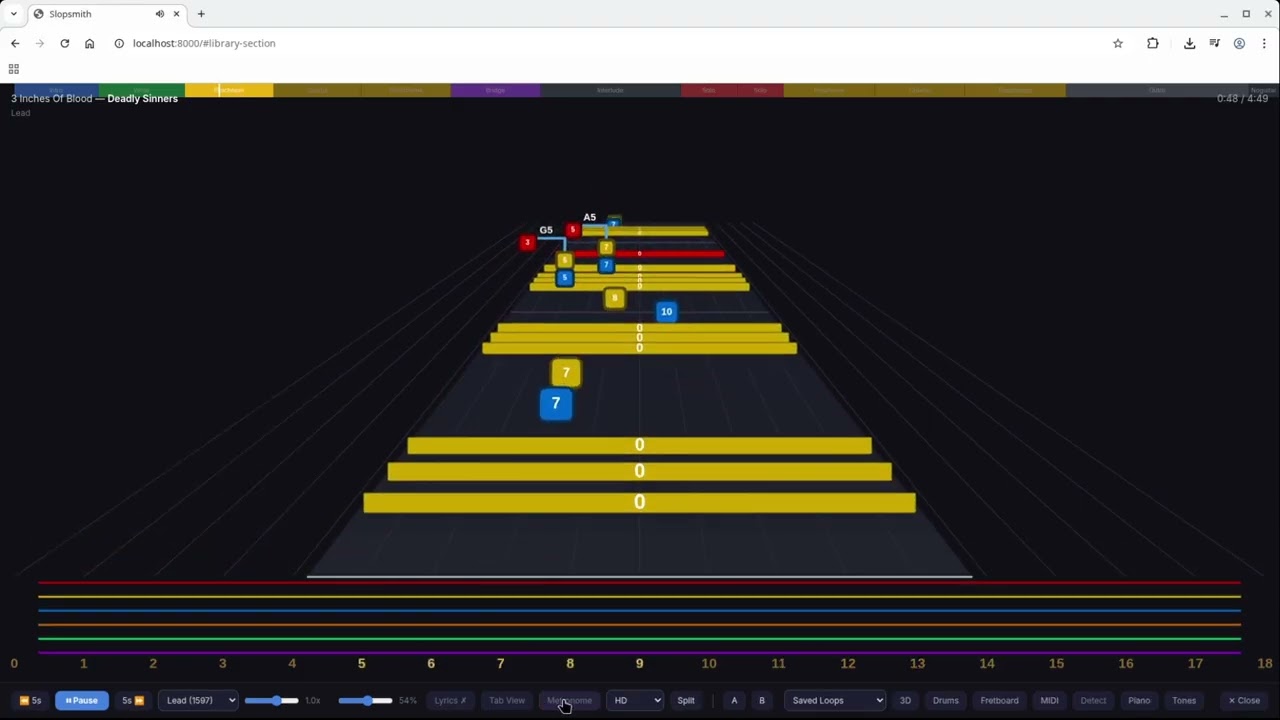
A real-time canvas-based note highway that renders Rocksmith arrangements as they would appear in the game.
Note rendering:
- Fret-positioned notes with string colors (red, orange, blue, orange, green, purple)
- Open string bars spanning the highway
- Chord brackets connecting chord notes with chord name labels
- Sustain tails that stay visible until the sustain finishes
Techniques:
- Bends with curved arrows and labels (1/2, full, 1-1/2, 2)
- Unison bends with dashed connector and "U" label
- Slides (diagonal arrow)
- Hammer-ons / Pull-offs / Taps (H/P/T labels)
- Palm mutes (PM label)
- Tremolo (wavy line)
- Accents (> marker)
- Harmonics (diamond shape)
- Pinch harmonics (diamond + PH label)
Additional features:
- Synced lyrics display (phrase-based, multi-row, karaoke highlighting) — toggleable
- Dynamic anchor zoom — fret range adjusts smoothly, looks ahead at upcoming notes
- Arrangement switcher — switch between Lead, Rhythm, Bass during playback
- Speed control — continuous slider from 0.25x to 1.50x
- Volume control
- A-B Looping — set start (A) and end (B) points to repeat a section
- Saved Loops — name and save multiple loop sections per song, persisted across sessions
- 4-Count Click — tempo-matched metronome count-in (1-2-3-4) before each loop repetition
- Rewind Effect — highway smoothly rewinds to the loop start point
- Create from Guitar Pro Tab — search Ultimate Guitar for GP3/GP4/GP5 tabs and convert them to playable CDLC with MIDI audio (available as a plugin)
- Supports both custom CDLC (from CustomsForge, etc.) and official Rocksmith DLC
- Official DLC: automatically converts SNG binary files to XML via built-in RsCli tool
- Reads arrangement names from manifest JSON (accurate Lead/Rhythm/Bass identification)
- In-memory PSARC scanning — reads metadata without writing to disk
- Parallel scanning — 8-thread metadata extraction
- Server-side pagination and search — SQLite-backed, handles 80,000+ songs
- Non-blocking scan — browse already-scanned songs while import continues in background
- Docker and Docker Compose
-
Clone the repository:
git clone https://github.com/byrongamatos/slopsmith.git cd slopsmith -
Set your DLC folder path and start:
DLC_PATH=/path/to/your/Rocksmith2014/dlc docker compose up -d
-
Open http://localhost:8000 in your browser.
On first launch, the app scans your DLC folder and imports metadata. A progress banner shows at the bottom of the screen. The library is usable while the scan runs.
- DLC Folder — set in Settings or via the
DLC_PATHenvironment variable - Default Arrangement — choose Lead, Rhythm, or Bass as the default when opening songs (Settings)
services:
  web:
    build: .
    ports:
      - "8000:8000"
    volumes:
      # Mount your Rocksmith DLC folder
      - /path/to/Rocksmith2014/dlc:/dlc
      # Persistent config, cache, and favorites
      - slopsmith-config:/config
      # Optional: mount plugins for development
      # - ./plugins:/app/plugins
    environment:
      - DLC_DIR=/dlc
      - CONFIG_DIR=/config

volumes:
slopsmith-config:Slopsmith supports a plugin system for extending functionality. Plugins can add navigation links, screens, settings sections, and API routes — all discovered automatically at startup.
Drop the plugin folder into the plugins/ directory (or mount it as a Docker volume):
plugins/
  my_plugin/
    plugin.json
    routes.py
    screen.html
    screen.js
    settings.html  (optional)
Then restart the container. The plugin's nav link, screen, and settings will appear automatically.
Each plugin requires a plugin.json manifest:
{
  "id": "my_plugin",
  "name": "My Plugin",
  "version": "1.0.0",
  "nav": {
    "label": "My Feature",
    "screen": "my-screen"
  },
  "screen": "screen.html",
  "script": "screen.js",
  "settings": { "html": "settings.html" },
  "routes": "routes.py"
}| Field | Required | Description |
|---|---|---|
| id | Yes | Unique identifier, used in API paths |
| name | Yes | Display name |
| nav | No | Navigation link with label and screen ID |
| screen | No | HTML file for the plugin screen content |
| script | No | JavaScript file loaded after the screen is injected |
| settings | No | Object with html field pointing to a settings HTML fragment |
| routes | No | Python module with a setup(app, context) function for API routes |
The routes.py module must export a setup(app, context) function:
def setup(app, context):
    config_dir = context["config_dir"]    # Path to config directory
    get_dlc_dir = context["get_dlc_dir"]  # Function returning DLC Path
    meta_db = context["meta_db"]          # MetadataDB instance
    extract_meta = context["extract_meta"] # Function to extract PSARC metadata

    @app.get("/api/plugins/my_plugin/search")
    def search(q: str):
        # Your logic here
        return {"results": []}
Routes are registered under /api/plugins/{plugin_id}/ to avoid conflicts.
screen.html— HTML fragment (no<html>or<body>tags). Injected into a<div class="screen">container.screen.js— JavaScript loaded after the HTML. Has access to all core functions (showScreen(),esc(),formatTime(), etc.).settings.html— HTML fragment injected into the Settings page.
| Plugin | Description | Install |
|---|---|---|
| Create from Tab | Search Ultimate Guitar for GP tabs and convert to playable CDLC | git clone ...slopsmith-plugin-ug.git ultimate_guitar |
| Import Tab | Drag and drop Guitar Pro files to create CDLC | git clone ...slopsmith-plugin-tabimport.git tab_import |
| Practice Journal | Auto-track practice time, speed, loops. Dashboard with charts | git clone ...slopsmith-plugin-practice.git practice_journal |
| Setlist Builder | Create ordered playlists with sequential playback | git clone ...slopsmith-plugin-setlist.git setlist |
| Metronome | Audible click and visual beat flash synced to song tempo | git clone ...slopsmith-plugin-metronome.git metronome |
| Tone Player | View amp/pedal/cab signal chains with Rocksmith gear artwork | git clone ...slopsmith-plugin-tones.git tones |
| Fretboard View | Live fretboard overlay showing active notes in real-time | git clone ...slopsmith-plugin-fretboard.git fretboard |
| Tab View | Scrolling guitar tablature notation via alphaTab | git clone ...slopsmith-plugin-tabview.git tab_view |
| MIDI Amp Control | Auto-switch amp/modeler presets via MIDI on tone changes | git clone ...slopsmith-plugin-midi.git midi_amp |
| Section Map | Color-coded song structure minimap with clickable navigation | git clone ...slopsmith-plugin-sectionmap.git section_map |
| RS1 Extractor | Extract RS1 compatibility songs into individual CDLCs | git clone ...slopsmith-plugin-rs1extract.git rs1_extract |
| Base Game Extractor | Extract on-disc base game songs from songs.psarc into individual CDLCs | git clone ...slopsmith-plugin-discextract.git disc_extract |
| 3D Highway | Three.js 3D perspective highway view as an alternative to the 2D canvas | git clone ...slopsmith-plugin-3dhighway.git 3dhighway |
| Arrangement Editor | DAW-like visual editor for creating and editing CDLC note charts | git clone ...slopsmith-plugin-editor.git editor |
| Profile Import | Import play counts, favorites, and scores from Rocksmith profiles | git clone ...slopsmith-plugin-profileimport.git profileimport |
| MIDI Capo | MIDI capo control for real-time transposition | git clone ...slopsmith-plugin-midi-capo.git midi_capo |
| Note Detection | Real-time pitch detection and scoring against highway notes | git clone ...slopsmith-plugin-notedetect.git note_detect |
| Find More CDLC | Search for more CDLC by the same artist | git clone ...slopsmith-plugin-find-more.git find_more |
| Piano Highway | Scrolling piano/keyboard view for Keys arrangements with MIDI input | git clone ...slopsmith-plugin-piano.git piano |
| Studio | Collaborative band recording and multi-track mixing | git clone ...slopsmith-plugin-studio.git studio |
| Drum Highway | Lane-based drum highway with MIDI drum pad input and built-in sounds | git clone ...slopsmith-plugin-drums.git drums |
| Split Screen | 2-4 highway panels side-by-side for multi-arrangement practice | git clone ...slopsmith-plugin-splitscreen.git splitscreen |
| Sloppak Converter | Convert PSARC to .sloppak with Demucs stem splitting | git clone ...slopsmith-plugin-sloppak-converter.git sloppak_converter |
| Stems Mixer | Per-stem mute/volume controls for .sloppak songs | git clone ...slopsmith-plugin-stems.git stems |
| Invert Highway | Flip the highway note direction | git clone ...slopsmith-plugin-invert-highway.git invert_highway |
| Jumping Tab | Yousician-style 2D horizontal tab with trajectory arcs and hopping ball | git clone ...slopsmith-plugin-jumpingtab.git jumpingtab |
| Step Mode | Rocksmith-1-style practice mode — highway freezes at each note until played (via Note Detection) or Space | git clone ...slopsmith-plugin-stepmode.git step_mode |
| Lyrics Sync | Generate synced LRC lyrics from text + vocals stem via Whisper alignment | git clone ...slopsmith-plugin-lyrics-sync.git lyrics_sync |
| NAM Tone Engine | In-browser amp modeling with NAM WASM, cabinet IRs, tone auto-switching | git clone ...slopsmith-plugin-nam-tone.git nam_tone |
| Guitar Theory Lab | Explore scales, chords, intervals, tunings, and voicings on a fully interactive fretboard | git clone ...slopsmith-plugin-nam-tone.git guitar-theory-lab |
| Themes | Offers several basic recolorings of the interface | git clone ...slopsmith-plugin-themes.git themes |
| Update Manager | Installs, updates, and uninstalls other plugins and the slopsmith core itself | git clone ...slopsmith-update-manager.git update_manager |
Install any plugin by cloning it into your plugins/ directory and restarting:
cd plugins
git clone https://github.com/byrongamatos/slopsmith-plugin-ug.git ultimate_guitar
docker compose restartThis repo includes a CLAUDE.md file with architecture overview, plugin conventions, and best practices for AI coding agents (Claude Code, etc.). If you're using AI tools to contribute, the guide is picked up automatically. If you're updating conventions or patterns, please keep CLAUDE.md in sync.
- Backend: Python / FastAPI / SQLite / WebSocket
- Frontend: Vanilla JS / Canvas 2D / Tailwind CSS (CDN)
- PSARC: Custom AES-CFB-128 decryptor with in-memory reading
- SNG Compiler: F# CLI tool wrapping Rocksmith2014.NET
- Audio: vgmstream (WEM decode) / FFmpeg / FluidSynth (MIDI render) / rubberband (pitch shift)
- Docker: Self-contained image with all dependencies
Core library modules have a small pytest suite (pure functions only — no fixtures, no Docker). To run it locally:
pip install -r requirements.txt -r requirements-test.txt
pytest
CI runs the same suite on every push and PR against main (see .github/workflows/tests.yml). Contributions adding tests are welcome — the current targets are lib/tunings.py and lib/song.py; natural follow-ups would be the pure helpers in lib/sloppak_convert.py and the tempo/tick math in lib/gp2rs.py.
MIT