How to use Serial Comunication in your App #10

Description

Configuration in menuconfig.
In the menuconfig we must check the next options:
System Type-> STM32 Periphetal Support -> Check an unchecked USART
Usually the default config profile of NuttX is the nsh console, so a USART port should be already checked to show the serial console. If you don't need the console, you can disable it (the console configuration) and use this port to communicate with the device.
Tip: If you want to use a peripheral but you don't know which pin to use, go to: nuttx/configs/(your board name)/include/board.h. There you can see which pin is used for each thing.
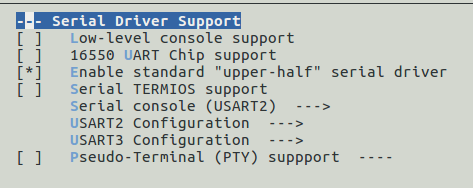
Device Drivers -> Serial Driver Support(Checked)
If you are using the console and new USART, you should see somenthing like this:
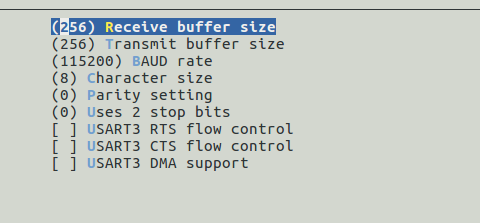
You must go to USART3 configuration and see this configuration(Normally this is the default config):
Code.
Nuttx have already developed a code that allows you to use easily the serial communication.
In the nsh console we can see the name of the device tipying ls /dev. Normally is ttyS1.
In your app the first thing to do is open the device and give the necessary permissions, for this case we want to write and read data from the USART3 so the function it looks like this:

If everything is correct it returns the file descriptor of the driver.
This example is an serial echo, so first we read the input data:

As arguments we use, the file descriptor of the device(fd), the buffer of an only character and the size of the buffer.
It's important to know that it only return one character.
Then to write the data to the device we use this function:

As arguments we use, the file descriptor of the device(fd), the auxiliary buffer of 256 characters, the size of the data that we are sending, is the size of the character multiply for the number of characters that we want to send.
The size of the buffer that we want to send, must fit the size of TX buffer configured.
I attached the file example.(change to .c)
echo_serial.txt