[BUG] xrmApp.Grid.HighLightRecord() doesnt seem to select records after release wave 2 #665

Description

Bug Report
Issues should only be created for items related to covered functionality.
Not covered functionality, feature requests, and questions should use the Feature Request or Question templates.
- Microsoft Dynamics 365 Online Version 9.1 (9.1.x) (DB 9.1.x) online
- UCI (XrmApp)
- Online
- Chrome
Describe the bug
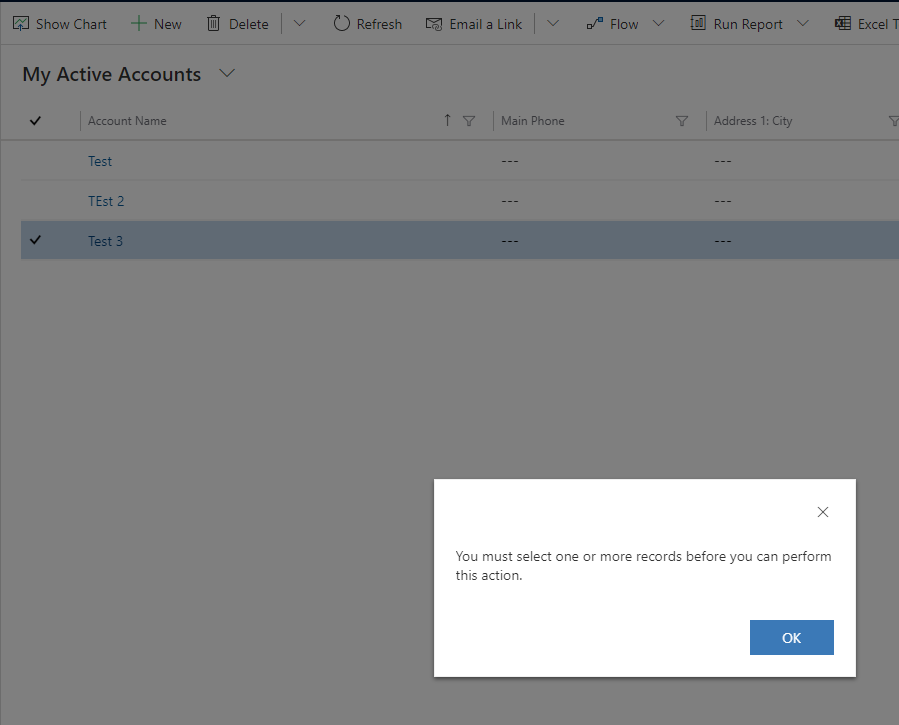
When using xrmApp.Grid.HighLightRecord() it does highlight the record as selected in the UI, although the grid doesnt appear to mark it as selected.
If you run a xrmApp.CommandBar.ClickCommand("Delete", "", false); afterwards it just tells you, you need to select a record in order to delete it.
Code to reproduce
You can use the Delete Account Test and change the record opening for a record highlighting
var client = new WebClient(TestSettings.Options);
            using (var xrmApp = new XrmApp(client))
            {
                xrmApp.OnlineLogin.Login(_xrmUri, _username, _password);

                xrmApp.Navigation.OpenApp(UCIAppName.Sales);

                xrmApp.Navigation.OpenSubArea("Sales", "Accounts");

                xrmApp.Grid.HighLightRecord(2);

                //xrmApp.Grid.OpenRecord(2);

                //Click the Delete button from the command bar
                xrmApp.CommandBar.ClickCommand("Delete", "", false); //Set to true if command is a part of the More Commands menu

                xrmApp.Dialogs.ConfirmationDialog(true); //Click OK on the Delete confirmation dialog (false to cancel)

                xrmApp.ThinkTime(3000);

            }
-->
Expected behavior
That the delete command doesn't state a record needs to be selected, and it brings out the prompt to confirm record deletion.
Screenshots