[Plan of Record] Improve MRTK ease of use: system facades, registrar interface, config ux #3545


Description

Plan of Record: Support Service Specific Scene Presence
Microsoft Mixed Reality Toolkit v2
This document describes a design change for the Microsoft Mixed Reality Toolkit v2 concerning how developer customers can choose the MRTK and its services.
The Issue: Usability
The MRTK team has received feedback from multiple sources that the current, single object presence in the application scene is difficult to use with regards to feature discovery and modularization. Multiple customers, both internal and external, have requested an alternative to beta 2’s MixedRealityToolkit object in the form of system specific locator components (ex: MixedRealityInputLocator) that can be additively included.
One piece of feedback, heard from multiple sources, points out the promise of additive vs. subtractive consumption of MRTK. The comments largely center around two themes:
- It is not easy, at a glance, to see if a scene is using a specific MRTK service. Many developers from whom we heard desire an individual service presence in the scene hierarchy.
- The root Mixed Reality Toolkit configuration profile makes it appear that all services are present in the application, even when disabled. There is a strong desire for scoping the profile inspector to show only installed and active services.
Solution: Enable Support for Individual Services to have Scene Presence
The solution defines the following changes:
- Provide service registration interfaces to enable customers to create a custom service locator and/or fully stand-alone service components
- Provide support for exposing active services and their configuration settings in the scene hierarchy at edit time via service facades
- Enable customers to create hybrid application architectures, if desired, that use any number of service locators in conjunction with any number of stand-alone services
- Create a light-weight service registry that maps service interfaces with the concrete type that manages service registration
- An updated scene hierarchy to contain the service registry, service facades, etc
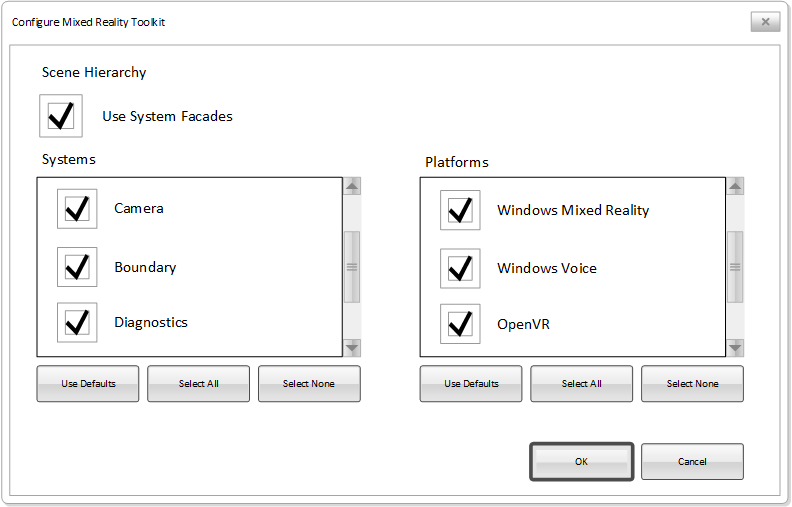
- Modified MRTK project configuration flow to provide enhanced flexibility for customers when setting up their projects
Please see the Solution Details section of this document for information the described changes.
Goals
- Respond to direct customer feedback
- Provide customers with a choice of how they consume MRTK services
- Minimize required client code changes
- Preserve as much of the MRTK service locator functionality as possible (anticipating 90% or greater equivalence)
Non-Goals
- Removal of the service locator pattern
- Require developers to change how they wish to work
Solution Details
Service Registration Interfaces
To enable developers to create custom service locators and/or extend an existing service locator to add support for MRTK services, a set of interfaces will be created to support the registration and retrieval of service instances.
It is anticipated that there will either be one or three interfaces that will be created. The following sections describe the pros and cons of each implementation.
Single Registrar Interface
In the single interface approach, the MRTK will define IMixedRealityServiceRegistrar. This interface would define explicit methods for supporting objects implementing the following service types (listed by interface):
- IMixedRealityService
- IMixedRealityExtensionService
- IMixedRealityDataProvider
Each method (Register, Unregister, Get, CheckRegistration) will have a version that is type safe to the listed interfaces.
| Pros | Cons |
|---|---|
| Only one interface to implement | Implementors may be required to implement stub methods |
| Can provide a single base class supporting all service types |
Multiple Registrar Interfaces
In the multiple interface design, each type of service would have a corresponding registrar interface:
- IMixedRealityServiceRegistrar
- IMixedRealityExtensionServiceRegistrar
- IMixedRealityDataProviderRegistrar
This approach would allow customers to support only the specific types of services necessary to build their component.
| Pros | Cons |
|---|---|
| Developers are free to implement only the required service type support | Potentially mutltiple interfaces to implement |
| Develipers do not have to implement stub methods | Cannot consume individual interface base class implementations (C# limitations) |
Base Class Implementations
As with much of the MRTK, base classes will be provided to provide robust, reusable implementations of the registrar interface(s).
Providing the Registrar Instance to Services
When the registrar instantiates a service instance, it will provide itself as a constructor argument. The following example shows the parameter to be added to each service constructor.
public ServiceClass(IMixedRealityRegistrar registrar, ...);A similar pattern will occur for data providers.
When a service requests registration of a data provider, it calls RegisterDataProvider, handing a reference to itself.
registrar.RegisterDataProvider<IMixedRealitySpatialObserver, IMixedRealitySpatialAwarenessSystem>(IMixedRealitySpatialAwarenessSystem system, Type observerType, ...);The data provider's constructor is passed the provided reference in its constructor.
public SpatialObserver(IMixedRealitySpatialAwarenessSystem system, ...);Service Facades
Service facades are an editor only monobehavior that exists in the application scene to give customers and easy, at-a-glance representation of the active services in the scene. When selected, the facade will display the service specific profile inspector and allow for easy configuration.
Backing these facades will be added to the scene and backed by the MRTK service locator. Developers not wishing these facades to be in their scene will be able to disable them in the MixedRealityToolkitConfiguration profile.
Hybrid Application Architecture
Hybrid applications architecture is a term intended to describe an application which utilizes any number of service locators and/or stand-alone service implementations.
To support hybrid architectures, MRTK will add a light-weight service registry that enables client code easy access to concrete service implementations.
Service Registry
The service registry in MRTK is an optional component that client code can use to acquire an instance of a desired service.
The registry can be thought of as a table that maps service interfaces to the object that manages the concrete implementation(s) .
The following table illustrates an example registry:
| Registrar | Interface |
|---|---|
| MixedRealityToolkitServiceLocator | IBoundarySystem |
| CustomServiceLocator | ISpatialAwarenessSystem |
| StandaloneInputSystem | IInputSystem |
The component managing the service registry can be attached to client script(s) or developers can choose to bypass the registry and hard-code references to the object managing service registration.
For example:
IServiceInterface service = MixedRealityToolkit.Instance.GetService<IServiceInterface>();Scene Hierarchy
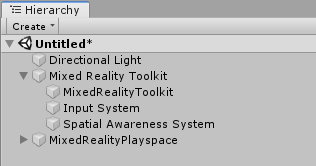
To help keep the scene hierarchy uncluttered, the default MRTK configuration process will create a Mixed Reality Toolkit parent object. This object will be the parent for the service locator and any enabled facades.
It is recommended that this object be the parent of objects created by registered services (ex: spatial awareness mesh objects).
The following image illustrates the default hierarchy when the MRTK service locator is used with the input and spatial awareness system facades enabled.
Project Configuration UX
To make it easy and intuitive for customers to configure MRTK to suit their application's requirements, the Mixed Reality Toolkit menu's Configure item will display a selection dialog similar to the following illustration.