Skip to content

Conversation

@kivikakk
Copy link
Contributor

@kivikakk kivikakk commented Apr 30, 2019

On Linux, the existence of a GNOME Virtual file system .gvfs directory precludes the use of VFS for Git entirely. For both this reason, and to fully disambiguate the VFSForGit project from GVfs, it would be preferable to use a different folder name for VFSForGit's metadata, such as .vfsforgit.

This PR introduces support for modifying the name of .gvfs folder on a per-platform basis. GVFSPlatform.Instance.Constants.DotGVFSRoot now holds the appropriate name of that folder.

Fixes #987.

/cc @chrisd8088 @jrbriggs @wilbaker @nickgra

@kivikakk kivikakk mentioned this pull request Apr 30, 2019
@kivikakk
Copy link
Contributor Author

I've made some progress in getting the functional tests running on my Windows VM, but still not quite there yet, so I'm as yet unable to debug the CI errors.

Copy link
Contributor

@derrickstolee derrickstolee left a comment

Choose a reason for hiding this comment

The reason will be displayed to describe this comment to others. Learn more.

Don't change the Mac without designing the full upgrade plan for transitioning existing enlistments. We have people using the Mac right now for testing and we should not interrupt them.

You could make these changes be Linux-only and that would be sufficient. Or is there even enough reason to have this name change? Does the GNU Virtual File System care about a .gvfs folder? Otherwise, it is added complexity for low value until we can design a full transition story for all platforms.

@chrisd8088
Copy link
Contributor

Just one quick comment in reply to @derrickstolee's question -- yes, GVfs (GNU Virtual file system) does care about .gvfs folders, and in fact, it creates them.

As I mentioned in #987, the gvfs clone operation fails if it finds a pre-existing .gvfs folder from GVfs (not VFSForGit) with the message You can't clone inside an existing GVFS repo in the CheckNotInsideExistingRepo() method. So on Linux, this folder name is effectively reserved and we need something different for VFSForGit.

@derrickstolee
Copy link
Contributor

I appreciate your patience with me. I should have seen the linked issue (#987) since you referenced this PR in the issue. That is sufficient reason to need this change in Linux.

I do still think we should limit the surface to the Linux platform and leave the Mac unchanged.

@chrisd8088
Copy link
Contributor

No worries, @derrickstolee! Thanks for taking a look at our work!

@kivikakk
Copy link
Contributor Author

Happy to leave Mac unchanged; I was responding to @wilbaker's comments in #987 by making the change in Mac too:

I agree and I think the sooner we can do this on Mac the better. We don't want any Mac tools to start taking a dependency on .gvfs.

@derrickstolee
Copy link
Contributor

@wilbaker has the ship not sailed on Mac clients already? Or are all of our current users understanding that they may be forced to reclone after an upgrade?

@wilbaker
Copy link
Member

@wilbaker has the ship not sailed on Mac clients already? Or are all of our current users understanding that they may be forced to reclone after an upgrade?

We've told our customers that we will not break their clones unless there is a compelling reason to do so. I'm not convinced this is compelling enough because it shouldn't be too complicated to write an upgrader for existing clones. If anything the tricky part is figuring out exactly what we'd want the upgrader to do.

Happy to leave Mac unchanged

@kivikakk if this issue is a blocker for Linux I think you'll be able to get a fix merged in much more quickly if you scope this PR to Linux only.

We can have a follow up issue to sort out exactly what we want the upgrade story to be on Mac. We'll need to do some digging and confirm whether our pilot customers have any custom tools in place that depend on the .gvfs directory (@nickgra we'll need some help from your side when this work gets scheduled).

/cc: @jrbriggs for his thoughts as well

@kivikakk
Copy link
Contributor Author

kivikakk commented May 2, 2019

I've scoped the PR to Linux-only for now. The refactor means we'll be able to make the change on Mac more easily when/if we decide to go for it.

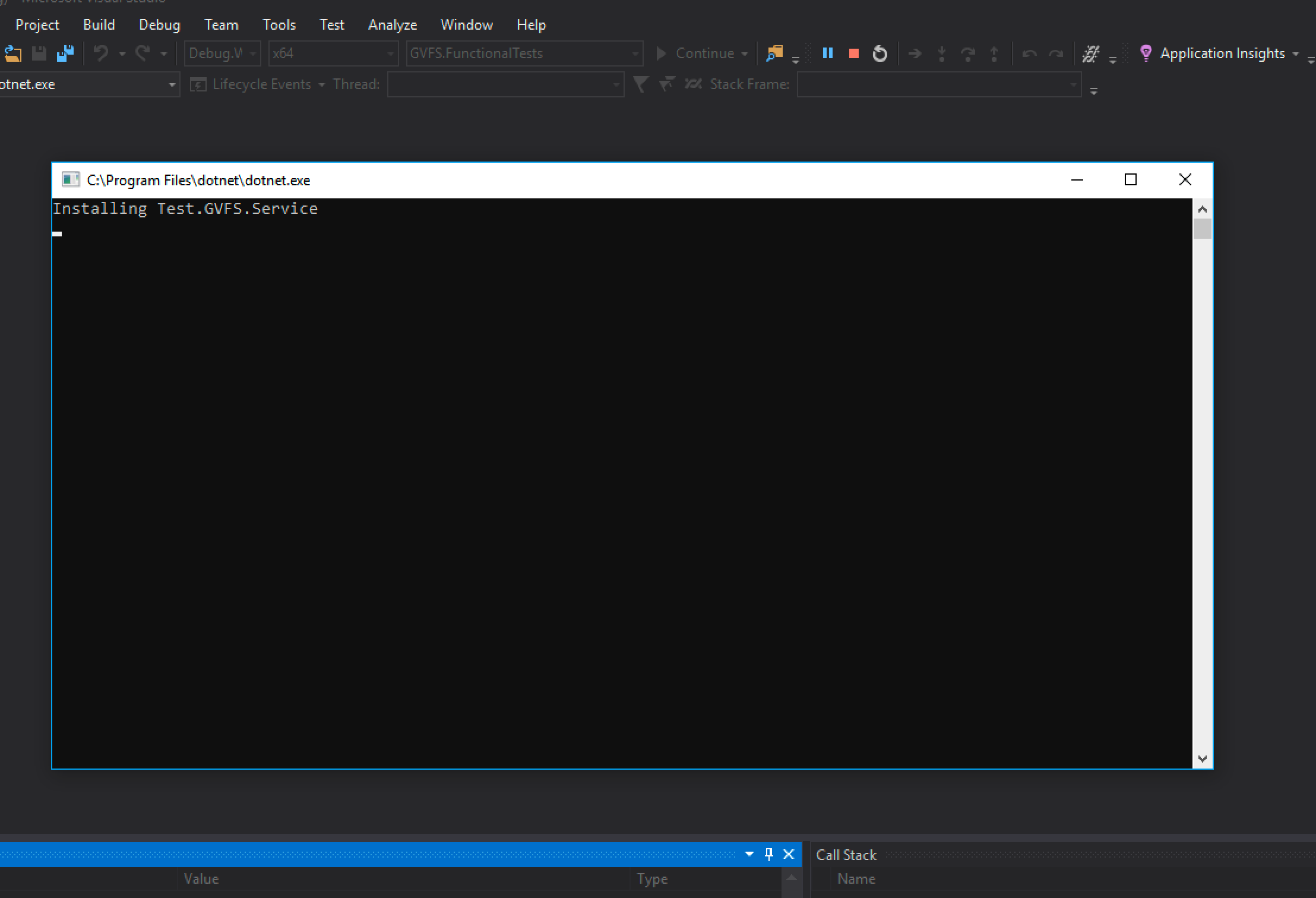
I'm continuing to struggle with getting functional tests running on Windows. It might be helpful if someone familiar with the project could do a setup from scratch and document the necessary steps; I've having problems running the functional tests from within Visual Studio as suggested in AuthoringTests.md; when running the GVFS.FunctionalTests project it just hangs like this:

image

and using RunFunctionalTests.bat (as an administrator) results in a variety of errors:

[2019-05-02 10:33:11 +10:00] IsServiceRunning_ServiceNotFound {"Area":"ProjFSFilter","Exception":"Service prjflt was not found on computer '.'.","Message":"IsServiceRunning: InvalidOperationException: PrjFlt service was not found"}
[2019-05-02 10:33:11 +10:00] MountVerb_Execute_EnablingKernelDriverViaService {"KernelDriver.IsReady_Error":"","Message":"Service will retry"}
[2019-05-02 10:33:12 +10:00] Error {"ErrorMessage":"Attaching the filter driver resulted in: 2149515283"}
[2019-05-02 10:33:12 +10:00] PreMount (Stop) {"DurationMs":1345}

I've already done quite a bit of hacking around with installing/uninstalling trying to get this work, but I'm not sure where I've gone wrong. Is there something undocumented I've missed? What does the developer flow look like for VFS for Git on Windows at the moment?

@kivikakk
Copy link
Contributor Author

kivikakk commented May 2, 2019

It hung because it was trying to uninstall the existing Test.GVFS.Service; the call to sc delete failed with access denied, but that wasn't caught, so it was just spinning in a loop waiting for the sc query to stop reporting the existence of the service, which never happened.

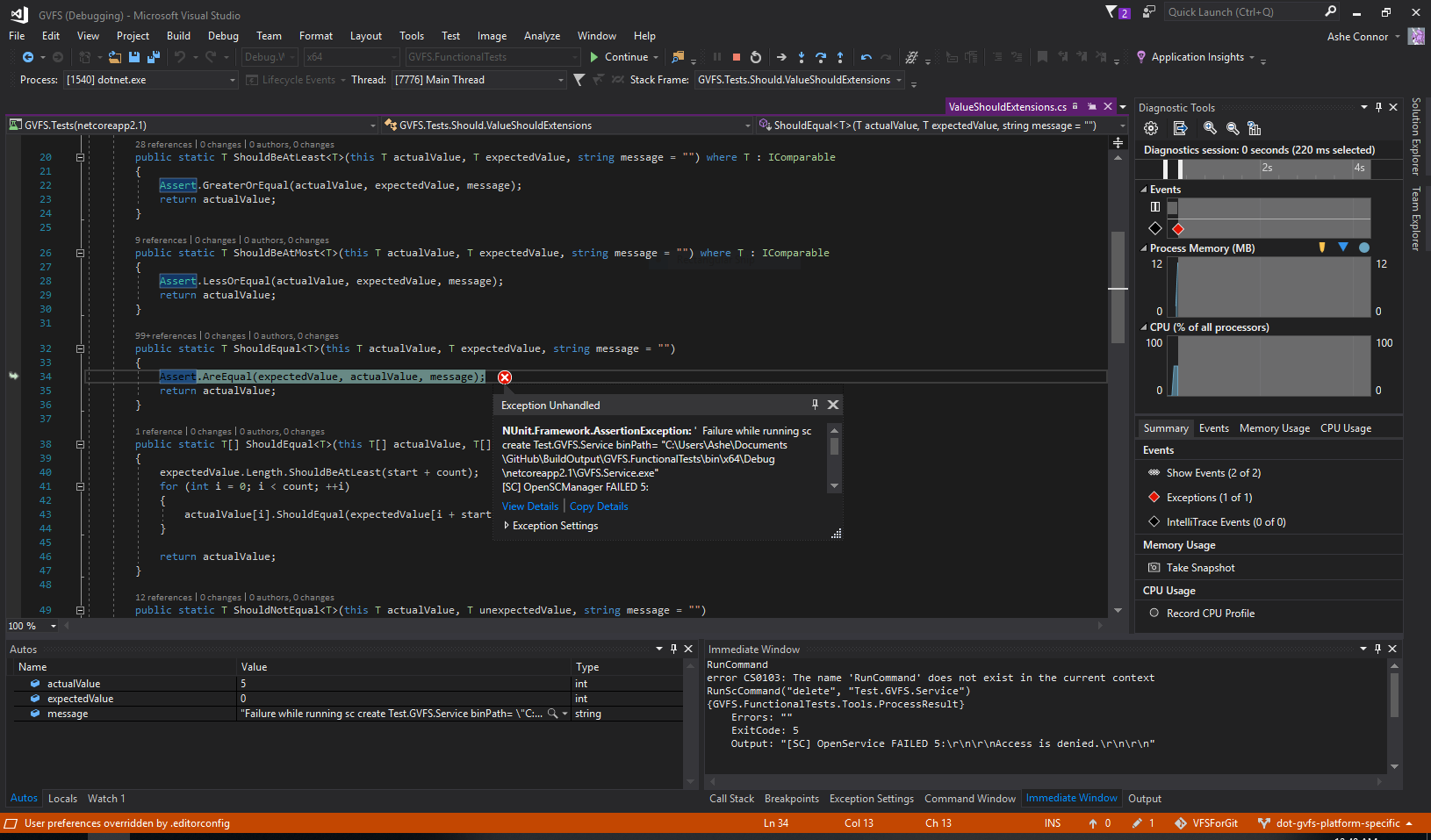
Now that I try running the project again (after removing the service myself from an elevated prompt), this happens:

image

(It fails to add the service because access is denied.)

I don't really want to run VS as admin, but maybe I need to?

@kivikakk
Copy link
Contributor Author

kivikakk commented May 2, 2019

I ran VS as admin, and it failed because C:\ProgramData\GVFS\GVFS.Service didn't exist and it tried to write a file in that directory. Creating that directory, it now fails with:

An exception of type 'NUnit.Framework.AssertionException' occurred in nunit.framework.dll but was not handled in user code
  Command gc --auto  blocked when it should not be.  Errors: Could not execute 'GVFS.Hooks.exe'. CreateProcess error (2).
fatal: pre-command hook aborted command
  Expected: 0
  But was:  128

I have a feeling I am going to keep running into issues and that my approach must be fundamentally wrong. I've already spent hours on this — can someone give me a hand in getting a working Windows development environment for GVFS? Thank you.

@wilbaker
Copy link
Member

wilbaker commented May 2, 2019

I have a feeling I am going to keep running into issues and that my approach must be fundamentally wrong. I've already spent hours on this — can someone give me a hand in getting a working Windows development environment for GVFS? Thank you.

Can you try installing the SetupGVFS.0.2.173.2.exe that was built locally when you built VFS4G?

You can find it here:

BuildOutput\GVFS.Installer.Windows\bin\x64\<Debug or Release>\SetupGVFS.0.2.173.2.exe

Running the installer should take care of the "Service prjflt was not found on computer" issue as well as the hooks issue.

After you've installed VFS4G, please launch VS as Administrator and try running GVFS.FunctionalTests.Windows (the bat script should work too, but let's start with the IDE and see how far we make it 😃 )

I'm on support rotation next week and will work on cleaning up the instructions for running the functional tests.

@kivikakk kivikakk force-pushed the dot-gvfs-platform-specific branch from acd2091 to cad5d34 Compare May 3, 2019 01:14
@kivikakk
Copy link
Contributor Author

kivikakk commented May 3, 2019

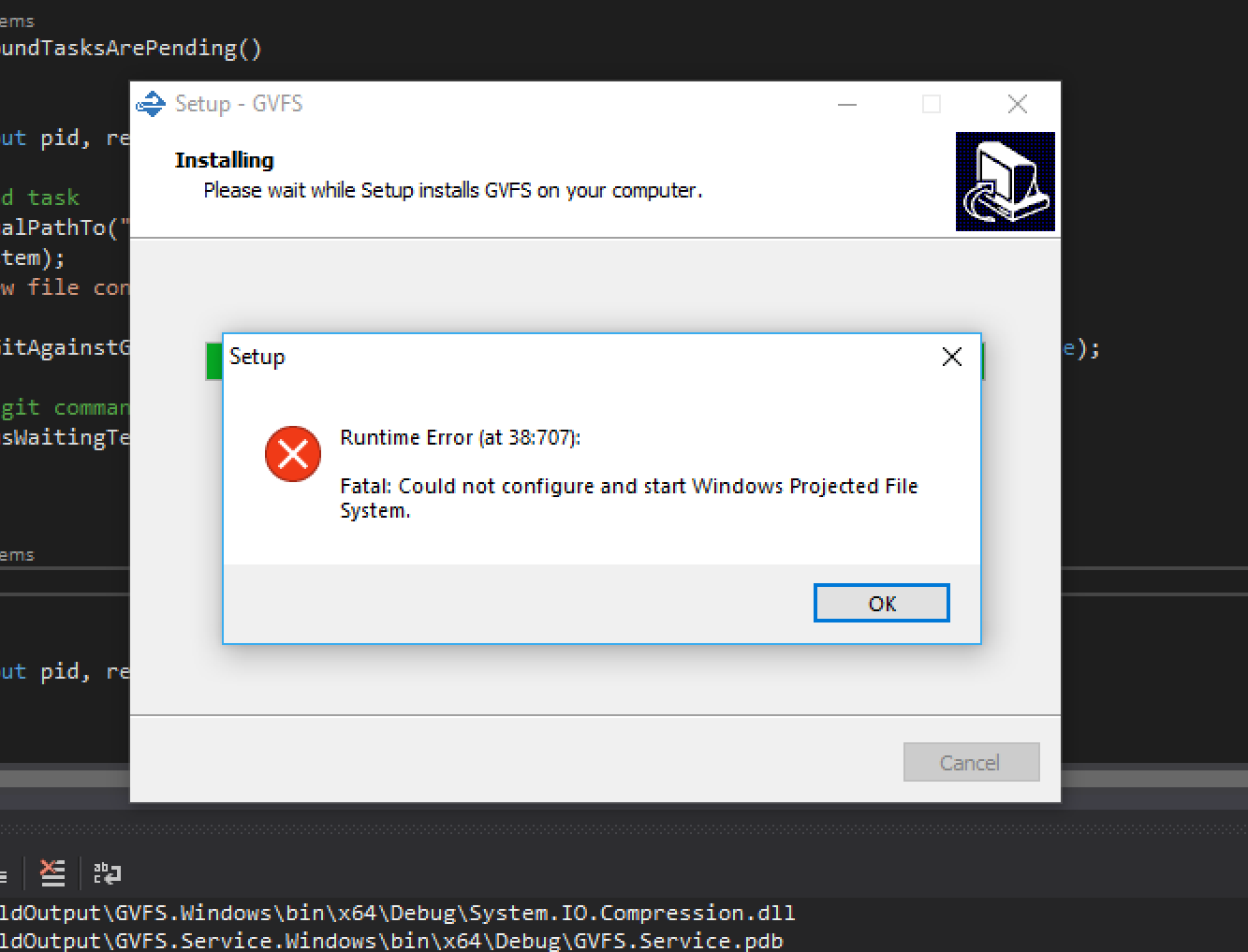
Running the installer produces the following error message:

image

I haven't yet been able to tie "38:707" to anything.

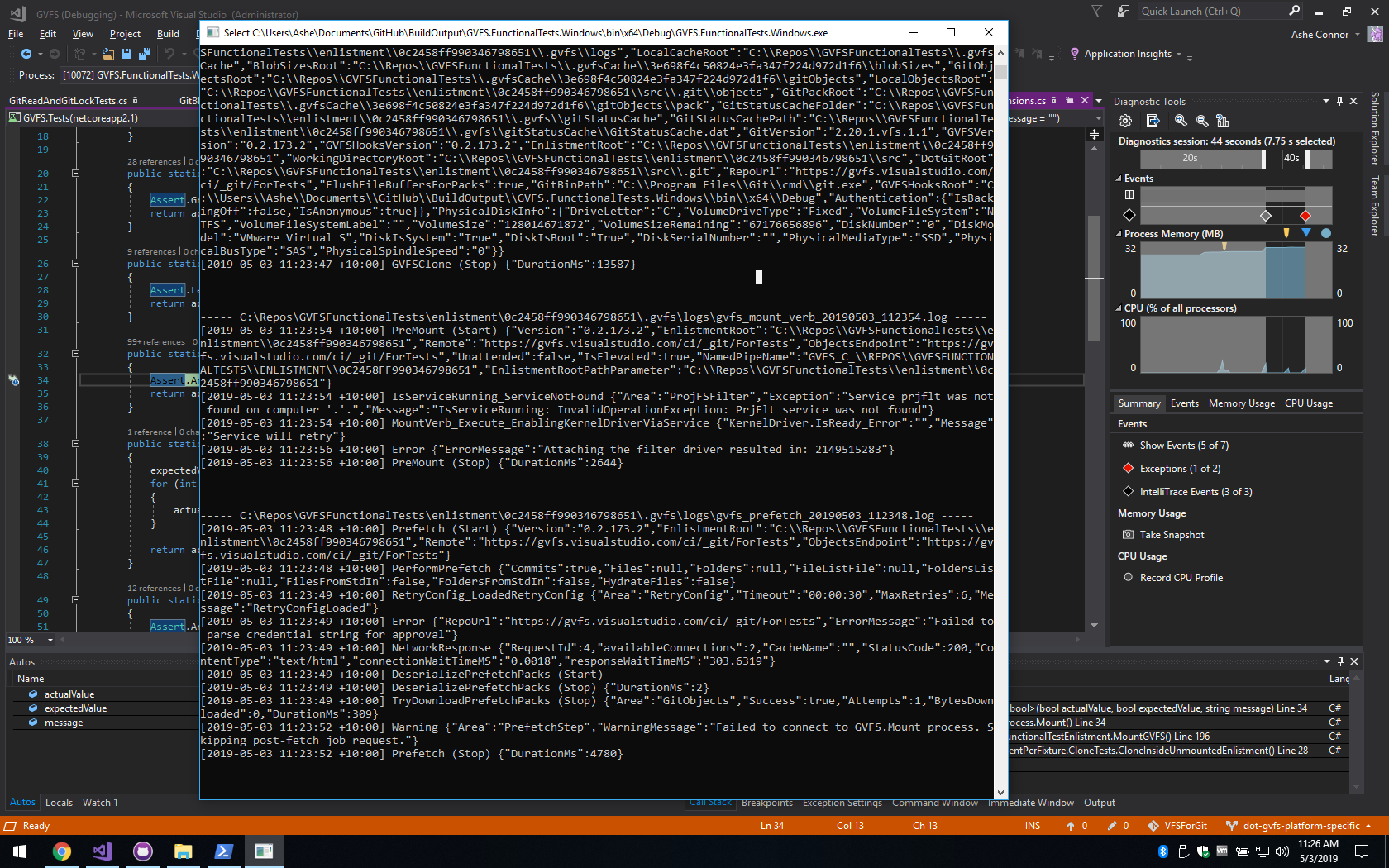
I've tried running the installer as administrator, manually stopping and deleting existing GVFS.Service and Test.GVFS.Service services before running the installer, and restarting the VM, but this error message still appears. The installer then continues and says it's finished, and the GVFS.Service is created, but I still get the hooks error shown above, and if I continue to the next test, the filter driver message again:

image

@kivikakk
Copy link
Contributor Author

kivikakk commented May 3, 2019

I haven't yet been able to tie "38:707" to anything.

TIL ISS scripts are written in Pascal 😭 Reproducing manually what the install script failed to do gives:

PS C:\Program Files\gvfs> .\GVFS.exe service --mount-all
Failed to enable PrjFlt: Failed to start prjflt service
PS C:\Program Files\gvfs>

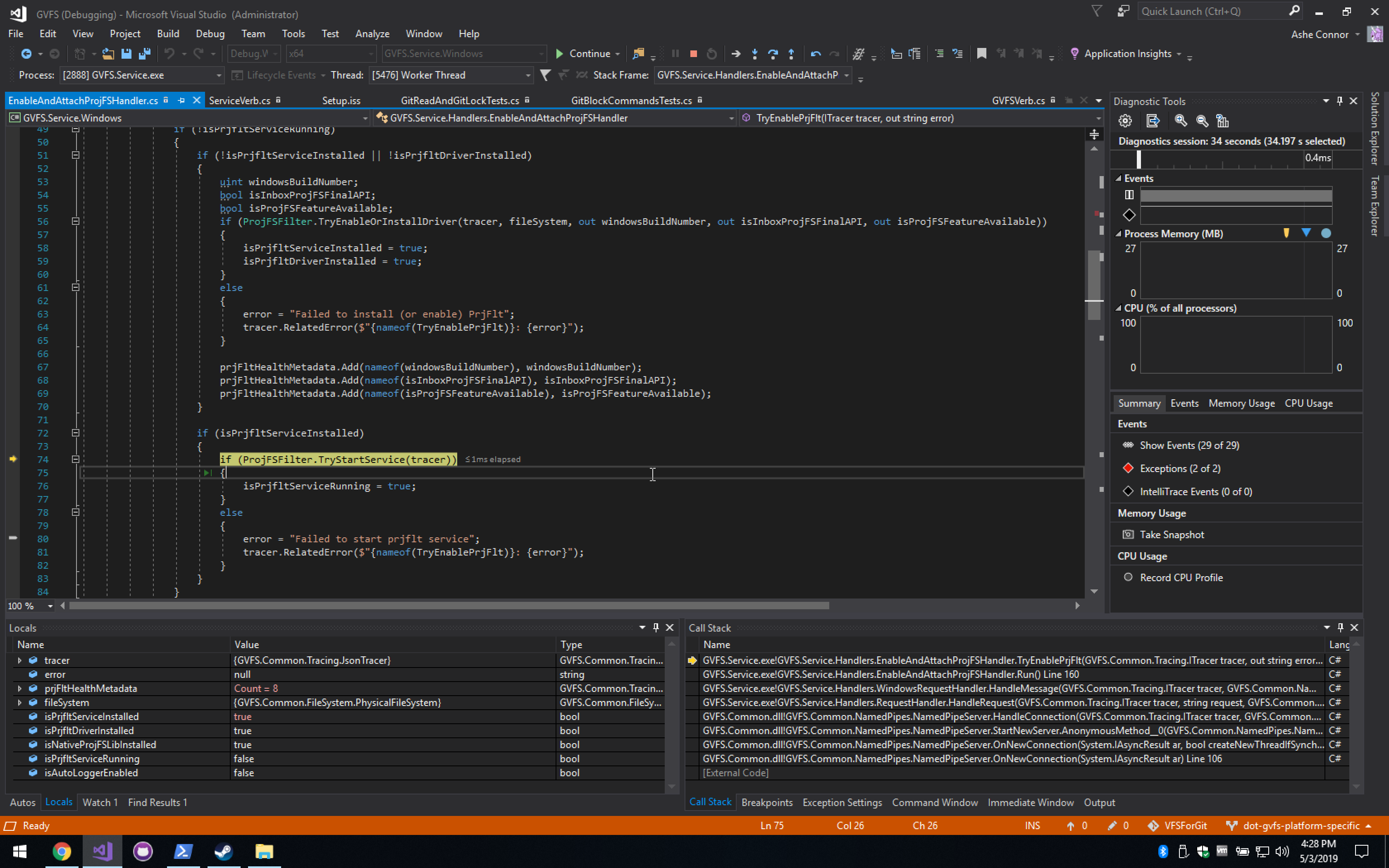
Attaching to GVFS.Service during the request:

image

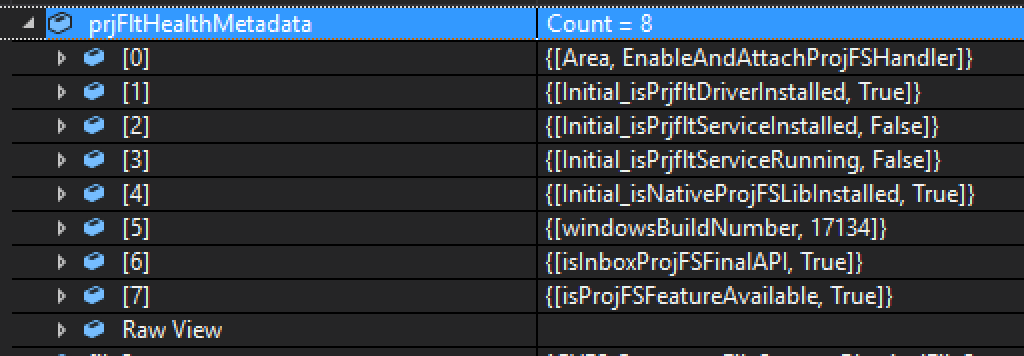
TryEnableOrInstallDriver was executed and succeeded; note values at time of being added to metadata:

image

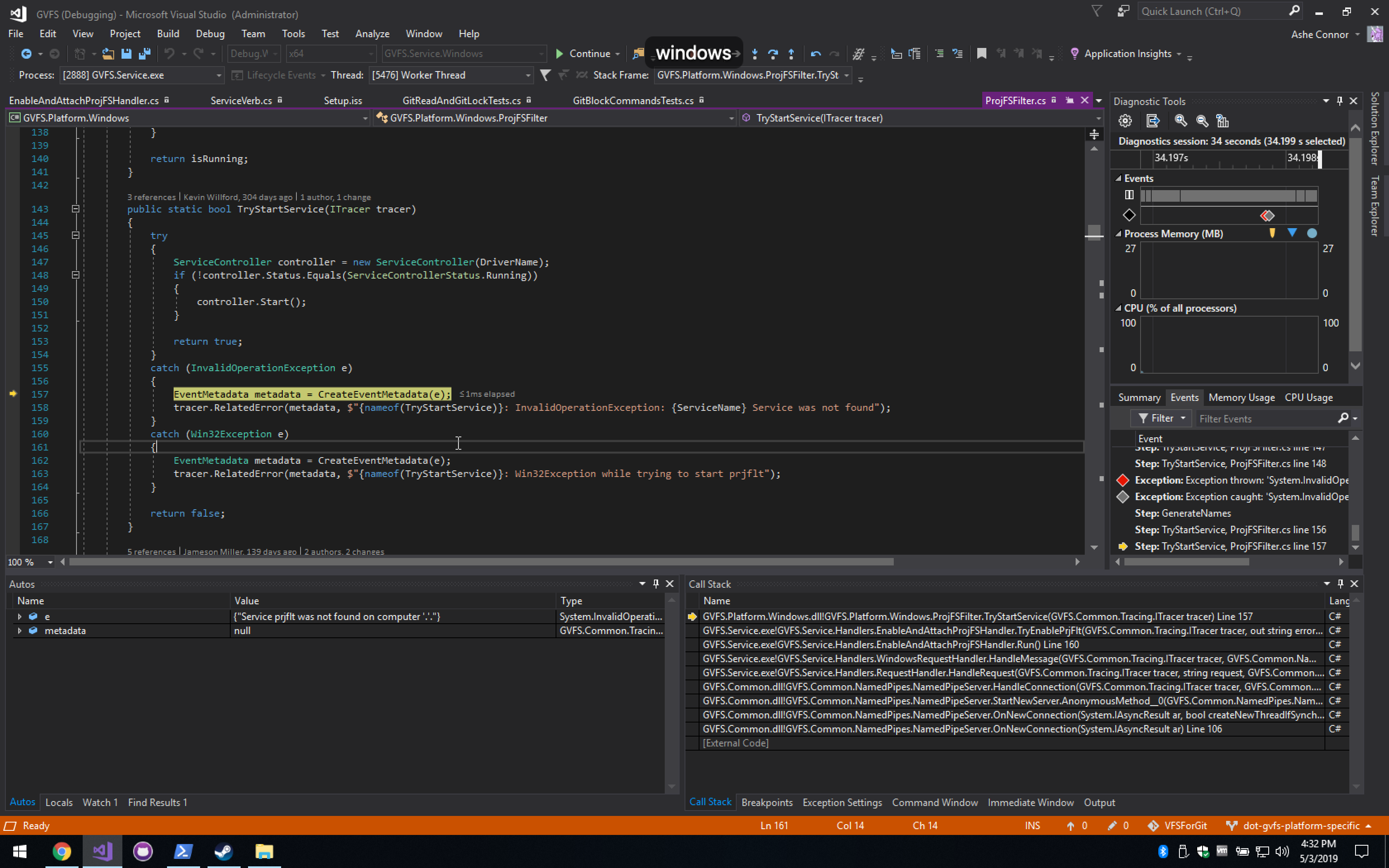
Now:

image

Drilling down into TryEnableProjFSOptionalFeature, it ends up with ProjFSInboxStatus.Enabled, and IsNativeLibInstalled returns true.

Should there be a prjflt service on my machine?

PS C:\Program Files\gvfs> sc.exe query prjflt
[SC] EnumQueryServicesStatus:OpenService FAILED 1060:

The specified service does not exist as an installed service.

PS C:\Program Files\gvfs>

@kivikakk
Copy link
Contributor Author

kivikakk commented May 3, 2019

I ran Disable-WindowsOptionalFeature followed by Enable-WindowsOptionalFeature, and the prjflt service appeared! 🎉 The installer now completes successfully.

However, I'm still getting:

Exception thrown: 'NUnit.Framework.AssertionException' in nunit.framework.dll
An exception of type 'NUnit.Framework.AssertionException' occurred in nunit.framework.dll but was not handled in user code
  Command gc --auto  blocked when it should not be.  Errors: The repo does not appear to be mounted. Use 'gvfs status' to check.
fatal: pre-command hook aborted command
  Expected: 0
  But was:  128

I hit continue and proceed to the next exception and get:


'GVFS.FunctionalTests.Windows.exe' (CLR v4.0.30319: GVFS.FunctionalTests.Windows.exe): Loaded 'C:\Program Files (x86)\Microsoft Visual Studio\2017\Enterprise\Common7\IDE\Remote Debugger\x64\Runtime\Microsoft.VisualStudio.Debugger.Runtime.dll'. Skipped loading symbols. Module is optimized and the debugger option 'Just My Code' is enabled.
'GVFS.FunctionalTests.Windows.exe' (CLR v4.0.30319: GVFS.FunctionalTests.Windows.exe): Loaded 'C:\WINDOWS\Microsoft.Net\assembly\GAC_MSIL\System.Configuration\v4.0_4.0.0.0__b03f5f7f11d50a3a\System.Configuration.dll'. Skipped loading symbols. Module is optimized and the debugger option 'Just My Code' is enabled.
The thread 0x12f4 has exited with code 0 (0x0).
The thread 0x2ad4 has exited with code 0 (0x0).
The thread 0x1314 has exited with code 0 (0x0).
The thread 0x33c has exited with code 0 (0x0).
Exception thrown: 'NUnit.Framework.AssertionException' in nunit.framework.dll
An exception of type 'NUnit.Framework.AssertionException' occurred in nunit.framework.dll but was not handled in user code
  GVFS did not mount: 
Authenticating...-
Authenticating...\
Authenticating...\
Authenticating...|
Authenticating...|
Authenticating.../
Authenticating.../
Authenticating...Succeeded

Querying remote for config...-
Querying remote for config...\
Querying remote for config...Succeeded
Configured cache server: None (https://gvfs.visualstudio.com/ci/_git/ForTests)

Validating repo...-
Validating repo...\
Validating repo...\
Validating repo...Succeeded

Mounting...-
Mounting...\
Mounting...\
Mounting...|
Mounting...|
Mounting.../
Mounting.../
Mounting...-
Mounting...-
Mounting...\
Mounting...\
Mounting...|
Mounting...|
Mounting.../
Mounting.../
Mounting...-
Mounting...-
Mounting...\
Mounting...\
Mounting...|
Mounting...|
Mounting.../
Mounting.../
Mounting...-
Mounting...-
Mounting...\
Mounting...\
Mounting...|
Mounting...|
Mounting.../
Mounting.../
Mounting...-
Mounting...-
Mounting...\
Mounting...\
Mounting...|
Mounting...|
Mounting.../
Mounting.../
Mounting...-
Mounting...-
Mounting...\
Mounting...\
Mounting...|
Mounting...|
Mounting.../
Mounting.../
Mounting...-
Mounting...-
Mounting...\
Mounting...\
Mounting...Failed. Run 'gvfs log C:\Repos\GVFSFunctionalTests\enlistment\cea17c9f3cbb4a62890c' for more info.
Could not connect to GVFS.Mount: GVFS.Common.NamedPipes.BrokenPipeException: Unable to send: GetStatus ---> System.IO.IOException: Pipe is broken.
   at System.IO.Pipes.PipeStream.WinIOError(Int32 errorCode)
   at System.IO.Pipes.PipeStream.WriteCore(Byte[] buffer, Int32 offset, Int32 count)
   at GVFS.Common.NamedPipes.NamedPipeStreamWriter.WriteMessage(String message)
   at GVFS.Common.NamedPipes.NamedPipeClient.SendRequest(String message)
   --- End of inner exception stack trace ---
   at GVFS.Common.NamedPipes.NamedPipeClient.SendRequest(String message)
   at GVFS.Common.GVFSEnlistment.WaitUntilMounted(String enlistmentRoot, Boolean unattended, String& errorMessage)

  Expected: True
  But was:  False

The logs for the enlistment can be seen here: https://gist.github.com/kivikakk/df212ed8fdb1a5644d3e39472d13c187

Restarting the service and attempting the mount manually fails with the same message:

PS C:\Program Files\GVFS> Restart-Service GVFS.Service
PS C:\Program Files\GVFS> gvfs mount c:\Repos\GVFSFunctionalTests\enlistment\cea17c9f3cbb4a62890c
Authenticating...Succeeded
Querying remote for config...Succeeded
Configured cache server: None (https://gvfs.visualstudio.com/ci/_git/ForTests)
Validating repo...Succeeded
Mounting...Failed. Run 'gvfs log C:\Repos\GVFSFunctionalTests\enlistment\cea17c9f3cbb4a62890c' for more info.
Could not connect to GVFS.Mount: GVFS.Common.NamedPipes.BrokenPipeException: Unable to send: GetStatus ---> System.IO.IOException: Pipe is broken.
   at System.IO.Pipes.PipeStream.WinIOError(Int32 errorCode)
   at System.IO.Pipes.PipeStream.WriteCore(Byte[] buffer, Int32 offset, Int32 count)
   at GVFS.Common.NamedPipes.NamedPipeStreamWriter.WriteMessage(String message)
   at GVFS.Common.NamedPipes.NamedPipeClient.SendRequest(String message)
   --- End of inner exception stack trace ---
   at GVFS.Common.NamedPipes.NamedPipeClient.SendRequest(String message)
   at GVFS.Common.GVFSEnlistment.WaitUntilMounted(String enlistmentRoot, Boolean unattended, String& errorMessage)
PS C:\Program Files\GVFS>

It's the end of my working day, so I'll leave it here for now. Let me know if I've missed something obvious; it seems like I'm close!

@wilbaker
Copy link
Member

wilbaker commented May 3, 2019

@kivikakk thanks for including the logs from your mount process. I saw the following message was logged:

[2019-05-03 17:04:46 +10:00] Error {"ErrorMessage":"StartVirtualizing failed: 80070002(FileNotFound)"}

Which typically means that the GVFS.Mount process is finding the wrong version of ProjectedFSLib.dll somewhere on your system (I suspect something got mixed up while you were sorting out getting prjflt installed).

Could you check if ProjectedFSLib.dll is located here:

C:\Program Files\GVFS\ProjectedFSLib.dll

And if it is, delete it? NOTE ProjectedFSLib.Managed.dll should be left in that directory.

The other thing that might be happening is that the functional tests csprojs have a post build event that is supposed to delete ProjectedFSLib.dll from the output directory if ProjFS is inbox, but it's possible something is not working correctly.

Example
https://github.com/Microsoft/VFSForGit/blob/11a704a2fbd8353c0ffca286a1f4b06ab2c077ef/GVFS/GVFS.FunctionalTests.Windows/GVFS.FunctionalTests.Windows.csproj#L194

Could you try doing a clean + build, and then checking if ProjectedFSLib.dll is present in <repo>\BuildOutput\GVFS.FunctionalTests\bin\x64\Debug\netcoreapp2.1?

If the file is present, please let us know what version of Windows you're on. We've seen that on some versions there are issues with WOW64 redirects and that might be preventing the file from being deleted.

If the file is present as a temporary work around you can manually delete the file and remove the conditional from the post build step so that the file is always deleted.

@kivikakk
Copy link
Contributor Author

kivikakk commented May 6, 2019

Could you check if ProjectedFSLib.dll is located here:

C:\Program Files\GVFS\ProjectedFSLib.dll

Not here!

Could you try doing a clean + build, and then checking if ProjectedFSLib.dll is present in <repo>\BuildOutput\GVFS.FunctionalTests\bin\x64\Debug\netcoreapp2.1?

Indeed, it is present, and in GVFS.FunctionalTests.Windows\.... There's also a netcoreapp2.1 directory within each netcoreapp2.1 directory, which also contains ProjectedFSLib.dll. When removing all of them, test failures continue unchanged.

If the file is present, please let us know what version of Windows you're on. We've seen that on some versions there are issues with WOW64 redirects and that might be preventing the file from being deleted.

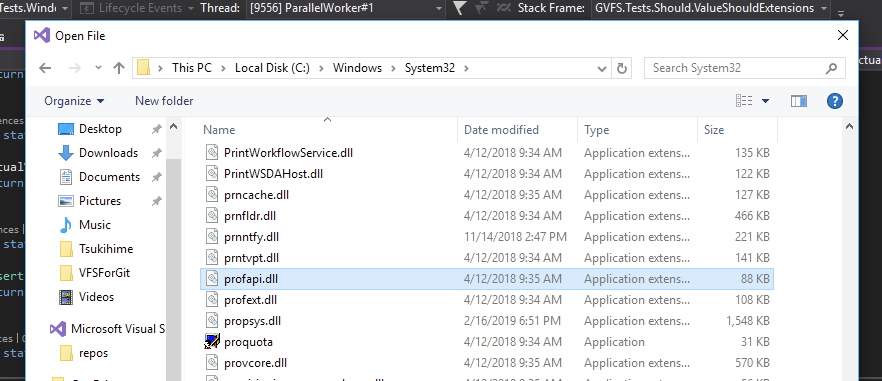
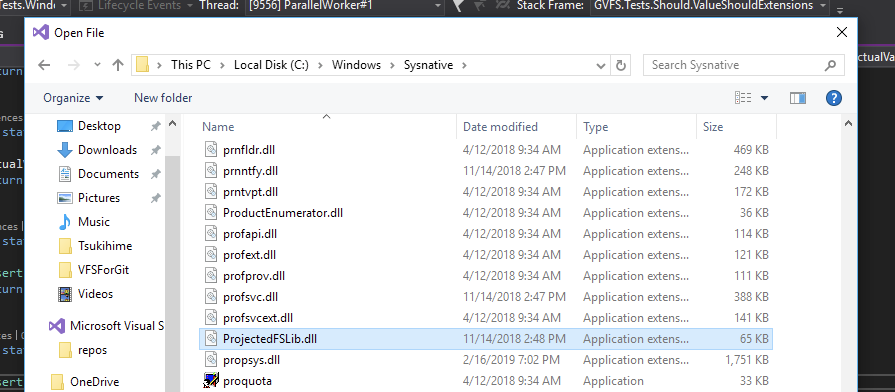
I suspect so -- VS is running in 32-bit mode, and from its perspective, there is no ProjectedFSLib.dll in System32:

image

But it can be seen in Sysnative:

image

The Windows I'm running is Windows 10 Pro (x64), version 1803, OS build 17134.706. Latest logs from a test run failure are here: https://gist.github.com/kivikakk/777c37d27a3b3ee21f37165d589037ba

@kivikakk
Copy link
Contributor Author

kivikakk commented May 6, 2019

@kivikakk
Copy link
Contributor Author

kivikakk commented May 6, 2019

Could you check if ProjectedFSLib.dll is located here:

C:\Program Files\GVFS\ProjectedFSLib.dll

I did notice there was a C:\Program Files\GVFS\ProjFS\ProjectedFSLib.dll. Renaming that away didn't make any noticeable change, however.

@wilbaker
Copy link
Member

wilbaker commented May 6, 2019

[kivikakk] I did notice there was a C:\Program Files\GVFS\ProjFS\ProjectedFSLib.dll. Renaming that away didn't make any noticeable change, however.

That file should be renamed back. C:\Program Files\GVFS\ProjFS\ProjectedFSLib.dll is where the installer lays down ProjectedFSLib.dll in case ProjFS is not available as part of the OS.

[kivikakk] When removing all of them, test failures continue unchanged.

Did you try removing the conditional from the post build step so that the file is always deleted?

[kivikakk] Looks like the failure originates at https://github.com/Microsoft/ProjFS-Managed-API/blob/2e355a3eefebf0af282deddf71773fb052d4213e/ProjectedFSLib.Managed.API/VirtualizationInstance.cpp#L680

I took a look at the logs, and the "StopVirtualizing" you probably saw is actually coming from the C++/CLI Managed API:

https://github.com/Microsoft/ProjFS-Managed-API/blob/5f8dacbd186046cd8f37416e43fd24ba260d3561/ProjectedFSLib.Managed.API/VirtualizationInstance.cpp#L678

I think at this point it makes most sense to take a step back and figure out exactly what state your machine and VFS4G installation is in. Could you try the following:

  1. In an Administrator Command Prompt run the following and provide the output:
  • powershell -NonInteractive -NoProfile -Command "&{Get-WindowsOptionalFeature -Online -FeatureName Client-ProjFS}"
  • sc query prjflt
  • dir C:\Windows\System32\Projec*
  • dir c:\Windows\System32\drivers\prjflt*
  • where gvfs
  • gvfs --version
  1. The last command above, gvfs --version, should return 0.2.173.2 (indicating that this is a local dev build of VFS4G). Assuming that is the case, can you confirm that you're able to clone/mount a repo?
  • gvfs clone https://gvfs.visualstudio.com/ci/_git/ForTests
  1. If you're able to clone and mount the repo using your local build of VFS4G, then something with the functional tests must be breaking ProjFS. Please try:
    1. Updating GVFS.FunctionalTests.csproj and GVFS.FunctionalTests.Windows.csproj so that their post-build step always removes ProjectedFSLib.dll
    2. Completely delete your BuildOutput directory for VFS4G
    3. Build VFS4G again
    4. Run the functional tests

Sorry that you've had so much trouble getting these to run!

@kivikakk
Copy link
Contributor Author

kivikakk commented May 7, 2019

That file should be renamed back. C:\Program Files\GVFS\ProjFS\ProjectedFSLib.dll is where the installer lays down ProjectedFSLib.dll in case ProjFS is not available as part of the OS.

👍 Done.

Did you try removing the conditional from the post build step so that the file is always deleted?

Yes; I observed no change as a result.

  • powershell -NonInteractive -NoProfile -Command "&{Get-WindowsOptionalFeature -Online -FeatureName Client-ProjFS}"
FeatureName      : Client-ProjFS
DisplayName      : Windows Projected File System (Beta)
Description      : Enables Windows Projected File System
RestartRequired  : Possible
State            : Enabled
CustomProperties :
  • sc query prjflt
SERVICE_NAME: prjflt
        TYPE               : 2  FILE_SYSTEM_DRIVER
        STATE              : 4  RUNNING
                                (STOPPABLE, NOT_PAUSABLE, IGNORES_SHUTDOWN)
        WIN32_EXIT_CODE    : 0  (0x0)
        SERVICE_EXIT_CODE  : 0  (0x0)
        CHECKPOINT         : 0x0
        WAIT_HINT          : 0x0
  • dir C:\Windows\System32\Projec*
 Volume in drive C has no label.
 Volume Serial Number is 8EB0-8E5D

 Directory of C:\Windows\System32

11/14/2018  01:48 PM            66,048 ProjectedFSLib.dll
               1 File(s)         66,048 bytes
               0 Dir(s)  67,477,520,384 bytes free
  • dir c:\Windows\System32\drivers\prjflt*
 Volume in drive C has no label.
 Volume Serial Number is 8EB0-8E5D

 Directory of c:\Windows\System32\drivers

12/08/2018  06:11 PM           195,600 prjflt.sys
               1 File(s)        195,600 bytes
               0 Dir(s)  67,477,573,632 bytes free
  • where gvfs
C:\Program Files\GVFS\GVFS.exe
  • gvfs --version
GVFS 0.2.173.2
  1. The last command above, gvfs --version, should return 0.2.173.2 (indicating that this is a local dev build of VFS4G). Assuming that is the case, can you confirm that you're able to clone/mount a repo?

I can clone but not mount:

C:\Users\Ashe\Desktop>gvfs clone https://gvfs.visualstudio.com/ci/_git/ForTests
Clone parameters:
  Repo URL:     https://gvfs.visualstudio.com/ci/_git/ForTests
  Branch:       Default
  Cache Server: Default
  Local Cache:  C:\.gvfsCache
  Destination:  C:\Users\Ashe\Desktop\ForTests
Authenticating...Succeeded
Querying remote for config...Succeeded
Using cache server: None (https://gvfs.visualstudio.com/ci/_git/ForTests)
Cloning...Succeeded
Fetching commits and trees from origin (no cache server)...Succeeded
Validating repo...Succeeded
Mounting...Failed. Run 'gvfs log C:\Users\Ashe\Desktop\ForTests' for more info.
Could not connect to GVFS.Mount: GVFS.Common.NamedPipes.BrokenPipeException: Unable to send: GetStatus ---> System.IO.IOException: Pipe is broken.
   at System.IO.Pipes.PipeStream.WinIOError(Int32 errorCode)
   at System.IO.Pipes.PipeStream.WriteCore(Byte[] buffer, Int32 offset, Int32 count)
   at GVFS.Common.NamedPipes.NamedPipeStreamWriter.WriteMessage(String message)
   at GVFS.Common.NamedPipes.NamedPipeClient.SendRequest(String message)
   --- End of inner exception stack trace ---
   at GVFS.Common.NamedPipes.NamedPipeClient.SendRequest(String message)
   at GVFS.Common.GVFSEnlistment.WaitUntilMounted(String enlistmentRoot, Boolean unattended, String& errorMessage)

C:\Users\Ashe\Desktop>

Logs for this invocation: https://gist.github.com/kivikakk/f65cac1eb173c21a9a94c3fc9fb3f1c4

Sorry that you've had so much trouble getting these to run!

On the contrary, thank you so much for your help so far!

This is a VM so I can wipe it and start over if you think that'd help/involve less detective work across timezone boundaries. If so, let me know what the best way to proceed from a clean slate is, so we can be sure it's in a known good state.

@kivikakk
Copy link
Contributor Author

kivikakk commented May 7, 2019

Got the mount working on a fresh VM:

C:\Users\ashe\Desktop>gvfs clone https://gvfs.visualstudio.com/ci/_git/ForTests
Clone parameters:
  Repo URL:     https://gvfs.visualstudio.com/ci/_git/ForTests
  Branch:       Default
  Cache Server: Default
  Local Cache:  C:\.gvfsCache
  Destination:  C:\Users\ashe\Desktop\ForTests
Authenticating...Succeeded
Querying remote for config...Succeeded
Using cache server: None (https://gvfs.visualstudio.com/ci/_git/ForTests)
Cloning...Succeeded
Fetching commits and trees from origin (no cache server)...Succeeded
Attaching ProjFS to volume...Succeeded
Validating repo...Succeeded
Mounting...Succeeded
Registering for automount...Succeeded

C:\Users\ashe\Desktop>

I'll retry the tests tomorrow.

@wilbaker
Copy link
Member

wilbaker commented May 8, 2019

This is a VM so I can wipe it and start over if you think that'd help/involve less detective work across timezone boundaries. If so, let me know what the best way to proceed from a clean slate is, so we can be sure it's in a known good state.

I'll retry the tests tomorrow.

Apologies for not getting back to this thread yesterday, at this point starting over from a clean VM is probably the quicker/easier option, and it sounds like you've already made it that far 😄

Please let me know if you still encounter problems getting the functional tests to run, it's still on my list to walk through the test document and update any step(s) that are missing details or out of date.

@kivikakk kivikakk force-pushed the dot-gvfs-platform-specific branch 2 times, most recently from 2c404cc to 9f27a8f Compare May 9, 2019 00:13
@kivikakk
Copy link
Contributor Author

kivikakk commented May 9, 2019

Please let me know if you still encounter problems getting the functional tests to run, it's still on my list to walk through the test document and update any step(s) that are missing details or out of date.

So far so good. It looks like using the test explorer isn't a viable option (even after installing the NUnit 3 Runner) -- the tests do get found, and execute, but the setup that populates GVFSTestConfig doesn't run, so attempts to access the properties there get nulls and end up failing soon after. Running single tests or fixtures with RunFunctionalTests.bat works fine 👍

@kivikakk kivikakk force-pushed the dot-gvfs-platform-specific branch 2 times, most recently from 2cb8429 to 5b5969d Compare May 14, 2019 01:05
@kivikakk kivikakk changed the title use .vfsforgit instead of .gvfs on non-Windows refactor use of .gvfs directory name May 14, 2019
@kivikakk
Copy link
Contributor Author

@derrickstolee @wilbaker This is now ready for review. Uses of GVFSConstants.DotGVFS.Root have been changed to GVFSPlatform.Instance.Constants.DotGVFSRoot. Some refactoring of the Mac and POSIX platforms was necessary to support the parameterisation of the name of the .gvfs directory.

If some refactoring points have been missed, they'll get shaken out once we're running Linux functional tests.

The situation with AcquireLockHolder not being able to reference platforms directly is a bit unfortunate as it requires duplicating some values.

@kivikakk
Copy link
Contributor Author

One failing test -- looks flakey. Passes locally:

Test GVFS.FunctionalTests.Tests.EnlistmentPerTestCase.LooseObjectStepTests.CorruptLooseObjectIsDeleted()
Passed at 11:55:00 AM taking 00:00:31.7604940


Run Settings
    Number of Test Workers: 4
    Work Directory: C:\Users\ashe\Documents\GitHub\VFSForGit\src
    Internal Trace: Off

Test Run Summary
  Overall result: Passed
  Test Count: 1, Passed: 1, Failed: 0, Warnings: 0, Inconclusive: 0, Skipped: 0
  Start time: 2019-05-14 01:54:28Z
    End time: 2019-05-14 01:55:00Z
    Duration: 31.808 seconds
PS C:\users\ashe\documents\github\vfsforgit\src> git status
On branch pr/1084
Your branch is up to date with 'github-desktop-github/dot-gvfs-platform-specific'.

nothing to commit, working tree clean
PS C:\users\ashe\documents\github\vfsforgit\src> git rev-parse HEAD
5b5969defc2bd41d0ea3f2b581ad8938f26fe52c
PS C:\users\ashe\documents\github\vfsforgit\src>

@derrickstolee
Copy link
Contributor

Sorry for the flakey test! I’m working on it.

Copy link
Member

@wilbaker wilbaker left a comment

Choose a reason for hiding this comment

The reason will be displayed to describe this comment to others. Learn more.

@kivikakk apologies for the delay, just a few more comments

@kivikakk kivikakk force-pushed the dot-gvfs-platform-specific branch from 5b5969d to bc4f67e Compare May 19, 2019 23:50
@kivikakk
Copy link
Contributor Author

@wilbaker Thanks for the review! This should be good to go now.

@chrisd8088
Copy link
Contributor

/azp run GitHub VFSForGit Mac Functional Tests

@azure-pipelines
Copy link

No pipelines are associated with this pull request.

@kivikakk
Copy link
Contributor Author

Friendly bump -- it would be good to merge before conflicts arise.

@kivikakk kivikakk changed the title refactor use of .gvfs directory name Support alternate names for the .gvfs folder May 24, 2019
@kivikakk
Copy link
Contributor Author

PR title and description has been updated for merge.

@kivikakk kivikakk merged commit 6a7fd2f into microsoft:master May 24, 2019
@kivikakk kivikakk deleted the dot-gvfs-platform-specific branch May 24, 2019 01:27
Sign up for free to join this conversation on GitHub. Already have an account? Sign in to comment

Projects

None yet

Development

Successfully merging this pull request may close these issues.

Rename the .gvfs folder

4 participants