iOS FRNAppearanceAdditions: add support for multiple trait collections #2675
Conversation


| _userInterfaceLevel = userInterfaceLevel; | ||
| _accessibilityContrastOption = accessibilityContrastOption; | ||
|
|
||
| NSNumber *rootTag = [[[notification object] contentView] reactTag]; |
There was a problem hiding this comment.
I think we should guard that the selector exists here, or else we might get a runtime crash.

There was a problem hiding this comment.
I prefer class verification, since it verifies that the selectors will also return the types you think (while pure duck-typed selector sniffing does not):
if (![[notification object] isKindOfClass:[RCTRootView class]]) {
    return;
}
RCTRootView *rootView = [notification object];
NSNumber *rootTag = [rootView rootTag];There was a problem hiding this comment.
Just updated - I thought that the verification for trait collection and rootTag should be the same, so I also changed the behaviour so that if the verification for trait collection fails we just return as well.
Some questions:
- I'm unclear what's happening in the
UITraitCollection *traitCollection = [[notification userInfo] valueForKey:...]line. At this point, if the right side doesn't return a UITraitCollection pointer, shouldn't this cause some kind of error instead of at the check on the next line where we explicitly check the class? Thinking about it more I would have expected this to result in a compiler error. Testing locally, if I changeUITraitCollection *traitCollectionto something clearly wrong likeUIView *traitCollectioneverything actually still works - I'm wondering if we should also check that contentView and reactTag are both non-nil
| return 'regular' as SizeClass; | ||
| return {}; | ||
| }, | ||
| userInterfaceLevel: () => { | ||
| console.warn('NativeAppearanceAdditions is only available on iOS'); | ||
| return 'base' as UserInterfaceLevel; | ||
| return {}; | ||
| }, | ||
| accessibilityContrastOption: () => { | ||
| console.warn('NativeAppearanceAdditions is only available on iOS'); | ||
| return 'normal' as AccessibilityContrastOption; | ||
| return {}; |
There was a problem hiding this comment.
Hmm so this file is just stubs for the other platforms. These methods changed from returning strings to returning dictionaries, so I changed it to return an empty dictionary. I'll double check on macOS to make sure other platforms aren't affected
There was a problem hiding this comment.
Tested by just running the macOS tester and don't see any issues. I realized on macOS though we don't seem to support multiple windows either...at least I haven't figure out how to open another FluentTester window. Will look into what's needed to support this
| horizontalSizeClassForRootTag(rootTag: number): SizeClass; | ||
| userInterfaceLevelForRootTag(rootTag: number): UserInterfaceLevel; | ||
| accessibilityContrastOptionForRootTag(rootTag: number): AccessibilityContrastOption; |
There was a problem hiding this comment.
The docs say not to rely on Root tag being a number. Can we use a different type here? Something more specific that comes from the RN Types?
https://reactnative.dev/docs/roottag#future-plans
There was a problem hiding this comment.
Yeah I had put this as a concern in the description. Can you explain more what you mean by "something more specific that comes from the RN Types"? I had actually thought I would need to make the type more generic
There was a problem hiding this comment.
Use the RootTag type from Typescript: https://github.com/DefinitelyTyped/DefinitelyTyped/blob/master/types/react-native/Libraries/ReactNative/RootTag.d.ts
Right now that's just a number... but in the future if that becomes, let's say.. a string, then our JS code would still run.
There was a problem hiding this comment.
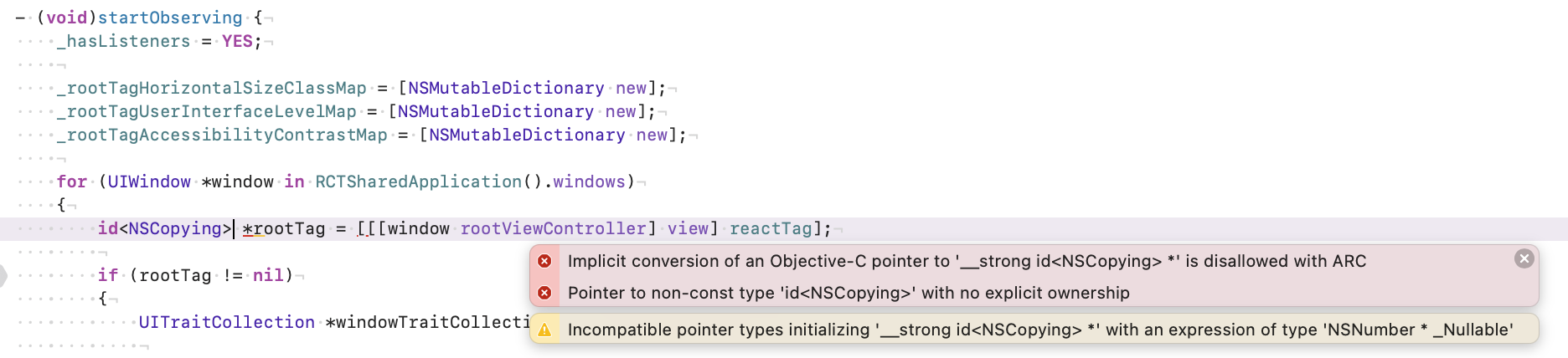
I also left a comment of what we can use inside our Objective-C type for the same purpose, in the absence of a formal type from RNCore (id<NSCopying>).
There was a problem hiding this comment.
Thanks Saad - didn't realize there was type in React Native I could use. Just updated to use import type { RootTag } from 'react-native'; - let me know if this is what you were thinking. The link you posted is from "DefinitelyTyped" - were you expecting the import to be from that?
@mischreiber I tried id but got this error when I tried to use it never mind realized I needed to also get rid of the *
 Saadnajmi
left a comment
Saadnajmi
left a comment
Saadnajmi
left a comment
There was a problem hiding this comment.
Random thought: Are we sure root tags are guaranteed to be unique? And what happens when you, say, close one window, and create a new one? Will the old root tag (and it's map of values) clash with the newly created window?

packages/experimental/AppearanceAdditions/ios/FRNAppearanceAdditions.m
Outdated
Show resolved
Hide resolved
packages/experimental/AppearanceAdditions/ios/FRNAppearanceAdditions.m
Outdated
Show resolved
Hide resolved
| }); | ||
| } | ||
|
|
||
| horizontalSizeClassForRootTag(rootTag: number): SizeClass { |
There was a problem hiding this comment.
Will these functions ever be called before the eventEmitter above has been invoked? If so, what are they returning?
There was a problem hiding this comment.
Hmm I don't think that can happen since those functions need to be called on an instance of AppearanceAdditions- so the constructor which initializes the eventEmitter would always be called first. Doing a very brief check, this seems to be the case. Were you thinking of a specific scenario?
Update on what I'm currently looking into: so when I tried to double check what was happening here I started noticing some other strange behavior. I thought that the native module was a singleton, and it would only be created once during the whole duration of the app - which I thought was while at least one window was open. I actually think now that every FluentTester window that gets opened will create a new FRNAppearanceAdditions instance. The same notification gets sent for every window that's open. Still trying to think through what this means for this PR. At some point I thought that this PR wouldn't work as expected when opening new windows, since it didn't look like we were updating the native dictionary anywhere - but I realized when new windows are opened, we actually do update the dictionary once appearanceChanged is called from that window. While testing, opening new windows does work as expected (with caveats described above ex. extra notifications sent) I also realized, if a user closes a window, we never remove the dictionary entry. I'm not sure yet if this is a problem - it actually seems like once any window is closed, the native module gets reset...still looking into this. Also the PR checks are failing because one of the places where we call the native module is in createAppleTheme, but at that point we don't have a view to get the rootTag from. I'm trying to figure out what the best thing to do there is, maybe just return the first entry in the dictionary. Overall, I think I need to come up with a more detailed test plan/set of test cases that should work as expected. Might need to take a step back and draw up a more detailed engineering plan. |
 lyzhan7
changed the title
lyzhan7
changed the title
|
Closing this PR in favor of #2697 The approach in this PR was made under the assumption that all native modules, including FRNAppearanceAdditions, are singletons - turns out this is not true. There is one native module created per bridge, and there is one bridge per scene. So every scene has its own instance of FRNAppearanceAdditions - which means we shouldn't need to maintain a dictionary of roottags to trait collections, we just need to modify the existing behavior so that each instance of FRNAppearanceAdditions communicates the right information to the JS side of each scene. |
3 participants


Platforms Impacted
Description of changes
Before this change, the FRNAppearanceAdditions native module assumed that there was only one window/root view at a time, i.e. one trait collection at a time. This assumption doesn't hold for iPad multiwindow scenarios where there can be more than one window at a time, each having different trait collections.
In order to get the native module working with multiple trait collections, the size class/user interface level/accessibility contrast option properties in the native module (both the JS side and the native side) needed to be refactored so we can make each property specific to a given window/root view- this was done by replacing the properties with dictionaries. All the methods between JS/native were refactored accordingly.
One of the main decisions made in this PR was determining what the key of the dictionaries should be. It needed to be something that both the native and JS side of the native module could figure out independently:
The react native rootTag identifier returns the react tag of the root view. I found that this is accessible from the native side by going through a window's rootViewController's view's reactTag. More documentation about rootTag here
I considered attempting to making the native module stateless, but decided against it because we would end up firing notifications for any trait collection change in any window, including ones we don't care about.
Notes:
State of the traits we support:
Verification
Before (can't have one side be compact mode, other side be regular mode - both windows will render the same way, which means that one side is sometimes incorrect)
multitraits_before.mov
After (each window will render in compact more or regular mode correctly - both at boot, and at runtime)
multitraitcollection_after.mov
Pull request checklist
This PR has considered (when applicable):