secureTextEntry when it is set to <TextInput secureTextEntry={true} /> causes the TextInput to not render #4371


Description

Environment
If you are using latest version:
-
react-native -v:
react-native-cli: 2.0.1
react-native: 0.61.5 -
react-native run-windows --info:
Otherwise if --info doesn't exist:
-
react-native -v:
react-native-cli: 2.0.1
react-native: 0.61.5 -
npm ls rnpm-plugin-windows:
-- (empty) -
npm ls react-native-windows:
react-native-windows@0.61.0-beta.44 -
node -v:
v12.10.0 -
npm -v:
6.10.3 -
yarn --version:
1.22.0
Then, specify:
10.0,18362.0
- Target Platform Version(s):
x64
- Target Device(s):
Windows 10 PC
- Visual Studio Version:
Visual Studio 2019
- Build Configuration: Debug
Steps to Reproduce
(Write your steps here:)
-
Get a clean version a new React Native Windows App environment.
-
The only code you need is below.
<TextInput secureTextEntry={false} />
<TextInput secureTextEntry={true} /> -
You will notice that the first one renders but the second one doesn't render.
Expected Behavior
(Write what you thought would happen.)
I expected this <TextInput secureTextEntry={true} /> to give me a TextInput for a password.
Actual Behavior
(Write what happened. Add screenshots!)
This didn't render anything <TextInput secureTextEntry={true} />
react-native run-windows --logging
Reproducible Demo
(Paste the link to an example project and exact instructions to reproduce the issue.)
Additional context
(Write any other additional context that may help in root causing the issue.)
Basically, this issue stems from C++/WinRT using 2 seperate UI elements for handling password and text i.e. winrt::Windows::UI::Xaml::Controls::PasswordBox and winrt::Windows::UI::Xaml::Controls::TextBox , whereas react native only uses <TextInput secureTextEntry={true/false} /> . The TextInputViewManager.cpp in ReactUWP attempts to swap out the PasswordBox and the TextBox depending on what the value of secureTextEntry is. This is where the TextInput fails to render in React Native.
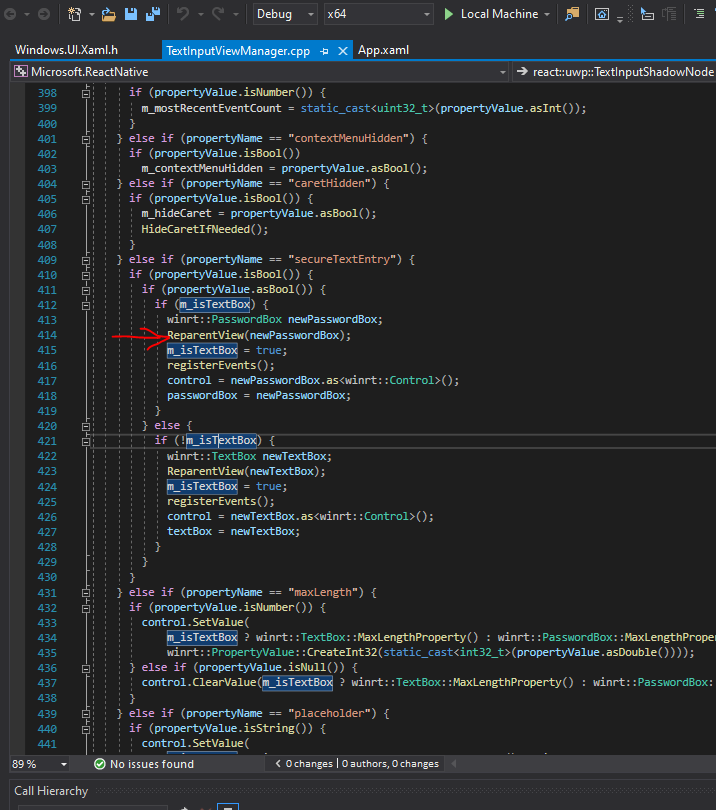
The ReparentView just leads to the ShadowNodeBase.cpp where it tries to swap out the PasswordBox with the TextBox

The only way I could ever get the PasswordBox to render was to comment out this line and replace it with the winrt::PasswordBox like as you can see in the screenshot below. I also had to fix a few exceptions.
