Some native module features stop working when building for Release on 0.64 #7537


Description

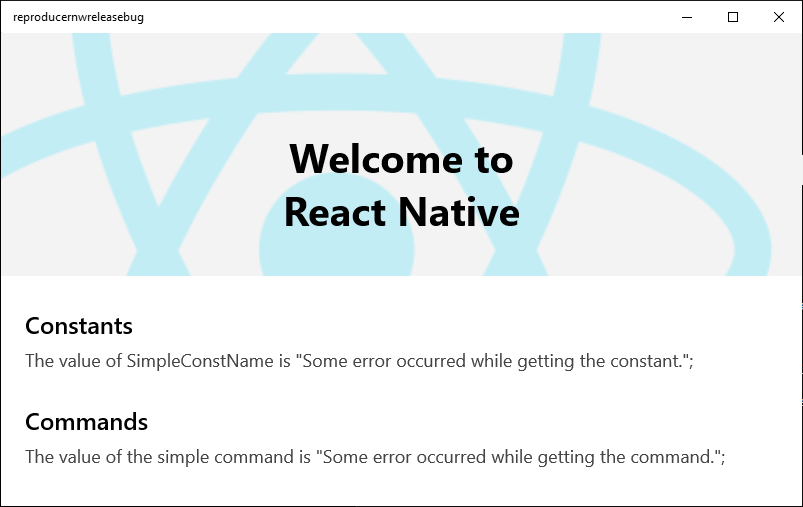
Some native module features that were working on react-native-windows 0.63 and when building for Debug in 0.64, fail when building for Release in 0.64.
This causes some apps that rely on native modules unexpectedly unable to run when built for Release. For example, react-native-gallery shows a blank screen if you build it for Release after it has been upgraded to 0.64.
I've verified that at least getting the constants declared in IViewManagerWithExportedViewConstants ExportedViewConstants() and the commands declared in IViewManagerWithCommands Commands() are not working. More features might be affected.
I suspect this is being caused by the the fact that different JavaScript engines are used in Debug and Release.
Environment
Run the following in your terminal and copy the results here.
npx react-native --version:
5.0.1-alpha.2
npx react-native info:
System:
    OS: Windows 10 10.0.18363
    CPU: (12) x64 Intel(R) Core(TM) i7-9750H CPU @ 2.60GHz
    Memory: 5.75 GB / 15.92 GB
  Binaries:
    Node: 12.16.2 - C:\Program Files\nodejs\node.EXE
    Yarn: 1.22.5 - C:\Program Files (x86)\Yarn\bin\yarn.CMD
    npm: 6.14.4 - C:\Program Files\nodejs\npm.CMD
    Watchman: Not Found
  SDKs:
    Android SDK:
      API Levels: 23, 25, 26, 27, 28, 29
      Build Tools: 27.0.3, 28.0.3, 29.0.2, 29.0.3
      System Images: android-29 | Google APIs Intel x86 Atom, android-29 | Google APIs Intel x86 Atom_64
      Android NDK: Not Found
    Windows SDK:
      AllowDevelopmentWithoutDevLicense: Enabled
      AllowAllTrustedApps: Enabled
      Versions: 10.0.17763.0, 10.0.18362.0, 10.0.19041.0
  IDEs:
    Android Studio: Not Found
    Visual Studio: 16.9.31129.286 (Visual Studio Community 2019)
  Languages:
    Java: 1.8.0_262 - C:\Program Files\OpenJDK\openjdk-8u262-b10\bin\javac.EXE
  npmPackages:
    @react-native-community/cli: Not Found
    react: 17.0.1 => 17.0.1
    react-native: 0.64.0 => 0.64.0
    react-native-windows: ^0.64.0-0 => 0.64.2
  npmGlobalPackages:
    *react-native*: Not Found
- Target Device(s): Desktop
- Visual Studio Version: 2019
Which build configuration are you running? Choose from Debug, DebugBundle, Release, ReleaseBundle - Build Configuration: Debug and Release
Steps To Reproduce
Instructions that I used to create the sample repo I pushed to: https://github.com/jaimecbernardo/reproduce-rnw64-release-issue
- Create an app from the template:
npx react-native init ReproduceRNWReleaseBug --template react-native@^0.64.0
cd ReproduceRNWReleaseBug
npx react-native-windows-init --overwrite- Add a native module that uses some exported constants and/or commands:
winrt::Microsoft::ReactNative::ConstantProviderDelegate winrt::reproducernwreleasebug::implementation::SimpleViewManager::ExportedViewConstants() noexcept
{
    return [](winrt::Microsoft::ReactNative::IJSValueWriter const& constantWriter)
    {
        WriteProperty(constantWriter, L"SimpleConstName", L"Sample Name");
    };
}

winrt::Windows::Foundation::Collections::IVectorView<winrt::hstring> winrt::reproducernwreleasebug::implementation::SimpleViewManager::Commands() noexcept
{
    auto commands = winrt::single_threaded_vector<hstring>();
    commands.Append(L"doSomething");
    return commands.GetView();
}- Access those exported constants and/or commands from JavaScript:
const getConstant = (): String => {
  try {
    return UIManager.RNSimple.Constants.SimpleConstName;
  } catch(e) {
    return 'Some error occurred while getting the constant.'
  }
}

const getCommand = (): String => {
  try {
    return UIManager.RNSimple.Commands.doSomething;
  } catch(e) {
    return 'Some error occurred while getting the command.'
  }
}- Observe differences between running in Debug and Release:
npx react-native run-windowsnpx react-native run-windows --releaseExpected Results
I expect to be able to access Constants and Commands in Release in 0.64.
Similar to how 0.63 works and how Debug in 0.64 works.
Snack, code example, screenshot, or link to a repository:
I've added a reproduction repo here: https://github.com/jaimecbernardo/reproduce-rnw64-release-issue